
WooCommerce loyalty program: the complete 2026 guide
Most WooCommerce stores spend nearly all their effort on the first order. Ads, product photos, free shipping thresholds, abandoned cart emails — all of it points at one moment: a stranger deciding to buy.
Then the order ships, and the store goes quiet. The customer has no particular reason to think about you again.
A WooCommerce loyalty program is the cheapest repair for that. It gives every customer a small, growing balance that is only worth anything in your store. That balance is the reason to come back.
This guide is the long version. It covers what a loyalty program actually is, the five settings that decide whether yours works or quietly costs you money, what it does to your margin, and how to choose software. Every number here has a source, and where our own plugin is relevant we say so plainly.
The short version
- A loyalty program is five decisions, not a plugin. What earns points, what a point is worth, how points are spent, when they expire, and what the whole thing costs you. The software only carries out what you decide.
- Returning customers are rare by default. RJMetrics, studying 18 million customers across 176 retailers, found about 27% of first-time buyers ever place a second order on their own.
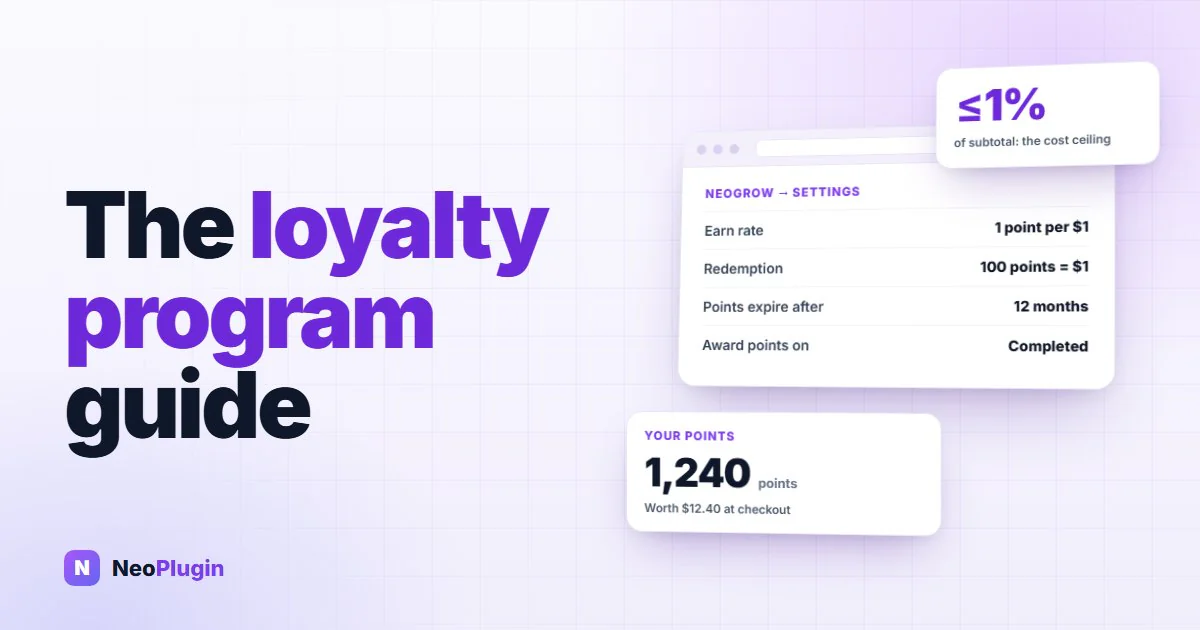
- The cost is smaller than it feels. At 1 point per $1 spent and 100 points redeemed for $1, you are giving back 1% of subtotal — and only on orders that come back.
- Points nobody spends are worth nothing to you. McKinsey's loyalty research found members who actually redeem spend around 25% more than members who never do. Making redemption easy is the whole game.
- Where the points live decides what you can build. A plugin inside WooCommerce can take a discount off the subtotal in the basket. A hosted app usually has to hand out a coupon code instead.
- You can run a real WooCommerce loyalty program for free. Nothing about points requires a monthly subscription.
What is a WooCommerce loyalty program?
A WooCommerce loyalty program is a system inside your store that gives customers points for actions you care about — usually placing an order, sometimes writing a review — and lets them spend those points as a discount on a later order.
That is the whole mechanism. Everything else is detail.
Three things separate it from a coupon:
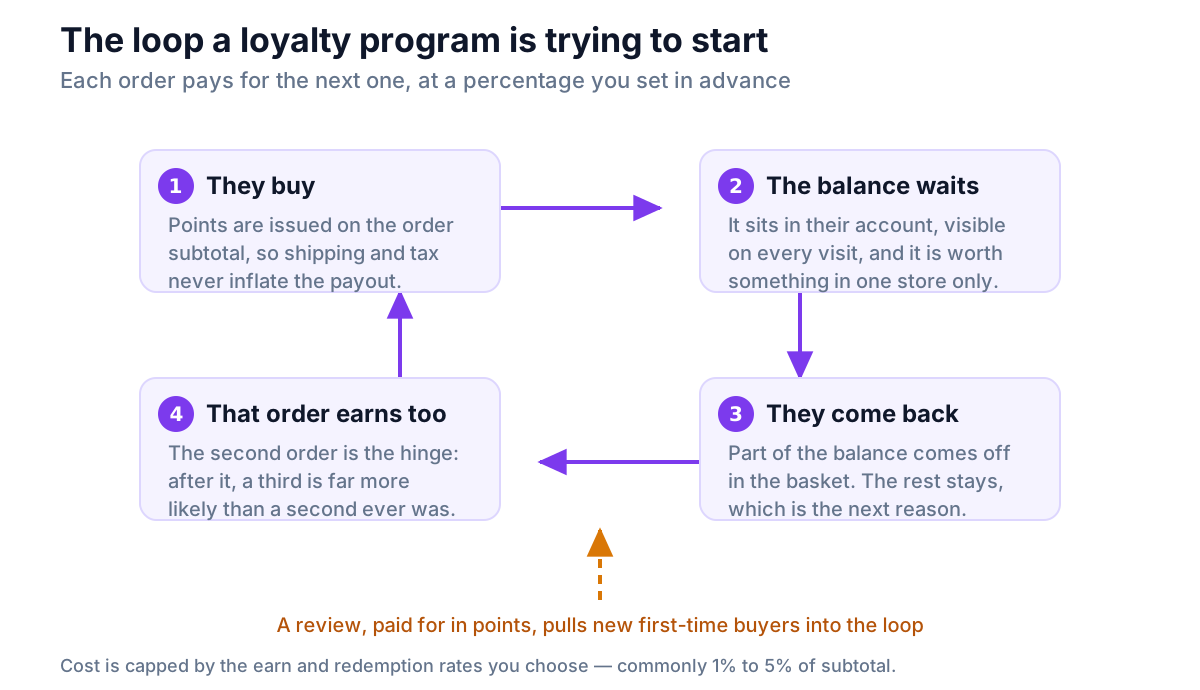
- It is earned, not announced. A coupon is a price cut you offer to everybody, including people who were going to buy anyway. Points are issued only after a customer has actually spent money.
- It is stored. A coupon is used once and forgotten. A points balance sits in the customer's account, visible every time they visit, getting slightly larger with every order.
- It only spends in your store. Cash back is a discount. Points are a reason to return to one specific shop — yours.
People search for this idea under a lot of names — woocommerce loyalty, woocommerce rewards program, loyalty program for woocommerce, woocommerce loyalty points. They all mean the same thing: points in, discount out.
Why loyalty pays more than another discount
Discounting works. That is the problem with it. It works for your competitor too, it works again tomorrow, and it takes margin off every single order — including the ones you would have won at full price.
Retention math runs the other way.
- Harvard Business Review, summarizing Bain's research, reports that acquiring a new customer costs five to twenty-five times more than keeping an existing one, and that a 5% lift in retention raises profits by 25% to 95%.
- RJMetrics found only about 27% of first-time customers come back on their own. The other 73% were not unhappy. They simply had nothing pulling them back.
- The second order is the hinge. Once someone has bought twice, the chance of a third rises sharply — you are no longer a website they tried once, you are a shop they use.
A loyalty program is a way of spending a small, fixed percentage of revenue to move customers across that hinge. Unlike a sale, it costs you nothing on the orders where it does not work.
A points balance is not the only stored reason to come back, and it works better alongside the others. A saved wishlist holds the shoppers who were not ready to buy yet, and a birthday email works on the one date every customer has and will happily tell you. Points are the most direct of the three, because they are only worth money in your store.
The five decisions behind a WooCommerce loyalty program
Nearly every failed loyalty program failed at one of these five, not at the software.
1. What earns points
Start with orders. A point per currency unit spent is the default for a reason: it scales with basket size, it is trivial to explain, and nobody can game it.
Two details matter more than they look:
- Earn on the subtotal, not the order total. If points are calculated on the total, you are paying customers for your own shipping charges and for sales tax you collected on behalf of a government. On a store with $9 shipping and 20% tax, that quietly inflates what you give away by a fifth or more.
- Decide what a coupon does. If a customer uses a 20% coupon, should they earn points on the full price or the discounted one? Either answer is defensible. Having no answer is not.
Beyond orders, the highest-value action you can pay for is a review — more on that below.
2. What a point is worth
This is the number that decides your cost, so set it deliberately and write it down.
Two settings combine into one percentage:
| Earn rate | Redemption rate | Value returned |
|---|---|---|
| 1 point per $1 | 100 points = $1 | 1% of subtotal |
| 1 point per $1 | 50 points = $1 | 2% of subtotal |
| 2 points per $1 | 100 points = $1 | 2% of subtotal |
| 5 points per $1 | 100 points = $1 | 5% of subtotal |
Most stores land between 1% and 5%. Below 1% the reward is too small to change behavior. Above 5% you are running a permanent sale with extra steps.
A useful test: work out what a typical customer's balance is worth after three orders. If it would not cover the shipping on a fourth, the rate is too low to bring anybody back.
Larger numbers feel more generous than they are. "Earn 5 points per dollar" reads better than "earn 1", even when both return the same 1%. That is not a trick — it is just how people read numbers — and it costs nothing to use.
3. How customers spend them
This is where most programs leak, and it is not a settings problem. It is a plumbing problem.
If your loyalty software runs outside WooCommerce, it cannot change your checkout. The only way it can grant a discount is to generate a coupon code and ask the customer to apply it. That means: open the widget, wait for the balance to load, pick a reward, copy the code, close the widget, find the coupon box at checkout, paste it.
Every one of those steps loses people. And Baymard's ongoing research puts average cart abandonment near 70% before you add any extra steps at all.
If the software runs inside WooCommerce, none of that is necessary. It can take the discount straight off the subtotal where the customer already is: type how many points to use, press Apply, totals update.
One more rule that matters: let them spend part of the balance. A customer who only wants to take a few dollars off today keeps the rest — and the rest is the reason they come back again. All-or-nothing redemption converts a recurring reason into a one-time one.
4. When points expire
Points that never expire are a liability that grows forever. Points that expire next week are an insult.
Six to twelve months from the date each point was earned is the normal range. The mechanic that makes it fair is FIFO — first in, first out — so the oldest points are always spent first and an active customer never loses anything.
Whatever you choose, say it in the account area where the balance is shown. A balance that vanishes without warning costs you the customer, not just the points.
5. What it costs you
Run the numbers before you switch anything on. They are simpler than people expect.
Take a store doing $20,000 a month in product subtotal, running 1 point per $1 with 100 points to the dollar:
| Line | Figure |
|---|---|
| Monthly subtotal | $20,000 |
| Points issued | 20,000 |
| Face value if every point is redeemed | $200 |
| Maximum cost as a share of revenue | 1% |
| Realistic cost after unredeemed points | Lower — often much lower |
The worst case is 1%. That is the honest ceiling, and it is the number to budget against.
The real figure is always below it, because some points are never spent. In the industry this is called breakage, and it is worth being clear-eyed about: breakage is not profit you earned. It is a customer who did not come back — exactly the outcome the program existed to prevent. Plan for the 1%. Treat anything you keep as luck, not strategy.
The same arithmetic is what makes points a better Black Friday offer than a deep discount, because the cost lands only on the return order: the worked margin comparison runs the numbers for 20% off against 10% off plus points.
Where to show loyalty points in your store
A loyalty program is invisible unless you show it, and showing it in the wrong places is the same as not having one.
There are four moments that carry nearly all the weight:
| Moment | What to show | Why it works there |
|---|---|---|
| Product page | "Earn 240 points with this purchase" | Before the decision, while they are still weighing price |
| Basket and checkout | Balance, and a box to spend it | The only place a balance turns into revenue |
| Order confirmation | "You just earned 240 points" | The highest-attention screen in the whole journey |
| Order email | Balance and what it is worth | Lands in the inbox, and gets re-read |
The product page number must follow the variation the shopper picks. A $30 T-shirt and an $80 hoodie on the same page cannot both say "earn 30 points" — and a number that does not move when the dropdown moves teaches people to ignore it. We wrote about that specific failure in how to sell variable products well in WooCommerce.
The account page matters too, but as a record rather than a prompt. Customers go looking for it once they already care. The four moments above are what make them care. There is a longer walkthrough of the three that do the most work in how to turn a first-time buyer into a repeat customer.
Reviews and points are the same program
This is the part most guides treat as a separate topic, and it should not be.
Points solve the second order. They do nothing for the first one, because a stranger has no balance. What wins the first order is other people's words.
The evidence here is unusually strong. Northwestern University's Spiegel Research Center found that a product displaying five reviews was 270% more likely to be purchased than the same product displaying none — and that the lift was larger on expensive products, where the buyer's risk is higher.
So the two halves fit together:
- Reviews turn strangers into first-time customers.
- Points turn first-time customers into repeat ones.
- Points paid for reviews turn those repeat customers back into the reviews that convert the next stranger.
That last step closes the loop, and it is why paying a few points for a photo review is usually the highest-return line in the whole program. A photo review costs you a few cents in points and then sells to every visitor who sees it, for years.
Two cautions, because this area has real rules:
- Reward the act, never the rating. Pay points for writing a review, whatever the stars say. Paying more for a positive review breaches Google's review policies and, in the United States, sits squarely inside FTC territory.
- Disclose it. A single line above the review form — "Customers can earn points for leaving a review on this store" — is what keeps an incentivized review program on the right side of that line. It protects you, not the customer.
And do not chase a perfect score. Purchase likelihood peaks somewhere around 4.0 to 4.7 stars and falls as a rating approaches a flawless 5.0, because shoppers read perfection as filtered. There is more on the research in why product reviews matter more than price in WooCommerce.
Choosing loyalty software: plugin, hosted app or custom build
Once the five decisions are made, picking software gets much easier, because you now know what you are asking it to do.
There are three broad options.
| Hosted loyalty app | WooCommerce plugin | Custom build | |
|---|---|---|---|
| Where points live | Vendor's server | Your database | Your database |
| Monthly cost | Scales with order count | Usually flat or free | Developer time |
| Redemption | Often a coupon code | Discount in the basket | Whatever you build |
| If you stop paying | You request an export | Nothing happens | Not applicable |
| Setup time | An afternoon | An afternoon | Weeks |
| Best suited to | Shopify stores, mostly | Most WooCommerce stores | Unusual rules |
The first thing to check about a hosted app is whether it supports WooCommerce at all — several of the best-known ones are built for Shopify and do not. That check, with sources, is in WooCommerce loyalty plugin vs hosted app.
For a plugin, the questions that actually predict whether you will be happy in a year are narrower than any feature list:
- Does redemption happen in the basket, without a coupon code?
- Does it work in the block-based Cart and Checkout, not only the classic shortcode versions?
- Where does it store balances? Points belong in a purpose-built table, not in
wp_postmetaalongside everything else — we measured why in why loyalty points do not belong in postmeta. - Does it declare HPOS compatibility? WooCommerce's High-Performance Order Storage moves orders out of
wp_postsandwp_postmetainto their own tables. A loyalty plugin that reads an order withget_post_meta()or queries theshop_orderpost type directly will read nothing once HPOS is authoritative. Order status hooks likewoocommerce_order_status_completedare fine — they fire either way — so the tell is not the hook, it is whether the plugin declarescustom_order_tablessupport. If it does not, WooCommerce says so on its own plugins screen. - Is anything metered? Orders, customers, emails, storage. Metered software gets more expensive precisely when your store does well.
- What happens to the ledger if you deactivate it?
Three companion posts go deeper on the shopping decision itself: what to check before installing a WordPress loyalty plugin, how to test a WordPress rewards plugin on your own store before you commit to it, and the nine questions to ask before you buy one — who owns the ledger, what is metered, and what happens the day you stop paying. If you want the mechanics rather than the shopping list, WooCommerce points and rewards: how earning and redeeming actually work walks through the full path a point takes.
Five loyalty program mistakes that cost real money
Earning on the order total. You pay out on shipping and tax. Silent, permanent, and usually a fifth of the budget.
Redemption that needs a coupon code. The balance gets issued and never spent, so you carry the liability and get none of the return visits.
Launching without telling anyone. A program nobody knows about is pure cost. One line on the product page and one on the order confirmation does more than a homepage banner.
Points that only buy whole rewards. "500 points = a free tote bag" sounds fun and converts badly. A customer with 260 points has nothing to do today, so they do nothing.
No expiry, ever. Five years in, you are carrying a balance sheet item made of customers who left in 2022.
Setting one up this afternoon
If you want the fast path, this is it.
- Pick your percentage. Start at 1%: 1 point per $1, 100 points per $1 back. You can raise it later; lowering it annoys people.
- Earn on the subtotal. Confirm the plugin does this before anything else.
- Set review rewards. Something like 50 points for a text review, 150 for one with a photo. Pay for the act, not the rating.
- Turn on the disclosure line above the review form.
- Check the four moments. Product page, basket, order confirmation, order email. Place a test order yourself and look at all four.
- Test redemption as a customer. Real account, real basket, spend part of a balance. If it needs a coupon code, fix that before launch.
- Set expiry to six or twelve months, FIFO, and say so on the account page.
- Leave it alone for 90 days. Then look at how many points were redeemed, not how many were issued. Redemption is the number that means anything.
Where NeoGrow fits
NeoGrow is the free WooCommerce loyalty plugin we build, so read this section knowing that.
It covers both halves of the loop in one plugin: points for orders, points for reviews and photo reviews, and redemption in the basket. Points are earned on the subtotal, so shipping and tax never inflate what you give away. The redemption panel appears by itself in both the block-based and classic Cart and Checkout, and the customer types how many points to spend rather than taking an all-or-nothing reward. Balances live in the plugin's own database tables — in your database — so checkout speed does not change as the ledger grows, and nothing leaves your server.
There is no order cap, no per-customer pricing, and no account to create. On a multi-currency store, points are calculated against your base currency so the same basket earns the same points whatever currency was paid in — the detail is here, because it is the most common way a loyalty plugin overpays without anyone noticing.
What it does not have today: VIP tiers, a referral system, and a visual rule builder. Expiry is fixed at six months in the free version; choosing your own window is part of the paid add-on. If tiers or referrals are must-haves this quarter, it is not the right tool yet, and we would rather say that here than have you find out after installing it.
Frequently asked questions
What is a WooCommerce loyalty program?
It is a system inside your WooCommerce store that gives customers points for actions you choose — normally placing an order, often writing a review — and lets them spend those points as a discount on a later order. The points are stored against the customer's account, so the balance is visible every time they return and grows with every purchase. Unlike a coupon, it only rewards people who have already bought from you, and it can only be spent in your store.
How much does a loyalty program cost a store?
The ceiling is set by two numbers you choose: the earn rate and the redemption rate. At 1 point per dollar spent and 100 points redeemed for one dollar, you are returning 1% of subtotal, so a store doing $20,000 a month in products carries a maximum cost of $200 a month. Most stores run between 1% and 5%. The real cost is always lower, because some points are never spent, and the cost only lands on orders that came back — which are orders you would probably not have had otherwise.
Is there a free WooCommerce loyalty program plugin?
Yes. A loyalty program is arithmetic against data your store already holds, so nothing about it requires a subscription. Several plugins offer a free tier, and some — including our own NeoGrow — run the core points engine with no order cap, no per-customer pricing and no license key. Check what the free tier actually includes before installing: the common limits are redemption only through coupon codes, no support for the block-based checkout, or a cap on how many customers can hold a balance.
How many points should I give per dollar?
Work backwards from the percentage you are willing to return, not from the point number. Decide on 1% to 5% of subtotal first, then pick whichever earn and redemption rates express it. Both "1 point per dollar, 100 points = $1" and "5 points per dollar, 500 points = $1" return exactly 1%; the second simply produces bigger numbers, which customers read as more generous. Start at the low end, because raising a rate later is easy and cutting one is not.
Should loyalty points expire?
Usually yes. Points that never expire become a liability that grows every year, and they stop being a reason to return because there is never any urgency. Six to twelve months from the date each point was earned is normal. Use first-in, first-out so the oldest points are always spent first, which means a customer who returns regularly never actually loses anything. State the expiry rule plainly wherever the balance appears.
What is breakage in a loyalty program?
Breakage is the share of issued points that are never redeemed. It is often presented as a saving, and that framing is a trap: every unredeemed point represents a customer who did not come back, which is precisely what the program was meant to prevent. McKinsey's loyalty research found that members who redeem spend around 25% more than members who do not. Budget for full redemption, and treat breakage as a warning sign rather than a margin.
Do loyalty points slow down a WooCommerce store?
They can, depending entirely on where the plugin stores them. A plugin writing every point movement into wp_postmeta or wp_options puts the loyalty ledger in the same tables your products and orders depend on, and those queries get slower as the ledger grows. A plugin using its own purpose-built table keeps them apart, so checkout speed does not change as history builds up. A hosted app is a different risk: every balance it displays is a request to another company's server, so your page waits on their response time.
Can I reward customers for reviews as well as purchases?
Yes, and it is usually the highest-return part of a program, because a review keeps selling to new visitors long after you paid for it. Two rules keep it safe: reward the act of writing a review and never the rating given, and disclose the incentive near the review form. Rewarding positive reviews specifically breaches Google's review policies and, in the United States, falls under FTC guidance on endorsements. A one-line disclosure above the form is enough, and it protects the merchant more than anyone else.
Start with the second order
If you take one thing from this guide, take this: your store is almost certainly good at first orders and bad at second ones, because nearly all the tooling in ecommerce points at the first.
A WooCommerce loyalty program is a small, capped, predictable percentage of subtotal spent on fixing exactly that. Decide the percentage, earn on the subtotal, make redemption take two clicks in the basket, show the balance in the four places that matter, and pay points for the reviews that bring the next stranger in.
The software should be the easiest part of it. If it is not, you are looking at the wrong software.
NeoGrow is a free WooCommerce plugin for loyalty points and photo reviews. It runs on your own store, with no order limits and no monthly fee.