Runs on
WordPress 6.4+
Requires
WooCommerce 8.0+
Storage
HPOS ready
License
Free, GPL‑2.0+

Automatic WooCommerce birthday coupons, done properly

Set the reward once. From then on, every customer who has given you a date gets a coupon in the week before it — and you get a record of what went out and what came back.

Set it once

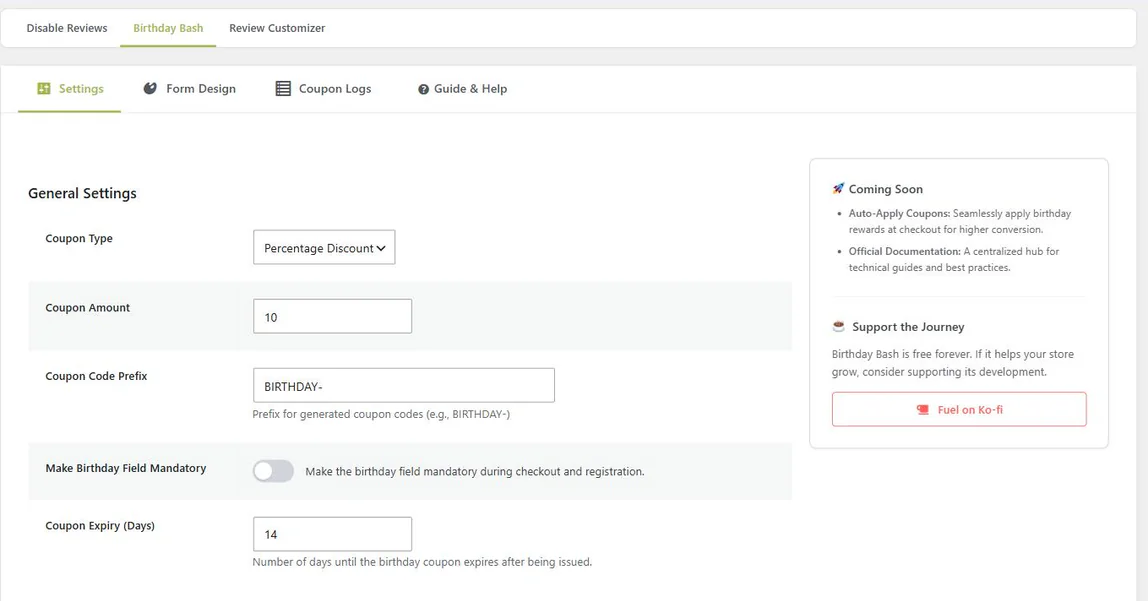
The whole campaign is five fields

Choose a fixed cart discount or a percentage, set the amount, pick a code prefix, and decide how long the coupon should live. There is no workflow builder to learn and no trigger graph to wire up.

One toggle makes the birthday field mandatory at checkout and registration if you would rather not leave it optional.

Birthday Bash settings screen showing coupon type, amount, code prefix, mandatory toggle and expiry in days
New in 1.3.0

See the email before your customers do

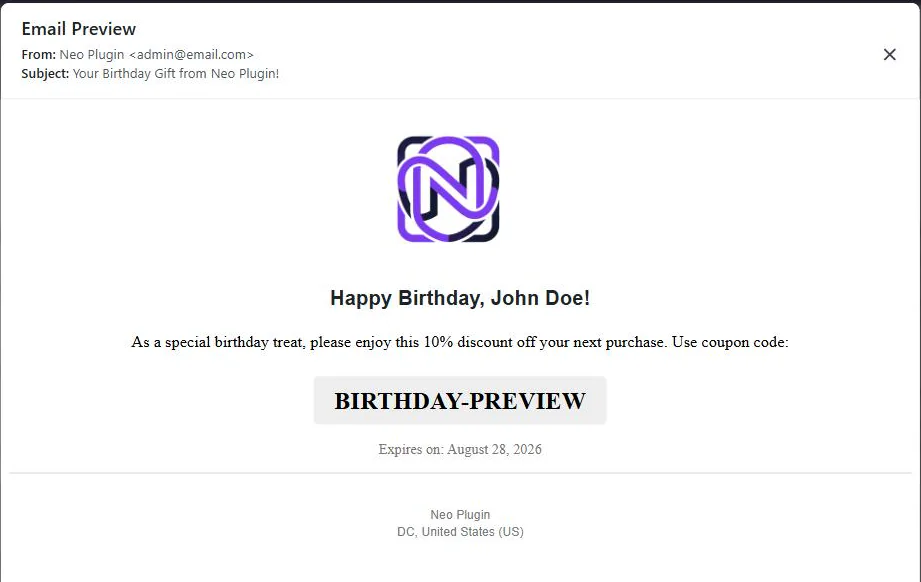
Upload your logo, write the subject, greeting and message, then open a live preview of the finished email — rendered exactly as it will arrive, from the address it will arrive from.

Merge tags fill in the rest: {customer_name} and {coupon_type_text}, so one message reads correctly whether you are giving 10% or $10.

Wrapped in WooCommerce’s standard email layout and sent in HTML, plain text or multipart — following the email type, Cc, Bcc and Reply-to you set under WooCommerce → Settings → Emails.

Live preview of the birthday coupon email showing the greeting, discount line, coupon code and expiry date

Collect the date where it actually fits

Day and month only — never the birth year, so you are not holding data you have no use for. Put the field wherever your customers already are.

  • ✓ Cart and checkout — inline on the classic checkout; on the Blocks interface, add a Shortcode block holding [birthday_bash_checkout_input] to the Checkout page.
  • ✓ WordPress registration form — captured at the moment the account is created.
  • ✓ Anywhere else — drop [birthday_bash_form] into any page or widget.

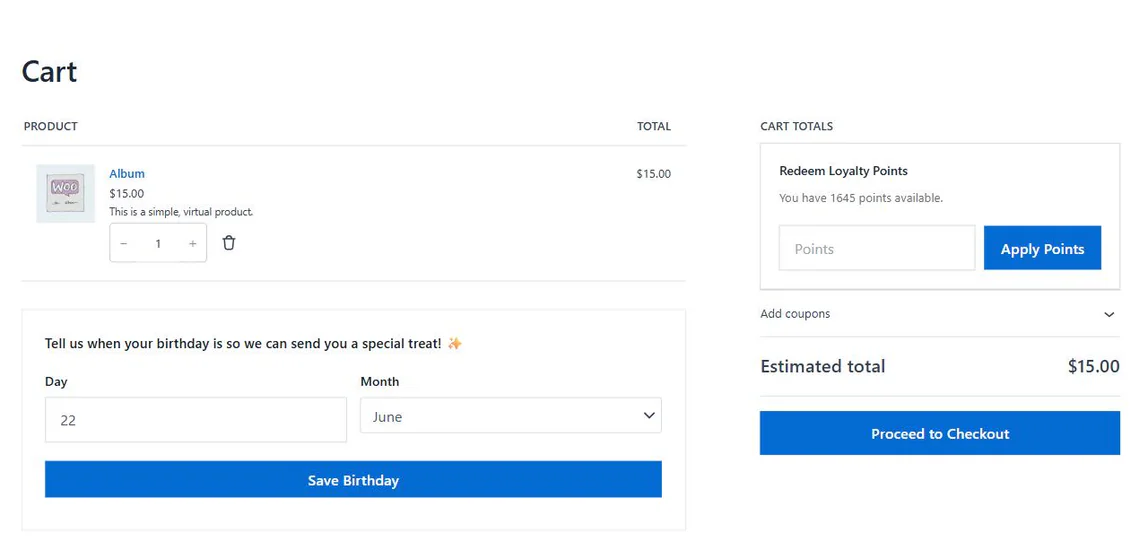
The screenshot on the right is a live cart: the birthday field sits under the items, and NeoGrow’s points redemption sits in the totals. The two plugins stay out of each other’s way.

WooCommerce cart page with the birthday day and month fields shown below the cart items

It should look like your store, not like a plugin

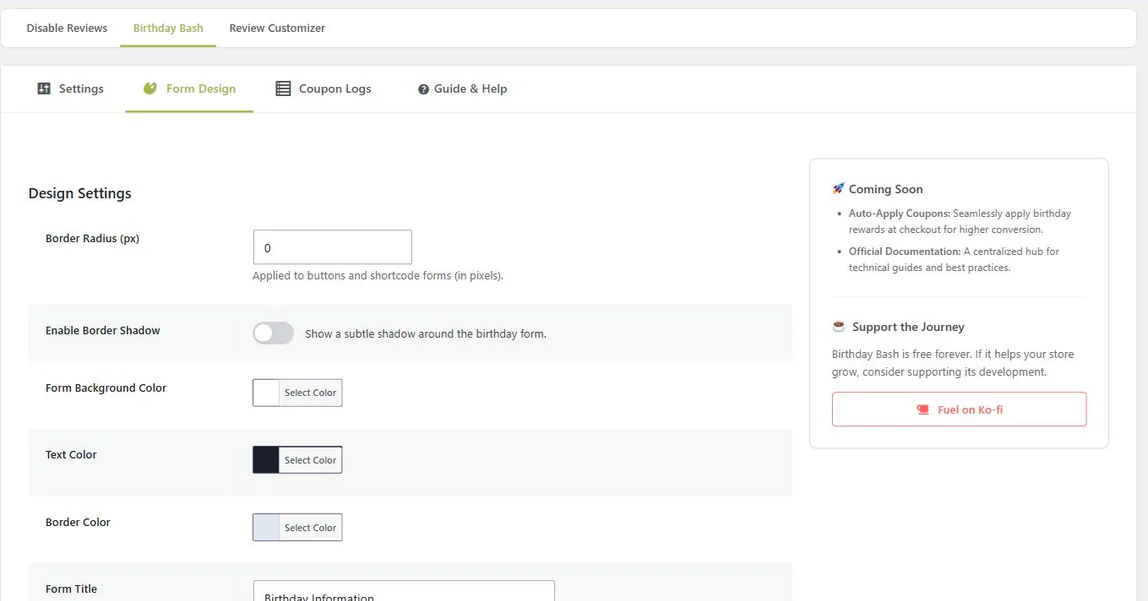
Border radius, an optional shadow, background, text and border colors, the form title and the line of copy above the fields — all editable, all in one tab.

Leave the title empty and it disappears entirely, which is usually what you want when the form is already sitting inside a checkout step that has its own heading.

Form Design tab with border radius, shadow toggle, color pickers, form title and top message fields

What went out, and what came back

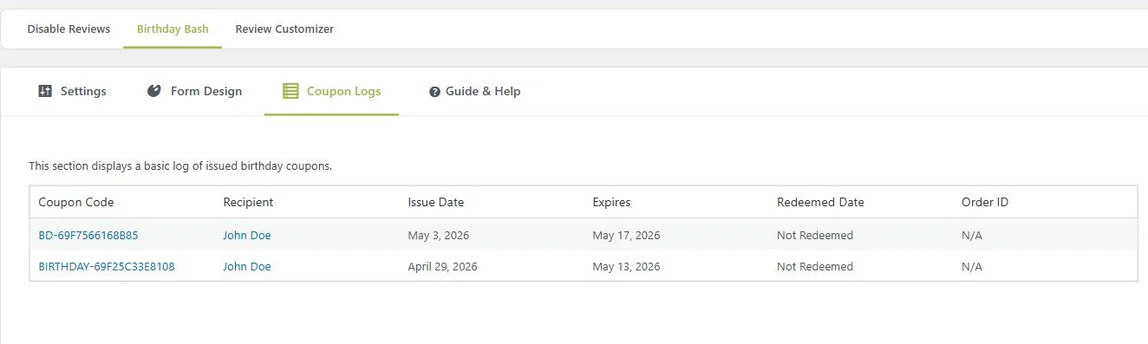
Every issued coupon is logged with its code, the recipient, the issue date and the expiry. When one is used, the log records the redeemed date and links straight to the order it paid for.

That is the difference between believing birthday emails work and being able to point at the orders. Long lists are paginated rather than loaded in one go.

Coupon Logs table listing coupon code, recipient, issue date, expiry, redeemed date and order ID

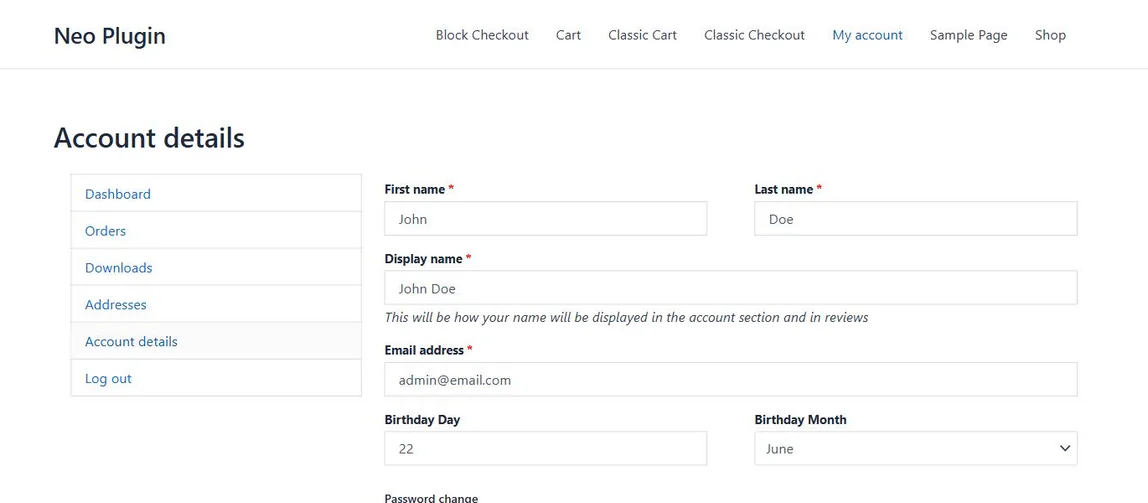
Already in the page they use to change their name

The birthday fields appear natively in the Account details screen, next to first name and email address. Customers who missed the field at checkout can add it later without being asked to, and anyone can change it.

Uninstalling removes all of it — every option, the coupons table, the generated coupons and the scheduled tasks, across every site on a multisite network.

WooCommerce Account details page showing Birthday Day and Birthday Month fields below the email address
Under the hood

How the birthday coupon email is sent

Four steps, none of which you have to run.

1

The date is captured

Day and month, from the account page, the registration form, the checkout, or a shortcode you placed yourself.

2

A daily check runs

Once a day, in your site’s timezone, through Action Scheduler — in batches of 100 customers, so a large list cannot time the job out.

3

A coupon is issued

Unique code, locked to that customer’s email address, usable once, with an expiry date. One per customer per year — duplicates are checked for before anything is created.

4

The email goes out

In the week before the birthday, not on the morning of it — so there is time to browse, decide, and order something that arrives before the day.

Everything, free

What’s in the plugin

There is no paid tier and nothing is held back. This is the whole feature list, and all of it is in the version on WordPress.org.

Feature Included
Coupons
Discount type Fixed cart amount or a percentage of the order Your choice
Unique code per customer Your own prefix, restricted to their email address ✓
Expiry date Set in days; 14 by default ✓
Single use, per customer Still stackable with your other coupons ✓
Duplicate protection One birthday coupon per customer per year ✓
Collecting the date
My Account › Account details ✓
Registration form The WordPress registration form ✓
Cart & checkout Classic checkout inline; block checkout via a Shortcode block ✓
Shortcodes [birthday_bash_form] and [birthday_bash_checkout_input] ✓
Optional or mandatory One toggle, applies to checkout and registration ✓
Email & branding
Logo, subject, greeting and message ✓
Live email preview Rendered exactly as the customer will receive it ✓
HTML, plain text and multipart sending Follows the email type, Cc, Bcc and Reply-to set in WooCommerce ✓
Form design controls Radius, shadow, colors, title and intro copy ✓
Store management
Coupon logs with redemptions Redeemed date and linked order, paginated ✓
Batched daily processing Action Scheduler, 100 customers per batch ✓
HPOS ready High-Performance Order Storage, and the cart and checkout blocks ✓
Translation ready Translation template and script translations included ✓
Clean uninstall Options, tables, coupons and scheduled tasks, multisite included ✓
Coming soon

On the roadmap

Not built yet. Listed here rather than in the table above, so everything above is something you can switch on today.

  • • Auto-applying the birthday coupon at checkout
Better together

Points reward the year. The coupon rewards the day.

Birthday Bash is deliberately standalone — it needs nothing but WooCommerce, and it will never ask you to install something else to finish the job.

But if you are already running NeoGrow for loyalty points and photo reviews, the two sit side by side without overlapping: NeoGrow handles every purchase in between, Birthday Bash handles the one date a year that is only about them.

See what NeoGrow does
365

NeoGrow

Points, photo reviews, redemption at checkout.

Birthday Bash

One coupon, one date, sent without you.

NeoLite Birthday Bash at a glance

Version
1.3.3
Last updated
Price
Free, no license key
License
GPL-2.0-or-later
WordPress
6.4+ · tested 7.1
WooCommerce
8.0+ · tested 11.0
PHP
7.4+
HPOS
Compatible, declared

From the plugin’s WordPress.org listing, read when this page was last built.

WooCommerce birthday coupons: questions

If yours is not here, the support forum is the fastest way to reach someone. For the wider picture, read how to turn first-time buyers into repeat customers.

No. WooCommerce is the only requirement. Birthday Bash is a self-contained plugin — there is no parent plugin, no workflow engine and no external service. It uses Action Scheduler, which ships with WooCommerce itself.

Yes. The classic checkout renders the field inline with nothing to set up. For the Blocks checkout, add a Shortcode block holding [birthday_bash_checkout_input] to your Checkout page — the plugin moves the fields into the contact details section and submits the day and month with the order through the Store API.

Nothing is created. The plugin records that a birthday coupon was issued for that customer in that calendar year and checks it before generating another, so a re-run of the daily job cannot flood your coupon list with duplicates.

The daily check runs in bounded batches of 100 customers through Action Scheduler rather than in one long request, so large customer lists do not risk a timeout or exhausted memory. On the front end, the plugin’s stylesheet loads only on pages that actually show the birthday form.

No. Only the day and the month are collected and stored, as standard user meta on your own site. Nothing is sent anywhere else, and uninstalling the plugin removes it.

Free, and GPL-2.0-or-later. There is no paid tier for Birthday Bash and no feature in this page that is locked behind one. If it is useful to your store, there is a Ko-fi link in the plugin — entirely optional.

NeoLite Birthday Bash

Free, and it stays free. Install it from your dashboard in under a minute, set the discount, and leave it alone.

Get NeoLite Birthday Bash

Requires WordPress 6.4+, PHP 7.4+ and WooCommerce 8.0+.