
Birthday emails are the easiest repeat sale your store is not making
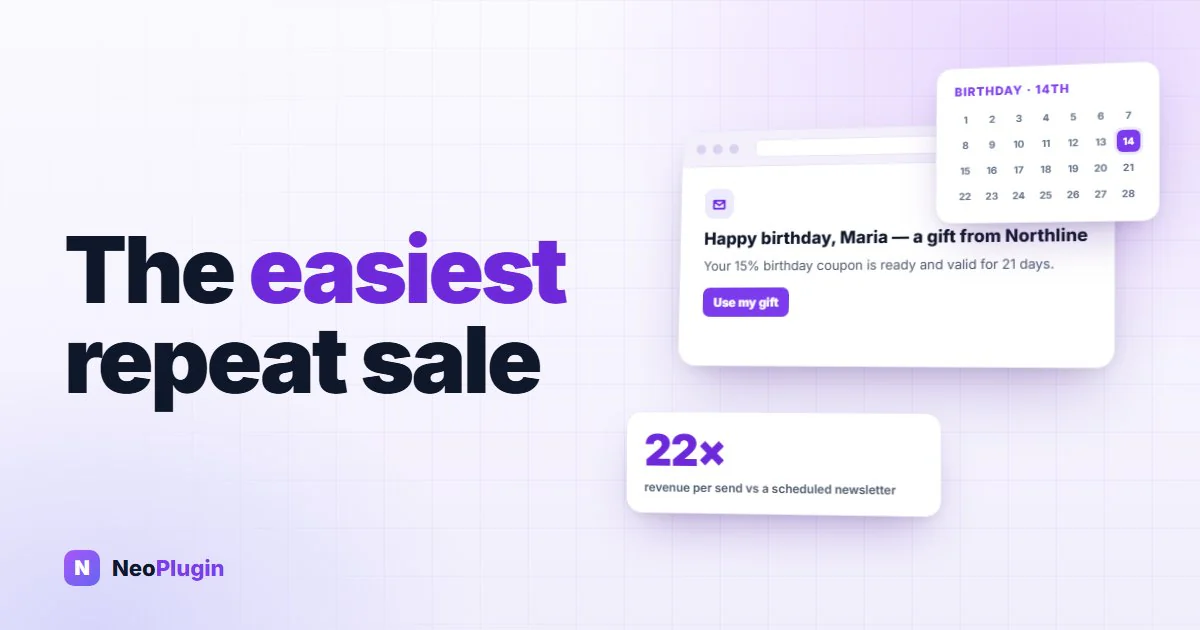
Most shops send email in one of two ways. Either everyone gets the same message on the same morning, or nobody gets anything at all.
There is a third way that almost nobody sets up, and the numbers behind it are not close.
The short version
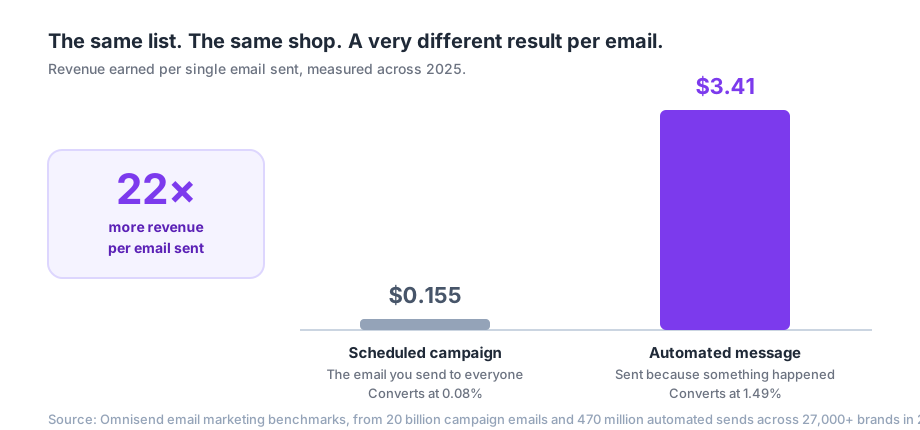
- The email you send to your whole list earns about 15 cents per send. An automated email sent because something actually happened earns about $3.41. That is roughly 22 times more (Omnisend, 2025 data).
- Automated messages were 2% of all sends and 30% of all email revenue in Omnisend's data. Klaviyo, measuring a completely different set of stores, found 5.3% of sends and 41% of revenue (Klaviyo benchmarks).
- Of every kind of automated email, birthday messages had the lowest unsubscribe rate of all: 0.22%. People do not mind getting this one.
- A birthday is the only date that every single customer has, and one of the very few they will tell you without being pushed.
- You can run this on WooCommerce for free, and the whole setup takes about ten minutes.
Your newsletter is working less well than you think
Sending the same email to your whole list is the oldest move in e-commerce, and it has quietly stopped working.
Omnisend measured more than 20 billion campaign emails and 470 million automated sends across 27,000+ brands during 2025. Scheduled campaigns — the "here is our autumn sale" kind — converted at 0.08%. That is eight orders per ten thousand emails.
The automated messages, sent one at a time because a specific customer did a specific thing, converted at 1.49%.
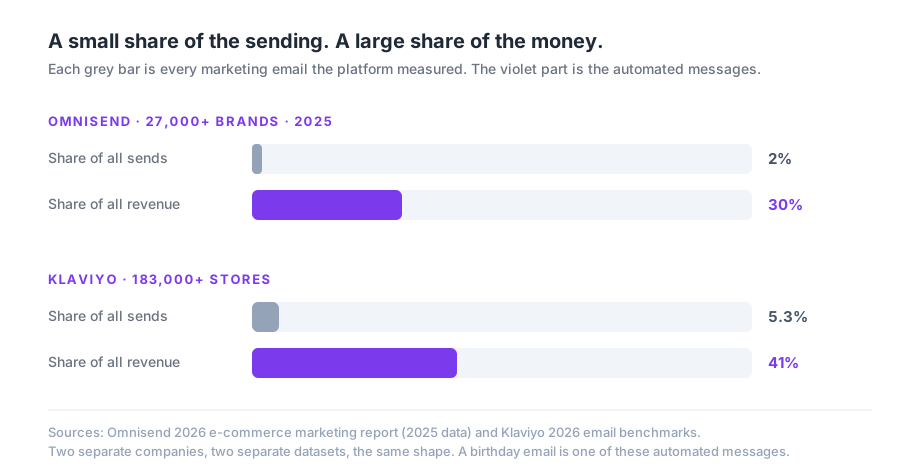
The interesting part is that two competing companies, measuring two completely different sets of shops, found the same shape. A tiny slice of the sending produces a huge slice of the money.
Here is the thing worth sitting with: in Omnisend's data, open rates were about the same for both, around 30%. Automated emails do not win because they are more attention-grabbing. Roughly the same number of people open them.
They win on timing. The message arrives when the person is already thinking about your shop, instead of on the Tuesday morning that suited your calendar.
Why the birthday, and not some other automation?
Most automations need the customer to do something first. An abandoned cart email needs an abandoned cart. A back-in-stock alert needs the thing to go out of stock and the customer to have asked about it. A review request needs an order.
All of those are good. All of them also only fire for the small number of people who happened to trigger them.
A birthday is different in three ways.
Everyone has one. It is the only automation that can eventually reach every customer on your list, once a year, forever, with no further work from you.
It is a genuinely good reason to email someone. This is where that 0.22% unsubscribe rate comes from — the lowest of any automated message type in Omnisend's data. Compare that to how you feel about the fourth sale email in a month. A birthday message is the rare marketing email that does not feel like one.
It is far away from your busy periods. Your customers' birthdays are spread evenly across the year. This is a small stream of orders arriving in February and in July, not another spike in the week before Christmas when you were already going to be busy.
There is one more number you will see quoted everywhere on this topic: that birthday emails produce 481% more transactions and 342% more revenue than standard promotions. It is a real finding from Experian, and it is genuinely striking — but it is also around fifteen years old, and almost every blog repeating it leaves that part out. We would rather point you at the 2025 data above, which is recent, much larger, and says the same thing more carefully.
A birthday is zero-party data the customer hands you
This part matters more in 2026 than it did a few years ago.
Google finished removing third-party cookies from Chrome for consumer traffic during 2025. The old way of following people around the internet is going or gone, and what is left is what your customers tell you directly.
Marketers call a birthday zero-party data: not something you inferred, tracked, or bought, but something the person deliberately gave you. It does not expire, it does not depend on anyone else's platform, and it cannot be switched off by a browser update.
It is also one of the easiest pieces of information to ask for, as long as you ask for the right amount of it.
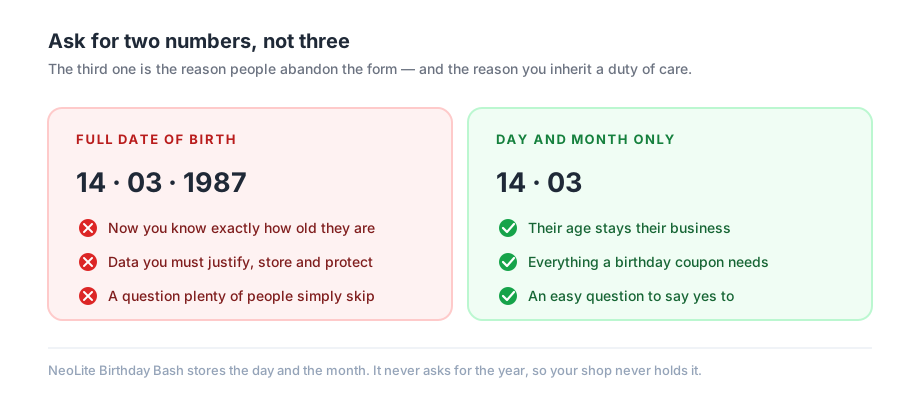
Do not ask for the year. You do not need it, and asking for it changes the question completely. A full date of birth tells you someone's exact age — that is sensitive personal information, it is a thing you now have to justify holding and protect, and it makes people hesitate over a form they would otherwise have filled in without thinking.
The day and the month are all a birthday coupon has ever needed.
Four reasons birthday emails fail
Plenty of shops do send a birthday email and get very little back. There are usually four reasons, and all of them are fixable.
It arrives on the day. A person's birthday is the single busiest, most distracted day of their year. Your email is behind messages from their family. And if you sell anything physical, a coupon that arrives that morning is already too late to be a birthday present — the delivery cannot make it.
Sending it about a week ahead fixes both problems at once. There is time to choose, time to order, and time for the parcel to actually arrive.
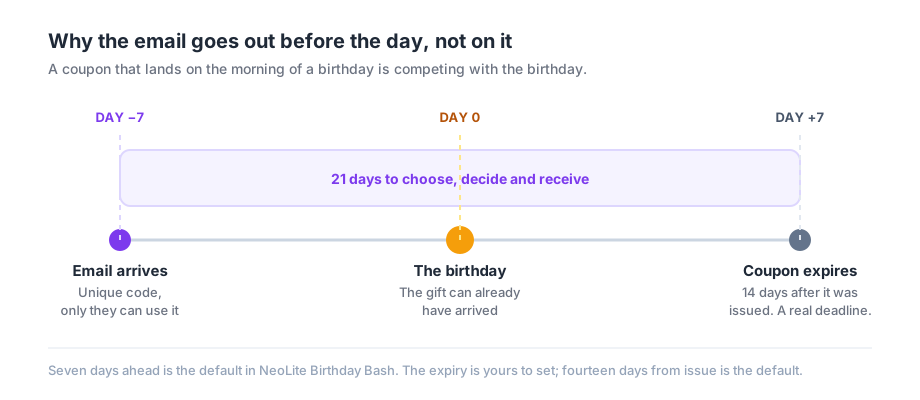
The coupon never expires. A discount with no deadline is a discount with no reason to act today. It gets saved for later and later is never. An expiry date sitting a couple of weeks out turns a nice gesture into a decision.
The code leaks. This is the one that quietly costs real money. If you send everyone the same code — BIRTHDAY20 — it will be on a coupon site within a week, and you will spend the rest of the year discounting orders for people whose birthday it very much is not.
The fix is a unique code for each person, locked to their own email address, usable once. Then it does not matter if they post it publicly, because it will not work for anybody else.
Nobody is ever asked. The most common failure of all. If the birthday field only lives in a corner of the account page, almost nobody fills it in. It needs to be somewhere people actually go: the registration form, the checkout, the account page. All three, ideally.
Those four and the question of what you store, in one table, because between them they are the whole difference between a birthday email that earns and one that does not:
| The version that fails | The version that works | |
|---|---|---|
| When it arrives | On the birthday itself | About a week ahead, so there is time to order and time to deliver |
| The code | One shared code for everybody | A unique code per customer, restricted to their own email address, usable once |
| The deadline | No expiry | A fortnight from issue, landing a week after the birthday |
| What you store | Full date of birth, including the year | The day and the month only |
| Where you ask | The account page, which nobody revisits | The registration form, the checkout and the account page |
What this is really building
The obvious win is a handful of extra orders spread through the year. The quieter win is bigger.
The hard order in e-commerce is the second one. RJMetrics studied 176 retailers and 18 million customers and found that after a first purchase, a customer has only about a 27% chance of ever buying again. Get them to that second order, though, and the odds of a third jump sharply. Each repeat purchase makes the next one more likely.
The rest of the playbook for that second order is in how to turn a first-time buyer into a repeat customer.
Most shops try to buy that second order with advertising, paying again for a customer they already have. A birthday email is a way of buying it with a reason to come back instead, and the reason costs you nothing but the discount itself.
And every birthday collected is one more customer you can reach next year, and every year after that, without paying a platform for the privilege. The list compounds. The ad spend does not.
Setting up birthday emails on WooCommerce this week
NeoLite Birthday Bash does this on WooCommerce, free, and it is deliberately small: it does one job and it does not need any other plugin except WooCommerce itself.
Here is what it does, and it maps directly onto the four failures above.
- It sends seven days ahead, so the coupon lands with time to spare rather than on the morning itself.
- Every coupon is unique and locked to that customer's email address. Usable once, by that person. Post it on a coupon site and it does nothing for anyone else.
- Coupons expire, fourteen days after they are issued by default, and you can change that. That is a real deadline sitting a week past the birthday.
- It asks where customers already are: the account page, the WordPress registration form and the classic checkout, with nothing to set up. On a block-based checkout you add its shortcode to the checkout page in a Shortcode block; the plugin then moves the fields into the checkout's contact details section and sends them through WooCommerce's Store API with the rest of the order. Either way you choose whether the field is required or optional.
- It stores the day and the month, and never the year. Your shop does not learn anyone's age, because it never asks.
- One coupon per customer per year, tracked, so nobody gets two and nobody gets missed.
- A log of what went out: who received a coupon, when, and whether they spent it. So after a few months you can actually check whether this is working, rather than guessing.
- Your email, your branding. Logo, subject line, greeting and message are all yours to write, with a live preview so you can see it before a single customer does.
It works on stores using WooCommerce's High-Performance Order Storage, the daily send runs in small batches so a large customer list does not stall your site, and it adds nothing to your front end for shoppers who are not looking at the form.
Install it from Plugins > Add New, search for NeoLite Birthday Bash, then set your discount and write your message. It needs WordPress 6.4, WooCommerce 8.0 and PHP 7.4 or newer. There is a full guide in the documentation if you would rather read first.
If you already run a WooCommerce loyalty points plugin like NeoGrow, the two work together without any setup: Birthday Bash handles the one big day, NeoGrow handles the other 364.
Do this bit first
Whatever plugin you use, the birthday field is worth adding to your checkout today, even if you do not send a single email for another month.
Every customer who checks out between now and then is one you can reach on their birthday next year. Every customer who checks out without being asked is one you cannot.
The asking is the part that has to start early. The emailing can wait a week.
Frequently asked questions
Do birthday emails actually increase sales?
The evidence says yes, though the honest version is more specific than the headline. Birthday emails are one type of automated email, and automated emails clearly outperform scheduled campaigns: in Omnisend's 2025 data, covering 27,000+ brands, automations earned $3.41 per email sent against $0.155 for campaigns, and converted at 1.49% against 0.08%. Birthday messages in particular had the lowest unsubscribe rate of any automation type, at 0.22%.
When should a birthday email be sent?
About a week before the birthday, not on the day. The day itself is the most distracted day of a person's year, and if you sell physical goods a coupon arriving that morning is already too late for delivery to arrive in time. Sending seven days ahead gives the customer time to choose and time for the order to actually turn up.
How long should a birthday coupon last?
Long enough to be usable, short enough to be a deadline. Around two weeks from issue is a sensible default. If it never expires, there is no reason to act now, and it gets forgotten. NeoLite Birthday Bash defaults to fourteen days and lets you change it.
Should I ask customers for their birth year?
No. The day and the month are all a birthday coupon needs. A full date of birth tells you a customer's exact age, which is sensitive personal information you then have to justify holding and protect, and it makes people hesitate over the form. Asking for less gets you more completed fields and less risk.
How do I stop birthday discount codes being shared online?
Give every customer their own code rather than one shared code for everybody, and restrict each code to that customer's email address with a usage limit of one. A shared code like BIRTHDAY20 will reach a coupon site quickly. A unique, email-restricted code is useless to anyone else, so it does not matter where it is posted.
Where should I collect birthdays in WooCommerce?
In every place customers already give you information: the registration form, the My Account page, and the checkout. Collecting only on the account page is the most common mistake, because most customers never go back there. NeoLite Birthday Bash adds the field to the account page, the WordPress registration form and the classic checkout on its own, and covers the newer block checkout through a Shortcode block you add to the checkout page — the Checkout block does not accept the field on its own, so the plugin moves it into the contact details section and submits it through the Store API.
Is there a free birthday email plugin for WooCommerce?
Yes. NeoLite Birthday Bash is free and GPL licensed, on the WordPress.org plugin directory. It does not require any parent plugin or automation suite — just WooCommerce. It needs WordPress 6.4, WooCommerce 8.0 and PHP 7.4 or newer.
The bit worth remembering
You already have the customers. You already have their email addresses. The only thing missing is two numbers and a reason to write.
An automated email earns roughly 22 times what a broadcast does, and the birthday one is the message your customers are least likely to unsubscribe from. That is an unusual combination, and it is sitting unused in most WooCommerce stores.