Free & GPLUnlimited reviews and photosYour data stays on your store
Leave a Review
★
★
★
★
★
Attach Photo
Total Earned
12,450 PTS
The problem with discounting
Why the dearer store wins: product reviews beat price
A shopper is comparing a coffee machine across two stores. This is
the moment your margin is decided — and it is usually not
decided by the price.
Tab A · a competitor
$89.00
Cheaper by $40
★★★★★
No reviews yet
Nothing here answers the only question the shopper actually has:
is this any good? The price is the sole argument, so the
next cheaper store wins them instead.
Tab B · your store
$129.00
And they buy this one
★★★★★4.8
342 reviews · 96 with photos
Three hundred strangers with nothing to gain have already
vouched for it, and some of them posted a photo of it on their
own kitchen counter. The extra $40 stops feeling like a cost and
starts feeling like the safer choice.
Illustration of a typical comparison, not data from a real store.
Here is the part most store owners find surprising: reviews are
worth more to you the more
you charge. Northwestern’s Spiegel Research Center measured a
380% lift in conversion for
higher-priced products once reviews were shown, against
190% for cheaper ones.
Discounting attacks your margin from one side; reviews defend it
from the other.
The evidence
Product review and loyalty statistics, with sources
None of the numbers below are ours. They come from published
research, and every one of them is linked to its source so you can
check it yourself.
Reviews win the first order
Why a stranger’s opinion outsells your product description.
270%
more likely to be bought — a product with just
five reviews, compared with the same
product showing none.
Read those two columns together and a strategy falls out of them.
Reviews are what convince a stranger to place a first order. Points
are what turn that stranger into the 49%. Most stores buy two
different tools for those two jobs, and the tools never speak to each
other.
How photo reviews and loyalty points work together
You set this WooCommerce rewards program up once. After that every
order makes the next order easier to win, because the same plugin
owns both ends of it.
1
They buy, and they see the reward
The product page shows what the order is worth in points before
they add it to the basket. The price stops being a cost and
starts being a deposit.
2
You ask, and you pay for the photo
A review earns points. A review with a photo earns more. You are
no longer begging for feedback — you are buying it, in a
currency that only spends in your own shop.
3
That review sells the next shopper
The next visitor lands on a product page with real ratings and
real photographs on it, and stops comparing you on price alone.
This is Tab B.
4
The points bring the first one back
Their balance is waiting in the basket, ready to spend with no
code to hunt for. They place a second order — and the loop
starts again at step one.
Why one plugin, and not two
Step 2 is where nearly every other setup breaks. A loyalty plugin
cannot award points for a review it did not record, so it watches
a separate review plugin and guesses. Change either one and the
connection quietly stops working — usually without telling
you, and usually after you have already promised customers the
points. NeoGrow records the review and holds the points ledger
itself, so step 2 is not an integration at all. It is one action.
What that means for you
Nothing to connect, nothing to keep in sync, and no month where
the points silently stopped being awarded.
What you actually switch on: a loyalty program and photo reviews
Everything a WooCommerce loyalty program plugin and a WooCommerce
photo reviews plugin would each give you separately, in one install.
Every one of these is in the free plugin unless it says otherwise.
Free
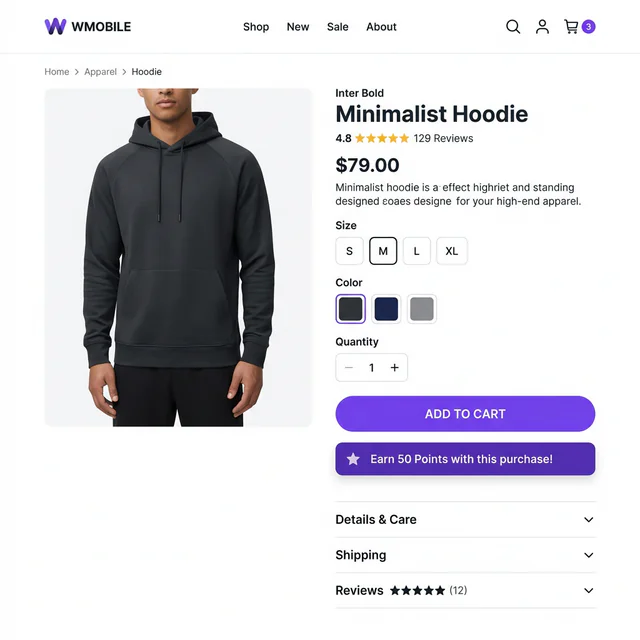
Give them a reason to buy here, on the page where they decide
Underneath the price, NeoGrow shows the customer exactly how many
points this order will earn them. Unlike most WooCommerce reward
points plugins, it sets itself up — you choose the earn rate
once and every product in the shop shows the right figure.
It is a small line of text that changes what the price means. Money
spent here comes partly back; money spent at the cheaper shop does
not. That is the whole argument, and the shopper does the sum
themselves.
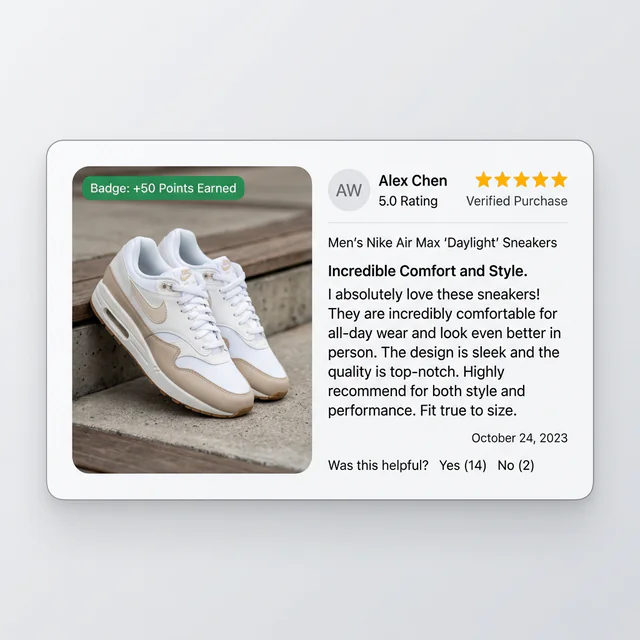
Stop asking for photo reviews. Start paying for them.
Customers will happily photograph what they bought — they
just need a reason to bother. NeoGrow turns ordinary ratings into
WooCommerce photo reviews by paying extra points for attaching one,
and credits those points only after
you approve the review, so a review that never gets
published never costs you anything.
A photograph settles the questions your description cannot: what
the color really looks like, how big it actually is, whether it
survived the post. Hosted platforms charge a monthly fee for
exactly this and cap how many you may collect. Here it is unlimited
and it is free.
The points only pay you back when they get spent
This is the finding worth acting on. McKinsey looked at loyalty
programs and found that members who
redeem their points spend
25% more than members who joined and never did — and that
programs leaning on unspent points are leaving the money on the
table.

So NeoGrow puts the balance where it cannot be missed: in the
basket and at the checkout. The customer sees what they have,
types how many points to spend — all of them or a few
— and presses Apply. The discount comes off the subtotal
there and then. No coupon code to find, no account page to go
hunting through. It works in the modern Cart and Checkout blocks
and in the classic shortcode versions alike, and the total updates
without a page reload.
They choose how many points to spend, and the discount comes off
the subtotal without a page reload.
New in 1.2.0
Selling abroad? You are probably giving away the wrong amount
If your shop shows prices in more than one currency, most loyalty
plugins quietly hand out the wrong number of points — they multiply
your earn rate by a total a currency switcher has already
converted. Nobody complains, because the customer has no idea what
they were owed. You simply pay out too much in one country and too
little in another, every day, until you notice.
NeoGrow always calculates points against your store's base currency,
using the exchange rate recorded on the order itself, so a customer
paying in yen earns exactly what the same basket earns in dollars.
Redemption works the other way: the discount is converted into the
currency the shopper is actually looking at, so the amount quoted is
the amount taken off.
The multi-currency built into
WooPayments, plus the
CURCY and
FOX switchers, are all
supported out of the box, with nothing to configure. Other currency
switchers plug in through two documented filters. Selling in a
single currency? Nothing changes at all.
One points balance, worth the same to every customer, whatever
currency they checked out in.
See whether it is working, without leaving WordPress
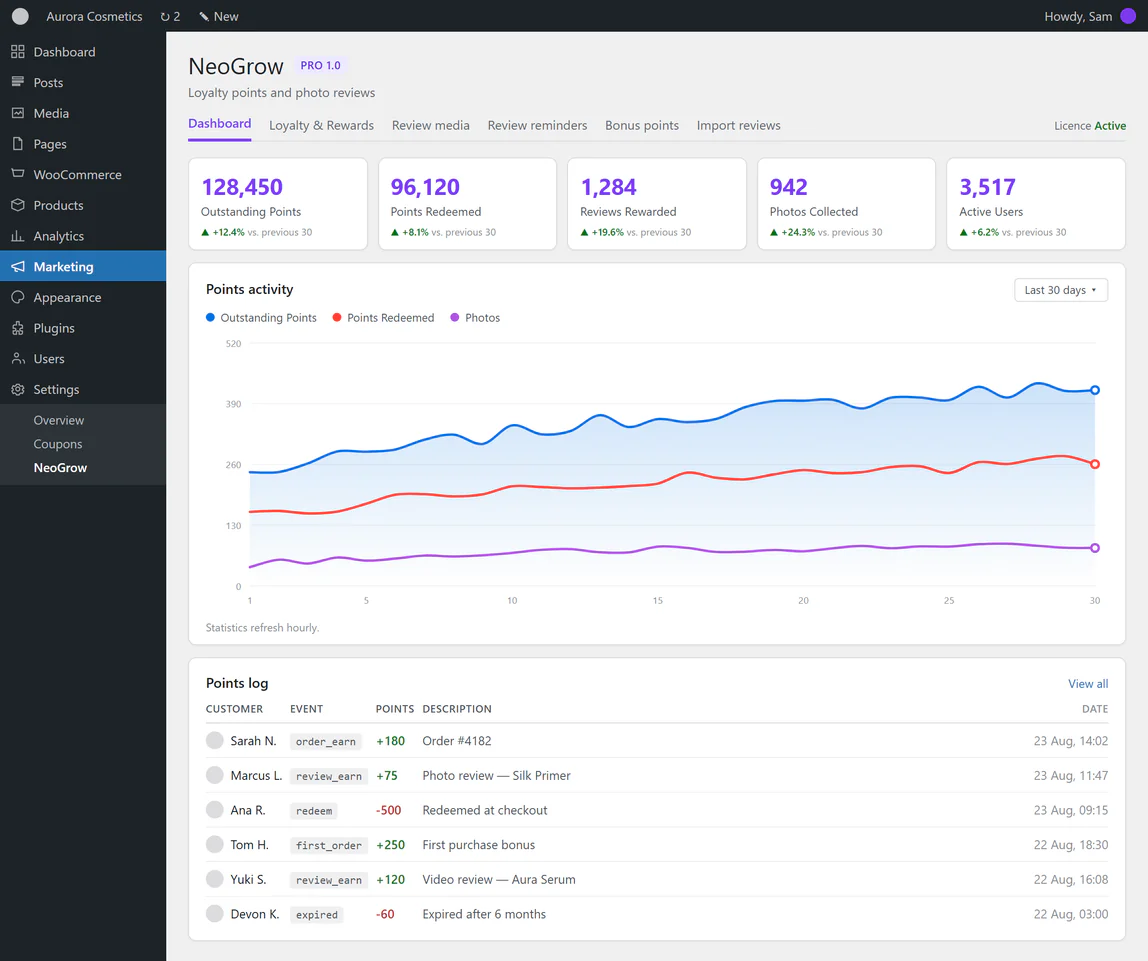
One screen in your dashboard answers the questions you will
actually ask: how many points are outstanding, how many have been
spent, how many reviews and photos you have collected, and how many
customers are still active. Each one carries a 30-day trend, so you
can see the direction and not just the number.
Underneath sits a live log of every point ever awarded or taken
away, with the reason attached. When a customer emails asking where
their points went, the answer takes about ten seconds to find.
Your customers write the search terms you never thought of
You optimized the page for “ergonomic office chair”. A
customer wrote “this chair is brilliant for my lower back
pain when I’m gaming”. Now the page can be found by
people searching that too — and there are far more of those
searches than there are of yours.
There is a second, quieter benefit. A product page normally sits
untouched for months. Every new review adds fresh, unique wording
to it, which is a signal search engines pay attention to. You are
not writing that content and you are not paying anyone to write it
— your customers are producing it as a side effect of being
rewarded.
The reviews are yours. Nobody can take them away.
Building up a few hundred reviews takes a year or two of steady
work. If they live on somebody else’s platform, that asset
disappears the month you stop paying, and every product page you
spent that year improving goes back to looking like Tab A. Reviews,
photos and points from NeoGrow sit in your own database, on your
own hosting.
There is no account to open and no external service to call, which
is also why nothing here slows your shop down. It is built for
WooCommerce’s modern order storage, and the points are kept
in their own table so they never get in the way of the queries that
run your checkout.
Check your own store
Five things shoppers check in your product reviews
They go through these in order, in a few seconds, mostly without
realizing it. Open one of your own product pages and follow along
— the rung where you fail is the one costing you orders.
01
Are there any reviews at all?
If the answer is no, most shoppers leave without reading
another word. The encouraging part is how low the bar is:
Spiegel found that most of the conversion benefit arrives with
the first five reviews, and that five is
already enough for a 270% difference. Going from nothing to
five is the hard part, and it is also nearly all of the prize.
What NeoGrow does
Puts a price on that first review. Points are a reason to write
one, and the first five stop being a waiting game.
02
Are there enough of them?
Five gets you taken seriously; a wall of them settles the
matter. PowerReviews found 68% of shoppers
want to see around 26 reviews before they feel confident. Most
stores manage a burst at launch and then nothing, because
asking politely only works once.
What NeoGrow does
A standing reward, not a one-off campaign. Every order that
arrives is another chance at another review.
03
Are they recent?
Around 71% of shoppers weigh how recent a
review is, and anything much older than a few months starts to
read as a shop that has gone quiet. A page whose newest review
is from two years ago can be worse than a page with none.
What NeoGrow does
Keeps a trickle coming in on its own, and the free plugin emails
a reminder after the order arrives, when they are happiest. Pro
adds follow-ups and targeting.
04
Is there anything there besides a star?
52% of shoppers do not trust a rating with no
words attached, and a photograph is worth more again — it
answers the size, color and condition questions that make
people hesitate, and that also cause your returns.
What NeoGrow does
Pays extra for a photo, so the useful reviews are the ones
worth writing. Pro adds several photos and video.
05
Is this too good to be true?
This is the one that catches store owners out.
96% of shoppers go looking for the bad reviews
on purpose, and Spiegel found that purchase likelihood peaks
somewhere around 4.0 to 4.7 stars and then
falls as a rating nears a perfect 5.0. Deleting your
critical reviews does not make you look better. It makes you
look edited.
A polite public reply to a fair complaint does more for your
credibility than another five-star entry ever will.
What NeoGrow does
Rewards the review, not the rating — so you are never
buying five stars. Pro adds the rating breakdown bar and star
filters that let shoppers find the criticism themselves, which
is exactly what makes the praise believable.
WooCommerce loyalty plugin vs hosted app: four differences
Not a longer feature list. These are the four differences you would
still notice a year from now, and they all come from the software
running on your own shop rather than on someone else’s
platform.
Nothing between the review and the reward
Elsewhere this takes two plugins that have to be wired together: one collects reviews, the other hands out points and watches for them. That join is fragile, and when it quietly breaks you find out from a customer who was promised points and never got them. NeoGrow does both jobs itself, so there is no join to break.
You keep everything if you stop
Reviews, photos and every point balance sit in your own database. There is no account to open and no company holding a copy, so there is no month where cancelling a subscription empties your product pages. A hosted platform genuinely cannot offer this — holding the data is what it is.
Growing does not cost you more
Hosted platforms in this category charge by review requests sent, by customers on file, or by minutes of video stored — so a good year raises your bill. Unlimited reviews, unlimited photos, unlimited points, and the price stays the same at ten customers and at ten thousand, because software on your own shop has nothing to meter.
It gives away what you meant to give away
Points are worked out on the goods total, so tax and postage never inflate what you hand out. Sell in several currencies and the order converts at the rate that order actually used. Refund one and the points come back measured against the same total they were earned on. Each of those is a bill you would otherwise pay quietly for years, and each is pinned in place by a test.
Weighing this against a hosted loyalty app? Worth knowing that the
three best-known ones either do not support WooCommerce or have
stopped taking new WooCommerce shops —
we checked, and wrote up what we found.
The stars in Google search results
Coming Soon
Those little gold stars that show under some results, and the
answers AI search engines now give in place of a list of links,
are both built from a machine-readable summary of your reviews.
You cannot have either without reviews to summarise, which is the
half NeoGrow does. Publishing that summary cleanly is the job of
NeoSEO,
a separate free plugin currently in development.
NeoGrow does not need it and works fully without it — we
are telling you now so you are not surprised later. Collect the
reviews first; they are the part that takes time.
The free WooCommerce loyalty plugin is free and stays free. Pro is
an add-on that installs alongside it — nothing you set up now
is lost or replaced if you upgrade later. Neither edition is priced
by how many orders you take, which is
the part that gets expensive elsewhere.
Feature
Free
Pro
Loyalty points
Points for purchases
Set your own earn rate
✓
✓
Redeem points at cart & checkout
Works in both the blocks and the classic shortcode
✓
✓
Multi-currency stores
Points always calculated in your base currency; discounts
shown in the shopper's
✓
✓
My Account balance & history
✓
✓
Points expiry
Free expires on a fixed 6-month schedule
6 months
Any period
Points taken back on refund or cancellation
Proportional to the amount refunded
—
✓
Redemption limits
Minimum cart, maximum discount, maximum share of an
order
—
✓
Bonus points
First order, registration, completed profile
—
✓
Photo & video reviews
Photo reviews with bonus points
1 photo
Multiple
Video reviews
MP4, WebM and MOV, with their own points bonus
—
✓
Customer photo lightbox
✓
✓
Helpful votes & review reports
Shoppers mark reviews helpful, or report one to you
✓
✓
Moderation
Pro adds thumbnails, so you are not approving photos
blind
Standard queue
With previews
Rating breakdown bar
The star distribution shoppers expect to see
—
✓
Filter reviews
By exact star rating, with media, or verified buyer —
plus photos-first sorting and the rating breakdown bar the
filters hang off
—
✓
Reviewer badges
—
✓
Automatic review request
One email
Follow-ups & targeting
Manual review request
Per order
Whole backlog
Import existing reviews
CSV, with a dry run before anything is written
—
✓
Store management
Growth dashboard & points log
Pro adds revenue, repeat rate and average order split by
member, period-on-period change, six charts and exportable
tables
Basic
Advanced
Branding & color settings
✓
✓
HPOS ready
High-Performance Order Storage, and the cart and checkout
blocks
✓
✓
Elementor widgets
Product Points, Product Reviews, Points Balance and Points
Redemption. Work with Elementor’s free version
Not built yet. Listed here rather than in the table above, so
everything above is something you can switch on today. Several of
these are headed for the free plugin, not Pro
— they say so where that is decided.
• Referral links with
double-sided rewards
• Earning rules per
product, category or role
• A photo gallery of all
review images
• Warning emails before
points expire
• Store credit and
cashback
• Free shipping and
percentage rewards
• Review export, and
analytics
• One page to review a
whole order at once
• Sort reviews by rating
and date, free
• Spam protection and a
consent checkbox, free
• A badge on reviews that
earned points
• Review grid, slider and
trust badge blocks
• Video recorded straight
from the camera
• A floating recent
review popup
• Review requests for
orders you already have
• Multi-criteria ratings
and a recommendation score
• Google Business Profile
review sync
Pro is not on sale yet. It will be sold here on neoplugin.com
and, once the listing is approved, on the WooCommerce
Marketplace —
start with the free plugin
and the add-on installs alongside it when it lands.
WooCommerce loyalty points and photo reviews: questions
If yours is not here, the
support forum
is the fastest way to reach someone.
NeoGrow is a free, GPL-licensed WooCommerce points and rewards
plugin that also owns the review system, so photo reviews and
loyalty points run in one install rather than two. Customers
earn points for orders and for leaving a review with a photo,
and spend them in the basket and at checkout. It is self-hosted
— the reviews and the balances sit in your own database on your
own hosting, the points in their own table rather than in
wp_postmeta, with no account to open and no external service to
call. It is built for High-Performance Order Storage and the
cart and checkout blocks, and it always calculates points
against your store's base currency, so a multi-currency store
awards the same points for the same basket.
For most shoppers, yes. Northwestern's Spiegel Research Center found a product
with five reviews is 270% more likely to be bought than the same product with
none, and that the lift is larger on expensive products (380%) than on cheap
ones (190%). PowerReviews puts the share of shoppers who read reviews at 99.9%.
Price still matters, of course. The point is that a review is the cheaper lever:
a discount costs you margin on every single order forever, while a review is
written once and keeps working.
It is a real cost, and it is the right question to ask. Three things make it
work out. You set the earn rate yourself, so you decide what a point is worth
before a single one is issued. Points are calculated on the goods total, so you
are never paying out on tax or postage. And a point only becomes a discount when
the customer comes back to spend it, which means the cost only lands on an order
you would not otherwise have had. McKinsey's loyalty research makes the same
point from the other direction: programs worry about people redeeming, but
members who redeem spend 25% more than members who never do, and the redemption
is what triggers the extra spending rather than eroding it.
Less than you would think, and a page with no bad reviews at all hurts more.
Spiegel found purchase likelihood peaks around 4.0 to 4.7 stars and then falls
as a rating approaches a perfect 5.0, and PowerReviews found 96% of shoppers go
looking for the critical reviews deliberately. A spotless page reads as edited,
not as excellent. The most valuable thing on your reviews tab is often a fair
complaint with a polite, helpful reply underneath it from you, because that is
the thing a competitor cannot fake. NeoGrow rewards a customer for writing a
review, never for the rating they give, so you are never in the position of
having paid for five stars.
A small shop is where it matters most, because a big shop already has reviews
and you do not. The threshold is lower than people expect: Spiegel found most of
the conversion benefit arrives with the first five reviews on a product, so the
gap you need to close is five, not five hundred. It also costs nothing to find
out. The plugin is free, there is no account or card involved, and if it turns
out not to suit you the reviews and balances stay in your own database either
way. Do bear in mind it is not retroactive, so the sooner it is switched on the
sooner orders start counting.
The free plugin is a complete WooCommerce loyalty points and photo review system on its
own: points for purchases, points for approved photo reviews, redemption at checkout, and review requests
— both the automatic one sent a set number of days after an order completes and a Send
now button for asking a single customer by hand. Both say what a review is worth and credit
the points on approval. NeoGrow Pro is a separate add-on that layers on multi-photo and
video reviews, follow-up reminders with targeting and your own template, one-click
invitations to your entire backlog of unreviewed orders, automatic point adjustment on
refunds and a configurable expiry window. The comparison above shows exactly where the line
falls, and the roadmap beside it lists what is coming to each edition.
Yes. The redemption panel appears automatically in both the block-based Cart and
Checkout and the classic shortcode versions, with no setup needed. Points are applied
through the WooCommerce Store API, so order totals update live without a page reload.
The [neogrow_cart_redemption] shortcode is still there if you would rather place the
form somewhere else, such as a custom landing page.
Yes, with the free version and with Elementor Pro. On product pages built with Elementor
Pro's Theme Builder, the points message appears above the add-to-cart button by itself,
and reviews, redemption, the thank-you notice and the My Account balance work through
Elementor Pro's own widgets. The free plugin also adds four widgets in a NeoGrow panel:
Product Points, Product Reviews, Points Balance and Points Redemption. They work with
Elementor's free version and never cache one customer's balance for another. On other
builders, the same things are available as shortcodes.
Points live in a custom database table rather than in wp_options or postmeta, so point
calculations never compete with your order queries — which is what keeps checkout
responsive on stores with thousands of active customers. Admin dashboard statistics are
cached for one hour to keep wp-admin fast; your live points data is always current, only
the analytics view lags behind.
No. NeoGrow is not retroactive. It starts tracking from the moment you activate it, and
it does not scan your database history to backfill points for past orders or count
pre-existing reviews in the Growth Dashboard. If you want to recognize long-standing
customers, Users > Edit User lets you set a starting balance by hand, with the reason
recorded in the Points Log.
Only after you approve the review, from Products > Reviews in your WordPress
dashboard. A review that never gets published therefore never costs you points. Uploads
accept JPG, PNG and WebP, up to 5 MB, and are offered to logged-in customers only.
In the free version points expire six months after they were earned, on a first-in,
first-out basis, so the oldest points in a balance are always spent first. Setting your
own expiry window, or turning expiry off entirely, is part of NeoGrow Pro.
The free version does not readjust the balance automatically. Go to Users > Edit User
to correct it by hand, and the change is written to the Points Log with your reason
attached. Automatic adjustment on refund and cancellation is a NeoGrow Pro feature.
Points are calculated on the order subtotal in the first place, so tax and shipping
never inflate what you would be giving back — and Pro measures the refund against
that same subtotal, so refunding only the postage takes back nothing at all.
Yes. Points are always calculated against your store's base currency, using the
exchange rate recorded on the order, so the same basket earns the same points whatever
currency the customer paid in. Redemption converts the other way, so the discount is
quoted and applied in the currency the shopper is browsing in. WooPayments, CURCY and FOX are all supported
natively with nothing to configure; other currency switchers can be
connected with two documented filters. If you sell in one currency, none of this
changes anything.
Your next customer is reading reviews right now
If your product page has none, they are reading somebody
else’s. NeoGrow collects WooCommerce product reviews for free,
installs from WordPress.org in a couple of minutes like any other
WordPress loyalty plugin, and starts collecting from the next order
you take.