
How to get your first reviews on products that have none
Every WooCommerce store has them: products that sell, or should, and whose reviews tab still reads There are no reviews yet. Underneath it, WooCommerce prints the most optimistic sentence in e-commerce — Be the first to review — and almost nobody ever takes it up.
Our complete guide to WooCommerce product reviews ends by telling you to sort your catalog by review count and start with the products on zero. This post is that afternoon's work, written out: which products to pick, who to ask, when, what to say, what to offer, and the handful of settings that quietly stop customers from answering even when they want to.
It is written for a store that already has some orders. If you have no customers yet at all, the same steps apply, but the first batch of asks will have to wait for the first batch of deliveries — there is no honest shortcut past that, and the dishonest ones are covered below.
The short version
- Zero to five is most of the prize. The measured conversion lift from reviews arrives largely with the first five on a product; the gap to close is five, not fifty.
- Start with products that have sales but no reviews. Those are the pages with people to ask. A one-line query against WooCommerce's lookup table lists them, best first.
- The first batch is asked by hand. Automated review requests only cover orders completed after you switch them on, so the customers who already bought have to be emailed by a person. Ten per product is plenty.
- Ask once, after they have used it, in a plain email with one link that lands on the review form.
- Give everyone the same reason — points or a discount, identical for every rating, disclosed above the form.
- Check the settings that block answers: the verified-owners restriction hides the form from every guest buyer, and per-product review toggles hide it from everyone.
- Never write them yourself, never swap, never import. A fake first review is illegal in the US and the UK, and shoppers are better at spotting one than you are at writing it.
Why zero is the hardest number, and the most valuable
A product with no reviews is asking shoppers to trust your description alone, and most of them decline. The size of that effect was measured by the Spiegel Research Center at Northwestern: a product showing five reviews was 270% more likely to be purchased than the same product showing none, with the benefit arriving largely in those first five and diminishing after. The full research, and the buyer psychology behind it, is in why product reviews matter more than price.
That is the good news: the bar is low. The bad news is that the first review is the most expensive one you will ever collect, for two reasons.
The first is the loop. No reviews means fewer sales, fewer sales means fewer customers to ask, and fewer customers to ask means no reviews. A product can sit in that loop for years while its neighbors accumulate dozens.
The second is that nobody wants to go first. A customer who reads twenty reviews and adds a twenty-first is joining in. A customer looking at an empty tab is being asked to put their name on a blank page, and even people who liked the product hesitate. The second review is noticeably easier to get than the first, and the sixth easier than the second.
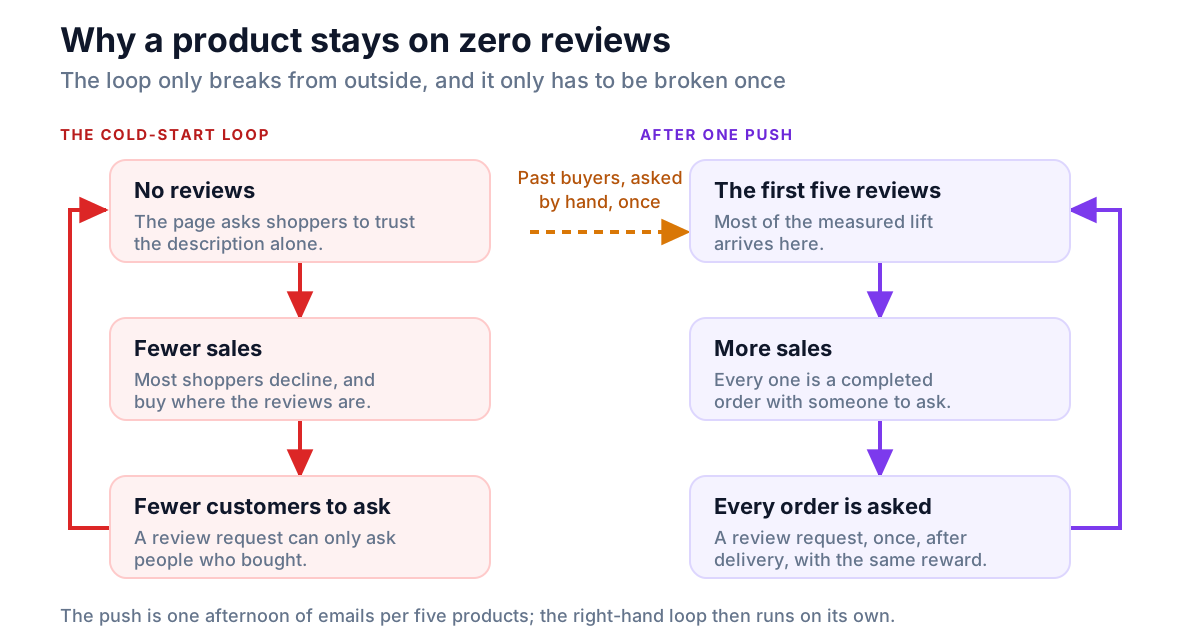
So this is a project rather than a setting. A review request email, switched on today, will slowly fix the problem for products you sell from now on — and you should switch one on. But the backlog of products that already have sales and no reviews needs a deliberate push, once, by a person. That is what the rest of this post is.
Step 1: find the products worth starting with
Start with the products that have sales and no ratings. List them by querying WooCommerce's product lookup table for rating_count = 0, sorted by total_sales, or by sorting the shop page by average rating and checking the unrated products at the end against Analytics. Then pick five.
Not every product on zero reviews is equal. A product with forty sales and no reviews has forty people you can ask. A product with no sales has nobody, and no amount of asking will help it until it sells. Sort the zero-review products by how many you have sold, and start at the top.
Two ways to get that list.
Without touching the database: on your shop page, choose Sort by average rating. WooCommerce orders that view by average rating, then by number of ratings, so every product on zero ends up at the bottom of the list — scroll to the end and the unrated products are all there together. Then open Analytics → Products for the items-sold column and match the two by eye. For a catalog of a few dozen products that takes ten minutes.
With one query, if you or your developer can run SQL against the store. WooCommerce keeps a lookup table with both figures on the same row, so the list comes out already sorted:
SELECT p.ID, p.post_title, l.total_sales
FROM wp_wc_product_meta_lookup l
JOIN wp_posts p ON p.ID = l.product_id
WHERE l.rating_count = 0
  AND p.post_type = 'product'
  AND p.post_status = 'publish'
ORDER BY l.total_sales DESC
LIMIT 20;
Change wp_ if your tables use a different prefix. Three notes on reading it:
rating_countcounts ratings rather than reviews. If you have never required a star rating, a product can have a written review and still show zero here — and still have no star average, which is the number that matters for search results. Require ratings, then run the query.post_type = 'product'deliberately leaves out variations. Reviews are written against the parent product, so a variable product's variations all show zero and would clutter the list.- If the figures look wrong — a product you know has sold showing no sales — the lookup table may be stale. WooCommerce → Status → Tools has a Product lookup tables regenerate button that rebuilds it.
Now pick five. Not fifty. Five products, each with a real list of buyers, is a project you will finish; a spreadsheet of every product on zero is one you will abandon by Thursday.
Step 2: decide who to ask
The people to ask are the people who already bought the product. Everything else is a distant second.
Pull the buyers of each product
Analytics → Orders, set the date range to cover the whole life of the product, and under Show choose Advanced filters. Add a filter of Products → Includes and pick the product. Every order containing it is listed, each with its customer, and the screen will download the list as a CSV.
The same list comes straight out of the analytics tables for anyone who would rather query than click. Put the product's ID in place of 35:
SELECT o.order_id, c.first_name, c.email, o.date_completed
FROM wp_wc_order_product_lookup op
JOIN wp_wc_order_stats o ON o.order_id = op.order_id
JOIN wp_wc_customer_lookup c ON c.customer_id = o.customer_id
WHERE op.product_id = 35
  AND o.status = 'wc-completed'
  AND op.product_qty > 0
  AND NOT EXISTS (
    SELECT 1
    FROM wp_wc_order_stats r
    JOIN wp_wc_order_product_lookup rp ON rp.order_id = r.order_id
    WHERE r.parent_id = o.order_id
      AND rp.product_id = op.product_id
  )
ORDER BY o.date_completed DESC
LIMIT 10;
It returns completed orders only, most recently completed first, and leaves out any order where that product was later refunded — WooCommerce records a refund as a child row with a negative quantity, which is what the NOT EXISTS clause looks for. Guest buyers are included, because the customer lookup table holds a row for them too. product_id is the parent product even for a variable product, so one query covers every variation.
From that list, you want orders that are:
- Completed and delivered. An order still in processing has not arrived; asking about it is a support ticket waiting to happen.
- Not refunded, in full or for that item. A refunded buyer may well have an opinion, but it is not one you should be soliciting with a reward attached.
- Reasonably recent. Someone who bought three months ago still remembers the product and the shop. Someone who bought two years ago may remember neither, and an email asking them to review it reads oddly. There is no hard cut-off, but recency is the order to work in.
Who to ask first
Within that list, some customers are far more likely to answer than others, and you should start with them:
- Repeat customers. Anyone who has ordered from you more than once has already told you they are happy, in the only way that costs them money. They are also the people most likely to read an email from you rather than delete it.
- Customers who have written to you. Anyone who sent a thank-you, a question you answered well, or a photo of the product in use. They have already volunteered an opinion; you are asking them to write it down.
- Loyalty members, if you run a points program. They have a balance, they understand that doing things for the store earns points, and a review is one more.
A single product rarely needs more than ten of these emails to produce its first few reviews. If the first ten produce nothing at all, the problem is usually the ask or the form — the next three sections — rather than the customers, and sending twenty more of the same email will not fix it.
Who never to ask
The temptation on a blank page is to fill it with anything, and the fastest ways of doing that are the ones that will hurt you.
- Not yourself, your staff or your family. The FTC's Consumer Reviews and Testimonials rule (16 CFR Part 465) bans fake reviews outright — one from someone who never used the product, or that misrepresents their experience — and separately prohibits reviews by a business's officers, managers and their relatives unless the connection is disclosed clearly. In the UK, writing or commissioning a fake review is a banned practice under the Digital Markets, Competition and Consumers Act. A review that would need a disclaimer to be legal is not one a shopper will trust anyway. The rules are set out in incentivized reviews in WooCommerce, which also covers the paid kind done properly.
- Not review swaps or "exchange" groups. Same thing with more participants.
- Not reviews copied from a marketplace listing of the same product. They are not reviews of buying it from you, the platform's terms prohibit it, and shoppers recognize the house style of a copied review quickly.
- Not only the customers you expect to be happy. Asking the satisfied ones and skipping the rest is review gating, and the regulators treat it as deceptive. Everyone on the list gets the same email.
None of this is only about compliance. Shoppers go looking for the critical reviews on purpose, and a brand-new product whose first three reviews are flawless, undated and photo-free reads as exactly what it is. Five honest reviews with a fair complaint among them do more work than fifty you wrote.
Step 3: ask at the right moment, once
Ask one to two weeks after delivery for most physical goods, later for anything that takes time to judge, and ask once. The hand-written batch goes out now, most recent buyers first; a review request handles every order from today on.
The window is after the product has arrived and been used. For most physical goods that is one to two weeks after delivery; longer for anything that takes time to judge, such as a mattress, skincare, or a pair of boots. Ask too early and the honest answer is "it has not arrived yet"; ask too late and the customer has forgotten which shop they bought it from.
For the hand-written batch, that timing is already past — these customers bought weeks or months ago — so send them now, most recent first.
For orders from today onward, let a review request do it. WooCommerce 10.8 and later includes one, off by default behind two switches, and its Delay counts from the moment an order is marked Completed rather than from delivery. The whole setup, including what number to put in the Delay box and three things to check before the first one goes to a customer, is in how to switch on the WooCommerce review request email. Switch it on the same day you send the hand-written batch; the two together cover your past and your future. How long to set the Delay for your products, and what time of day the email arrives, is in when to send a review reminder.
Whatever you use, ask once. A second reminder buys a handful of extra reviews and costs you the goodwill of everyone who ignored the first on purpose. For the hand-written batch, there is no second email at all — if a customer does not answer a personal note from the owner, a follow-up will not change their mind, and it will change how they feel about the shop.
Step 4: what to say
Send a short plain email from a named person that names the product, says it has no reviews yet, offers the same reward for every rating, and carries one link straight to the review form.
A plain email, from a named person, with one link. Not a campaign template, not a header image, not a "we value your feedback" opener. It should read like what it is — the owner of a small shop asking a customer for a favor, and offering something in return.
Subject: Would you review the Beanie with Logo?

Hi Maria,

You bought a Beanie with Logo from us in August. It has no reviews yet,
and you are one of the few people who can say what it is actually like.

Would you write a few sentences about it? A photo helps the next shopper
more than anything else, if you have one to hand.

[Leave a review]

It takes about two minutes, and every review earns 50 points toward your
next order — whatever rating you give.

Thank you,
Sam
Northline Knitwear
Why each line is there:
- "It has no reviews yet." Say so. People hesitate to go first on a blank page, but they respond well to being told plainly that they are the one being asked to. It turns a chore into a small distinction.
- "Whatever rating you give." This is the sentence that keeps the reward legal and makes the eventual review credible. It also removes the quiet pressure that a reward otherwise implies, which is what honest customers feel and resent.
- No "if you loved it". Any wording that selects for happy customers is gating by other means. Ask for an opinion, not a good one.
- A photo, asked for once, as a help to the next shopper. Framed that way it gets photographs; framed as a requirement it gets nothing.
- One link, and it goes to the form rather than the home page.
Where the link should land
On a classic theme, a product URL ending in #reviews opens the reviews tab directly — WooCommerce's own product-page script switches to that tab when it sees #reviews or #tab-reviews in the address, so the customer arrives looking at the form rather than at the description. On a block theme, the Reviews heading block carries the same reviews id, so the anchor scrolls to the section. Either way, the customer should not have to find the form.
If the customer bought as a guest and your store restricts reviews to logged-in buyers, that link lands on a message telling them they cannot review. That is the single most common reason a well-written ask produces nothing, and it is the subject of Step 6.
Doing it by hand is the point
For five products and ten customers each, that is fifty emails. Send them from your own mailbox, with the name and product filled in by you. It is an afternoon, and it is deliberately not automated: an email that is obviously from a person gets replies — and reviews — that a merge template does not, and the replies that are not reviews are often worth having too. A customer who answers "actually, the stitching came loose" has just told you why the product has no reviews.
Step 5: give everyone the same reason
Offer every buyer the same reward for a review — loyalty points, a single-use coupon, or nothing but a personal ask — identical for every star rating and disclosed next to the reviews.
Goodwill produces a trickle. A concrete reason produces reviews, and it is the single biggest change most stores can make. Three options, in descending order of how well they work.
Points. If you run a loyalty program, a review earns points, a review with a photograph earns more, and the balance brings the customer back to spend it. Points are credited when you approve the review, so you pay for reviews rather than for submissions. This is the mechanism most of the stores that get this right use, and setting the figures is covered in WooCommerce points and rewards.
A discount code. For a store without a points program, a single-use coupon sent after the review is approved does the same job with more admin. In Marketing → Coupons, give the coupon a Usage limit per coupon of 1 and put the customer's address in Allowed emails under Usage restriction, so it cannot circulate. It works; it just does not scale past the first batch, which is fine, because the first batch is what this post is about.
Nothing but the ask. A personal email from the owner, with no reward, does produce some reviews — fewer, and mostly from the repeat customers at the top of your list. If you cannot offer anything, send the email anyway. Just expect to need the whole list rather than the first ten.
| Reward | What it takes to run | Suits | What the rules require |
|---|---|---|---|
| Loyalty points | A points plugin; credited on approval without further work | Any store that wants the reviewer back as a customer | The same figure for every rating, disclosed next to the reviews |
| Single-use coupon | One coupon per reviewer, made by hand after approval | A store without a points program, for the first batch | The same discount for every rating, disclosed next to the reviews |
| Nothing but the ask | One email | Repeat customers; small catalogs with a known clientele | No disclosure, since nothing is offered — but still ask everyone |
Whichever you choose, three rules apply, and they are not optional:
- The reward is the same for every rating. No bonus for five stars, no extra for "positive" reviews. An incentive that depends on the rating is paying for an opinion, which the FTC's rule prohibits in as many words and Google's product ratings policy disallows.
- It is disclosed, next to the reviews. One sentence above the form — Customers can earn points for leaving a review on this store; every review earns the same, whatever the rating — does the job. A line in your terms does not.
- Everyone is asked. Not the happy ones.
The reasoning behind each, with the regulations quoted, is in incentivized reviews in WooCommerce.
Step 6: remove what stops them answering
Four WooCommerce settings decide whether a customer who clicks your link can actually review: the verified-owners restriction, the per-product reviews toggle, star ratings, and comment moderation. Check all four before the first email goes out.
A surprising share of first-review projects fail at this step, after the email has gone out, because the customer clicked the link and could not review. Four settings to check, all in WooCommerce → Settings → Products unless noted, and one habit.
The verified-owners restriction hides the form from guests
Reviews can only be left by "verified owners" sounds like a quality setting. In practice it shows the review form only to a logged-in customer whose account bought the product. Everyone else — including a guest who paid with the same email address and is holding the product — sees Only logged in customers who have purchased this product may leave a review and no form.
If your store has any meaningful guest checkout, this setting alone can explain an empty reviews tab. For a first-review push, switch it off. Spam is a problem you can solve later with moderation; silence is the problem you have now. The decision for the long run is a separate one, and the pillar guide covers both sides of it.
With it off, guests still get the verified owner badge: WooCommerce checks the email address they type into the review form against your paid orders, so a guest who uses the same address they bought with is marked verified like anyone else. Tell them to, in the email if you like.
Reviews switched off on the product itself
Each product has its own Enable reviews box, on the Advanced tab of the product data panel. A product that shows no review form when the rest of the store does is usually unticked here — often from a duplicated product whose original had reviews disabled. Check all five.
Star ratings on, and required
Enable star rating on reviews and Star ratings should be required, both on. A review without a rating does not count toward the product's average, and a product without an average has no stars to show in a search result, however many words have been written about it.
Hold reviews for approval, then approve the same day
In Settings → Discussion, Comment must be manually approved applies to reviews too, and you want it on — not to filter opinion, but to catch spam, a delivery complaint that belongs in support, or a phone number. The important part is speed. While your batch is still being asked, approve each review the day it arrives, so that the second customer who clicks through finds a page that already has one review on it rather than a blank one. That is the first review doing its most useful job.
Reply to the first one
When the first review lands, reply to it in public, as the store, using the ordinary comment reply. Thank them, answer anything they raised, and keep it short. A product page whose only review has a reply from the owner reads as a page that is tended, and it tells the next reviewer that writing one is worth their time because somebody reads them.
If the first review is a critical one, reply to that too — more carefully, and sooner. A fair complaint with a useful public answer underneath it is more persuasive than a five-star review with nothing underneath, and it is the one thing on the page a competitor cannot copy.
A two-week plan
Day 1. Run the query or sort the shop page, pick five products, and pull each one's buyer list from Analytics. Check the settings in Step 6. Decide the reward and write the disclosure sentence. Switch on a review request for future orders.
Day 2. Write the email once, then send it by hand to up to ten customers per product, most recent and most loyal first. Fifty emails, one afternoon.
Days 3 to 10. Approve each review the day it arrives. Reply to each one. Credit the reward. Watch for replies that are not reviews, and answer them.
Day 14. Count. A product that reached three or more reviews is out of the loop; the request email will carry it from here. A product still on zero gets one more round — to a different ten customers, never a second email to the first ten — and if that fails too, look at the product rather than the process. Something customers will not say in public is something they are saying with their silence.
Then stop. The point of the exercise is to get the five hardest pages over the line once; after that, the automation and the reward do the work on every order without you.
Where NeoGrow fits
NeoGrow is the free plugin we build, and the reward and the follow-through above are the parts it handles.
- The reason. It pays loyalty points for a review and a larger amount for one with a photograph, the same for every rating — nothing in the plugin reads a review's star rating when deciding what it earns, and there is no setting that could. Points are credited when you approve the review.
- The disclosure. It ships the disclosure sentence switched on, just above the review form on both classic and block themes, and lets you edit the wording. It hides itself if you set review points to zero, so it never promises a reward you have stopped paying.
- The form. It adds a title and a photograph to WooCommerce's own review form, and renders both on the block path as well as the classic one.
- Future orders. Its review reminder is off by default. Switched on, it sends one email per completed order after a delay you set — the default is 14 days, counted from when the order is completed — with a one-click opt-out link, and it never reaches back over orders completed before you enabled it. Where WooCommerce's own review request is switched on and sending, NeoGrow stands down rather than emailing your customer twice.
- The backlog. The Orders screen gains a Review reminder column with a Send now button on completed orders, so a past customer can be invited without waiting for the schedule, and a column entry afterward that says whether it went. That covers the hand-written batch for customers with an account; guest orders, which have no account to opt out from, are not emailed by the reminder and are the ones to write to from your own mailbox.
Two limits worth knowing: the free plugin captures one photograph per review, and the reminder is one email, not a sequence — which, for the reasons above, is how we would recommend it even if it were not. Full setup is in the NeoGrow documentation.
Frequently asked questions
How do I get my first product reviews on a new product?
Ask the people who already bought it, by hand, one email each, one to two weeks after delivery. Tell them plainly that the product has no reviews yet, offer the same reward for any rating, and link straight to the review form. Ten personal emails per product is usually enough for the first few reviews; after that, an automated review request keeps them coming on every new order.
How do I find products with no reviews in WooCommerce?
On the shop page, sort by average rating and scroll to the end — WooCommerce puts every unrated product last. For a sorted list, query the wc_product_meta_lookup table for rows where rating_count is 0, ordered by total_sales, so the products with buyers to ask come first. Leave variations out, since reviews attach to the parent product.
Can I ask past customers to review a product they bought months ago?
Yes. Automated review requests only cover orders completed after you switch them on, so past buyers have to be asked by hand. Work from most recent backward — someone who bought three months ago still remembers the product; after a year or so the answer rate falls and the email starts to read oddly. Pull the buyers of a specific product from Analytics → Orders with a Products filter.
Can I write the first review myself, or ask friends and family?
No. A review from someone who never bought or used the product is a fake review, which the FTC's consumer reviews rule bans outright. One from you, your staff or your relatives is an insider review, which the same rule prohibits unless the connection is clearly disclosed, and UK law lists fake reviews as a banned practice. Shoppers also recognize them quickly, and a page of obviously seeded reviews does more damage than an empty one.
Should I offer a discount or points for a first review?
Yes, if you can. A concrete reward is the biggest single lever on review volume. Keep it the same for every rating, say so next to the reviews, credit it after approval rather than on submission, and ask every buyer rather than the ones you expect to be happy. Points work best because the balance brings the customer back; a single-use coupon works for a store without a points program.
Why can't my customers leave a review on my WooCommerce store?
The usual cause is Reviews can only be left by "verified owners" under WooCommerce → Settings → Products, which shows the form only to logged-in customers whose account bought the product — every guest buyer sees a message instead. The other common causes are reviews disabled on that one product, on its Advanced tab, or disabled globally. Check all three before assuming customers are not interested.
How long after a purchase should I ask for a review?
After the product has arrived and been used: one to two weeks after delivery for most physical goods, longer for anything that takes time to judge. Ask once. If you use WooCommerce's built-in review request, remember its Delay counts from when the order is marked Completed, so add shipping time if you complete orders when they ship.
What if the first review on a product is negative?
Reply to it in public, quickly and usefully, and leave it up. A fair complaint with a good answer under it is more persuasive to the next shopper than a five-star review with nothing underneath, and removing criticism for its rating is both bad practice and, under the FTC's rule, unlawful if it leaves a misleading picture of the reviews you received. Then keep asking the rest of the list — one critical review on its own is a sample of one.
How many reviews does a product need?
Five is the urgent number: most of the measured conversion lift arrives with the first five reviews on a product. Confidence keeps rising after that, and shoppers say they want to see something in the twenties before they feel sure, but the gap that costs you sales today is the one between zero and five.
Five pages, five reviews each
Everything in this post reduces to a short list: find the five products that sell without reviews, email ten of their buyers by hand, give everyone the same reason, make sure the form is actually reachable, and approve and reply the same day. It is one afternoon of sending and two weeks of tending.
What you get for it is not five products with reviews. It is five products that have left the loop — pages that now convert well enough to produce the customers who write the next reviews, without anyone asking by hand again.