NeoSEO in short

NeoSEO is a free WordPress plugin that turns the product data already in WooCommerce into the structured data Google reads for merchant listings and product snippets: a Schema.org ProductGroup with each variation as its own Product, shipping rates from your shipping zones, and the return policy you declare once. That clears Search Console’s “Missing field shippingDetails” and, once your return terms are entered, “Missing field hasMerchantReturnPolicy”. It adds no database tables and loads no scripts or styles on your storefront.

The silent problem

What Google sees on a WooCommerce product page, before and after

Product markup is invisible. Nothing on the page looks wrong when it is incomplete, and no WooCommerce screen tells you. So we measured it: the same product, read the way Google reads it.

WooCommerce on its own
1 product
With a price range, $42–$45
  • No variant markup. The four variations are not described at all.
  • No shipping cost, although the store has three shipping zones.
  • No return policy.
  • Stands alone: no website or page node linking it into the rest of the site.

Google can tell this product exists and roughly what it costs. It cannot tell which colour costs what, what delivery costs, or whether it can be sent back.

The same product, with NeoSEO
1 group, 4 variants
Each with its own price, SKU, colour and stock
  • A ProductGroup holding all four variations, grouped by colour.
  • Three shipping rates on every offer, read from the store’s own zones.
  • Brand, four gallery images, condition, MPN, weight and size.
  • Linked into one graph with the store, the site and the breadcrumb trail.

Nothing was typed in to get this. Every value came from the product, its variations and the store’s WooCommerce settings.

Measured on our test store with WooCommerce 11.1, using the sample “Hoodie” product and its four variations. The return policy appears once the store declares one; NeoSEO never invents it.

See the JSON-LD NeoSEO prints for a variable product

One variation of the Hoodie, trimmed for length and moved to an example domain. The ProductGroup lists every variation under hasVariant and says what they differ by in variesBy. Each variation is a Product whose offer carries OfferShippingDetails and a MerchantReturnPolicy, and the @id links tie it to the store and the page.

{
  "@context": "https://schema.org",
  "@type": "ProductGroup",
  "@id": "https://yourstore.com/product/hoodie/#product",
  "name": "Hoodie",
  "brand": { "@type": "Brand", "name": "Your Brand" },
  "productGroupID": "woo-hoodie",
  "variesBy": [ "https://schema.org/color" ],
  "hasVariant": [
    {
      "@type": "Product",
      "@id": "https://yourstore.com/product/hoodie/#variant-31",
      "name": "Hoodie - Red",
      "sku": "woo-hoodie-red",
      "color": "Red",
      "inProductGroupWithID": "woo-hoodie",
      "offers": {
        "@type": "Offer",
        "price": 42,
        "priceCurrency": "USD",
        "availability": "https://schema.org/InStock",
        "itemCondition": "https://schema.org/NewCondition",
        "seller": { "@id": "https://yourstore.com/#organization" },
        "shippingDetails": {
          "@type": "OfferShippingDetails",
          "shippingRate": { "@type": "MonetaryAmount", "value": 5, "currency": "USD" },
          "shippingDestination": { "@type": "DefinedRegion", "addressCountry": "US" }
        },
        "hasMerchantReturnPolicy": {
          "@type": "MerchantReturnPolicy",
          "applicableCountry": "US",
          "returnPolicyCategory": "https://schema.org/MerchantReturnFiniteReturnWindow",
          "merchantReturnDays": 30,
          "returnMethod": "https://schema.org/ReturnByMail",
          "returnFees": "https://schema.org/FreeReturn"
        }
      }
    }
  ]
}

This sample is trimmed, so Google’s test would flag the fields left out, such as images. To test the real output, put one of your own product URLs through Google’s Rich Results Test once NeoSEO is active.

The rules

Merchant listing and product snippet requirements, from Google’s own documentation

None of this is our opinion. Each point below links to the Google Search Central page it comes from, so you can read the rule yourself.

Incomplete markup is not half a result

Why a store can have product markup and still get nothing.

0

rich results for an item that is missing a required property. Google’s wording: items missing required properties “are not eligible for rich results”.

Google, structured data general guidelines →
More

recommended properties make a better result. The same page: the more recommended properties you provide, the higher the quality of the result for users.

Google, structured data general guidelines →

What a merchant listing is built from

The pieces Google documents, and where NeoSEO gets each one.

Variants

are grouped with ProductGroup, hasVariant, variesBy and productGroupID. NeoSEO builds them from your variable products.

Google, product variant structured data →
Shipping

and returns sit inside the offer, as shippingDetails and hasMerchantReturnPolicy. NeoSEO reads the first from your shipping zones and the second from the policy you declare.

Google, merchant listing structured data →

Read the two columns together and the problem is plain. The markup Google wants is mostly information your store already holds. It just never reaches the page in a form a machine can read, and one gap is enough to lose the result.

Stars missing from your results? The seven causes, in the order to check them →

How it works

How NeoSEO turns a WooCommerce store into product schema

There is nothing to add to your pages and no per-product form to fill in. Most stores need one settings section, and then it runs on its own.

1

You install it

It checks for Yoast, Rank Math and five other SEO plugins, and for schema-only plugins, and switches off whatever would overlap before it prints anything.

2

It reads your store

Variations, prices, stock, gallery, brand, weight, dimensions and shipping zones — on every product page, from the data WooCommerce already keeps.

3

You declare your returns

The one thing WooCommerce does not store. Five fields, once. Until you fill them in, NeoSEO publishes no return policy at all.

4

You check it in one click

Pick any product in the schema inspector, see exactly what Google will read, and send it to Google’s Rich Results Test from the same screen.

Why it reads your settings instead of asking for them

Markup you type in by hand is right on the day you type it. Change a shipping rate next month and a hand-written rate goes on telling Google the old one, which is exactly the kind of mismatch Google flags. NeoSEO builds the markup from the live setting on every page view, so when you change the store, the markup has already changed with it.

What that means for you

No second copy of your prices and rates to keep in step, and nothing to forget when you change them.

What you actually switch on: WooCommerce product schema and more

Every one of these is in the free plugin. Each is a module you can turn off on its own if another plugin already does the job.

Free

Your variants, described as the separate products they are

A variable product is not one thing for sale. It is several, each with its own price, SKU, colour and stock. NeoSEO describes it the way Google’s variant documentation asks: a ProductGroup with every variation inside it, each one carrying its own offer.

Your attributes are mapped to colour, size, material, pattern and audience automatically, in your language — a German store’s “Farbe” is recognised as colour without anyone setting it up. When it cannot guess, one setting per attribute fixes it. A variation with no price is left out rather than published incomplete, because one broken variant can fail the whole group.

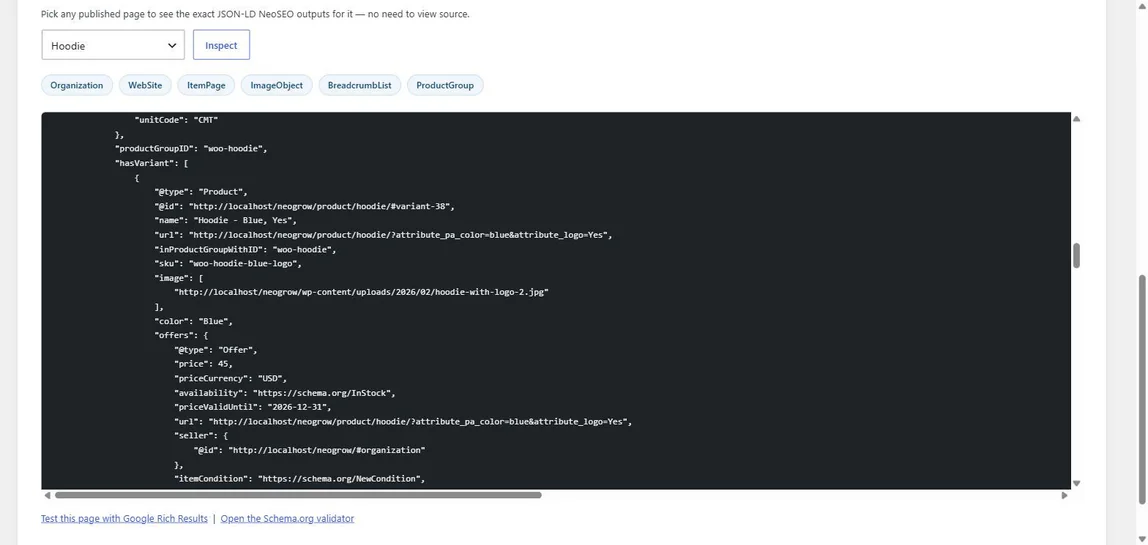
The NeoSEO schema inspector showing the markup for a Hoodie product: a productGroupID, a hasVariant list, and the first variant, Hoodie in blue, with its own SKU, image, colour and an offer of 45 US dollars, in stock.

Shipping and returns, from the settings you already have

Shipping cost is read from your WooCommerce shipping zones and attached to every offer, including each variant’s. Your return policy comes from a short Returns section: whether you accept returns, the window, how items come back and who pays the postage.

Nothing is made up to fill a gap. A rate worked out from a formula needs a basket that does not exist yet, so it is left out. Free shipping that needs a minimum order is not free for this product, so it is not claimed. And a store that has not declared a return policy publishes none — a return policy is a promise to your customers, not just a signal to Google.

Change a shipping rate in WooCommerce and the markup changes on the next page view. There is no second copy to update.

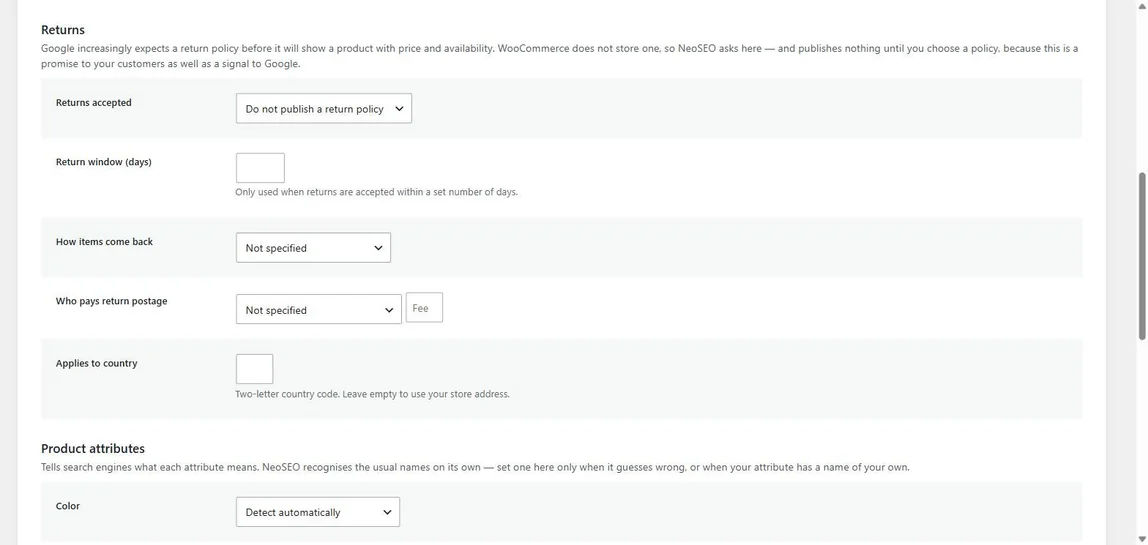
The NeoSEO Returns settings: returns accepted, return window in days, how items come back, who pays return postage with an optional fee, and the country the policy applies to. Below them, the Product attributes section begins with Colour set to detect automatically.

One connected description of your store, not scattered fragments

The store, the website, the page, the breadcrumb trail and the product are separate nodes linked to each other, so a search engine reads one picture of your shop instead of five pieces that never mention one another.

  • Shop and category pages list their products, with positions that carry on across page 2, 3 and beyond.
  • Posts are marked up as articles, with author, dates and the parts suited to being read aloud.
  • FAQ markup straight from WordPress’s own Details block — no shortcode, no special block.
  • EU energy labels, as Certification markup, on the products that carry one.
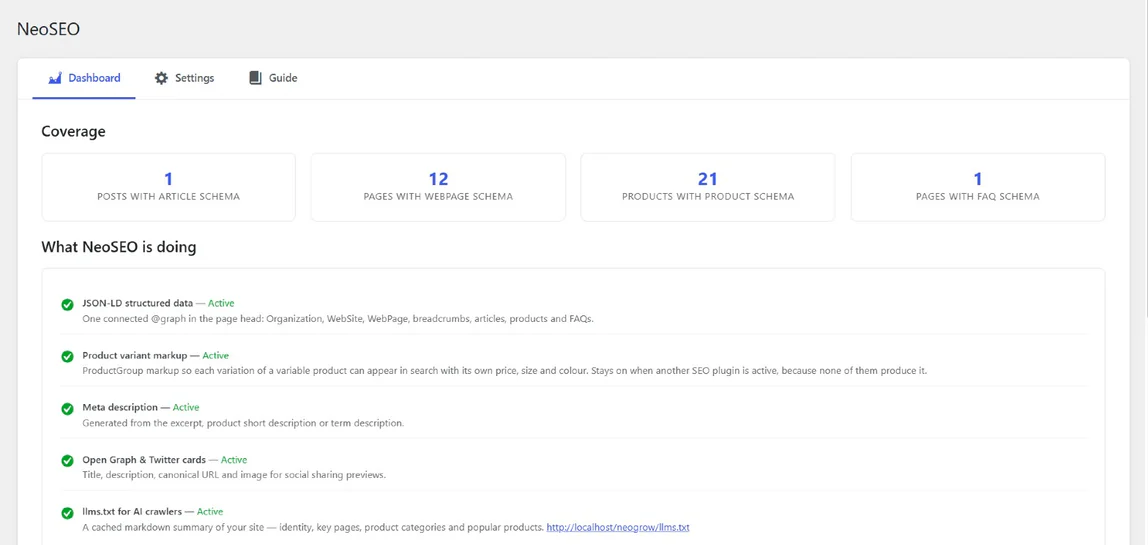
The NeoSEO dashboard. A coverage row counts posts with article schema, pages with web page schema, products with product schema and pages with FAQ schema. Below it, What NeoSEO is doing lists five modules, each marked active: JSON-LD structured data, product variant markup, meta description, Open Graph and Twitter cards, and llms.txt for AI crawlers.

Ready for AI search, and for the share button

AI answer engines read the same markup Google does, and NeoSEO adds what they look for on top: an llms.txt file at the root of your site with your key pages, product categories and best-selling products, kept current as the store changes. Blog posts get speakable markup that points voice and AI assistants at the headline and opening paragraph.

It also writes the meta description, and the Open Graph and Twitter tags that decide how a link looks when someone shares it — with the price and stock tags that Facebook catalogues and Pinterest read on product pages. Each product gets a Search Appearance box in the editor, with a preview, for when you want to write the description yourself.

yourstore.com/llms.txt

# Your Store

## Pages

- [Shop](https://yourstore.com/shop/)
- [Shipping & returns](https://yourstore.com/returns/)

## Product categories

- [Knitwear](https://yourstore.com/product-category/knitwear/)

## Popular products

- [Merino Crew Sweater](https://yourstore.com/product/merino-crew/) — $64.00
Check your own store

Five things Google needs from a WooCommerce product page

Paste one of your product URLs into Google’s Rich Results Test and follow along. The first question you cannot answer is the one to fix first.

01

Is there a price, a currency and stock?

The basics of any offer. WooCommerce publishes these for a simple product. For a variable product it publishes a price range, which tells Google what the product costs in general but not what any one variation costs.

What NeoSEO does

Keeps the price range, and adds an exact price and stock status to every variation.

02

Which variant is this?

If the test shows one product where your shop sells six, Google is seeing one product. It has no way to show the blue one in medium to someone who searched for exactly that.

What NeoSEO does

Groups the variations in a ProductGroup, each with its own SKU, GTIN, image, colour and size.

03

What will delivery cost?

Look for shippingDetails inside the offer; Search Console reports it missing as Missing field “shippingDetails”. WooCommerce does not publish it, even though your shipping zones hold the answer.

What NeoSEO does

Publishes a rate for each zone that has a fixed one, and leaves out any it would have to guess.

04

Can it be sent back?

Look for hasMerchantReturnPolicy; Search Console reports it missing as Missing field “hasMerchantReturnPolicy”. WooCommerce has nowhere to store a return policy, so on most stores it is simply absent.

What NeoSEO does

Gives you five fields to declare it, then attaches it to every offer — and publishes nothing until you do.

05

Is there only one of them?

This is the one that catches stores out. If the test lists two Product items for one product, two plugins are both describing it, and where they disagree Google has to pick one.

Adding a third plugin does not fix that. Deciding which one speaks for the product does.

What NeoSEO does

Replaces WooCommerce’s own product markup rather than adding beside it, steps aside for SEO plugins, and names any schema plugin still writing product markup on its settings screen.

Why NeoSEO

NeoSEO and your SEO plugin: four differences

NeoSEO is not a replacement for Yoast or Rank Math, and it does not try to be. These are the four ways it is built differently, and the reason the two can run on the same store.

It steps aside instead of competing

When Yoast, Rank Math, All in One SEO, SEOPress, Slim SEO, The SEO Framework or Squirrly is active, NeoSEO switches off its own product schema, meta description and social tags, so your SEO plugin stays in charge of them. It keeps only its variant markup on, which the free versions of those plugins don’t produce, and that is a switch like any other.

It is about products, not pages

An SEO plugin is built around titles, keywords and sitemaps for every kind of page. NeoSEO is built around the WooCommerce product: its variations, its offers, its shipping and its returns. It adds no sitemap, no redirects and no content analysis, which is why it does not get in your SEO plugin’s way.

It leaves out what it cannot know

A plausible guess in your markup is worse than a gap, because Google checks offers against your actual store. So NeoSEO never invents a return policy, a delivery time or a shipping rate that depends on the basket. What it publishes is what your store really says.

Your shoppers never load it

No JavaScript and no stylesheet on the front of your store, and no database tables, now or later. Its whole output is a block of markup in the page head, plus a short product list at the end of shop and category pages, put together while the page is built. Remove it and nothing is left behind.

The stars come from your reviews

NeoSEO publishes the rating and the reviews your products already have. It cannot publish reviews you do not have yet — that half is NeoGrow, our free plugin that rewards customers with points for writing one, with a photo. The two work fully on their own and better together.

About NeoGrow
Free & GPL

What’s in NeoSEO, feature by feature

Everything in this table is in the free plugin, with no licence key, no account and no limit on products.

Feature Free
Product schema
ProductGroup variant markupProductGroup with hasVariant and variesBy; each variation with its own SKU, GTIN, image, attributes and offer ✓
Attribute mappingColour, size, material, pattern and audience, detected in several languages ✓
Shipping rates from your shipping zonesOfferShippingDetails on every offer, read from your zones ✓
Return policyMerchantReturnPolicy from five fields you fill in once; nothing published until you do ✓
Gallery, brand, condition, GTIN, MPN, weight and dimensions ✓
Ratings and reviewsFrom your WooCommerce product reviews ✓
EU energy label certification ✓
Product lists on shop and category pages ✓
Site graph
Organization, website and page, linked as one graph ✓
Breadcrumbs and article markup ✓
FAQ markup from core Details blocks ✓
Search, social and AI
Meta description, with a per-post override and preview ✓
Open Graph and Twitter cardsPlus product price and stock tags for Facebook and Pinterest ✓
llms.txt for AI crawlers ✓
Running it
Steps aside for seven SEO pluginsAnd warns when a schema-only plugin is also writing product markup ✓
Schema inspector, with links to Google’s and Schema.org’s validators ✓
Every module switchable on its own ✓
Works alongside Yoast, Rank Math, AIOSEO and SEOPressHPOS and Cart & Checkout blocks compatible, declared ✓
Works without WooCommerceThe site graph, articles and FAQ run on any WordPress site ✓
Coming soon

On the roadmap

Not built yet. Listed here rather than in the table above, so everything above is something you can switch on today. All of these are planned for the free plugin.

  • • Delivery times: handling and transit days
  • • A full-text llms-full.txt alongside llms.txt
  • • Markdown versions of products and pages for AI crawlers
  • • Allow or block each AI crawler in robots.txt
  • • A product feed for AI shopping assistants
  • • A per-product check in the editor showing what blocks a rich result
  • • Review titles and photos from NeoGrow in the markup
  • • Correct URLs on WPML, Polylang and TranslatePress stores

NeoSEO at a glance

Price
Free, no license key
License
GPL-2.0-or-later
WordPress
6.6+ · tested 7.1
WooCommerce
Optional · tested 11.1
PHP
7.4+
HPOS
Compatible, declared
Database tables
None
Storefront scripts and styles
None
Scheduled tasks
None
Download
neoplugin.com · WordPress.org in review

From the plugin’s own headers and code. Submitted to WordPress.org on 18 October 2026; the download moves there once the review passes.

Tested on 233 WooCommerce themes → The full results, theme by theme.

WooCommerce product schema: questions

If yours is not here, get in touch — the support page has every way to reach us.

NeoSEO is a free, GPL-licensed WordPress plugin that publishes WooCommerce product schema: a ProductGroup for variable products with every variation inside it, shipping rates from your shipping zones, your declared return policy, and a connected JSON-LD graph for the rest of the site. It also writes meta descriptions, Open Graph and Twitter tags, and an llms.txt file for AI crawlers. It adds no database tables and nothing to the front end of your store except the markup itself.

Because WordPress.org is still reviewing it. NeoSEO was submitted on 18 October 2026, and every new plugin is checked by hand before it is listed, which takes a while. Until then you can download the same plugin from this page. Upload the zip under Plugins → Add New → Upload Plugin. Once it is listed on WordPress.org, updates arrive in your dashboard like any other plugin’s, with nothing to reinstall.

No. When Yoast, Rank Math, AIOSEO, SEOPress, Slim SEO, The SEO Framework or Squirrly is active, NeoSEO switches off its own product schema, meta description and social tags, so a store never ends up with two sets of that markup. It keeps only its variant markup, which the free versions of those plugins don’t produce. If you run Yoast’s paid WooCommerce SEO add-on, which has variant markup of its own, switch that module off too.

For most stores, yes. Search Console reports Missing field “shippingDetails” (in “offers”) under Merchant listings when an offer says nothing about delivery cost. NeoSEO adds shipping details to every offer from your WooCommerce shipping zones: each zone set up by country with a flat rate, or with free shipping that needs no minimum order, becomes a shipping rate. A zone whose cost depends on a formula, or that lists only continents or postcodes, is left out rather than guessed, so a store with only those zones keeps the warning. It is an optional field: the warning limits what a listing can show, not whether it can appear.

Yes, once you declare your policy. WooCommerce has nowhere to store a return policy, so on most stores Search Console reports Missing field “hasMerchantReturnPolicy” (in “offers”). Fill in the five fields under NeoSEO → Settings → Returns and the policy is added to every offer, including each variation’s. Until you do, NeoSEO publishes none, because a return policy is a promise to your customers.

Yes. Rank Math’s free version describes a variable product with a price range and no entry for each variation. With Rank Math active, NeoSEO leaves Rank Math’s product markup, meta and social tags alone and adds only a ProductGroup with one entry per variation. The same goes for free Yoast SEO. Yoast’s paid WooCommerce SEO add-on has variant markup of its own, so if you run it, switch NeoSEO’s Product variant markup module off.

Both. They are the two product reports in Google Search Console. Merchant listings covers pages where shoppers can buy the product and checks the most fields, shipping, returns and variants included. Product snippets covers the rating, price and stock shown under an ordinary result. The same product markup feeds both, so NeoSEO’s output is checked by each.

NeoSEO recognises the common schema-only plugins, including Schema & Structured Data for WP & AMP and Schema Pro, and switches its own schema module off while leaving its meta description and social tags running. If both are still writing product markup, it says so on its settings screen and names the other plugin, so you can choose which one speaks for your products.

No. NeoSEO adds no frontend JavaScript, no CSS and no database tables. Its output is structured data in the page head, put together while the page is built, and llms.txt is cached rather than rebuilt on every request.

No. WooCommerce is optional: without it you still get the full content graph. With it, product markup is added from your products, variations and shipping settings.

Because you have not declared one yet. WooCommerce does not store a return policy, and a return policy is a promise to your customers as well as a signal to Google, so NeoSEO will not invent one. Fill in the Returns section under NeoSEO → Settings and it appears on every offer.

It publishes the rating and reviews your products already have, in the form Google reads. Whether the stars are shown is Google’s decision, not any plugin’s, and a product needs reviews before there is a rating to publish.

Open NeoSEO → Dashboard and pick any product in the schema inspector. It shows the exact markup the page carries, with links underneath that send the page to Google’s Rich Results Test and to the Schema.org validator.

A Product node per product page with its offer, which for a variable product is a price range rather than one entry per variation. It does not include shipping details or a return policy. NeoSEO replaces that node with its own rather than adding a second one.

Alongside it, not instead of it. NeoSEO is not a product feed and sends nothing to Merchant Center; for a feed, use a feed plugin such as Google for WooCommerce. What NeoSEO does is the markup on your product pages, and Merchant Center reads that too: its automatic item updates use your pages’ structured data to correct price, sale price, availability and condition when the feed falls behind. Accurate per-variation offers give it the right values to read.

Your products already have the answers Google is asking for

The variations, the shipping rates, the brand — it is all in WooCommerce. NeoSEO is free, installs in a couple of minutes, and puts it in front of Google on the next page view.

Download NeoSEO Plugin

Direct download while WordPress.org reviews it · Source on GitHub