
Runs on
WordPress 6.0+
Requires
WooCommerce 8.0+
Settings
Four, total
License
Free, GPL‑2.0+

Reviews from logged-in customers only: the middle ground

Bots post as guests. Real customers have accounts. Requiring an account to write a review removes almost all of the first group and almost none of the second.

One screen

Two switches, and that is the plugin

The first restricts WooCommerce product reviews to logged-in customers. The second extends the same rule to comments everywhere — posts, pages and products alike.

Underneath, both do the same honest thing: they turn on WordPress’s own “users must be registered and logged in to comment” rule for the context you chose, so the form is never rendered rather than being hidden with CSS.
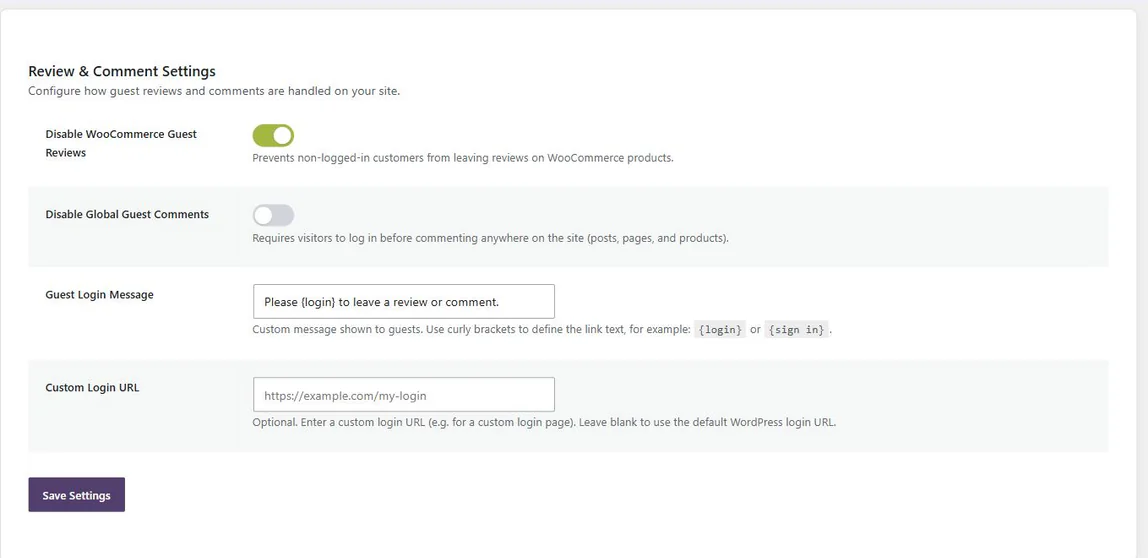
Review and comment settings screen with toggles for guest reviews and global guest comments, plus a guest login message and custom login URL

Guests see a sentence, not a wall

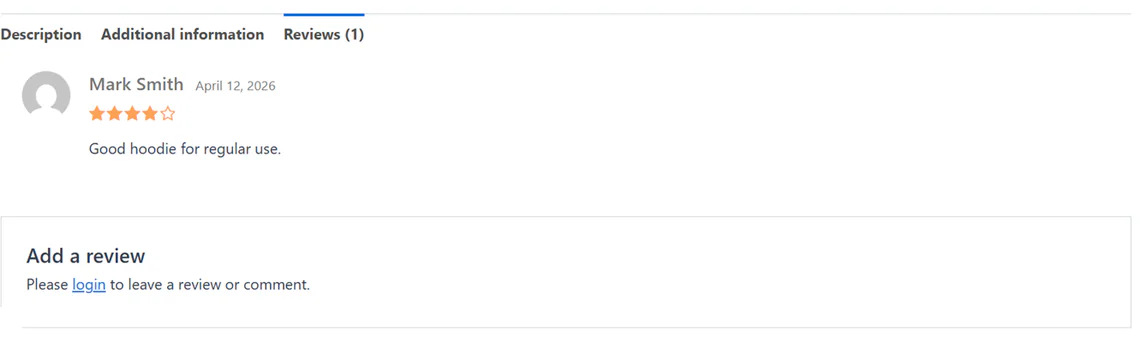
The reviews tab still opens. The star average is still there. The reviews you have earned are still there. Only the submission form is replaced — with one line telling the visitor how to leave one.

Nothing is deleted, hidden or migrated. Turn the setting off again and the form comes straight back.

A product reviews tab seen by a logged-out visitor: the existing review is still shown, and the form is replaced by a short login prompt

Write that sentence yourself

Anything you wrap in curly brackets becomes the login link. Put the brackets around whichever words should be clickable — the plugin turns them into a link and leaves the rest of the sentence alone.

The link points at the standard WordPress login and returns the visitor to the page they were reading. If your store has its own login page, put its URL in the last field and it will be used instead.

What you type
Members review this one — {sign in} to join them.
What the visitor reads

Add a review

Members review this one — sign in to join them.

Scope

What restricting WooCommerce reviews changes, and what it keeps

A plugin that removes something should be very clear about what it leaves behind.

What changes

  • • Logged-out visitors no longer get a review or comment form.
  • • They see your sentence, with your login link, in its place.
  • • Trackbacks and pingbacks are closed when the site-wide switch is on.

What stays exactly as it was

  • • Every review already in your database, and every star average computed from them.
  • • Logged-in customers, who carry on reviewing as normal.
  • • Your theme, your review layout, and any other review plugin you run.
  • • Your database — the plugin adds no tables and stores one option row.
Everything, free

What’s in the plugin

There is no paid tier. This is the whole plugin, and all of it is in the version on WordPress.org.

Feature Included
Restrictions
Logged-in only, WooCommerce product reviews Applies to products, and only to products ✓
Logged-in only, comments site-wide Posts, pages and products together ✓
Pingbacks and trackbacks closed With the site-wide switch ✓
The message guests see
Custom wording Used for both reviews and comments ✓
Curly-bracket link syntax {login}, {sign in}, or any words you choose ✓
Custom login URL Optional; defaults to the WordPress login, returning to the same page ✓
Build quality
Classic and block themes ✓
Admin styles load on this settings page only ✓
Translation ready Translation template included ✓
Clean uninstall Across every site on a multisite network ✓
Better together

Shut out the spam here. Reward the real ones there.

Requiring an account raises the bar for writing a review, which is the point — but it also means fewer reviews if nothing encourages the customers who can still write them.

NeoGrow gives those logged-in customers loyalty points for reviewing, and bonus points for attaching a photo. Neither plugin needs the other; they simply solve the two halves of the same problem.

See what NeoGrow does

Disable Reviews

Removes the guests who were never going to buy.

+

NeoGrow

Gives the customers who remain a reason to write.

NeoLite Disable Reviews at a glance

Version
1.1.1
Last updated
Price
Free, no license key
License
GPL-2.0-or-later
WordPress
6.0+ · tested 7.1
WooCommerce
Tested 11.0
PHP
7.4+
HPOS
Compatible, declared

From the plugin’s WordPress.org listing, read when this page was last built.

Restricting WooCommerce reviews: questions

If yours is not here, the support forum is the fastest way to reach someone. New to reviews? The complete guide to WooCommerce product reviews covers the settings around them.

No. The plugin only controls whether the submission form is shown. Every review already in your database stays there, stays visible, and keeps counting towards your star averages. If what you are after is a way to delete WooCommerce reviews in bulk, this is not that plugin — nothing here removes a review.

Only if you ask it to. The first switch is scoped to WooCommerce products and nothing else. The second switch is the one that covers posts and pages as well — it is off until you turn it on.

Yes. Rather than hiding anything with CSS, it works through WordPress’s own comment-registration option and the standard comment form filters, so the behavior is the same whether your theme is classic or block-based.

There is very little of it to slow anything down. It adds no database tables, makes no external requests, loads no front-end JavaScript, and its admin stylesheet is queued only on its own settings page.

Guest review and comment forms come back immediately — the restriction is applied at render time and never written to your WordPress discussion settings. Deleting the plugin also removes its single option row, on every site of a multisite network.

NeoLite Disable Reviews

Free, and it stays free. Install it, flip one switch, and stop moderating spam.

Get NeoLite Disable Reviews

Requires WordPress 6.0+, PHP 7.4+ and WooCommerce 8.0+.