NeoLite Disable Reviews Documentation
All documentation · Plugin page · Download on WordPress.org · Support forum
1. Introduction
1.1 Welcome & Features
Welcome to NeoLite Disable Reviews. Most stores facing review spam get offered two bad options: leave submissions open and moderate forever, or switch reviews off and lose the social proof you already earned.
This plugin takes the middle path. Bots post as guests; real customers have accounts. Requiring an account to submit removes almost all of the first group and almost none of the second.
Core Features
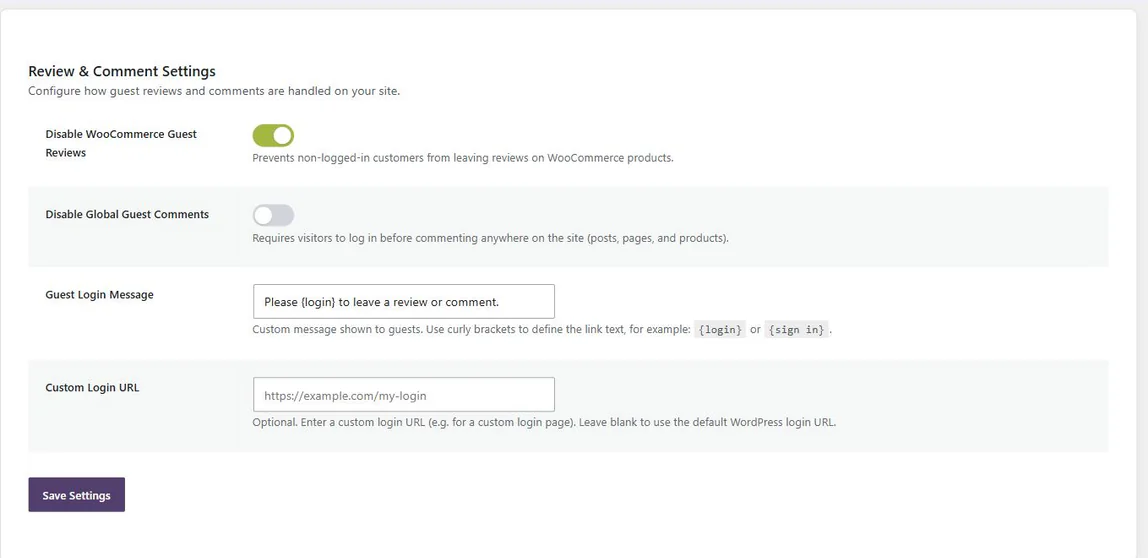
- 🛡️ Guest review lockdown: Restrict WooCommerce product review submissions to logged-in users.
- 💬 Site-wide comment lockdown: Optionally require login before commenting anywhere on the site.
- ⭐ Social proof preserved: Existing reviews and ratings stay on the page.
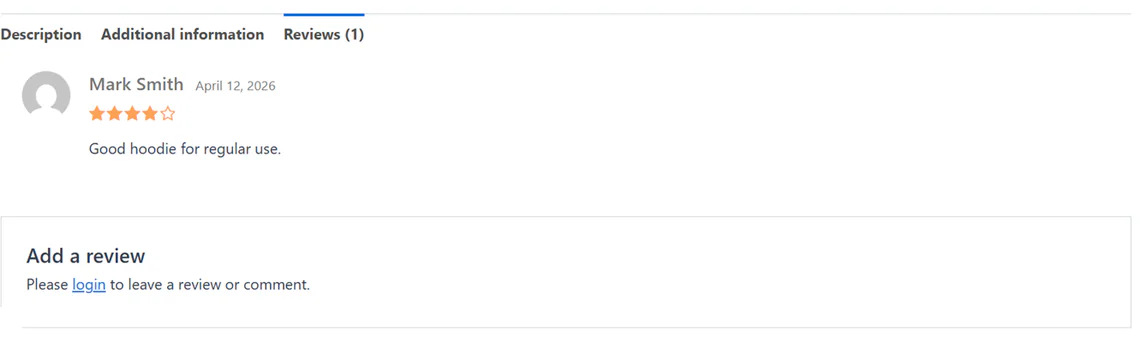
- ✏️ Custom message: Write what guests see in place of the form, with a login link.
- ⚡ No spam service: No filters to tune, no API key, no external requests.
1.2 System Requirements
There is very little here to be demanding:
| Component | Requirement |
|---|---|
| WordPress | 6.0 or higher |
| WooCommerce | 8.0 or higher |
| PHP | 7.4 or higher |
| Dependencies | None. No external spam service and no API key. |
2. Installation & Setup
2.1 How to Install
- Go to Plugins > Add New.
- Search for NeoLite Disable Reviews.
- Click Install Now, then Activate.
- Open NeoPlugin > Disable Reviews in the sidebar.
3. Configuration
3.1 The Two Switches
The whole plugin is two independent options. They are deliberately separate because their scope is very different:
| Option | Scope |
|---|---|
| Disable guest reviews (WooCommerce) | Product reviews only. Guests see your message instead of the review form; everything else on the site is untouched. |
| Disable global guest comments | The entire site. Requires visitors to log in before commenting anywhere — blog posts, pages, everything. |
3.2 The Guest Message
Write what guests see where the form would be. Curly brackets mark the text that becomes the login link:
Please {login} to leave a review or comment.Everything inside the brackets is turned into a link to your login page, so the wording of the link is yours to choose.
3.3 How It Works
Rather than hiding the form with CSS — which leaves it submittable to anything that ignores stylesheets — the plugin works through WordPress’s own comment-registration option and the standard WooCommerce review hooks.
That is why it behaves consistently on block themes and classic themes alike, and why the restriction is real rather than cosmetic.
4. Troubleshooting
4.1 Common Issues
| Symptom | What to check |
|---|---|
| Guests can still comment on posts | Product reviews and site comments are separate switches. The second option is the site-wide one. |
| Existing reviews disappeared | This plugin does not remove reviews. Check whether reviews are enabled in WooCommerce > Settings > Products. |
| My message is not showing | Confirm the option is enabled and that you are viewing the page logged out — logged-in users still see the normal form. |
| The login link is not a link | The linked text must be wrapped in curly brackets, for example {login}. |
4.2 Frequently Asked Questions
Will this delete my existing reviews?
No. The plugin only controls whether the submission form is shown. Every review already in your database stays there and stays visible.
Does it affect my blog comments too?
Only if you ask it to. The first switch is scoped to WooCommerce products and nothing else. The second switch is the site-wide one.
Does it work with block themes?
Yes. Rather than hiding anything with CSS, it works through WordPress’s own comment-registration option and the standard WooCommerce hooks.
Will it slow my site down?
There is very little of it to slow anything down. It adds no database tables, makes no external requests and loads no front-end assets.
What happens if I deactivate it?
Guest review and comment forms come back immediately — the restriction is applied at render time and never written to your content.
4.3 Uninstalling
- Deactivating restores the default guest forms straight away.
- Deleting removes the plugin’s options and activation transient, across every site on multisite.
Still stuck? The WordPress.org support forum is the fastest way to reach someone.
Other manuals: NeoGrow · NeoWish · NeoLite Birthday Bash · NeoLite Review Customizer