
Runs on
WordPress 6.0+
Requires
WooCommerce 8.0+
Settings
Five, total
License
Free, GPL‑2.0+

Customize the WooCommerce reviews section

Shoppers read the reviews before they read anything else you wrote. Five settings decide whether that section looks designed or inherited.

One screen

Five settings, and no page two

A color picker, two text fields and two toggles. There is no template to override, no CSS to write, and nothing to rebuild when you change your theme.

Everything works through WooCommerce’s own filters, so your theme keeps rendering the review section — it just renders it with your wording and your color.
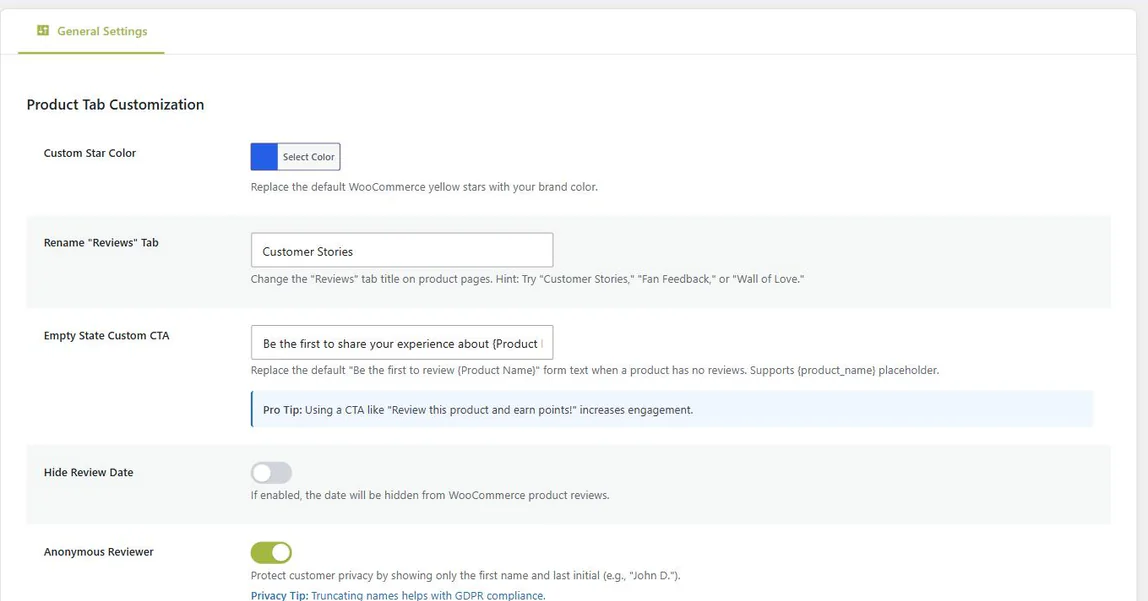
Review Customizer settings: custom star color, renamed Reviews tab, empty-state call to action, hide review date and anonymous reviewer toggles

The tab is called whatever you call it

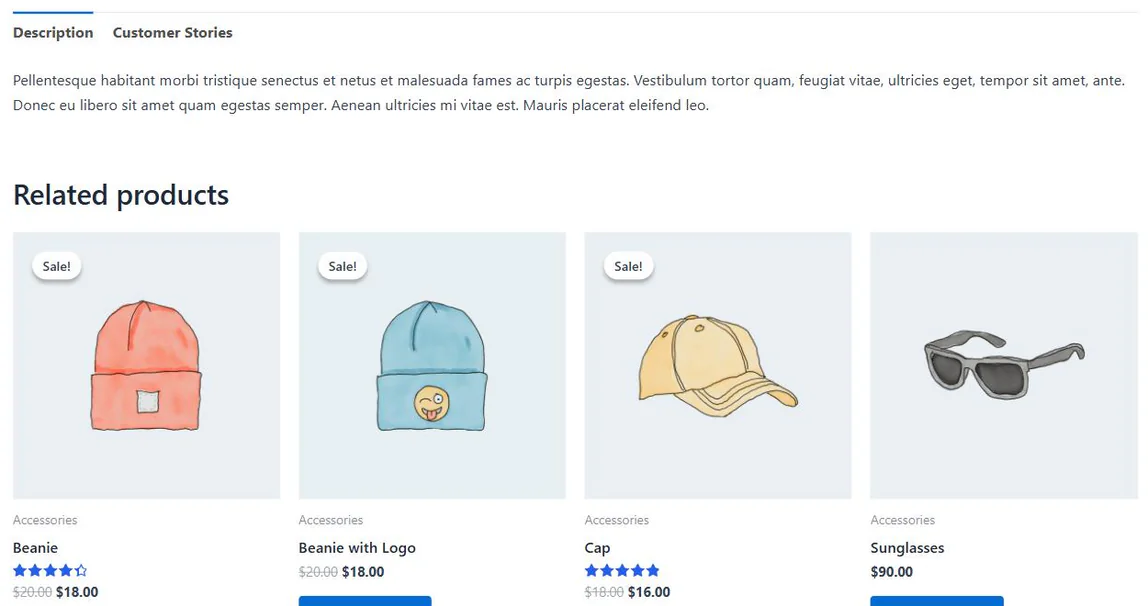
“Reviews” becomes “Customer Stories”, “Testimonials”, “Wall of Love”, or whatever suits your store’s voice — on every product, from one field.

The star color follows everywhere WooCommerce draws stars: the product page, the reviews list, and the WooCommerce product ratings on cards throughout your shop. Since 1.1.1 that includes the block-based review display WooCommerce renders on block themes.

A WooCommerce product page with the reviews tab renamed to Customer Stories, and product card star ratings shown in a custom blue rather than the default yellow

Say something better than “no reviews yet”

A product with no reviews is the one place where the wording genuinely earns you the first one. WooCommerce’s default states a fact. Yours can make an offer.

Write it once and use {product_name} wherever the product should be named.

WooCommerce, by default
Be the first to review “Merino Wool Beanie”
What you can write instead
Own the Merino Wool Beanie? Tell the next shopper what nobody mentions in the description.
Review the Merino Wool Beanie and earn loyalty points.

Both written as {product_name}, filled in per product.

Names and dates, on your terms

Reviewers who used their full name are shown as a first name and a last initial instead. It is a courtesy to them and one less piece of personal data on public display.

Dates can go too. A genuinely useful review from two years ago is still a genuinely useful review, but the timestamp is the only part of it that ages.

Default
Jonathan Doherty
14 March 2026
★★★★★

Exactly as described, and it arrived two days early.

Both toggles on
Jonathan D.
★★★★★

Exactly as described, and it arrived two days early.

Nothing is edited in your database — only how the name and date are displayed.

Under the hood

Why it survives a theme change

Nothing here overrides a template or writes to your content.

1

It hooks, it does not replace

The tab label, the empty-state text, the reviewer name and the date each go through a standard WooCommerce or WordPress filter. Your theme still draws the section.

2

The color is a few lines of CSS

The star color is emitted inline on the front end. No stylesheet request, no render-blocking file, nothing to purge from a cache when you change it.

3

Your reviews are never edited

Names and dates are changed on the way to the screen, not in the database. Deactivate the plugin and every review is exactly as it was written.

Everything, free

What’s in the plugin

There is no paid tier. This is the whole plugin, and all of it is in the version on WordPress.org.

Feature Included
Appearance
Custom star color Any hex color, applied everywhere stars are drawn ✓
Rename the Reviews tab One label, every product ✓
Wording
Custom empty-state call to action Replaces “Be the first to review…” ✓
{product_name} placeholder Filled in per product ✓
Privacy & presentation
Shorten reviewer names First name and last initial, for example “John D.” ✓
Hide review dates Display only; the stored date is untouched ✓
Build quality
No new database tables One option row, and nothing else ✓
HPOS compatible It customizes reviews, not order storage ✓
Translation ready ✓
Clean uninstall Settings removed; your reviews are never touched ✓
Better together

One plugin makes reviews look right. The other makes them happen.

Review Customizer is standalone and needs nothing but WooCommerce. But it is designed to sit next to NeoGrow, which rewards customers with loyalty points for writing reviews and for attaching photos.

They also agree on color: when this plugin is installed, NeoGrow Pro defers to the star color you set here rather than applying its own. You pick the color once, in one place.

See what NeoGrow does
★

Review Customizer

How the review section looks and reads.

+

NeoGrow

Why a customer bothers to write one.

NeoLite Review Customizer at a glance

Version
1.1.1
Last updated
Price
Free, no license key
License
GPL-2.0-or-later
WordPress
6.0+ · tested 7.1
WooCommerce
8.0+ · tested 11.0
PHP
7.4+
HPOS
Compatible, declared

From the plugin’s WordPress.org listing, read when this page was last built.

Customizing WooCommerce reviews: questions

If yours is not here, the support forum is the fastest way to reach someone. New to reviews? The complete guide to WooCommerce product reviews covers the settings around them.

No. WooCommerce is the only requirement. Nothing here is gated behind another plugin, and no setting links the two — they simply do not conflict if you run both.

In most cases, yes. It uses WooCommerce’s standard hooks and filters rather than replacing templates, so any well-coded theme keeps working. A theme that rewrites the review section from scratch may ignore some of it — the star color is the most likely to need a look.

No. Both are display filters applied as the page renders. The full name and the original date stay in your database, and turning either setting off brings them straight back.

It adds no database tables, no background processes and no external requests. The star color is written inline rather than loaded as a separate stylesheet, so the front end gains one option lookup and a few lines of CSS.

This one. NeoGrow Pro checks whether Review Customizer is active and, if it is, uses the color set here instead of its own setting — so the two never fight over the stars.

Yes, and GPL-2.0-or-later. There is no paid tier for Review Customizer and nothing on this page is locked behind one.

NeoLite Review Customizer

Free, and it stays free. Five settings between a default review section and one that looks like yours.

Get NeoLite Review Customizer

Requires WordPress 6.0+, PHP 7.4+ and WooCommerce 8.0+.