
How to fix WooCommerce star ratings not showing in Google
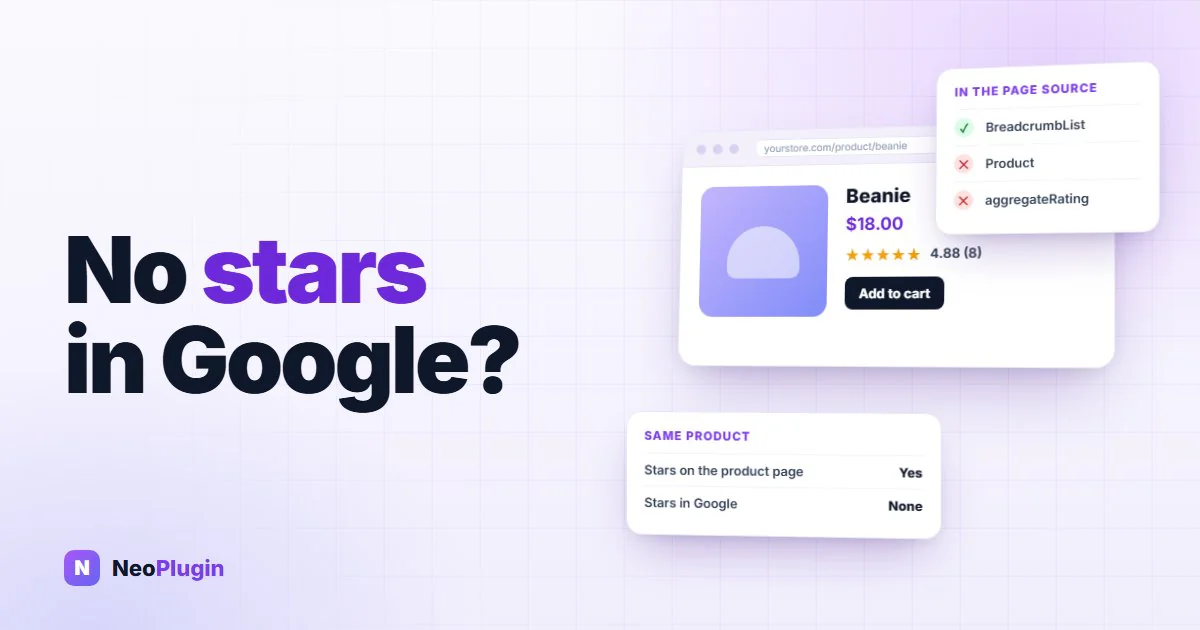
Your product has a dozen good reviews. The stars show on the product page. But search for the product in Google and your result is a plain blue link, while a competitor's result has a row of yellow stars under it.
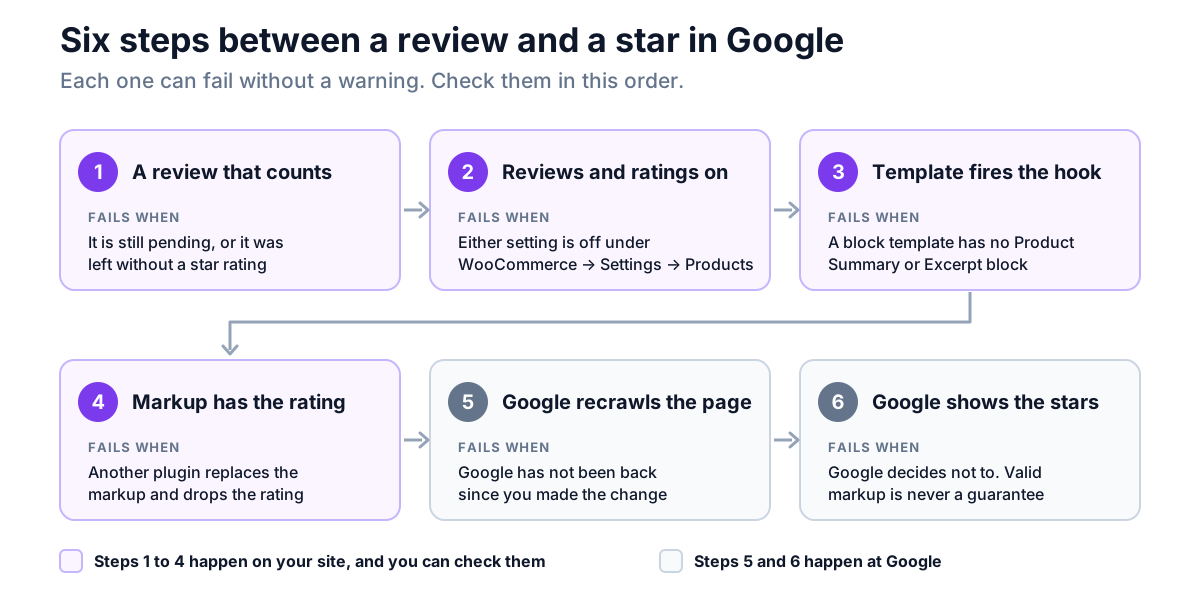
Those stars come from a few lines of hidden markup on your product page, and every step between a customer's review and that markup can fail without a single warning. This post covers all seven causes in the order to check them, from the quickest to the slowest. Everything about WooCommerce below was checked against the code of WooCommerce 11.1.2 and tested on a live local store, with a classic theme (Astra) and a block theme (Twenty Twenty-Five).
Quick answer. Google draws review stars from the
AggregateRatingthat WooCommerce adds to each product page's structured data. It is left out when the product has no approved review with a star rating, or when reviews or star ratings are switched off in WooCommerce. On a block theme, the whole product markup disappears if the product template has no Product Summary or Excerpt block, even though the stars still show on the page. If the markup is there and valid, Google may simply not have recrawled the page yet, or may have decided not to show stars. Google never guarantees them.
The short version
- Only approved reviews with a star rating count. Pending reviews and reviews without a rating add nothing to the score Google reads.
- Two settings remove the rating from the markup. Enable product reviews and Enable star rating on reviews, both under WooCommerce → Settings → Products.
- Block themes have a trap. A product template without a Product Summary or Excerpt block outputs no product markup at all. The fix is one block, or six lines of code.
- Stars only belong on product pages. WooCommerce doesn't mark up shop or category pages, and Google wants a rating for one specific item.
- Valid markup is not a promise. Google says structured data enables stars and doesn't guarantee them.
- Google allows stars for reviews you collect yourself. Its self-serving rule covers business and organization reviews, not products.
Where the stars come from
WooCommerce writes a block of JSON-LD (structured data in the page's source) into every single product page. When the product has ratings, that block includes an AggregateRating: the average score and the number of reviews. On our test store it looked like this:
"aggregateRating": {
  "@type": "AggregateRating",
  "ratingValue": "4.88",
  "reviewCount": 8
}
WooCommerce also adds the five most recent rated reviews as a review list. Google reads all of this when it crawls the page, checks it against its rules, and then decides whether to draw stars. You don't need an SEO plugin for any of it. WooCommerce does it out of the box.
So "no stars in Google" can mean two different things. Either the AggregateRating never reaches the page, which is your problem to fix, or it does and Google has chosen not to use it, which mostly isn't. The first four causes below are the first kind.
First, look at your own page source
Before changing anything, check what your product page actually says. Open one product that has reviews, right-click, choose View page source, and search the source (Ctrl+F, or Cmd+F on a Mac) for aggregateRating, then for "Product".
| What the page source shows | What it means | Go to |
|---|---|---|
aggregateRating with a sensible ratingValue and reviewCount | Your site is doing its part | Causes 5, 6 and 7 |
"@type":"Product", but no aggregateRating | The product markup was built without a rating | Causes 1, 2 and 4 |
| Neither | The product markup is missing completely | Causes 3 and 4 |
Two Product blocks for the same page | Two plugins are describing the same product | Cause 4 |
Then paste the product's address into Google's Rich Results Test. It reads the page the way Google does and reports a Product snippets result. Checking the page source first matters, because the test only tells you that something is missing, not why.
1. The product has no review that counts
WooCommerce only puts a rating in the markup when the product's rating count is above zero, and it counts a review only when:
- it is approved. Reviews waiting in Products → Reviews as pending
don't count, and neither do spam or trashed ones.
- it has a star rating. If Star ratings should be required is off, a
customer can leave a review with no stars. It appears on the page but adds nothing to the rating.
- it is a review, not a reply. Your replies to reviews never count.
A product with three pending reviews and one approved review without stars has a rating count of zero, so there is nothing to mark up. Approve what is waiting, and switch on Star ratings should be required so that every future review counts.
If the product simply has no reviews yet, that is a different problem, and our guide to getting your first product reviews starts there.
2. Reviews or star ratings are switched off
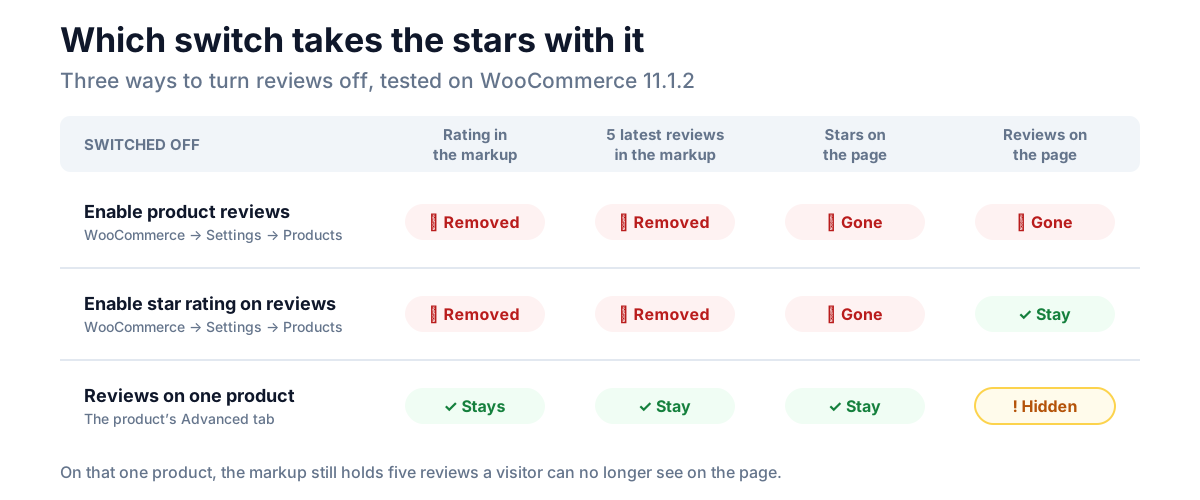
Two checkboxes under WooCommerce → Settings → Products decide whether WooCommerce publishes a rating at all:
- Enable product reviews. Off means no reviews anywhere, and no rating in
the markup. Our post on disabling WooCommerce reviews covers what else that switch takes with it.
- Enable star rating on reviews. Off means the reviews stay, but the
rating leaves the markup, and the stars leave both the page and Google.
Switching reviews off on one product, on its Advanced tab, is different. We tested it: the product page loses its Reviews tab, but WooCommerce still puts the product's existing rating and its five latest reviews into the markup, and still shows the stars at the top of the page. So that product keeps its stars in Google. Be aware that Google's guidelines ask for marked-up reviews to be visible on the page, and on that product they no longer are.
3. Your block template drops the product markup
This is the one most likely to catch out a store on a block theme, because nothing on the page looks wrong.
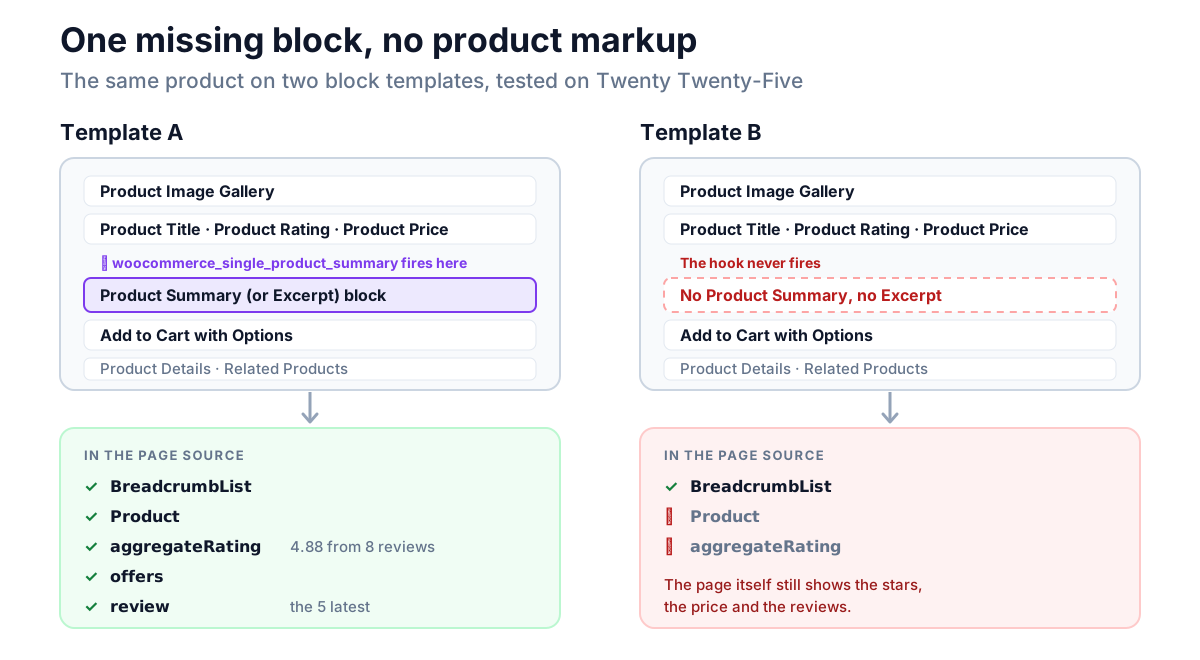
On a classic theme, WooCommerce builds the product markup on the woocommerce_single_product_summary hook, which every classic product template fires. Block themes don't use that template, so WooCommerce fires the hook itself, just before one of two blocks in your product template:
- the Product Summary block (
woocommerce/product-summary), or - the Excerpt block (
core/post-excerpt), which WooCommerce's own
product template uses to show the short description.
If your product template has neither, the hook never fires, and WooCommerce outputs no product markup at all. No rating, no price, no Product. We tested it on Twenty Twenty-Five: with both blocks removed, the product page still showed its stars, its price and its reviews, and the page source held a breadcrumb and nothing else.
It is an easy template to end up with. A store that removed the short description from the product layout in the Site Editor, or a block theme that ships its own product template built differently, can lose the markup without anyone noticing.
The no-code fix: open Appearance → Editor → Templates → Single Product and add a Product Summary block back. If you don't want the short description to show, leave it in and hide it with CSS rather than deleting it.
The code fix, if you can't change the template: this builds the product markup on the page footer when WooCommerce hasn't built it already. Add it to a small custom plugin or a code-snippets plugin:
add_action( 'wp_footer', function () {
	if ( ! is_product() || ! function_exists( 'WC' ) ) {
		return;
	}
	foreach ( (array) WC()->structured_data->get_data() as $node ) {
		if ( 'Product' === ( $node['@type'] ?? '' ) ) {
			return; // WooCommerce already built it.
		}
	}
	WC()->structured_data->generate_product_data( wc_get_product( get_queried_object_id() ) );
}, 5 );
It runs just before WooCommerce prints its markup, and does nothing on a page that already has a Product. We tested it on the broken template, where it restored the full markup, and on Astra and the default Twenty Twenty-Five template, where it added nothing and left a single Product.
Or let a plugin write the markup. NeoSEO, our free product schema plugin, prints its product markup in the page head on every product page instead of waiting for the summary hook, so the template makes no difference to it. We tested it on the same broken template: without it the page source held no product markup at all, and with it the source held the full product with its aggregateRating. It replaces WooCommerce's markup rather than adding to it, so you don't need the code fix as well.
4. Another plugin replaces WooCommerce's markup
SEO plugins and schema plugins often switch off WooCommerce's product markup and print their own. That is fine when theirs includes the rating. When it doesn't, or when a setting in the plugin turned the rating off, the stars go with it.
You can see which you have in the page source. Search for "Product" and look at the block around it:
- One
Product, with anaggregateRating: fine, whoever wrote it. - One
Product, noaggregateRating: if the product has approved, rated
reviews, the plugin that wrote it is dropping the rating. Check its WooCommerce or schema settings, or ask its support.
- Two
Productblocks for the same page: two plugins are describing the
same product. Switch one of them off, so that Google gets one clear answer.
NeoSEO is one of these plugins, and it keeps the rating: its product markup carries the same aggregateRating and reviews WooCommerce would have written. On a variable product its node is a ProductGroup, the type Google's variant markup uses, so search the source for that if "Product" only finds the variations. If NeoSEO finds a schema plugin that is also writing product markup, it names that plugin on its settings screen so you can choose which one to keep.
5. Google hasn't recrawled the page yet
Google only sees the markup when it next crawls the page, and its own documentation says it can take several days to find and crawl a page after it changes. A fix today won't show tomorrow.
To speed it up, open the page in Search Console's URL Inspection, check the live test reads your markup, and click Request indexing. Then watch the Product snippets report under Shopping in Search Console, which lists the product pages Google found markup on, and any errors.
6. Google decided not to show stars
If the markup is there, the Rich Results Test passes, and weeks have gone by, you have reached the part you don't control. Google's structured data policies put it plainly: using structured data "enables a feature to be present, it does not guarantee that it will be present."
Google doesn't publish a checklist for this, but it does name reasons a valid page can miss out: markup that isn't representative of the page, content hidden from the visitor, or a page that breaks its wider guidelines. In practice, a new site, or one Google doesn't trust much yet, often waits longer for rich results than an established one. Keep collecting real reviews, and keep the markup honest.
Two things that are not the reason, though both get blamed:
- Collecting the reviews on your own site. Google's
review snippet guidelines rule out "self-serving" reviews only for LocalBusiness and Organization markup, where a business rates itself. Customer reviews of the products you sell, collected on your own store, are exactly what product stars are for.
- Not paying for Google Shopping. The stars in Shopping ads and listings
come from a different system, Merchant Center's Product Ratings, which needs a review feed and at least 50 reviews across your products. The stars under an ordinary search result come from your page's markup, and cost nothing.
7. The reviews break Google's rules
In July 2026 Google added a line to its review snippet guidelines: don't use fake reviews, or incentivized reviews whose incentive isn't disclosed. Breaking its structured data rules can bring a manual action, which removes the page's eligibility for rich results, stars included, until it is fixed. It doesn't affect where the page ranks. Search Console's Manual actions report shows whether you have one.
Reviews that earn a reward are allowed, as long as the reward is disclosed clearly, and the same whatever the rating. Our guide to incentivized reviews covers the FTC, UK and EU rules that go further than Google's.
If you reward reviews with NeoGrow
NeoGrow, our free loyalty and reviews plugin, doesn't touch WooCommerce's product markup, so the rating in your page source is WooCommerce's own. It helps with cause 1: it pays points for approved reviews, and sends registered customers a review reminder after their order is completed, which is how a product goes from no rating to one.
Because those reviews earn points, they are incentivized reviews under Google's new rule. NeoGrow's Show Review Disclosure setting, on by default, puts a statement above the review form: "Customers can earn points for leaving a review on this store." Keep it on, and keep the reward the same for every rating.
Frequently asked questions
Why do my reviews show on my site but not in Google?
Because the stars on your page come from your theme, and the stars in Google come from the AggregateRating in your page's structured data. The two can disagree. Search the page source for AggregateRating. If it isn't there, the cause is on your site: reviews that don't count yet, a switched-off setting, a block template without a Product Summary block, or a plugin that replaced WooCommerce's markup. If it is there, Google either hasn't recrawled the page or has chosen not to show stars.
How long does it take for review stars to appear in Google?
Usually days, sometimes weeks, and never guaranteed. Google has to recrawl the page first, which its documentation says can take several days. Requesting indexing in Search Console's URL Inspection tool can speed that up. After that, the decision is Google's.
Do I need a plugin for review stars in WooCommerce?
No. WooCommerce adds an AggregateRating to every product page that has approved, rated reviews, with reviews and star ratings switched on. An SEO plugin can replace that markup, but you don't need one for stars. The exception is a block template with no Product Summary or Excerpt block (cause 3), where WooCommerce writes nothing: add the block back, use the code fix, or use a plugin such as NeoSEO that writes the markup itself.
Can my shop or category pages show stars in Google?
Not from WooCommerce. It only adds review markup to single product pages, and Google's guidelines ask for a rating about one specific item, not a category or a list.
Does Google allow stars for reviews collected on my own store?
Yes, for products. Google's self-serving review rule applies to LocalBusiness and Organization markup, where a business reviews itself. Customer reviews of the products you sell are eligible, as long as they are real, visible on the page, and any incentive is disclosed.
Why do I have stars in Google Shopping but not in normal results?
They come from different places. Shopping stars come from Merchant Center's Product Ratings, a review feed with a minimum of 50 reviews across your products. Stars in ordinary results come from the markup on your product page. A store can have one without the other.
Start with the page source
Most missing stars are found in two minutes with View page source and a search for aggregateRating. If it isn't there, the cause is on your site and is usually one setting or one block. If it is, request indexing, give Google time, and spend that time on what actually earns stars: more real reviews, from customers who were asked at the right moment.