
How to stop WooCommerce review spam without losing real reviews
The spam arrives overnight. Casino links, handbag sites, a paragraph of nonsense, all of it "reviews" of a beanie. Faced with a queue full of it, most store owners reach for one of two switches: turn reviews off, or make everyone log in.
Both work, and both cost you real reviews. Our post on disabling WooCommerce reviews explains what each switch takes with it. This post is about everything in between: the layers that stop review spam while leaving the door open for customers, starting with the free ones you already have.
Everything below was checked against the code of WordPress 7.1.3 and WooCommerce 11.1.2, and tested by posting test reviews to a live local store, which were deleted afterwards.
Quick answer. WooCommerce reviews are WordPress comments, so WordPress's own comment settings apply to them. By default, a review from someone with no approved review yet waits for your approval, so most spam fills your queue rather than your product page. Cut the queue in layers: hold reviews with links, send known spam words to the trash, require login for guest reviews on products only, and add a spam filter or a challenge such as Cloudflare Turnstile. If your reviews earn points, keep manual approval on, because the spam a reward attracts comes from real customers that bot filters were never built to catch.
The short version
- Spam bots don't use your review form. They post straight to WordPress, so hiding the form does nothing. Only a rule checked on the server stops them.
- By default, spam waits for you. WordPress holds a review from anyone without an approved review yet. The problem is usually the queue, not the product page.
- Two lists do different jobs. Comment Moderation words hold a review, Disallowed Comment Keys send it straight to the trash. Both match inside words.
- You can close reviews to guests without closing your blog. WordPress's own login setting is site-wide; a plugin can limit it to products.
- Akismet checks product reviews, but a store has to pay for it. Cloudflare Turnstile is a free alternative that blocks bots, not people.
- Rewards change the spam. When reviews earn points, the spammer is often a real customer, and only your approval stops them.
Where review spam actually comes from
A WooCommerce review is a WordPress comment on a product. When a customer submits one, the browser sends it to wp-comments-post.php, the same address every comment on a WordPress site goes to.
Spam bots know that address. They don't load your product page, find the form and fill it in. They send the fields straight to wp-comments-post.php with a product's ID, thousands of times, on every WordPress site they can find. That is why hiding the review form, or removing the Reviews tab, stops nothing: the form was never how the spam got in. Our post on removing the reviews tab covers that trap.
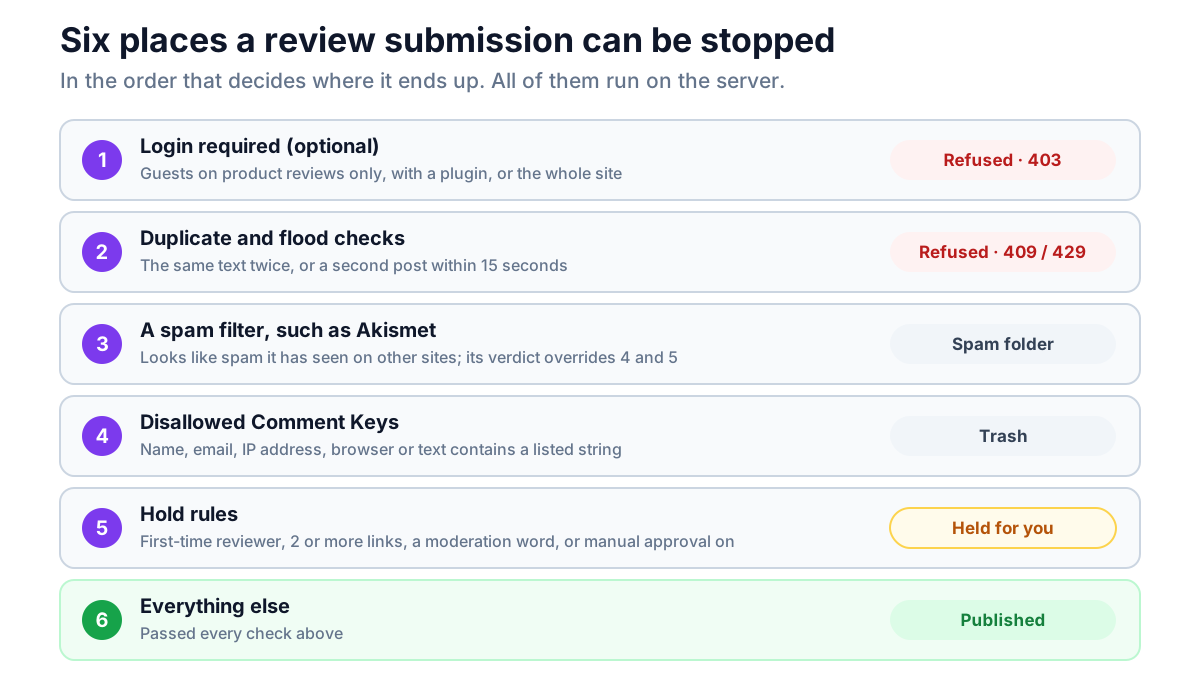
So every rule worth having is one WordPress checks when the review arrives, whatever sent it. Each rule below is one of those, and they stack.
For developers: wp-comments-post.php hands the submission to wp_handle_comment_submission(), which refuses it with a 403 if reviews are closed on the product or a login is required. Then wp_new_comment() runs the preprocess_comment filter, where Akismet checks it, and wp_allow_comment(), which applies the duplicate and flood checks, the hold rules and the disallowed list, and ends with the pre_comment_approved filter, where Akismet's verdict lands. Only then does wp_insert_comment() save it and comment_post fire. A rule hooked anywhere in that chain applies to every review, however it was sent.
What WordPress already does for you
Before you add anything, know what is already running. Out of the box, WordPress applies four checks to every product review from anyone who can't moderate comments:
- First-time reviewers wait. *Comment author must have a previously
approved comment* is on by default. A review from an email address, or an account, with no approved review yet is held for your approval.
- Two links and it waits. *Hold a comment in the queue if it contains 2 or
more links* is the default.
- No machine-gun posting. A second comment from the same IP address,
account or email address within 15 seconds is refused with "You are posting comments too quickly. Slow down."
- No exact repeats. The same text from the same person on the same product
is refused as a duplicate.
The first one matters most. It means that on a store with default settings, review spam doesn't go live. It piles up in Products → Reviews waiting for you, and the real cost is the time it takes to clear. If spam is appearing on your product pages, check that this setting hasn't been switched off, under Settings → Discussion.
Layer 1: tune the settings you already have
All of these live under Settings → Discussion, apply to product reviews and blog comments alike, and cost nothing.
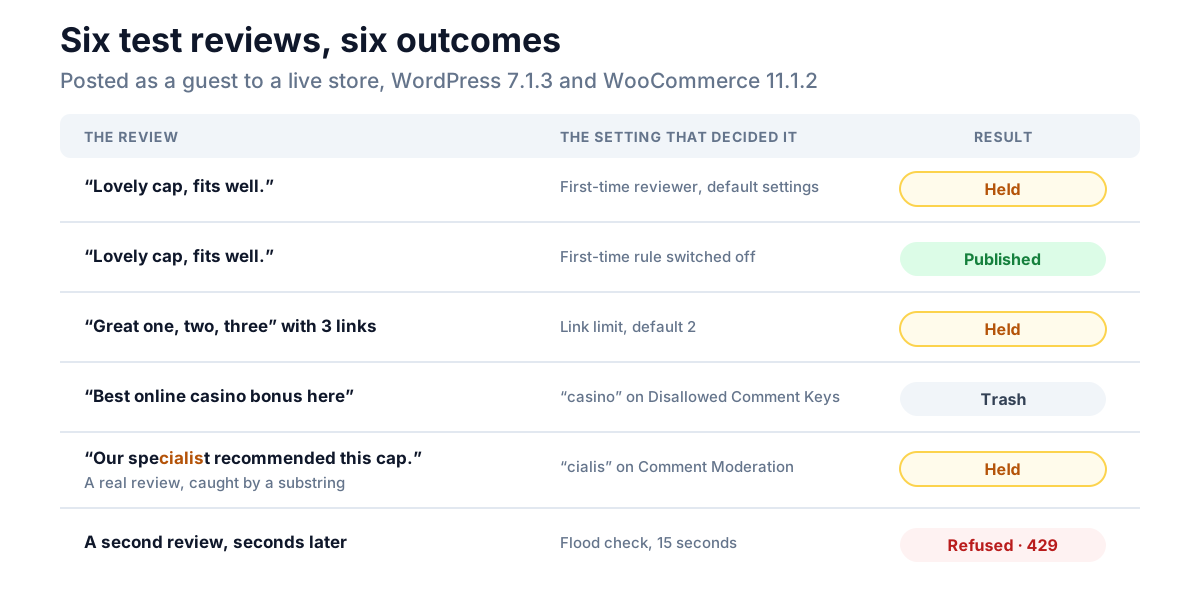
Lower the link limit to 1. A real review rarely needs a link, and pushing a link is what most comment spam is for. Under Settings → Discussion → Comment Moderation, change Hold a comment in the queue if it contains 2 or more links from 2 to 1, and every review with a link waits for you. In our test, a review with three links was held even with the first-time rule switched off.
Use the two word lists, and know the difference:
| List | What a match does | Use it for |
|---|---|---|
| Comment Moderation | Holds the review for approval | Words that are usually spam: product names spammers push, words that can appear in a real review |
| Disallowed Comment Keys | Sends it straight to the trash | Words, domains and addresses that are never in a real review |
Both lists check the reviewer's name, email address, IP address and browser, as well as the text, so the disallowed list can also block a single spammer's email domain or IP address. The same goes for mistakes: a short entry such as host on the disallowed list would trash a real review from anna@hostnet.example.
Both lists match inside words. WordPress looks for the text anywhere, ignoring case, not for whole words. We tested it: with cialis on the moderation list, a review saying "our specialist recommended this cap" was held. On the moderation list that costs you a click. On the disallowed list it quietly bins a real review, so keep that list to strings that can't be part of an ordinary word, such as full domains (spamshop.example) and exact phrases.
Trash is not spam. A disallowed match goes to the trash, which WordPress empties after 30 days by default. It doesn't go to the spam folder, and nobody is told.
Layer 2: require login for guest reviews, on products only
Automated spam is posted as a guest, because a bot has no account on your store. Requiring an account to submit a review cuts out that drive-by spam, leaves every existing review on display, and only turns away customers who bought without an account.
WordPress's own setting, Users must be registered and logged in to comment, does this for the whole site at once, blog included. To do it for product reviews only, our free plugin NeoLite Disable Reviews adds a switch for guest reviews on products, with your own message and login link in place of the form. It works on the server, not the page: in our test, a guest review sent straight to wp-comments-post.php, form or no form, was refused with "Sorry, you must be logged in to comment."
The cost is guest buyers. If you allow guest checkout, a customer who bought without an account can't review from the product page. WooCommerce's review request email gives them a way back in, because its Review Order page is checked against the order, not a login.
Layer 3: add a spam filter or a challenge
The first two layers stop spam by shape: links, words, guests. A filter or a challenge catches the rest.
Akismet checks every comment WordPress receives, product reviews included, against the spam it has seen across the sites that use it, and moves matches to the spam folder. It learns from you as well: marking a review as spam, or not spam, reports it back. The catch for a store is the price. Akismet's free Personal key doesn't cover commercial sites, and its own support pages list "running on e-commerce plugins or platforms" as needing a paid plan. In October 2026, the cheapest commercial plan, Pro, starts at $9.95 a month, billed yearly, for 500 spam checks a month on one site.
A challenge stops bots by checking that a person is there. Cloudflare Turnstile is free, with unlimited challenges, and doesn't require you to move your site to Cloudflare. You add it to the review form with a plugin. Whichever plugin you choose, check that it verifies the challenge when the review is submitted, not just that it shows the widget, for the same reason that hiding the form does nothing: a bot that never loads the page never sees the widget.
You don't need both. A filter catches spam that gets past a challenge, such as a person paid to paste links, and a challenge stops bots before they cost you a filter check. Pick one and see what still reaches your queue.
Layer 4: only buyers can review
The strictest setting is WooCommerce's own: Reviews can only be left by "verified owners", under WooCommerce → Settings → Products. With it on, only a logged-in customer with a paid order for that product can review it from the product page. Almost no spammer has a paid order.
It also locks out every guest buyer, gift recipient and offline customer, which is why it is the last layer, not the first. Our post on verified owner reviews covers exactly who it locks out and when it is worth it.
Reviews from the review request email skip three checks
WooCommerce's review request email (10.8 and later) links to a Review Order page where the customer rates everything on the order. Those reviews go through the same wp_new_comment() path as the product page form, so your link limit, both word lists, a spam filter and manual approval all still apply.
Three checks are switched off for them, on purpose, because the order key in the link already proves who is writing:
- the first-time reviewer hold, so a genuine buyer's first review can
publish straight away,
- the 15-second flood check, because one order can mean several reviews
in a row,
- the duplicate check, because the same text on two variations of one
product is not spam.
So if you rely on the first-time hold to keep spam off the page, reviews from the email will still publish immediately. That is what you want from real buyers, and the link limit and word lists still catch anything odd.
When reviews earn rewards, the spam changes
Everything above was designed for bot spam: links, junk text, guests, volume. Pay customers points for reviews and a second kind turns up. A real customer, logged in, maybe with an order, writes "good product" on ten things to collect the points.
None of the automatic layers is built for that, because none of them is checking for it:
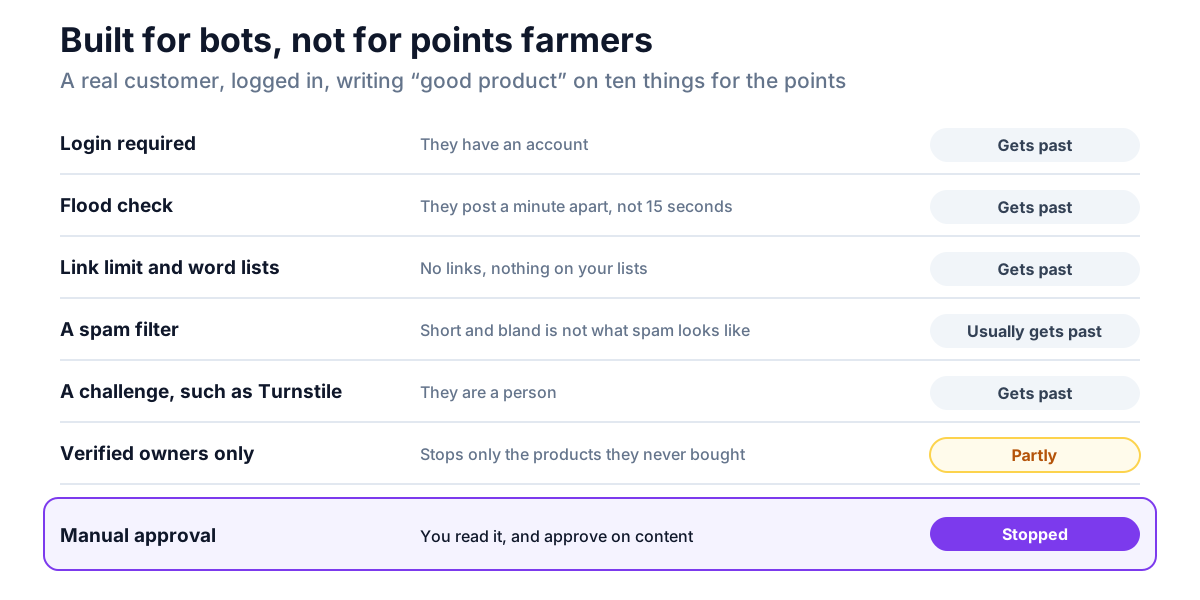
That leaves the approve button. If reviews earn a reward, keep reviews held for approval, by leaving the first-time rule on or by switching on Comment must be manually approved, and approve on content:
- Approve honest reviews, short or long, glowing or harsh.
- Don't approve reviews that say nothing about the product, copy the same
text across products, or review something the customer never bought.
Never hold back a review for its rating. A low score is not spam, and suppressing reviews because they are negative, then presenting the rest as your reviews, breaks the FTC's rule on reviews. Our guide to incentivized reviews lists what the rule does let you remove.
If you use NeoGrow
NeoGrow, our free loyalty and reviews plugin, pays review points only when a review is approved, never when it is submitted. A review held in the queue earns nothing until you approve it, one you send to spam or trash instead earns nothing at all, and a guest's review earns nothing because there is no balance to credit. So the approve button is also the pay button, and manual approval is enough to stop points farming. Approval is the moment that counts: marking a review as spam after approving it doesn't take the points back.
It also adds a Report link to each review for signed-in customers, limited to ten reports a person a day, with reasons limited to policy problems such as spam or a review of the wrong product. A report emails you and flags the review in Products → Reviews. Nothing is hidden automatically: you decide.
Which layers your store needs
| Your store | Start with |
|---|---|
| Occasional spam, all held in the queue | Layer 1: link limit 1, a few disallowed domains |
| Dozens a day, mostly guests | Layers 1 and 2 |
| Still too much after that | Add layer 3: Turnstile, or Akismet if you will pay for it |
| Reviews earn points or coupons | Keep manual approval on, whatever else you use |
| Spam is a legal or trust risk (regulated products) | Layer 4, with the review request email switched on |
Frequently asked questions
Does Akismet work on WooCommerce reviews?
Yes. Product reviews are WordPress comments, and Akismet checks every comment WordPress receives, so reviews are filtered the same way. Matches go to the spam folder, and marking a review as spam or not spam reports it back to Akismet.
Is Akismet free for an online store?
No. Akismet's free Personal key doesn't cover commercial sites, and its support pages name sites running on e-commerce plugins as needing a paid plan. In October 2026 the cheapest commercial plan, Pro, starts at $9.95 a month, billed yearly.
Why do my WooCommerce reviews go to pending?
Usually because of a WordPress comment setting. The common causes are Comment author must have a previously approved comment, on by default, which holds every first-time reviewer; Comment must be manually approved; a review with two or more links; or a word on your Comment Moderation list. All four are under Settings → Discussion.
How do I block one spammer from reviewing?
Add their email address, domain or IP address to Disallowed Comment Keys under Settings → Discussion. WordPress checks that list against the reviewer's name, email, IP address and browser as well as the text, and sends matches straight to the trash.
Does hiding the review form stop spam?
No. Spam bots post straight to wp-comments-post.php without loading your product page, so a hidden form or a removed Reviews tab doesn't stop them. Only a check made when the review arrives does: a login requirement, a link limit, a word list, a spam filter or a challenge that is verified on submission.
Should I delete review spam or mark it as spam?
Mark it as spam. It keeps a record, and if you use Akismet, marking it reports it, which helps the filter catch the next one. Empty the spam folder when you like. Deleting a review is permanent.
Spam is a queue problem first
On a store with WordPress's defaults, review spam mostly doesn't reach your product pages. It reaches your queue. So the goal isn't a switch that ends reviews, it's a short stack of checks that keeps the queue small: a link limit of one, a few disallowed domains, login for guests on products, and a filter or a challenge if you still need one. Keep manual approval for the one kind of spam no filter catches, the kind your own rewards invite.