
WooCommerce verified owner reviews: when to let only buyers review
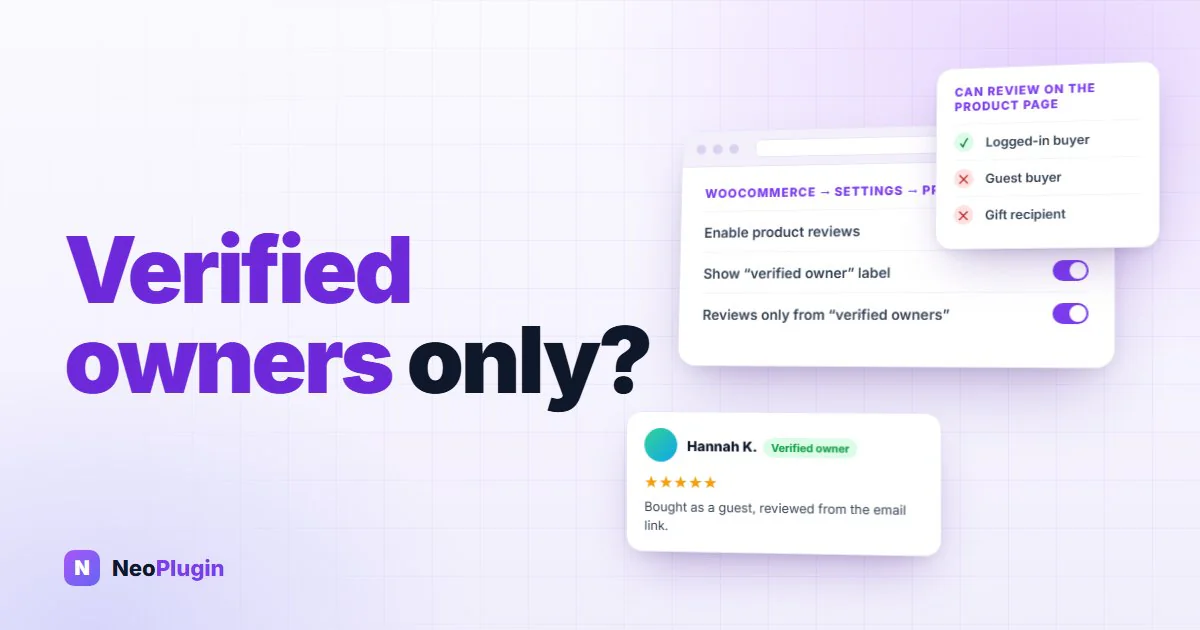
WooCommerce has two settings about verified owners, and they do very different jobs. One puts a small (verified owner) label next to reviews from people who bought the product. The other stops everyone else from reviewing at all.
The label costs nothing. The restriction is the setting our guide to WooCommerce product reviews calls the silent review-volume killer, because when it is set wrong nothing warns you. The form just disappears for a large share of your real customers, and reviews stop.
This post covers exactly who WooCommerce counts as a verified owner, who the restriction locks out, the review request email that gets around it, and how to decide whether your store should switch it on. Everything below was checked against the code of WooCommerce 11.1, and the account-matching rules were tested on a live local store.
Quick answer. "Reviews can only be left by verified owners" shows the review form only to customers who are logged in to an account that has a Processing or Completed order for the product. Guest buyers can't review from the product page, even with the product in their hands. Neither can gift recipients, or anyone whose purchase isn't a website order (a shop till, a marketplace). The exception is WooCommerce's review request email (10.8 and later): its review page uses the order itself as proof, so guests can review through it and their reviews are marked verified. Switch the restriction on if spam is your problem and you send that email. Leave it off if your problem is too few reviews.
The short version
- The label and the restriction are separate settings. The verified owner label marks reviews from buyers and blocks no one. It is on by default and worth keeping. The verified owner restriction hides the product page review form from anyone not logged in with a paid order for the product. It is off by default.
- With the restriction on, the product page form needs a logged-in buyer. Guest buyers see a message instead of the form, even if they use the same email they bought with.
- Only Processing and Completed orders count. A bank transfer waiting on hold doesn't count yet. A cancelled or fully refunded order doesn't count.
- Guest orders don't count for an account until they are linked to it. A customer who checked out as a guest and registered later is locked out until that happens.
- The review request email gets around the restriction. Its review page lets anyone holding the order review it, guests included, and marks the review verified.
- The label is decided once, when the review is posted. It is not checked again if the order is refunded later.
Two settings, two jobs
Both live under WooCommerce → Settings → Products, in the Enable reviews group:
| Setting | Default | What it does |
|---|---|---|
| Show "verified owner" label on customer reviews | On | Adds (verified owner) after the reviewer's name when they bought the product |
| Reviews can only be left by "verified owners" | Off | Hides the review form from everyone who is not a logged-in buyer, and rejects their submissions |
Keep the label on whatever you decide about the restriction. It is the one part of a review a competitor can't easily fake, and shoppers look for it. One catch: the label is printed by WooCommerce's classic review template. The Product Reviews block that block themes use does not display it at all, which is one of several things our post on the Product Reviews block skipping review hooks covers.
Switching the restriction on doesn't touch reviews you already have. Reviews from non-buyers stay published. It only controls who can write new ones.
Who WooCommerce counts as a verified owner
When the restriction is on, WooCommerce asks one question about the visitor: does the account they are logged in with have a paid order containing this product? It answers it like this:
- Logged in is required. For the restriction, WooCommerce checks the
current account and nothing else. A logged-out visitor is never a verified owner on the product page, whatever they bought.
- The order must belong to that account. WooCommerce matches orders by the
customer account they are attached to, not by email address. A guest order placed with the same email doesn't count. We tested it: an account and a guest order with the same address gave "not a buyer" until the order was linked to the account.
- The order must be Processing or Completed. These are WooCommerce's "paid"
statuses. A bank transfer or cheque order sitting On hold doesn't count until you confirm payment. A Cancelled or Refunded order doesn't count. A partial refund leaves the order Completed, so it still counts.
- Variations count for the main product. Buying the blue one in medium makes
you a verified owner of the T-shirt.
A visitor who fails the check sees this message where the form would be:
Only logged in customers who have purchased this product may leave a review.
On a block theme, a logged-out visitor sees the same sentence with a Log in link, and a logged-in visitor who hasn't bought sees Only customers who have purchased this product may leave a review. A submission that gets past the missing form is rejected on the server, with the same message on a bare error page.
For developers: every check above goes through wc_customer_bought_product( $customer_email, $user_id, $product_id ). The product page form and the server-side check pass an empty email and the current user's ID, which is why only the logged-in account counts. The label passes the reviewer's email as well, which is how a guest can earn it (more on that below). Both count only the statuses in wc_get_is_paid_statuses(), Processing and Completed by default. The woocommerce_order_is_paid_statuses filter can add one, such as On hold, but it changes what WooCommerce treats as paid everywhere, not just for reviews. The restriction itself is the woocommerce_review_rating_verification_required option.
Who the restriction locks out
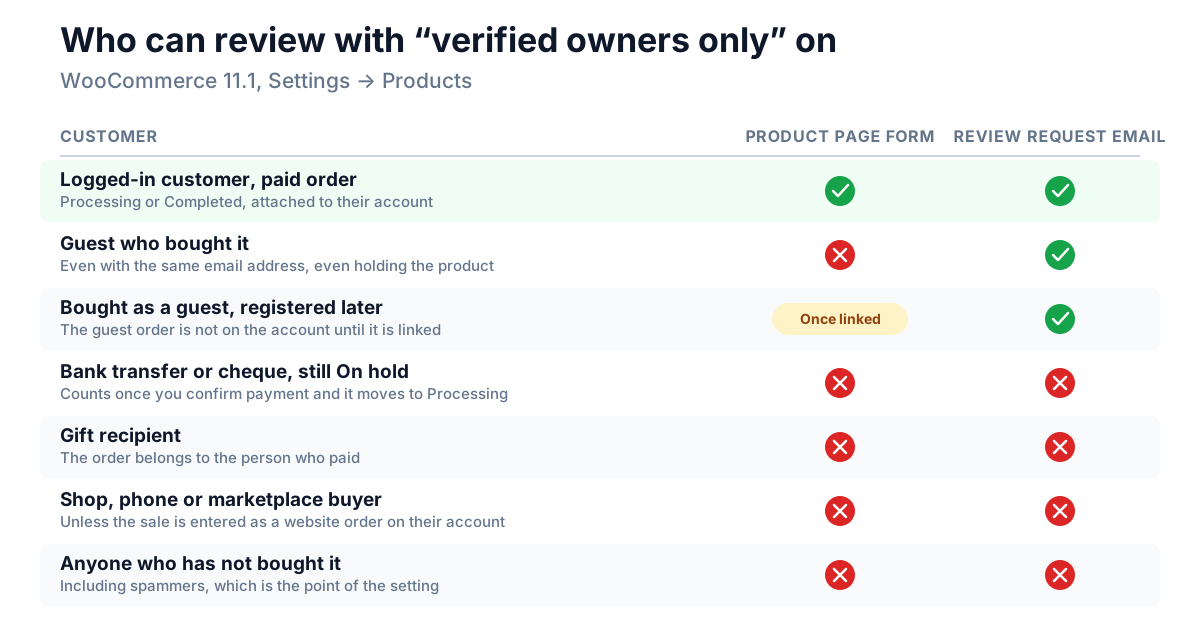
That definition is narrow, and it is narrower than "people who bought it". With the restriction on, these customers can't review from the product page:
- Guest buyers. Anyone who checked out without an account. On a store
with guest checkout on, this is often the largest group.
- Customers who registered after buying. Their earlier guest orders are not
attached to the new account automatically. See the next section.
- Customers waiting on payment. Bank transfer and cheque orders count only
once you move them to Processing.
- Gift recipients. The order belongs to the person who paid, not to the
person using the product.
- Shop, market-stall, phone and marketplace buyers, unless you enter their
purchase as a WooCommerce order attached to their account.
- Your own staff, replying from the product page. A reply is a comment on
the product, so it goes through the same check. Reply from Products → Reviews in the dashboard instead, which doesn't.
You can measure the first group before you decide. This query counts the share of paid orders this year that were placed as a guest. It is for stores using WooCommerce's order tables (HPOS), the default for new stores since WooCommerce 8.2. Run it in phpMyAdmin or your host's database tool, and change wp_ if your tables use a different prefix:
SELECT
  SUM(customer_id = 0) AS guest_orders,
  COUNT(*) AS paid_orders,
  ROUND(100 * SUM(customer_id = 0) / COUNT(*)) AS guest_percent
FROM wp_wc_orders
WHERE type = 'shop_order'
  AND status IN ('wc-processing', 'wc-completed')
  AND date_created_gmt >= '2026-01-01';
It only reads data. If guest_percent comes back at 40, the restriction takes the product-page review form away from four in ten of this year's buyers.
Getting guest orders onto accounts
A customer who bought as a guest and later created an account with the same email is the most frustrating case. They are a real buyer, they are logged in, and they are still turned away. Two things fix it:
- WooCommerce 11 links them when the customer confirms their email. If guest
checkout is on, a customer whose email hasn't been confirmed sees a prompt under My Account → Orders to verify it. Once they click the link in that email, or reset their password, WooCommerce attaches every guest order placed with that address to their account. From then on they count as a verified owner.
- You can attach an order by hand. Edit the order and set its Customer
field to the right account. That has the same effect, for that one order.
Neither happens on its own. A customer who never opens My Account → Orders stays unlinked.
The review request email gets around the restriction
WooCommerce 10.8 added a review request email, off by default, which our step-by-step guide to the review request email walks through. Its link opens a Review Order page that lists every product on the order with a star rating and a text box.
That page does not use the product page's review form, and it doesn't apply the verified owners restriction. The order key in the link is the proof. Every WooCommerce order has a random key, the same one that appears in the order-received page's address, and the Review Order page opens only when the key in the link matches the order's. It isn't a password and it doesn't expire, but it has two limits. The order must still be Completed, so a link from an order that was later refunded or cancelled stops working. And each product can be reviewed once per order. So with the restriction on:
- Guests can review through it, without logging in or creating an account.
- Every review from it is marked verified, because only someone holding
that order can open the page.
- It still respects the per-product setting. A product with reviews switched
off on its own Advanced tab can't be reviewed there either.
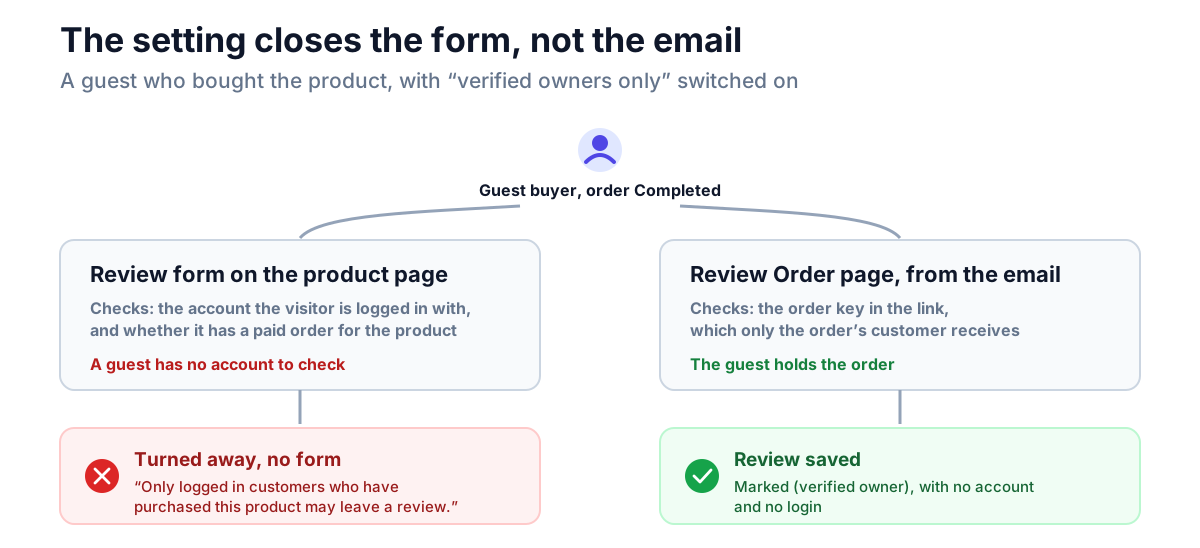
This changes the decision for most stores. With the email on, the restriction mostly blocks people who never bought, while every real buyer with a completed order still gets a personal link to review. Without the email, the restriction blocks guest buyers completely.
The email only goes to orders that are completed after you switch it on, so older guest customers are still locked out of the product page.
The label has two weak spots
The (verified owner) label is useful, but it is weaker than it looks in two ways.
It is decided once. WooCommerce checks the purchase when the review is posted and stores the answer with the review. It never checks again. A review posted before the order was paid stays unlabelled, and a review from an order that was refunded later keeps its label.
For a guest, it rests on the email they type. With the restriction off, guests can review, and WooCommerce labels a guest's review as verified when the email address in the form matches a paid order. Nothing confirms that the visitor owns that address. A guest who uses the same address they bought with gets an honest label, which is useful, and our guide to getting your first product reviews suggests telling customers to do it. But the label isn't proof.
The labels you can rely on are those on reviews from logged-in customers, and on reviews written through the Review Order page.
How to decide
The restriction swaps review volume for review certainty. Which matters more depends on four things you can check in an afternoon.
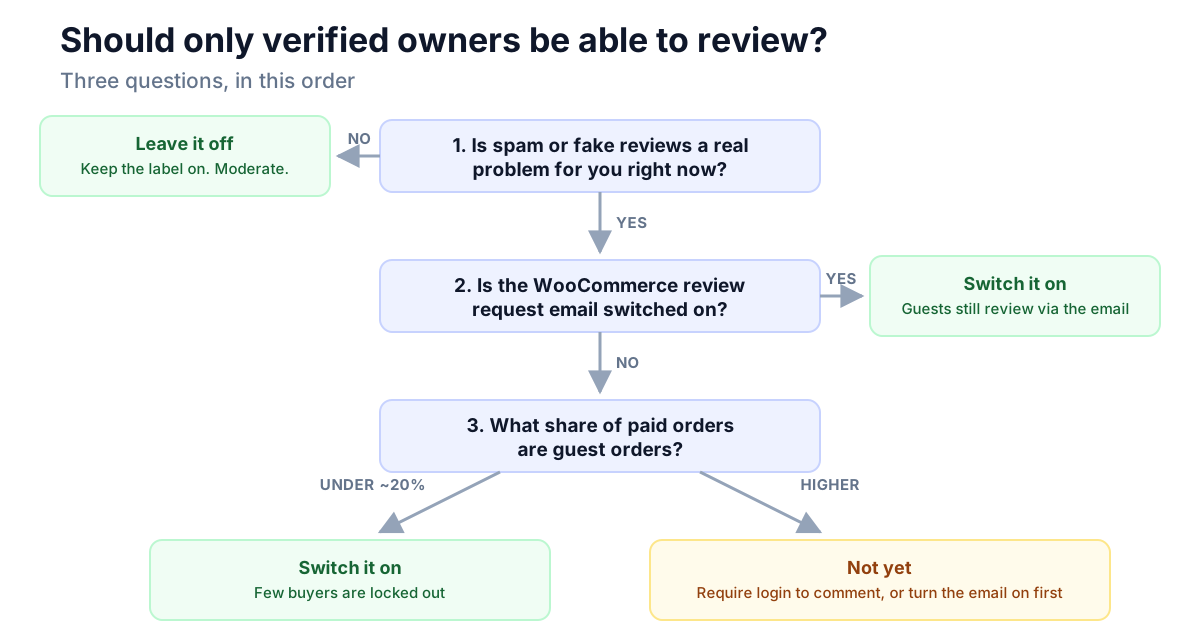
1. Do you have a spam or fake-review problem today? Not "might we", but "are we deleting junk every week". If not, leave the restriction off. An empty reviews tab costs you more sales than the odd off-topic review, and moderation handles those. Most small stores are short of reviews, not overrun with fakes.
2. Is the review request email on? If it is, real buyers have a way in that the restriction doesn't close, and switching the restriction on costs much less. If you want buyers-only reviews, switch the email on first.
3. What share of your orders are guest orders? Run the query above. Under about a fifth, the restriction locks out few buyers. Above that, it locks out a lot of them unless the email is doing the work.
4. Do many of your buyers never place an order on your website? Gift-heavy shops, stores with a physical shop, and brands that sell mostly through marketplaces will lose those customers' reviews entirely.
| Your store | Restriction | Why |
|---|---|---|
| New store, few reviews, no spam | Off | Volume matters most, and moderation handles the rest |
| Spam problem, review request email on | On | Buyers still review through the email |
| Spam problem, mostly guest checkout, no email | Off for now | Require login to comment first (Settings → Discussion), or switch the email on |
| Mostly logged-in customers (subscriptions, memberships, B2B) | On | Nearly every buyer passes the check |
| Gift shop, or most sales offline or on marketplaces | Off | The people using the product have no order on your site |
| Regulated or high-trust products, where a fake review is a real risk | On, with the email | Certainty is worth more than volume |
If spam is the problem but you can't afford to lose guest reviews, there is a middle step. Settings → Discussion → Users must be registered and logged in to comment removes the drive-by guest submissions that make up most review spam, and it doesn't care whether the account bought anything. Our post on disabling WooCommerce reviews compares it with the other options.
If you reward reviews with points
NeoGrow, our free loyalty and reviews plugin, pays points for approved reviews from customers with an account. It doesn't look at the verified owner label. A guest's review earns nothing, because there is no balance to credit. A review from the Review Order page is credited to the order's account holder, even when they weren't logged in when they wrote it.
If you want to keep reviews open to everyone but pay points only to verified owners, NeoGrow has a filter for exactly that. Add this to a small custom plugin or a code-snippets plugin:
add_filter( 'neogrow_review_should_award', function ( $award, $comment ) {
    return $award && wc_review_is_from_verified_owner( $comment->comment_ID );
}, 10, 2 );
Unverified reviews are still published as normal. They just don't earn points. Whatever you decide, keep the reward the same for every rating: a reward that depends on what the review says breaks the FTC's rule on reviews, as our guide to incentivized reviews explains.
Check what your customers actually see
Settings pages don't show you the review form, so test it from the customer's side after any change:
- Open a product in a private window, logged out. With the restriction on
you should see the message, not the form.
- Log in as a test customer with no order for that product. You should see
the message.
- Log in as a customer with a Completed order for it. You should see the
form.
- If the review request email is on, open the link from a recent email and
check the product is listed on the Review Order page.
If step 3 shows the message, check the order's status and that the order is attached to that customer's account.
Frequently asked questions
What does "verified owner" mean in WooCommerce?
A reviewer who bought the product. WooCommerce checks for a Processing or Completed order containing the product, attached to the reviewer's account or, for a guest, placed with the email address they gave. If it finds one, it adds (verified owner) after their name.
Can guest customers leave a review if only verified owners can review?
Not from the product page. The form there needs a logged-in account with a paid order, so a guest buyer sees a message instead. Guests can still review through the link in WooCommerce's review request email, and those reviews are marked verified.
Why can't a customer who bought the product leave a review?
The usual causes, in order: they are not logged in; they bought as a guest and the order isn't attached to their account; the order is still On hold, or was cancelled or refunded; or reviews are switched off on that product's Advanced tab.
Does the verified owner restriction stop review spam?
Almost all of it, for the product page form, because a spammer would need a paid order. It also blocks every guest buyer. If you want to cut spam without losing guest reviews, require login to comment instead, or turn on the review request email alongside the restriction.
Does a refund remove the verified owner label?
No. WooCommerce decides the label once, when the review is posted, and never checks it again. A refunded order does stop the customer leaving new reviews for that product, from the product page while the restriction is on and from the review request email's link.
Does the verified owner label show on block themes?
Not with WooCommerce's Product Reviews block. The label is printed by the classic review template, and the block doesn't display it. The setting still records which reviews are verified, so the label returns if you switch back to the classic template.
Make it a decision, not a default
The verified owners restriction is neither good nor bad. It is a trade between how many reviews you get and how sure you are that each one is real. Keep the label on. Measure your guest share. Switch the review request email on before you switch the restriction on. And if you're short of reviews rather than overrun with fake ones, which is where most stores are, leave the restriction off for now and come back to it when spam becomes a real problem.