
The WooCommerce Product Reviews block skips every review hook

A WooCommerce review plugin can be written correctly, pass every test you give it, and still print nothing on a customer's product page. No PHP notice, no deprecation warning, no broken layout. The photo the shopper uploaded, the "verified owner" badge, the helpful-vote buttons: they are simply not there.
The cause is that WooCommerce now renders product reviews in two different ways, and only one of them fires the hooks review plugins are built on. We hit it in our own plugin, traced it through WooCommerce 11's source, and tested it on a real store. This post is the write-up: what breaks, which stores are affected, how to check yours, and a fix you can paste.
If you run a store rather than build plugins, the symptom is the one in WooCommerce photo reviews: customer photos that never appear. The wider picture is in our guide to WooCommerce product reviews.
Quick answer. WooCommerce's Product Reviews block (
woocommerce/product-reviews) draws each review from its own blocks and never calls the sixwoocommerce_review_*actions that review plugins print through. So review photos, titles, badges and helpful votes vanish from the page, with no error. It only happens when the single-product template contains that block. The default template still uses the classic path. The fix for developers is therender_block_woocommerce/product-review-contentfilter, which runs once per review with the comment ID in$instance->context['commentId']. The fix for store owners is to reset the Single Product template to its default, or to ask your review plugin's developer for block support. Checked on WooCommerce 11.1.2.
Running a store? Go to How to check a store, then If you would rather not add code. Building a plugin? Go to The fix.
The short version
- Two render paths. Classic reviews come from
single-product/review.php. Pages built with the Product Reviews block render each review from blocks instead. - The block path fires no
woocommerce_review_*action. Notwoocommerce_review_meta, notwoocommerce_review_before_comment_text, none of the six. Anything hung on them is skipped. - Nothing reports it. The review form is the same on both paths, so submitting a review works and every check that a plugin "works" passes.
- It is narrower than "block themes". The default template and the Site Editor's "Transform into blocks" button both still use the classic path. Only templates that contain the Product Reviews block are affected.
- WooCommerce's own review-request beta is caught by it too. Its variation summary ("Size: Small") disappears on the block path. We confirmed that by rendering it.
- There is a clean fix: the
render_block_woocommerce/product-review-contentfilter runs once per review, with the comment ID in its context.
Two ways WooCommerce renders a review
| Classic path | Product Reviews block | |
|---|---|---|
| Where the markup comes from | templates/single-product/review.php | src/Blocks/BlockTypes/Reviews/, one block per part of the review |
woocommerce_review_* actions | All six fire, once per review | None fire |
| Review text | comment_text(), inside the woocommerce_review_comment_text action | ProductReviewContent applies the comment_text filter directly |
| Star markup | <div class="star-rating"> | <div class="wc-block-product-review-rating__stars"> wrapping the inner span, no .star-rating |
| Review form | comment_form() | comment_form(), so form hooks still fire |
The six actions the classic template fires, in order, are woocommerce_review_before, woocommerce_review_before_comment_meta, woocommerce_review_meta, woocommerce_review_before_comment_text, woocommerce_review_comment_text and woocommerce_review_after_comment_text. On the block path, the only extension point left inside a review is the core comment_text filter, which also runs on every blog comment on the site.
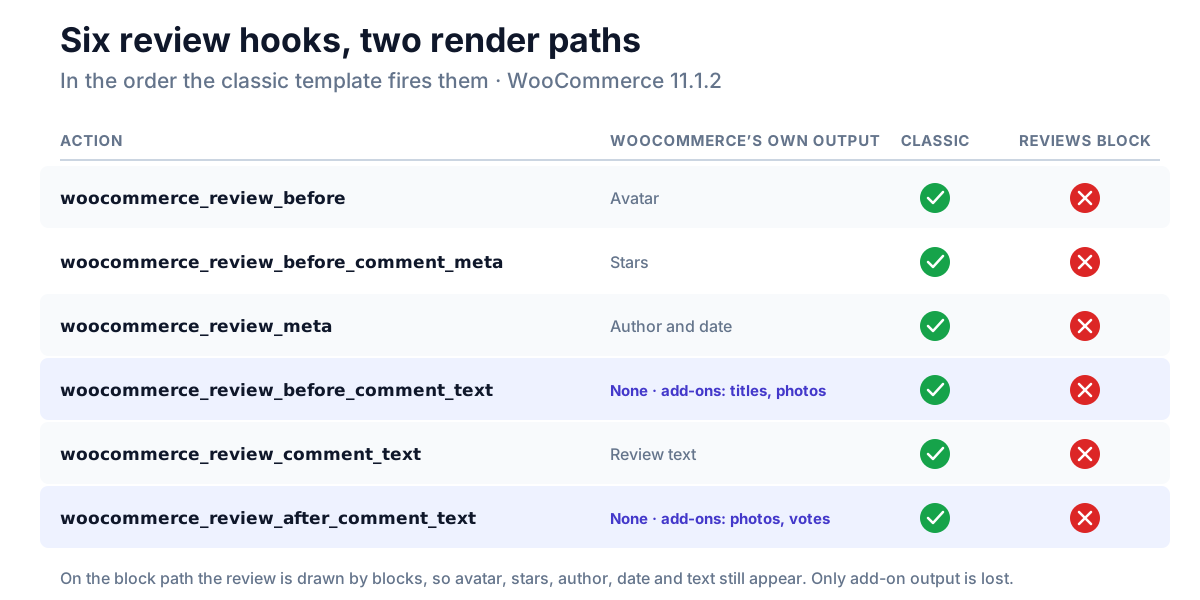
What disappears
Anything a plugin adds to a review through those actions:
- Review photos and videos printed under the review text.
- Review titles printed above it.
- Badges, such as verified-owner or "points earned" labels in the review meta.
- Helpful / not helpful votes after the text.
- Star styling that targets
.star-rating, since the block stars do not carry that class. - WooCommerce's own variation summary. The "Customer review request (beta)" feature, off by default, records which variation a review was for and prints it with
woocommerce_review_before_comment_text. On the block path it is gone.
The review itself still shows: the author, the date, the stars and the text are all drawn by blocks. That is what makes this so hard to spot. The page looks complete. It is only missing the parts your plugin was supposed to add.
Which stores are affected
This is the part most easily overstated, so it is worth being exact. We checked each case on WooCommerce 11.1.2 with Twenty Twenty-Five:
| Single-product template | Review path | Plugin hooks fire? |
|---|---|---|
The default template (woocommerce/legacy-template) | Classic | Yes |
| After the Site Editor's "Transform into blocks" | Classic | Yes |
| A template containing the Product Reviews block | Block | No |
The middle row surprises people. "Transform into blocks" inserts a Product Details block with no inner blocks, and an empty Product Details block falls back to the classic product tabs, which load review.php. Every hook fires.
The block path is reached when the template contains the Product Reviews block: either placed on its own, or inside a Product Details block that has its own inner blocks. That is what the Site Editor inserts when someone adds a new Product Details or Product Reviews block from the inserter, which is exactly what a store owner redesigning a product page tends to do.
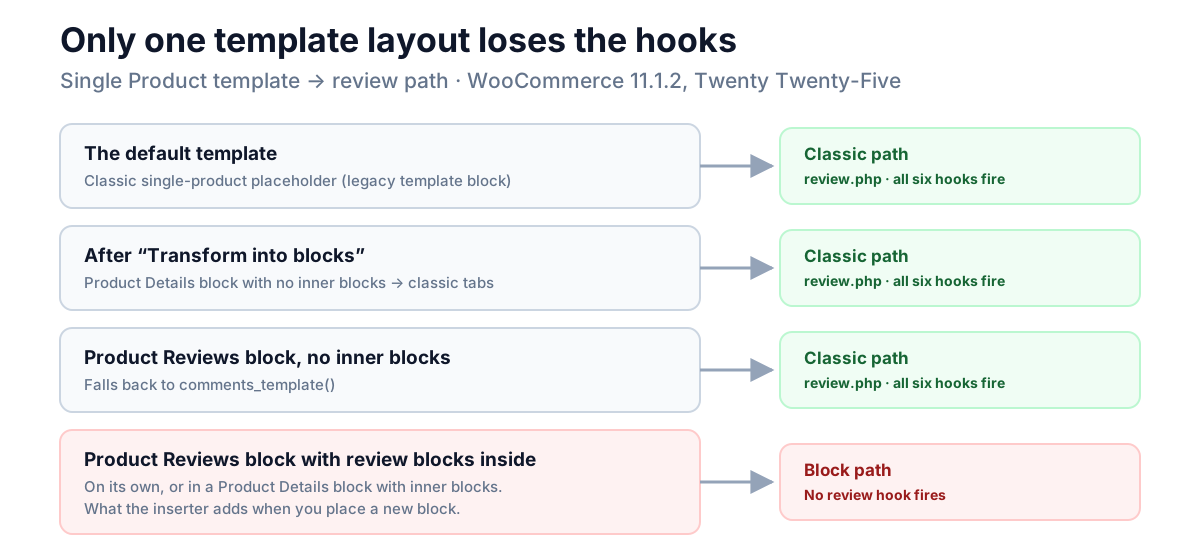
One more fallback: a Product Reviews block with no inner blocks calls comments_template(), which is the classic path again.
How to check a store
- Look at the page source. Open a product with reviews, view the source and search for
wp-block-woocommerce-product-review-content. If it is there, reviews are rendering from blocks. If you findclass="commentlist"instead, it is the classic path. - Or look in the Site Editor. Open Appearance → Editor → Templates → Single Product and the List View. A "Product Reviews" block with review blocks inside it means the block path. A single "Product Details" block with nothing inside it, or the classic single-product placeholder block, means classic.
Product-specific templates can differ from the main one, so check the template the product actually uses.
Why nothing reports it
Every usual check passes:
- No error. The plugin's callbacks are registered correctly. WooCommerce just never calls them.
- No deprecation. The actions still exist, and the classic template still fires them.
- The form works. Both paths use
comment_form(), so a test that submits a review, and a reward or email triggered on submission, both behave normally. - Most test stores are on the classic path, because the default template is.
The only way to see it is to render a review on a page that uses the Product Reviews block and look for the plugin's output.
It was planned for
WooCommerce's tracking issue for the block, #55729, "Product reviews block", lists the same six actions under the heading "Hooks to support with compatibility layer". The issue was closed as completed on 2 May 2025 with "Conduct extensibility investigation" still unchecked in its acceptance criteria. As of WooCommerce 11.1.2, nothing in the review blocks fires those actions.
That is not a criticism of the people who built the blocks. Moving a template to blocks is a large job, and compatibility layers are the part that gets deferred. But it does mean the fix, for now, is on the plugin side.
The fix
WordPress runs a render_block_{name} filter for every block it renders, and the review content block receives the review's comment ID in its block context. That gives a plugin one reliable place to add its output, once per review:
/**
 * Fire the review text actions on woocommerce/product-review-content.
 *
 * Restores review photos, badges and votes on the WooCommerce Product Reviews
 * block, which renders reviews without calling any woocommerce_review_* action.
 *
 * Only the two text actions are fired. The other four carry WooCommerce's
 * own avatar, stars, author, date and review text, which the blocks already
 * draw, so firing them here would print all of that twice.
 *
 * Tested on WooCommerce 11.1.2.
 */
add_filter( 'render_block_woocommerce/product-review-content', function ( $html, $block, $instance ) {
	$comment_id = isset( $instance->context['commentId'] ) ? (int) $instance->context['commentId'] : 0;
	$comment    = $comment_id ? get_comment( $comment_id ) : null;
	if ( ! $comment ) {
		return $html;
	}

	ob_start();
	do_action( 'woocommerce_review_before_comment_text', $comment );
	$before = ob_get_clean();

	ob_start();
	do_action( 'woocommerce_review_after_comment_text', $comment );
	$after = ob_get_clean();

	return $before . $html . $after;
}, 10, 3 );
Three things about it are deliberate.
It fires only two of the six actions. The other four have WooCommerce's own default output attached: the avatar on woocommerce_review_before, the stars on woocommerce_review_before_comment_meta, the author and date on woocommerce_review_meta, and the review text on woocommerce_review_comment_text. The blocks already draw all four, so firing those actions again would print every review's stars, author and text twice. The two text actions have no default output, so they are safe to fire, and they are where most review add-ons put their extras.
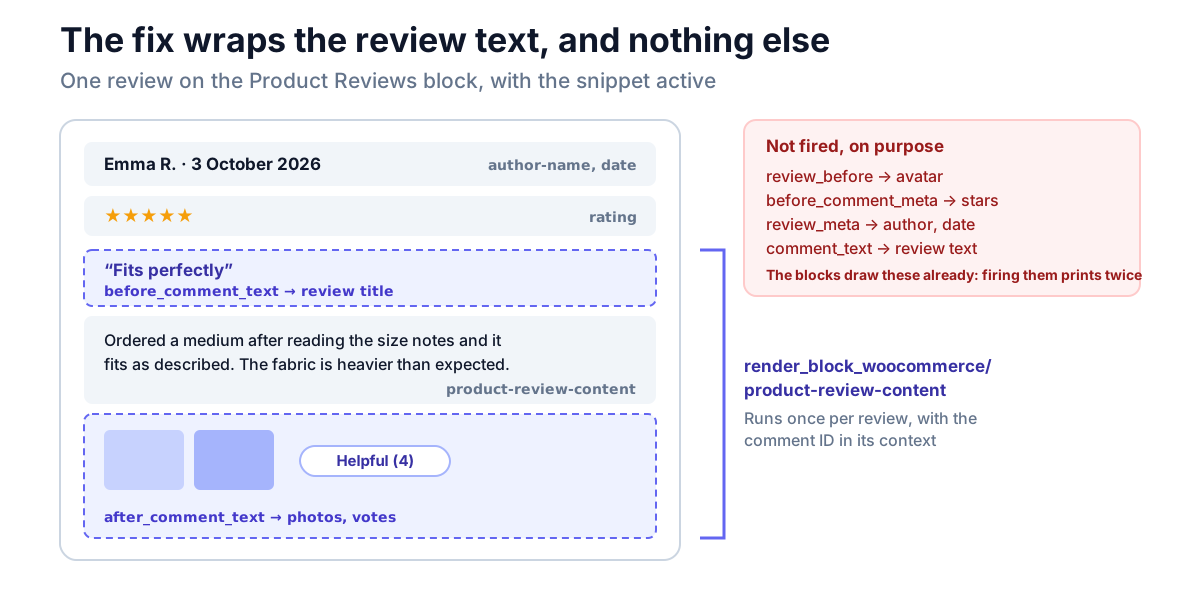
It needs no double-render guard. The filter only runs when the review content block renders. On the classic path, including the Product Reviews block's own fallback to comments_template(), it never runs, so classic pages are unchanged.
It restores WooCommerce's own feature as a side effect. Because the review-request beta prints its variation summary on woocommerce_review_before_comment_text, the snippet brings that back too.
Put it in a small custom plugin or a code-snippets plugin rather than your theme's functions.php, which is replaced whenever the theme updates. It needs no namespace or wrapper: the callback is an anonymous function, so it can't clash with a function of the same name.
We tested the snippet on WooCommerce 11.1.2 against a product with five reviews, with a marker hooked onto woocommerce_review_after_comment_text:
| Template | Without the snippet | With the snippet |
|---|---|---|
| Classic | Marker on all 5 reviews, summary shown | Unchanged: 5 markers, 1 summary, nothing doubled |
| Product Reviews block | 0 markers, summary missing | 5 markers, summary shown, review text not duplicated |
If your plugin uses woocommerce_review_meta for something you want next to the author, the cleaner route is the same filter on render_block_woocommerce/product-review-author-name or render_block_woocommerce/product-review-date, which carry the same commentId context. Don't re-fire the action itself, because WooCommerce's own author and date output is attached to it.
Stars
If your plugin styles the rating, target both markups:
.star-rating,
.wc-block-product-review-rating__stars {
	/* your star styles */
}
If you would rather not add code
A store owner has two options that need no PHP.
Reset the Single Product template. In Appearance → Editor → Templates → Single Product, open the template's actions menu and choose Reset template. That puts back the default template, which uses the classic path, so every review add-on prints again. It also discards any design changes made to that template, so note what you changed first. A product-specific template needs the same treatment.
Ask your review plugin's developer. Send them this post. A plugin that adds its output with the filter above works on both paths, and the change is small.
What NeoGrow does
NeoGrow is the free reviews and loyalty plugin we build, and this is how we found the problem: a shopper could upload a photo, earn the higher photo reward, and never see the photo on the product page. Since 1.2.4, NeoGrow renders review titles, photos and helpful-vote controls on both paths, using the render_block_woocommerce/product-review-content filter above on block pages and the classic actions everywhere else.
If you run a different review plugin, the check in "How to check a store" takes two minutes, and the snippet above is safe to try on a staging copy first.
Frequently asked questions
Why do my WooCommerce review photos or badges not show on a block theme?
Because the Product Reviews block renders reviews without firing the woocommerce_review_* actions that review plugins print through. It is not the block theme itself: the default template and the "Transform into blocks" result still use the classic path. It happens when the product template contains the Product Reviews block. View the page source and search for wp-block-woocommerce-product-review-content to confirm.
Does the WooCommerce Product Reviews block support woocommerce_review_meta?
No. As of WooCommerce 11.1.2, none of the six woocommerce_review_* actions fires on the block path. The review content block applies only the core comment_text filter. Use the render_block_woocommerce/product-review-content filter, which receives the review's comment ID in $instance->context['commentId'].
Does "Transform into blocks" break review plugins?
No. The button inserts a Product Details block with no inner blocks, which falls back to the classic product tabs and single-product/review.php, so every review hook still fires. Plugins only stop printing when the template contains the Product Reviews block itself, which is what the Site Editor adds when you insert a new Product Details or Product Reviews block.
Do review rewards and review emails still work on the block path?
Yes, if they run when the review is submitted. Both paths use the same comment_form() and the same comment submission, so hooks that fire on a new review are unaffected. Only output printed inside the rendered review is lost.
Can I add this fix with a code-snippets plugin?
Yes. In a plugin such as Code Snippets or WPCode, create a new PHP snippet, paste the code from The fix, set it to run on the front end of the site (or everywhere), and activate it. You don't need to edit theme files. Try it on a staging copy first, then check a product page that uses the Product Reviews block for your review plugin's output.
Is this a bug in WooCommerce?
It is a known gap rather than an accident. WooCommerce's tracking issue #55729 listed these hooks for a compatibility layer, and the issue was closed in May 2025 without one being built. Until that changes, plugins need to add their output through the block render filters as shown above.
Check before you trust it
A review plugin that works on the classic template tells you nothing about the block path, and nothing will warn you when a store moves from one to the other. If you build or run review add-ons, render one product page with the Product Reviews block, look for your output, and keep that page in your test suite.