
Can customers stack loyalty points on top of your Black Friday coupon? We tested it
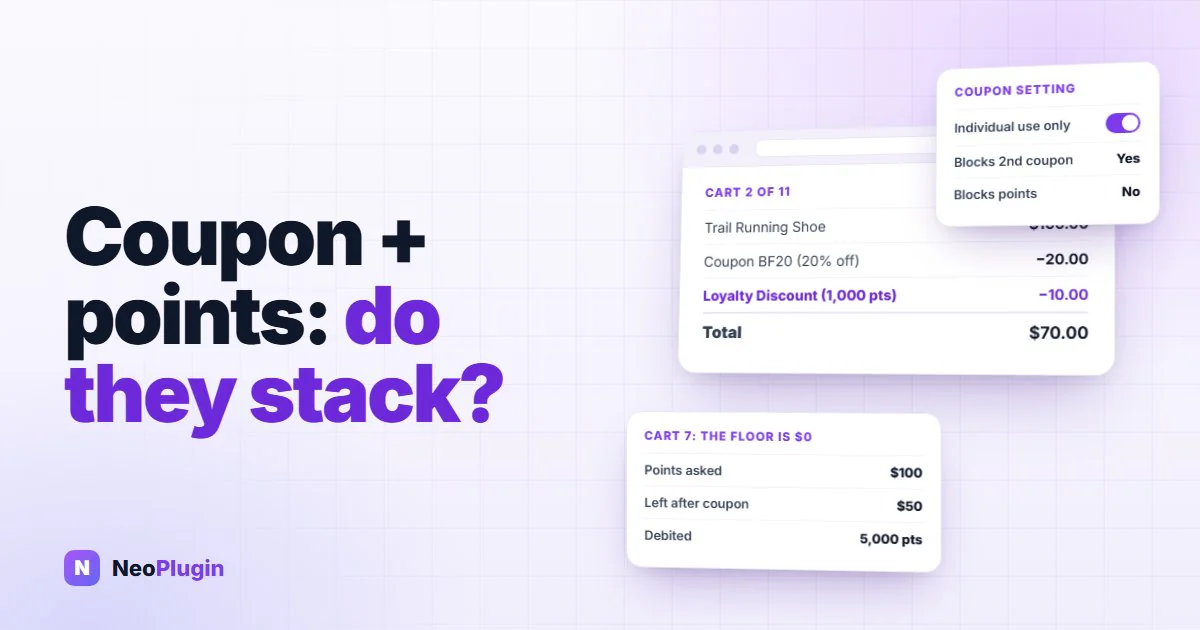
Every Black Friday plan that involves both a coupon code and a points program runs into the same question a week before the sale: if a customer applies the 20% code and spends their points, do they get both? And if they do, is that a discount you planned?
The honest answer from most plugin documentation is a shrug. So we tested it. Eleven carts on a local WooCommerce 11.0.1 store running the free NeoGrow plugin, with a $100 product, a $100 product on sale at $70, five kinds of coupon and a customer holding a balance, and every figure below is the number the cart produced. Nothing is estimated.
The short answer is yes, they stack, in every combination WooCommerce allows a coupon to be applied at all, and the setting most store owners reach for to stop it does nothing. The longer answer has two findings worth knowing before the sale, one of them in your favor and one not.
This is the second of three Black Friday posts. The first, running Black Friday on loyalty points instead of discounts, makes the case for paying part of the offer in points; this one is about what happens at the cart when a coupon and a balance meet.
Quick answer. Yes, loyalty points stack with coupon codes in WooCommerce by default, with percentage, fixed-cart and Individual use only coupons alike. A points redemption is applied as a negative cart fee, and WooCommerce's coupon rules only govern coupons, so no coupon setting blocks it. The cart cannot go below zero. To stop the stack on a Black Friday code, block or cap redemption through the points plugin, or run the sale on sale prices with no code at all.
The short version
- Points stack with every kind of coupon. Percentage, fixed cart, and a coupon marked Individual use only: in all three the points came off on top of the code.
- "Individual use only" does not block points. It stops a second coupon, which it did in our test. A points redemption is not a coupon; WooCommerce applies it as a negative fee, which coupon rules never see.
- "Exclude sale items" works on the coupon, not on the points. The code was refused on the sale product; the points came off anyway.
- The cart cannot go below zero. A customer who tries to spend $100 of points on a $50 remainder gets a $50 discount and a $0 total, and NeoGrow debits only the 5,000 points that discount cost, not the 10,000 they offered.
- Customers earn points on the part they paid for with points. A $100 order with $10 of points taken off earned 100 points, not 90. At a 1% program that returns 1% of every redemption; the one-line filter below stops it if you want it stopped.
- The Black Friday stack is three deep: sale price, then coupon, then points, and the order still earns points on the sale subtotal. Decide which of the three you are offering before the weekend, not after.
How WooCommerce decides what combines
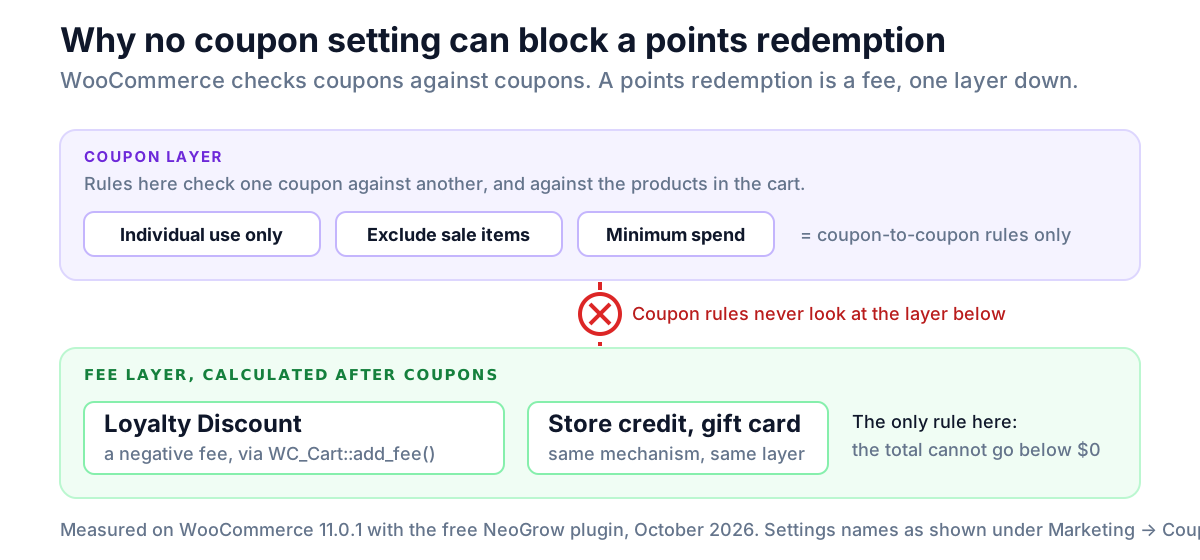
WooCommerce has rules about coupons combining with coupons. It has no rules about coupons combining with anything else, because as far as the cart is concerned, nothing else exists.
Three settings on a coupon, under Marketing → Coupons, govern the first kind of combination:
| Setting | What it does | What it does not do |
|---|---|---|
| Individual use only | Refuses any other coupon while this one is applied, and is refused if another is already applied | Nothing about fees, store credit or points |
| Exclude sale items | Refuses to apply to a product with a sale price | Nothing about whether that product earns or redeems points |
| Minimum spend | Requires a cart subtotal before the coupon applies | Checked against the subtotal before points, so points cannot push a cart under the minimum |
A points redemption is not a coupon. Almost every points plugin, NeoGrow included, applies it as a negative fee: a line item labelled Loyalty Discount with a minus figure, the same mechanism a plugin would use for a gift card or store credit. In code, that is a callback on woocommerce_cart_calculate_fees calling WC_Cart::add_fee() with a negative amount, after coupons have already reduced the totals that get_discount_total() reports. WooCommerce calculates fees after coupons and has exactly one rule about them: a negative fee may not take the total below zero.
That is the whole explanation for everything in the table below. Coupon rules never look at fees, so no coupon setting can block a points redemption, and the only thing that limits the redemption is the money left to take it from.
The test, cart by cart
A customer with a balance, a $100 product, taxes off, NeoGrow at its defaults of 1 point per dollar earned and 100 points redeemed per dollar. "Points" is what the customer asked to spend; the discount is what came off.
| # | Cart | Coupon | Points asked | Coupon took | Points took | Total |
|---|---|---|---|---|---|---|
| 1 | $100 | none | 1,000 | $0 | $10 | $90 |
| 2 | $100 | 20% off | 1,000 | $20 | $10 | $70 |
| 3 | $100 | 20% off, Individual use only | 1,000 | $20 | $10 | $70 |
| 4 | $100 | $30 off cart | 1,000 | $30 | $10 | $60 |
| 5 | $70 sale item | 20% off, Exclude sale items | 1,000 | refused | $10 | $60 |
| 6 | $70 sale item | 20% off | 1,000 | $14 | $10 | $46 |
| 7 | $100 | 50% off | 10,000 ($100) | $50 | $50, capped | $0 |
| 8 | $100 | 50% off | 5,000 ($50) | $50 | $50 | $0 |
| 9 | $100 | 20% off + $30 off | 1,000 | $50 | $10 | $40 |
| 10 | $100 | 20% Individual use + $30 off | 1,000 | $20, second refused | $10 | $70 |
And one order rather than a cart:
| # | Order | Points fee on the order | Points the order earned |
|---|---|---|---|
| 11 | $100 product, marked Completed | −$10 | 100, not 90 |
Finding 1: points stack with every WooCommerce coupon, and "Individual use only" does not block them
Carts 2, 3 and 4 are the ones most stores care about. A percentage code, a fixed-amount code, and a percentage code marked Individual use only all took their discount, and the points came off on top in every case. Cart 10 shows the setting doing its actual job: with the individual-use code applied, the second coupon was refused with WooCommerce's usual message. The points were untouched.
So if your Black Friday plan says "20% off with code BF20" and your store runs a points program, a customer with a balance will pay 20% less and spend their points, and no coupon setting changes that. That is not a bug in either system. It is two systems that were never introduced.
Whether it matters depends on what you intended:
- If the points are part of the offer, as in the "10% off plus 10% back" of the Black Friday points post, this is exactly right, and you want the balance spendable alongside the code in January too.
- If the code was meant to be the whole discount, you have three choices: block redemption while any coupon is applied, cap the redemption at the post-coupon total, or accept the stack and size the code accordingly. The filters for the first two are in the NeoGrow section.
Cart 5 is the sale-item version of the same lesson. Exclude sale items refused the coupon on the $70 product, and the points came off regardless. If you exclude sale items from the code because the margin cannot take more, the points are still taking more.
In one line: every coupon setting is a rule about coupons. Points are a fee, so the only way to keep them off a coupon order is a rule in the points plugin, not on the coupon.
Finding 2: the WooCommerce cart floor is zero, and the customer is protected
Cart 7 is the one we expected to be ugly. A 50% coupon leaves $50 to pay, and the customer asks to spend 10,000 points, worth $100. NeoGrow's own cap lets them, because it bounds the redemption by the cart subtotal before coupons, which is $100.
Two things then happened, and both are right. WooCommerce trimmed the negative fee to the money actually left, so the discount shown was $50 and the total $0 rather than −$50. Then, when the order was placed, NeoGrow debited the points for the discount the order actually received, 5,000, not 10,000. It reads the fee off the finished order and never takes more points than the money that came off. Cart 8, with exactly the remaining $50 asked for, gave the same total and the same debit.
So a customer cannot be charged points for a discount they did not get, and an order cannot go negative. The cart page shows the trimmed figure, $50, as the loyalty line, because WooCommerce displays a fee's capped total rather than the amount the plugin asked for.
In one line: the worst a customer can do with too many points is reach $0. WooCommerce caps the discount at what is owed, and NeoGrow charges points only for the discount that was actually given.
Finding 3: orders earn points on the part paid with points
Order 11 is the finding that was not in our favor. A $100 order with a $10 loyalty discount on it was marked Completed, and the customer earned 100 points, calculated on the $100 subtotal, not on the $90 they paid.
Why: points are earned on the order subtotal, the value of the products, and a fee is not part of the subtotal. The same rule that stops shipping and tax from earning points also stops a negative fee from reducing them. NeoGrow's documentation says points are earned on the subtotal, and it is, so this is the documented behavior; it was simply never spelled out that the subtotal includes the part paid with points.
What it costs: the program's own percentage, on every redemption. At the default 1%, a customer who spends $10 of points earns $0.10 of points back. At a 5% program it is $0.50 per $10 redeemed. Small, but it is a loop, and it is worth a line in the margin model if your Black Friday plan expects a lot of redemption in January. The filter in the NeoGrow section closes it in four lines. We have also put it on the list to revisit in the plugin itself, since most stores would expect the fee to count.
In one line: redeeming $10 of points earns the customer the program's rate on that $10 again. At 1% it is ten cents; the filter below makes it zero.
The Black Friday stack, in full
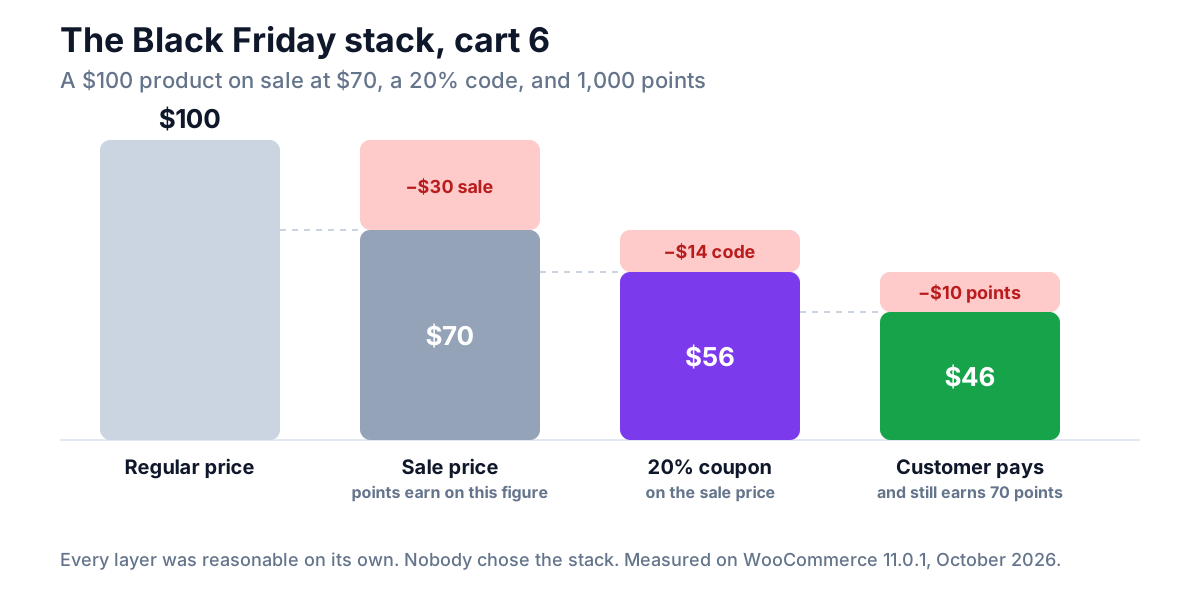
Put the findings together for a store running sale prices, a site-wide code and points, which is most stores on the last Friday of November. Cart 6 is the realistic one. A $100 product on sale at $70, a 20% code, and 1,000 points:
| Layer | Took | Running total |
|---|---|---|
| Sale price | $30 | $70 |
| 20% code, on the sale price | $14 | $56 |
| 1,000 points | $10 | $46 |
| Points earned on this order, on the $70 subtotal | +70 points |
The customer paid $46 for a $100 product and left with 70 points toward the next one. Each layer was reasonable on its own. Nobody chose the stack.
The fix is not a setting, because no single setting sees all three layers. It is a decision, made before the sale, about which layers you are offering:
- Sale prices only, points as normal. The simplest and the one the first post recommends. No code, no stacking question.
- A code, with points blocked while it is applied. The customer keeps their balance for a non-sale order. One filter, below.
- A code, with points capped at the remainder. The stack is allowed but can never exceed the post-coupon total, which cart 7 shows WooCommerce enforces anyway; the filter makes the cart show the right figure from the start.
- Everything stacks, on purpose, and the code is sized knowing that points and sale prices will sit under it.
Whichever you choose, run cart 6 on your own staging store with your own code and look at the total. It takes two minutes and it is the number your margin is actually facing.
Where NeoGrow fits
NeoGrow is the free plugin we build, and it is the plugin the table above was produced with. The behaviors it adds to WooCommerce's own are these:
- Redemption is a negative fee labelled Loyalty Discount, applied after coupons, in the shopper's currency.
- The cap on points a customer may spend is the smaller of their balance and the cart subtotal before coupons. WooCommerce's own zero floor then applies, and the debit at checkout is taken from the fee actually on the order, so a customer is never charged for more discount than they received.
- Earning is on the order subtotal, after sale prices, before coupons and before fees, credited when the order is completed.
Three filters change the three behaviors above. Each goes in a small plugin or your theme's functions file.
Block points while any coupon is applied:
// No points redemption on a cart that has a coupon on it. The cap is
// applied after NeoGrow's own balance and cart-value checks, so a filter
// can only tighten it. $cart is null outside a cart context.
add_filter( 'neogrow_max_redeemable_points', function ( $max, $user_id, $cart ) {
    if ( $cart && $cart->get_applied_coupons() ) {
        return 0;
    }
    return $max;
}, 10, 3 );
Cap points at what is left after coupons, so the cart shows the right figure immediately rather than relying on WooCommerce's floor:
// Never offer more points than the post-coupon remainder is worth.
add_filter( 'neogrow_max_redeemable_points', function ( $max, $user_id, $cart ) {
    if ( ! $cart ) {
        return $max;
    }
    $remaining = (float) $cart->get_subtotal() - (float) $cart->get_discount_total();
    $cap       = \NeoGrow\Modules\Loyalty\Redemption::amount_to_points( $remaining, $user_id );
    return min( $max, $cap );
}, 10, 3 );
Stop earning on the part paid with points, by taking the loyalty fee out of the earn base:
// Earn on the subtotal minus any negative fee on the order, so money paid
// with points does not earn points. $amount is the subtotal; $order is the
// WC_Order being completed.
add_filter( 'neogrow_earn_base_amount', function ( $amount, $order ) {
    foreach ( $order->get_fees() as $fee ) {
        $total = (float) $fee->get_total();
        if ( $total < 0 ) {
            $amount += $total;
        }
    }
    return max( 0, $amount );
}, 10, 2 );
The second and third are the ones a store with a Black Friday code most often wants. Full setup is in the NeoGrow documentation.
Frequently asked questions
Can customers use a coupon and loyalty points on the same WooCommerce order?
Yes, by default, with every kind of coupon. We tested percentage, fixed-cart and individual-use coupons on WooCommerce 11 with the NeoGrow points plugin, and the points came off on top of the coupon in every case. A points redemption is applied as a negative fee, and WooCommerce's coupon rules only govern coupons, so nothing on the coupon screen prevents the combination.
Does "Individual use only" stop loyalty points being redeemed?
No. It stops a second coupon and nothing else. In our test the setting refused a second code, as designed, while the points redemption applied unchanged. To block points while a coupon is on the cart you need the plugin to do it; with NeoGrow that is a four-line filter on the maximum redeemable points.
Can loyalty points make a WooCommerce order free, or take it below zero?
Free, yes; below zero, no. WooCommerce caps a negative fee at the amount still owed, so a customer spending more points than the remainder gets a $0 total, not a credit. NeoGrow then debits only the points that produced the discount actually applied, 5,000 for a $50 discount in our test rather than the 10,000 the customer offered.
Do customers earn points on the part of an order they paid for with points?
Yes, with most plugins, because earning is calculated on the subtotal and a points redemption is a fee rather than part of it. A $100 order with $10 of points taken off earned 100 points in our test, not 90. The cost is the program's own percentage on every redemption; a short filter on the earn base removes the fee from the calculation if you prefer.
Does "Exclude sale items" on a coupon affect loyalty points?
No. It affects the coupon only. On a sale product the coupon was refused and the points redemption applied as normal, and the order still earned points on the sale price. If sale items are excluded from the code because the margin cannot carry more, the points need their own rule.
How do I stop points stacking with my Black Friday coupon?
Either block redemption while a coupon is applied, or cap it at the post-coupon remainder. Both are filters on the maximum redeemable points in NeoGrow, shown in this post. The alternative is to run the sale on sale prices alone, with no code, which leaves nothing to stack and is the version the first Black Friday post recommends.
Can two coupons be combined in WooCommerce?
Yes, unless one of them is marked "Individual use only". Two ordinary coupons applied together in our test, a 20% code and a $30 code, for $50 off a $100 cart. With the percentage code set to individual use, the second was refused. That setting is the only coupon-to-coupon control WooCommerce has; discounts applied as fees are outside it.
Two minutes on staging before the weekend
Put your Black Friday product on sale, apply your code, redeem some points, and read the total. Then complete the order and read the points it earned. Those two numbers are the whole of what this post found, and they are the two that decide whether your sale makes money. Every plugin behaves slightly differently here, and the only version that counts is the one on your store.
Still choosing which products go on sale? Your wishlist data can tell you. Setting up points for the first time? Start with the complete WooCommerce loyalty program guide.