
Choosing a WooCommerce rewards plugin: 9 questions that matter
A rewards plugin is not really a feature purchase. It is a liability you agree to carry.
From the first order it processes, it holds a number against every customer account that those customers believe is money. They will ask about it. They will expect it to still be there next year, in the same checkout, worth the same amount. That number lives in somebody's database schema, under somebody's licence terms, and you inherit both.
Which is why the questions that decide whether you will be happy in two years are almost never the ones on the comparison page. This post is the nine to ask before you install anything — not what the software does, but what you are agreeing to.
The short version
- Ask where the balance lives and whether you can read it without the plugin. A ledger you cannot query is a ledger you cannot leave.
- Ask what happens the day the licence lapses. There is a large difference between "updates stop" and "redemption stops".
- Ask what is metered. Metered pricing rises fastest in the year your store does best.
- Ask what a migration would carry. Most exports move balances and silently drop expiry dates, which restarts every clock.
- Ask who follows WooCommerce. HPOS and the Cart and Checkout blocks both broke plugins that had stopped being maintained.
- Ask what shape the free tier is. A free tier built as a product is generous. One built as a funnel restricts the redemption path, which is the part that makes the program work at all.
These are not the same questions as the last two posts
Three posts in this series overlap on purpose, and it is worth being clear about which one answers what.
| Post | The question it answers |
|---|---|
| Seven checks before you install | Is this plugin built sensibly? Signals you can read in twenty minutes |
| Nine tests on a real store | Does it behave correctly? Test orders on staging |
| This one | What am I agreeing to? Ownership, metering, lapse and exit |
The first two are about the software. This one is about the arrangement, and the arrangement is what you cannot test your way out of later.
1. Whose database is the points ledger in, and can you query it without the plugin?
Every rewards plugin stores its ledger somewhere. The choice of table has performance consequences, which is a separate subject. What matters at the buying stage is narrower: can you get the balances out with a SQL query you could write yourself?
A plugin with its own table gives you a structure you can read, export, audit against your accounts and hand to a developer. A ledger spread across wp_postmeta rows, keyed by whatever meta keys the author chose, is technically yours and practically not — you need the plugin's own code to interpret it.
A hosted service is the strict version of the same problem: the balances are on someone else's server, and what you can retrieve is whatever their export button offers.
What a good answer sounds like: the plugin creates its own tables, the schema is documented, and there is an export.
2. What happens to customer points when the licence lapses?
Ask this one directly, because the answer varies far more than anyone expects and it is rarely on the pricing page.
There are three behaviours in this market when an annual licence lapses:
| On lapse | What it means |
|---|---|
| Updates and support stop, the plugin keeps working | The normal, reasonable model |
| The plugin nags in admin but functions | Annoying, survivable |
| Features switch off | Your customers' balances become unspendable |
The third one is the one to ask about explicitly, in writing, before you buy. A points balance that cannot be redeemed is not a lapsed subscription — it is a promise to your customers that you can no longer keep, and they will not accept "our licence expired" as the reason.
The same question applies with more force to a hosted app: if you stop paying, the balances are on their server, not yours. That is covered in plugin versus hosted app.
3. What is metered — orders, customers or emails?
Read the pricing page for its units rather than its features. Orders per month, customers holding a balance, emails sent, sites in the licence — each one is a line that rises as your store succeeds.
The three-year arithmetic is stark. For one store growing from around 400 orders a month to 1,800 over three years, a metered plan reaches about $3,516, an annual licence at $129 comes to $387, and a self-hosted free plugin stays at $0. The software is identical in all three columns; only the order count moved. The full model, and where those figures come from, is in the nine-test comparison.
Software that runs entirely on your own server has nothing to meter, which is the reason a free tier in this category can be genuinely unlimited rather than a trial with a cap.
4. Who follows WooCommerce when it changes — HPOS and the checkout blocks
This is a maintenance question dressed as a compatibility question, and it has bitten this category twice in recent memory.
HPOS moved orders out of wp_posts and wp_postmeta into their own tables. A plugin hanging its points logic on save_post_shop_order awards nothing once compatibility mode is off — no error, no warning, just a balance that stays at zero.
The Cart and Checkout blocks are what new stores get by default. A redemption panel written only for the classic shortcode checkout does not appear there at all, and you find out on the day you rebuild your checkout.
Both were announced years ahead. Both still stranded plugins. What you are buying is not a compatibility badge — declaring HPOS support is self-certification, and nothing verifies it — but a maintenance cadence that will handle the next one of these.
What a good answer sounds like: a release in the last few months, "tested up to" matching the current WordPress, and a changelog that mentions the blocks.
5. How does a customer spend a point?
The mechanics belong to the post on earning and redeeming. The buying decision hiding inside them is simpler.
If redemption means a generated coupon code the customer must copy and paste, every redemption costs four or five extra steps — on a checkout where abandonment already averages close to 70% before you add anything. If it means a field in the basket, it costs two.
That difference decides whether the program does anything at all, because redemption is the behaviour you are paying for: McKinsey's loyalty research found that members who redeem spend around 25% more than members who never do. A plugin that suppresses redemption suppresses the return on the whole exercise, whatever its price.
6. If you leave, does the export carry expiry dates and history?
Nearly every evaluation stops at "can I export the balances?" and the answer is nearly always yes. That is the wrong question, because a balance is not the whole obligation.
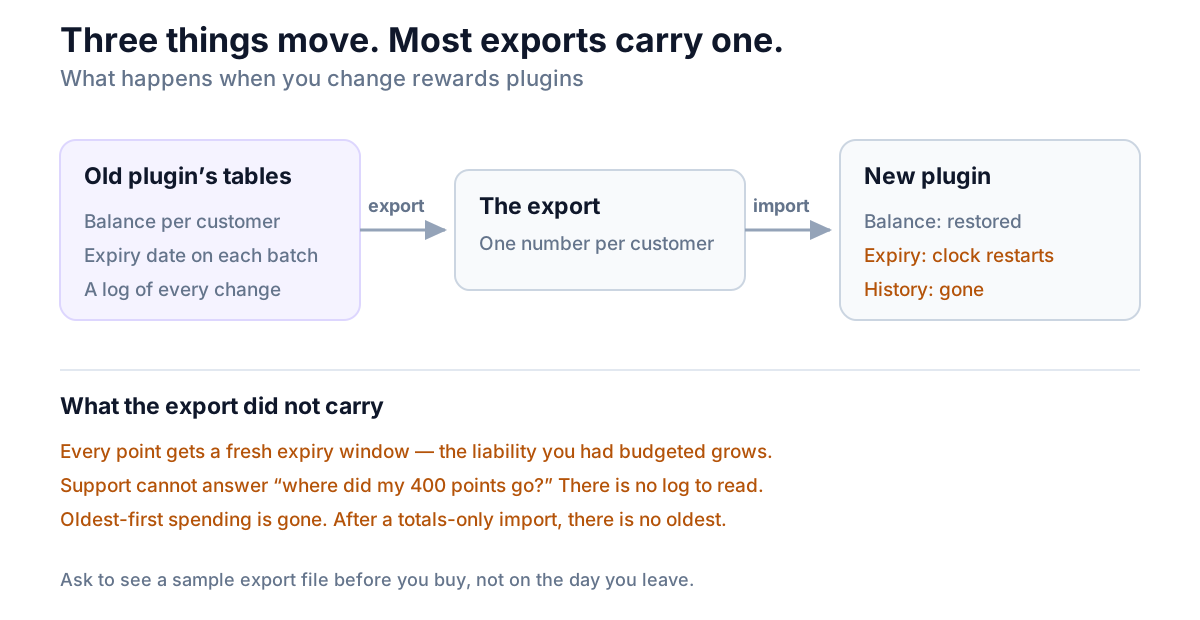
Three things have to move, and only one of them usually does:
- The balance. One number per customer. Always exportable.
- The expiry dates behind it. Points are earned in batches, each with its own clock. A migration that carries totals restarts every clock from the import date — so points that should have expired in March are suddenly good until September, and the liability you had budgeted for grows.
- The history. The log of what was awarded, spent, adjusted and why. This is what your support replies are made of. Without it, "where did my 400 points go?" has no answer.
Lose the batch dates and you also lose the spending order. Points are normally spent oldest first, which is what makes expiry fair; after a totals-only import there is no oldest.
What a good answer sounds like: an export with one row per transaction, not one row per customer.
7. Is the free tier a product or a funnel?
Free tiers in this category are shaped by one of two intentions, and the shape tells you which.
A free tier built as a product limits scale or convenience: fewer reports, a fixed expiry window, manual work where the paid version is automatic. Everything the program needs to function is present.
A free tier built as a funnel limits the mechanism: redemption only via coupon codes, no block checkout support, or a cap on how many customers may hold a balance. Each of those breaks the program rather than trimming it, and each is chosen precisely because it hurts.
Read the free tier's limits and ask which of the two lists they belong to. It is the single most reliable signal of how the paid tier will be priced and scoped later.
8. Who answers when it breaks, and how fast?
Support in this market comes in three shapes: a WordPress.org forum, email or tickets tied to a purchase, and a marketplace's own help desk. None is wrong. What matters is that the shape matches what you paid and what you need.
A free plugin supported through the public forums is an honest arrangement — the threads are public, and reading the unresolved ones tells you more than any feature list. A paid plugin with the same support route as its free version is worth asking about. And a plugin whose support is a chat widget on a marketing site, with no public record at all, gives you nothing to read before you buy.
Check response times in the forum by date, not by the resolved count.
9. Will you be joining two plugins together?
Most stores that want rewards also want reviews — points for a review is one of the oldest and best-working mechanics there is, and reviews and points are two halves of one machine.
Assembled from two plugins, that mechanic becomes an integration: one plugin watches the other's review events and awards points, through a hook that neither vendor tests, across two update cycles and two support inboxes. When it breaks, each will reasonably tell you it is the other one.
If the review side matters to you, ask whether one plugin does both before you buy either. If it does not, at least know you are buying a join.
The nine, and what each one costs if you get it wrong
| Question | If you get it wrong |
|---|---|
| 1. Whose database, and can you read it | You cannot leave without a developer |
| 2. What happens on lapse | Balances your customers cannot spend |
| 3. What is metered | The bill rises fastest in your best year |
| 4. Who follows WooCommerce | Points silently stop being awarded |
| 5. How a point is spent | The program runs and nobody redeems |
| 6. What a migration carries | Expiry clocks reset; history gone |
| 7. Free tier: product or funnel | An upgrade path disguised as a limit |
| 8. Who answers when it breaks | A broken checkout and a contact form |
| 9. One plugin or two | An integration nobody owns |
Questions 1, 2 and 6 are the ones to settle in writing before money changes hands. The rest you can test.
Where NeoGrow fits, on its own nine
NeoGrow is the free WooCommerce rewards plugin we build, so here are its answers — including the places it loses.
Points and review history live in the plugin's own database tables, documented in the manual, with a transaction log rather than a running total. There is no licence to lapse on the free version and nothing metered — no order cap, no customer cap, no key — so question 2 does not arise and question 3 has no units. It declares HPOS compatibility and the redemption panel appears in both the block-based and classic Cart and Checkout with no configuration. Redemption is a field in the basket: the customer types how many points to spend, and no coupon code is involved. Reviews and points are the same plugin, so the points-for-a-review mechanic is not a join.
The free tier's limits are deliberately the first kind: expiry is fixed at six months, and refunds are reversed by hand — full and partial alike, with a reason recorded in the points log. Automatic reversal and a custom expiry window are in the paid add-on.
What it does not do at all: no VIP tiers, no referral system, no visual rule builder. If one of those is a requirement this quarter, NeoGrow is the wrong plugin and no amount of the above changes that.
Frequently asked questions
What is the best WooCommerce rewards plugin?
There is no single answer, because the deciding factors differ by store. What holds across stores is the order of the questions: can you read the ledger without the plugin, does redemption keep working if a licence lapses, what is metered, and would a migration carry your expiry dates as well as your balances. A plugin that answers those four well is a safer purchase than one with a longer feature list that answers them badly, because those four are the ones you cannot fix later.
What happens to customer points if a rewards plugin licence expires?
It depends entirely on the plugin, which is why it has to be asked before you buy. The common and reasonable behaviour is that updates and support stop while the plugin carries on working. Some show a persistent admin notice. A few disable functionality, which means customers can no longer spend balances you already promised them. Get the answer in writing, because this is the one failure mode that turns a billing problem into a customer-trust problem.
Can I export loyalty points from a WooCommerce plugin?
Usually the balances, yes. The question worth asking is whether the export has one row per transaction or one row per customer. A totals-only export loses the expiry date attached to each batch of points and the history of how the balance was reached, so after an import every point's clock restarts and your support team has nothing to look up. Ask to see a sample export file before you commit.
Do I need a paid rewards plugin for WooCommerce?
Often not. A points program is arithmetic over data your store already holds, so there is no external service that must be paid for — which is why free tiers here can be complete rather than crippled. Pay when you want something genuinely additional, such as automatic refund reversal, custom expiry rules or tiers. Do not pay to unlock the redemption path, because that limit was designed to be paid for.
How much should a WooCommerce rewards plugin cost?
Judge it over three years. An annual licence around $129 comes to roughly $387 across that period regardless of how you grow, while a plan metered by monthly orders can reach several thousand for the same software on a store that simply sold more. Then set either figure against the program itself: at 1 point per dollar and 100 points to the dollar you are returning about 1% of subtotal, which is usually the larger number.
How do I switch rewards plugins without losing customer balances?
Export a per-transaction ledger from the old plugin before deactivating anything, and check it contains the earn date for each batch. Import into the new plugin on a staging copy first, then verify three things: total liability matches, expiry dates survived the import, and spending draws from the oldest points. Tell customers before the switch only if balances will visibly change — and if they do, settle the difference in the customer's favour rather than your own. A few points given away costs less than one support thread about points that vanished.
Does a WooCommerce rewards plugin slow down the store?
The deciding factor is where the ledger lives and whether anything is fetched from another server. A balance read from the plugin's own indexed table is a fast query. A ledger kept in wp_postmeta adds permanent weight to queries your store already depends on, and a hosted widget makes your page speed depend on another company's response time. The measurements are in why loyalty points do not belong in postmeta.
The question behind the nine
Every one of these is really asking the same thing: when this goes wrong, who is holding the problem?
If the ledger is in your database, in a readable schema, exportable per transaction, with no licence gate on redemption, then a bad outcome is an inconvenience. If any one of those is not true, a bad outcome is a conversation with customers about points they earned and can no longer spend.
Ask the nine before you install. They take an afternoon to answer and they are the part of the decision that testing cannot reach.
If you have not settled the design of the program itself — earn rate, redemption rate, expiry, what it costs you — start with the complete guide to a WooCommerce loyalty program. When you have a shortlist, run the nine tests on your own store.
NeoGrow is a free WooCommerce plugin for loyalty points and photo reviews. It runs on your own store, in its own tables, with no order limits and no monthly fee.