
WooCommerce points and rewards: how earning and redeeming actually work
Most guides to WooCommerce points and rewards stop at the settings screen. Set an earn rate, set a redemption rate, save, done.
The settings screen is the easy part. What decides whether the program works — and what it quietly costs you — is everything that happens between a customer pressing Place Order and a discount appearing on their next basket.
This post follows a single point through its whole life: when it gets created, what it was calculated from, where the customer sees it, how it is spent, what happens if the order is refunded, and when it disappears.
The short version
- Points are awarded on an order status, and which status matters. Awarding on processing pays out before you know the order is real. Awarding on completed is the safe default.
- The earn base should be the subtotal. Calculating on the order total means paying customers for your shipping charge and for the tax you collected.
- Rounding is a real setting, not a detail. Rounding up on every order line adds up faster than people expect.
- Redemption should be a discount in the basket, not a coupon code emailed to the customer. The number of steps here decides the redemption rate, and redemption is the whole program.
- Expiry should be first in, first out, so the oldest points are always spent first and a returning customer never loses anything.
- Refunds do not reverse themselves in most plugins, and partial refunds are the ones that slip through — they never change the order status. Know which behavior yours has before your first return.
The life of one point
Here is the whole path, before we take it apart.
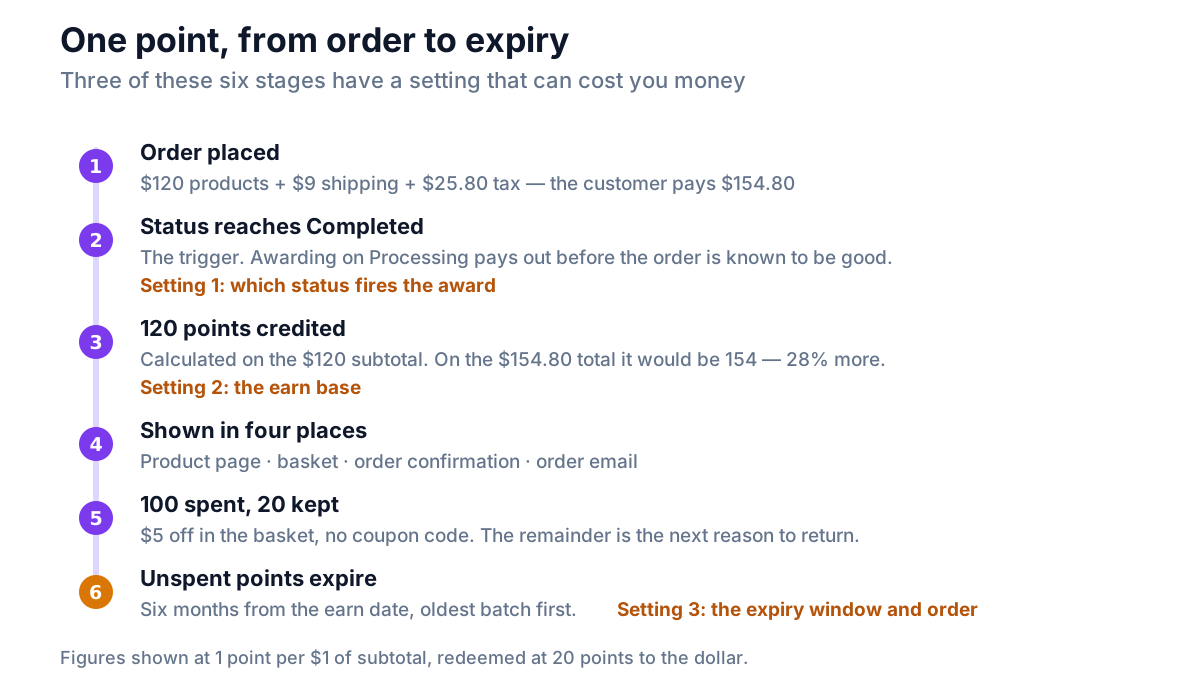
Six stages. Three of them have a setting that can cost you money if it is wrong.
How points are earned: order status, subtotal and rounding
1. Which order status triggers the award?
WooCommerce orders move through statuses: pending, processing, on hold, completed, cancelled, refunded.
A points plugin has to pick one to fire on, and the two candidates behave very differently:
| Trigger status | What it means | Risk |
|---|---|---|
| Processing | Payment received, order not yet shipped | Points exist before you know the order is good |
| Completed | You marked the order fulfilled | Points arrive later, but they are real |
Completed is the right default for most stores. It means points only exist for orders you actually shipped, which removes an entire class of fraud and an entire class of support ticket.
The trade-off is honest: a customer who buys on Monday may not see points until Wednesday. That is why the order email matters — it is where they find out the points arrived.
For stores selling downloads, where orders go straight to completed, the distinction disappears.
If you are reading a plugin's source or its filter documentation, the hooks behind this are woocommerce_order_status_completed and woocommerce_order_status_processing. Those are WooCommerce's own order hooks, and they fire the same way whether your store keeps orders in the posts table or in High-Performance Order Storage. A plugin hanging its points logic on a WordPress post hook instead — transition_post_status, or save_post_shop_order — stops receiving anything once HPOS is authoritative and compatibility mode is off. There is a two-minute way to test that without reading any code.
2. What amount is the calculation based on?
This is the most expensive setting in the category, and it has one correct answer for nearly every store: the product subtotal.
Take a typical order:
| Line | Amount |
|---|---|
| Products | $120.00 |
| Shipping | $9.00 |
| Tax at 20% | $25.80 |
| Order total | $154.80 |
At 1 point per $1, earning on the subtotal gives 120 points. Earning on the total gives 154.
That is 28% more than you intended, on every single order, and nothing will ever report it. You are paying customers for your own shipping charge and for tax you collected on behalf of a government and will hand over in full.
A related question with no single right answer: if the customer used a 20% coupon, do they earn on $120 or on $96? Earning on the pre-coupon subtotal is more generous and keeps the number on the product page honest. Earning on what they actually paid is more conservative. What matters is knowing which your plugin does, and being able to change it.
3. How does it round?
An order of $47.60 at 1 point per $1 is 47.6 points. Points are whole numbers, so something has to happen.
- Round down — the customer gets 47. Slightly stingy, costs you nothing.
- Round to nearest — 48. Fair, roughly neutral over many orders.
- Round up — 48, every time. Generous, and it compounds.
Any of the three is defensible. Rounding up per line item rather than per order is the one to watch: a basket of eight items rounds up eight times, and on small-value lines that can add several percent to the payout.
4. What about guest orders?
Points are attached to a user account. A guest checkout has no account, so there is nothing to credit.
Most plugins award nothing, which is correct. The problem is not the behavior, it is the silence: a product page that says "Earn 120 points with this purchase" followed by an empty account is a support ticket you wrote yourself.
Either state the requirement near the earn message, or credit the points when the customer creates an account with the same email afterwards.
Redeeming points: basket discount or coupon code
A balance is worth nothing to you until it is spent. That is not a slogan — McKinsey's loyalty research found members who redeem spend around 25% more than members who never do. A program that issues points and never sees them come back has produced a liability and no revenue.
So the redemption path deserves more scrutiny than the earning settings, and it usually gets less.
The two ways a discount can reach the order
As a coupon code. The plugin creates a WooCommerce coupon and gives the customer the code. Anything that cannot modify the checkout must work this way, including every hosted loyalty app.
As a discount applied in the basket. The plugin adds a negative line to the order itself. No code exists, nothing is copied.
Count the steps:
| Coupon code | Discount in the basket | |
|---|---|---|
| Steps for the customer | 5 to 7 | 2 |
| Needs a code copied | Yes | No |
| Spend part of a balance | Usually not | Yes |
| Works if they close the panel | The code is lost | Nothing to lose |
| Visible where they already are | No | Yes |
Cart abandonment already averages close to 70% without adding a copy-and-paste step to the checkout. Every extra step is a place to leave.
Partial redemption is not a nice-to-have
If a customer can only redeem in fixed blocks — 500 points for a $5 reward — then a customer with 260 points has nothing to do today. They close the tab, and their balance stops being a reason to return.
Letting them spend any amount fixes that in both directions. They can knock a few dollars off this order, and the remainder is still there next month, still pulling.
Limits worth setting
Three limits keep redemption sane without making it annoying:
- A minimum spend — points can be used on orders over a certain value. Stops a $2 order becoming free.
- A maximum share of the order — for example, points may cover at most half the subtotal. Protects margin.
- Points do not pay for shipping or tax. The discount comes off the products, the same place it was earned.
The block checkout is not optional any more
WooCommerce's block-based Cart and Checkout are what new stores get by default. A redemption panel that only appears on the classic shortcode checkout is a panel most new customers will never see.
Done properly, the panel appears by itself in both, and applying points updates the order totals live through the Store API — no page reload, no code.
Worked example: the math across two orders
Take a store running 1 point per $1 spent, and 20 points redeemed for $1 — a 5% program.
Order 1
| Line | Amount |
|---|---|
| Product subtotal | $120.00 |
| Shipping | $9.00 |
| Tax | $25.80 |
| Customer pays | $154.80 |
| Points earned (subtotal × 1) | 120 |
| Balance is worth | $6.00 |
Order 2, six weeks later
| Line | Amount |
|---|---|
| Product subtotal | $80.00 |
| Points redeemed | 100 |
| Discount applied | −$5.00 |
| Shipping | $9.00 |
| Tax (on $75) | $16.80 |
| Customer pays | $100.80 |
| Points earned on this order | 80 |
| Balance after (120 − 100 + 80) | 100 |
Two things to notice.
The cost to the store was $5 on an order worth $80 — a little over 6% on that order, and 2.5% across the two orders together. That is the real shape of the expense: it looks large on the order where it lands, and small across the relationship.
And the customer finished with a larger balance than they started with. That is the loop working. They came back, spent, and left with more reason to return than before.
Points expiry, and why FIFO matters
Points that never expire become a liability that grows every year and stop feeling urgent. Six to twelve months from the earn date is the normal window.
The mechanic that makes it fair is FIFO — first in, first out.
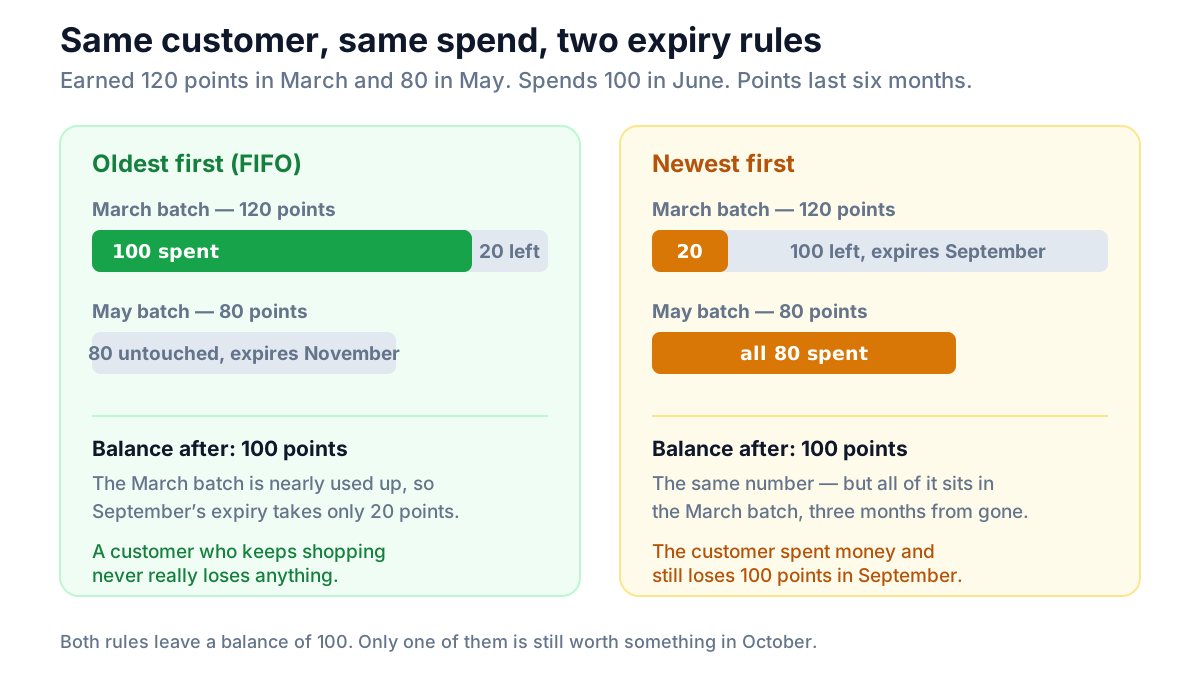
Under FIFO, a customer who shops regularly never actually loses points, because their oldest batch is always being consumed. Under the reverse, a customer can spend steadily and still watch old points expire, which feels like being punished for being a customer.
Two rules make expiry safe to run:
- Show the date. The account page should say when the next batch expires.
- Warn before it happens. An email a couple of weeks out converts expiring points into an order, which is the outcome you wanted anyway.
Refunds, cancellations and manual adjustments
Points do not reverse themselves in most plugins. If an order is refunded after points were awarded, the points usually stay.
Three approaches exist:
- Automatic reversal on refund or cancellation. Cleanest, and worth having on a store with a high return rate.
- Manual adjustment with a reason recorded in a points log. Fine for most stores, as long as the tooling exists and somebody remembers.
- Nothing at all. Points stay, no record, no way to fix it without database work.
Check which one you have before your first refund, not after. And whatever the plugin does automatically, you want a manual adjustment tool anyway — for the long-time customer who deserves a gesture, for a mistake you need to undo, and for the support case that does not fit any rule.
Test the partial refund separately
There is one detail here that catches even plugins which handle refunds properly, and it is worth knowing before you rely on any of them.
In WooCommerce, a full refund moves the order into the refunded status. A partial refund does not — refund $20 of a $50 order and the order keeps whatever status it already had. Both fire refund hooks of their own, but only the full refund changes the status.
So a plugin that reverses points by watching for the status change will handle your full refunds correctly and silently miss every partial one. On a store that takes returns on single items out of a multi-item order, partial refunds are the common kind, and the gap can run for years with nothing reporting it.
Test both. Refund a whole order and check the balance, then refund part of another and check again.
An audit trail matters more here than it sounds. Every point movement — earned, spent, expired, adjusted by hand — should leave a row you can read later. The first time a customer says "I had 400 points", you will want to be able to answer precisely.
Multi-currency, briefly
If you sell in more than one currency, points have an extra trap in them.
The question is what a point is worth. If points are calculated against whatever currency the customer happened to pay in, the same basket earns different amounts depending on the shopper's country, and your cost per point drifts with the exchange rate.
The fix is to anchor everything to your base currency: convert the order back through the rate that order actually used, then calculate points on that. Redemption should still be displayed in the currency the customer is browsing, so the discount reads correctly to them.
This is a place where plugins fail quietly and expensively. There is a full write-up in reward customers in every currency you sell in.
Where NeoGrow fits
NeoGrow is the free WooCommerce points and rewards plugin we build, so here is how it answers each of the above.
Points are awarded when an order reaches completed, and calculated on the product subtotal, so shipping, tax and fees never earn. Coupons do not reduce the earn base by default, and the neogrow_earn_base_amount filter changes that if you would rather they did. Redemption is a discount applied in the basket: the customer types how many points to spend — any amount, not a fixed reward — presses Apply, and the subtotal drops. The panel appears by itself in the block-based Cart and Checkout as well as the classic ones, and totals update live through the Store API. Points expire six months after they were earned, oldest first, and every movement is written to a points log you can read.
On a multi-currency store, points are calculated against base currency using the rate the order actually used; WooPayments, CURCY and FOX work with no configuration. If a currency switcher is converting prices and NeoGrow cannot read its rate, it says so rather than calculating with the wrong one.
Two honest limits in the free version: refunds are adjusted by hand, through Users → Edit User, with the reason recorded in the log — full and partial alike, so there is no status-change gap to fall through, but also nothing automatic. Automatic reversal is part of the paid add-on, as is choosing your own expiry window. And balances live in the plugin's own database tables rather than wp_postmeta, for reasons we measured.
Frequently asked questions
How do WooCommerce points and rewards work?
A customer places an order, and when that order reaches a status you have chosen — usually completed — the plugin credits points to their account, calculated from the order's product subtotal at a rate you set. The balance is stored against the customer and shown on the product page, in the basket, on the order confirmation and in the order email. On a later order, the customer spends some or all of the balance, and the plugin applies the corresponding discount to that order.
When are points awarded, exactly?
On an order status change, and the status your plugin uses matters. Awarding on processing credits points as soon as payment clears, before you know the order is genuine or will actually ship. Awarding on completed credits them once you have marked the order fulfilled, so points only ever exist for orders you shipped. Completed is the safer default for physical goods; for downloadable products the order usually reaches completed immediately anyway.
Should points be calculated on the subtotal or the order total?
The product subtotal, almost always. Calculating on the order total means awarding points for your own shipping charge and for sales tax you collected on behalf of a government and will pay over in full. On a $120 order with $9 shipping and 20% tax, earning on the total awards 154 points instead of 120 — about 28% more than you intended, on every order, with nothing reporting it.
Why do some plugins give a coupon code instead of a discount?
Because they cannot change the checkout. Any tool that runs outside WooCommerce — a hosted loyalty app, for example — has no way to alter an order total, so the only mechanism available to it is to create a coupon and ask the customer to apply it. A plugin running inside WooCommerce can add the discount to the order directly, which is why the redemption step can be two clicks in the basket rather than five or six with a code in the middle.
Can customers redeem only part of their points?
They should be able to, and it is worth checking before you install anything. Fixed-reward redemption — 500 points for a $5 voucher — leaves a customer with 260 points no action to take today, so they take none. Letting them spend any amount means a balance is useful on every visit, and the unspent remainder keeps working as a reason to come back.
What happens to points when an order is refunded?
That depends on the plugin, and most do not reverse points automatically. The three behaviors are automatic reversal on refund, manual adjustment with a reason recorded in a points log, and nothing at all. Test full and partial refunds separately, because they are not the same event: a full refund moves the order into the refunded status, while a partial refund leaves the status alone, so a plugin watching only for that status change will handle full refunds and silently miss every partial one. Find out which one you have before your first return rather than after.
Do WooCommerce loyalty points expire, and which ones go first?
Most plugins expire points on a window measured from the date each point was earned, commonly six or twelve months. The important part is the order in which they are spent. First in, first out means the oldest batch is always consumed first, so a customer who shops regularly never loses anything. The reverse — spending newest first — lets old points expire under an active customer, which reads as a punishment for shopping. Show the next expiry date in the customer's account, and warn before it lands.
The parts that actually decide it
If you only check three things in a points and rewards plugin, check these.
The earn base, because getting it wrong costs you roughly a fifth of your budget forever and never announces itself. The redemption path, because a balance that never gets spent produces a liability and no revenue. The expiry order, because FIFO is the difference between a program that feels fair and one that feels like a trick.
Everything else — tiers, badges, rule builders — is decoration on top of those three.
For the wider design decisions behind a program, start with the complete guide to a WooCommerce loyalty program. If you are still choosing software, there are seven checks to run before installing anything and nine tests to run on your own store once you have a shortlist, and nine questions to settle before you buy. And if the points are meant to bring people back, here is where to show them so they do.
NeoGrow is a free WooCommerce plugin for loyalty points and photo reviews. It runs on your own store, with no order limits and no monthly fee.