
WordPress rewards plugins, compared on a real store
Every comparison of WordPress rewards plugins you will find online has the same shape. A table, ten rows of feature names, green check marks nearly everywhere, and a recommendation at the bottom.
The trouble is that the rows are chosen by whoever built the table, and a check mark says a feature exists — not that it works the way you assumed, or in the checkout you actually use.
So this post is not another table. It is nine tests you can run yourself, on a staging copy of your own store, in about an afternoon. At the end you will have a scorecard filled in with facts rather than claims, and a three-year cost figure for each candidate.
The short version
- Feature tables do not predict satisfaction. A green check for "points redemption" covers both a two-click discount in the basket and a coupon code the customer has to copy and paste.
- Nine tests separate the candidates fast, and six of them take under five minutes each.
- Three of the nine catch real money leaks: earning on the order total, all-or-nothing redemption, and points that survive a refund.
- Compare costs over three years, not one. A metered plan that starts at $15 a month can reach $199 a month on the same software, purely because you sold more.
- Run the tests on staging with a real order. Settings screens describe intentions; orders reveal behavior.
Why the feature table fails you
Three reasons, all structural.
A feature name hides the implementation. "Redeem points at checkout" is true of a plugin that inserts a discount into the order total, and equally true of one that emails the customer a coupon code. Those are not the same product.
The rows are chosen to flatter. Any vendor can build a table where they win, by picking rows they lead on. This is not dishonesty, it is just what a marketing page is for.
The expensive problems have no row. Nobody writes a row called "silently pays out points on your shipping charges", and that one costs more over three years than any missing feature.
The fix is to stop reading about the plugins and start running them.
Set up the test store once
Thirty minutes, and you reuse it for every candidate.
- A staging copy of your store, or a clean WooCommerce install with your theme.
- One simple product at $50, and one variable product with options at $30 and $80.
- Shipping set to a flat $9, and a tax rate of 20%.
- One coupon: SAVE20, 20% off.
- Two user accounts: one as the shop manager, one as a customer.
- A checkout page built with the Checkout block, and a second one using the classic
[woocommerce_checkout]shortcode.
Now install the first candidate, set it to 1 point per $1 spent and 100 points to the dollar, and work down the list.
Nine tests to run on a WordPress rewards plugin
1. What does it earn on?
Place an order for the $50 product with shipping and tax. The order total is $70.80. The subtotal is $50.
Pass: 50 points. Fail: 70 points, or anything above 50.
This is the most expensive default in the category. Earning on the total means paying customers for your own shipping charge and for tax you collected on behalf of a government — roughly a fifth more than you intended, on every order, forever.
2. What does a coupon do to earning?
Order the same product with SAVE20 applied. Subtotal after discount: $40.
There is no universally right answer here. Earning on $50 is generous and defensible; earning on $40 is conservative and defensible. What you need is to know which it does, and ideally to be able to change it.
Pass: the behavior is documented, or configurable. Fail: neither, and you find out from a customer.
3. Can they spend part of a balance?
Give the customer account 600 points. Put the $50 product in the basket. Try to spend 200 of the 600.
Pass: a field accepting an amount, and the discount comes off the subtotal. Fail: the only option is "redeem 500 points for $5" as a fixed reward, or a button that spends the whole balance.
All-or-nothing redemption turns a recurring reason to return into a one-time one. A customer with 260 points and no 260-point reward has nothing to do today.
4. Does redemption need a coupon code?
Still in the basket, count the steps from "I have points" to "the total went down".
Pass: two — enter an amount, press apply, totals update in place. Fail: the plugin issues a code the customer has to copy, close a panel, find the coupon field, and paste.
Every step loses people, and cart abandonment already averages close to 70% before you add any. Redemption is the whole point of the program: McKinsey's loyalty research found members who redeem spend around 25% more than members who never do.
5. Does it work in the block checkout?
Repeat test 3 and 4 on the page built with the Checkout block.
Pass: the redemption panel appears on both checkouts with no extra configuration. Fail: it appears only on the classic one.
This is the test most likely to change your shortlist, because plenty of long-established plugins were written against the classic checkout and have not caught up. The failure is invisible until the day you rebuild your checkout.
6. What happens when the customer was a guest?
Place an order while logged out, then create an account with the same email.
Most plugins award nothing for guest orders, which is reasonable — there is no account to credit. What you are checking is whether the plugin says so anywhere the customer can see it, because "earn 50 points" on a product page followed by nothing in the account is a support ticket.
Pass: points are awarded on account creation, or the requirement to be logged in is stated. Fail: silence.
7. What happens on a refund?
Award points for an order, mark the order refunded, and look at the balance.
Pass: points are reversed automatically, or the plugin documents that you must adjust them by hand and gives you a way to do it with a reason recorded. Fail: points stay, quietly, with no record and no tooling.
Then run it a second time with a partial refund, because that is where the interesting failure lives. Refund $20 of a $50 order and check the balance again.
The reason this is a separate test: in WooCommerce, a full refund moves the order into the refunded status, but a partial refund does not — the order stays as it was. A plugin that watches for the status change catches your full refunds and silently misses every partial one. Since partial refunds are the common kind on a store that takes returns on single items, that gap can run for years without anyone noticing.
Pass: the partial refund is reflected too, proportionally or by a documented rule. Fail: full refunds adjust the balance and partial ones do nothing.
This one matters more on stores with high return rates. Clothing especially.
8. Expiry, and which points go first
Set expiry to a short window on staging. Award points on two dates, then spend some.
Pass: the oldest points are spent first — first in, first out — and the expiry date is visible to the customer somewhere in their account. Fail: newest-first spending, which silently expires points a customer thought they had used, or no visible expiry at all.
9. Deactivate, then reactivate
Pass: balances are exactly where they were. Fail: the tables were dropped on deactivation, and a routine troubleshooting step has become permanent data loss.
The scorecard: disqualifying tests and important ones
Copy this and fill one column per candidate. Tests 1, 3, 4 and 5 are the ones we would treat as disqualifying.
Test baseline, repeated here so the scorecard stands on its own: one $50 product and one variable product at $30 and $80, flat $9 shipping, 20% tax, a 20% coupon called SAVE20, a customer account, and two checkout pages — one built with the Checkout block, one with the classic shortcode. Every plugin gets the same settings: 1 point per $1, 100 points to the dollar.
| Test | What a pass looks like | Weight |
|---|---|---|
| 1. Earn base | Points match the subtotal ($50, not $70.80) | Disqualifying |
| 2. Coupon handling | Documented or configurable | Important |
| 3. Partial redemption | Customer chooses the amount | Disqualifying |
| 4. Redemption path | Two steps, no coupon code | Disqualifying |
| 5. Block checkout | Works with no extra setup | Disqualifying |
| 6. Guest orders | Behavior stated to the customer | Important |
| 7. Refunds | Full and partial refunds both reflected | Important |
| 8. Expiry and FIFO | Oldest first, date visible | Important |
| 9. Uninstall safety | Deactivation loses nothing | Important |
A plugin that passes the four disqualifying tests and fails two of the others is a better buy than one with the opposite result and twice the features.
One test deliberately not on this list is whether the plugin's HPOS badge is real, because it needs a settings change rather than a test order. It takes two minutes and it is step 8 of the pre-install checks.
Three-year cost of ownership: flat license vs metered pricing
A rewards plugin is not a purchase you repeat every quarter. It gets wired into your checkout and stays there, so the number that matters is the three-year one.
There are three pricing models in this market, and they diverge sharply.
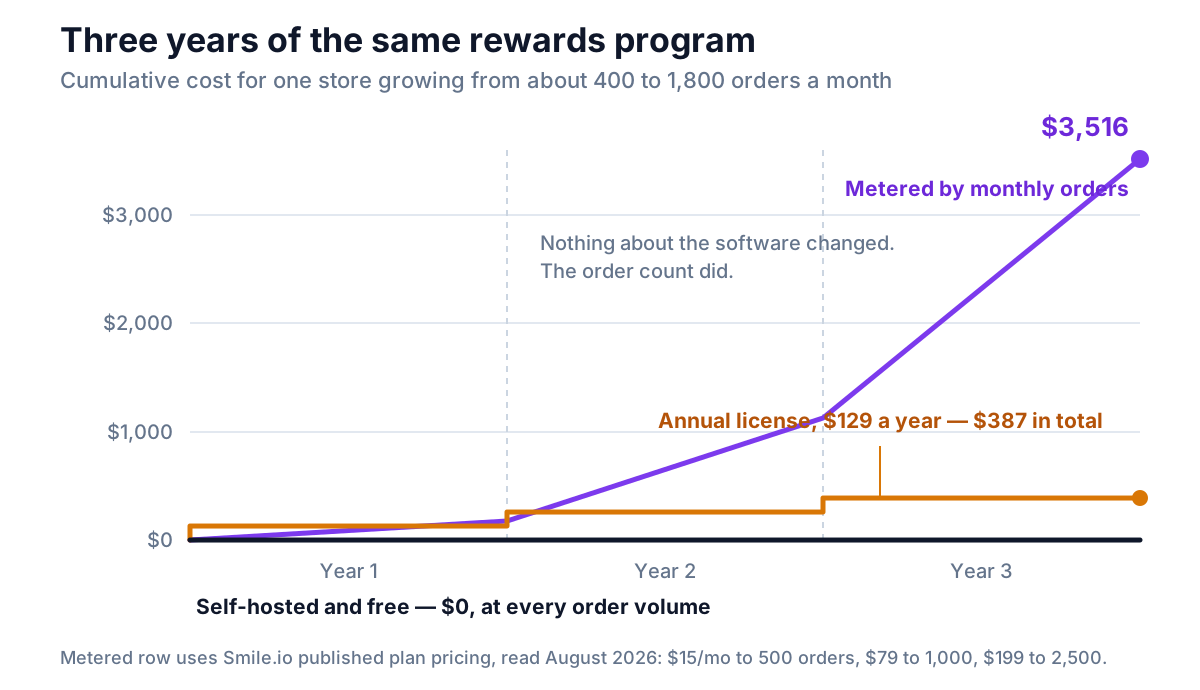
The model behind that chart is one store growing steadily: around 400 orders a month in year one, 900 in year two, 1,800 in year three. Nothing about the software changes. Only the order count does.
| Pricing model | Year 1 | Year 2 | Year 3 | Three-year total |
|---|---|---|---|---|
| Self-hosted, free | $0 | $0 | $0 | $0 |
| Annual license, $129/yr | $129 | $129 | $129 | $387 |
| Metered by order volume | $180 | $948 | $2,388 | $3,516 |
The metered row uses Smile.io's published plan pricing, read in August 2026: $15 a month up to 500 orders, $79 up to 1,000, $199 up to 2,500. Orders above a plan's cap are charged on top.
Two things to take from this rather than the raw totals.
The metered curve is steepest when your store is doing best. A good Christmas moves you up a tier, and tiers do not move back down quickly.
A paid license is not the expensive option. $387 over three years for a plugin that passes all four disqualifying tests is a good trade against a free one that fails them. The expensive option is the metered one, and only because it is priced against your success rather than against the software.
How to read your own results
When the scorecard is full, you will usually find one of three patterns.
One clear winner. Take it. Do not keep researching; the remaining differences are smaller than the time you would spend.
A winner on tests, a loser on price. Work out the three-year figure, then compare it against what test 1 alone costs you. A plugin earning on the order total instead of the subtotal, on a store doing $20,000 a month with $9 shipping and 20% tax, gives away roughly an extra $40 a month. That is $1,440 over three years — more than most licenses.
Everything fails test 4 or 5. Then your shortlist came from an article written before the block checkout existed. Search again with the redemption path as your first filter rather than your last.
Where NeoGrow fits, on the same nine tests
NeoGrow is the free WooCommerce rewards plugin we build, so here are its own results — including the ones it does not pass.
| Test | NeoGrow |
|---|---|
| 1. Earn base | Subtotal. Tax, shipping and fees never earn |
| 2. Coupon handling | Earns on the pre-coupon subtotal; a filter changes it |
| 3. Partial redemption | Customer types the amount to spend |
| 4. Redemption path | Two steps in the basket, no coupon code |
| 5. Block checkout | Block and classic, no setup |
| 6. Guest orders | No points; the requirement is documented |
| 7. Refunds | Manual in the free version, full and partial alike, with a reason recorded in the points log. Automatic reversal is in the paid add-on |
| 8. Expiry and FIFO | Six months, oldest spent first. A custom window is in the paid add-on |
| 9. Uninstall safety | Deactivation changes nothing |
Three-year cost of the free version: $0, with no order cap, no customer cap and no license key.
And the things it does not do at all, so the scorecard is honest: no VIP tiers, no referral system, no visual rule builder. If any of those is on your requirements list, NeoGrow will fail before the nine tests start.
Frequently asked questions
What is the best rewards plugin for WordPress?
There is no single answer, because the tests that matter depend on your store. What holds across stores is the order of the questions: does it earn on the subtotal rather than the order total, can a customer spend part of a balance, does redemption happen in the basket without a coupon code, and does it work in the block-based checkout. A plugin that passes those four will outperform a plugin with a longer feature list that fails any one of them.
How do I compare WordPress rewards plugins fairly?
Run the same tests on each one, on the same staging store, with the same settings — 1 point per dollar and 100 points to the dollar makes the arithmetic obvious. Comparing marketing pages compares copywriting. Comparing behavior on one test order compares the software. Budget about an afternoon for a shortlist of three.
Are free WordPress rewards plugins good enough?
Often, yes. A points program is arithmetic against data your store already holds, so there is no external service that has to be paid for. Free tiers fail for a different reason: they are sometimes shaped to push you to upgrade, by restricting redemption to coupon codes, omitting block checkout support, or capping how many customers may hold a balance. Those limits show up in the nine tests, which is the point of running them.
How much should a WordPress rewards plugin cost?
Judge it over three years, not one. A self-hosted plugin with an annual license around $129 a year comes to about $387 over three years, whatever your order volume does. A plan metered by monthly orders can reach several thousand over the same period on a store that simply grew. Set that against what the program itself costs: at 1 point per dollar and 100 points to the dollar you are returning 1% of subtotal, which is usually larger than any license fee.
Do rewards plugins work with the WooCommerce block checkout?
Some do and some do not, and the listing rarely says. The block-based Cart and Checkout are what new WooCommerce stores get by default, and a plugin written for the classic shortcode checkout will show no redemption panel there at all. Test it directly: build a page with the Checkout block, put something in the basket as a customer with a balance, and look for the panel.
What is the most expensive mistake when picking a rewards plugin?
Letting it earn points on the order total instead of the product subtotal. It never announces itself, it affects every single order, and it inflates your payout by roughly the size of your shipping and tax — often a fifth. On a store doing $20,000 a month that is about $40 a month given away by accident, which over three years outweighs the price of most licenses in this market.
An afternoon is cheaper than a migration
You will live with this plugin for years. It sits in your checkout, holds a ledger that grows every day, and the cost of changing your mind later is a data migration plus an explanation to customers about why their balances moved.
Nine tests, one staging store, one afternoon. Then the decision is made on what the software does, rather than on what its table says it does.
If you have not settled the underlying design yet — earn rate, redemption rate, expiry, what the whole thing costs — read the complete guide to a WooCommerce loyalty program first, and the seven pre-install checks for narrowing a shortlist before you start testing. The questions no test can answer — who owns the ledger, what is metered, and what happens the day a licence lapses — are the nine to settle before you buy. For the mechanics of what happens between earning and spending, see WooCommerce points and rewards: how earning and redeeming actually work. And if a hosted app is still on your list, check it supports WooCommerce at all before you test anything.
NeoGrow is a free WooCommerce plugin for loyalty points and photo reviews. It runs on your own store, with no order limits and no monthly fee.