
WordPress loyalty plugins: what to check before you install one
Search for a WordPress loyalty plugin and you get a wall of results that all look the same. Every listing says points, rewards, tiers and referrals. Every screenshot shows a dashboard with a chart on it. Nothing on the page tells you the things that will actually matter to you in six months.
That is not the plugin authors being evasive. It is that the important differences are invisible from a listing — they live in the database, in the checkout, and in the licensing.
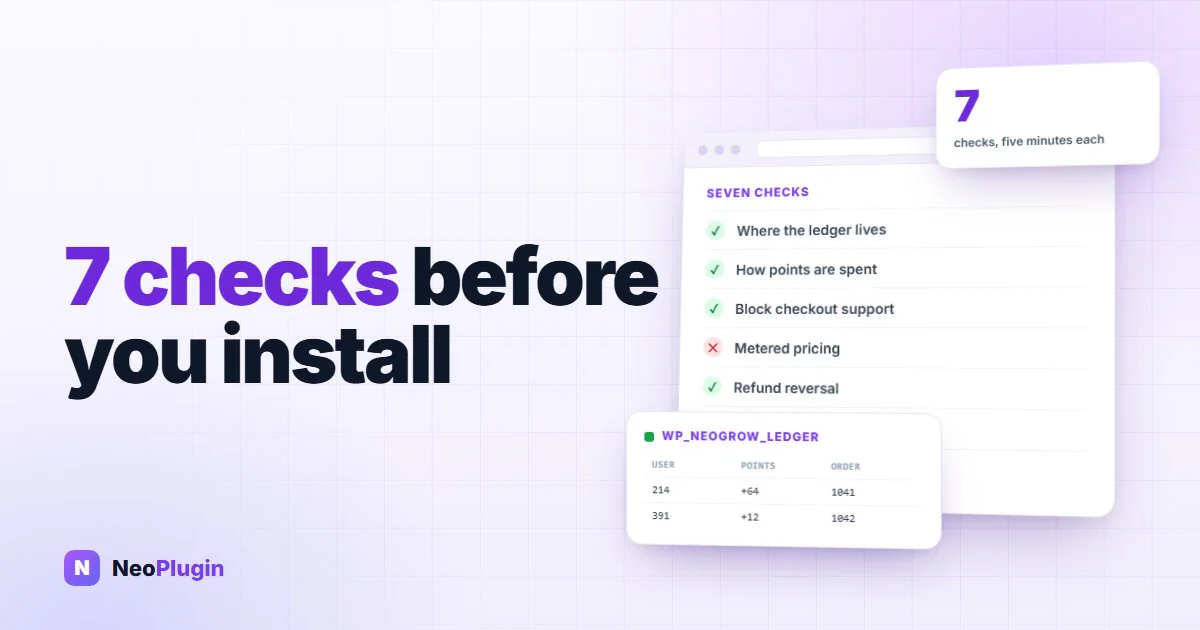
This post is the checklist we would use. It takes about twenty minutes on a staging site, and it will save you a migration.
The short version
- Check you need an ecommerce loyalty plugin at all. "Points for WordPress" and "points for a WooCommerce store" are two different kinds of software, and installing the wrong one is the most common mistake here.
- Ask where the points are stored. A ledger in
wp_postmetaorwp_optionsshares tables with the queries your store depends on. A purpose-built table does not. - Ask how a customer spends them. If the answer is a coupon code, redemption is going to be low, and points nobody spends do nothing for you.
- Ask what is metered. Orders, customers, emails, sites. Metered pricing means the software gets more expensive exactly when your store does well.
- Ask what happens on uninstall. Some plugins drop every table on deactivation. You want that decision to be yours.
- Check the maintenance signals, not the feature list. Last updated, "tested up to", and whether the plugin declares HPOS compatibility — then test that claim, because declaring it is self-certification and nothing verifies it.
WooCommerce loyalty plugin or WordPress gamification plugin?
The phrase loyalty program WordPress covers two completely different jobs, and the search results mix them together.
| Kind of site | What "points" usually means | What you need |
|---|---|---|
| WooCommerce store | Points earned on orders, spent as a discount at checkout | An ecommerce loyalty plugin |
| Membership or course site | Points for completing lessons or renewing | A points system tied to the membership plugin |
| Forum or community | Points for posts, badges, leaderboards | A gamification plugin |
| Plain WordPress site | Usually nothing yet | A store first |
The third row is where people get caught. A general WordPress point system — the kind built for gamifying a community — can award points for almost any action, which sounds more flexible. But it has no concept of an order, no concept of a subtotal, and no way to take money off a checkout total. Bolting a store onto it afterwards is far more work than starting from an ecommerce plugin.
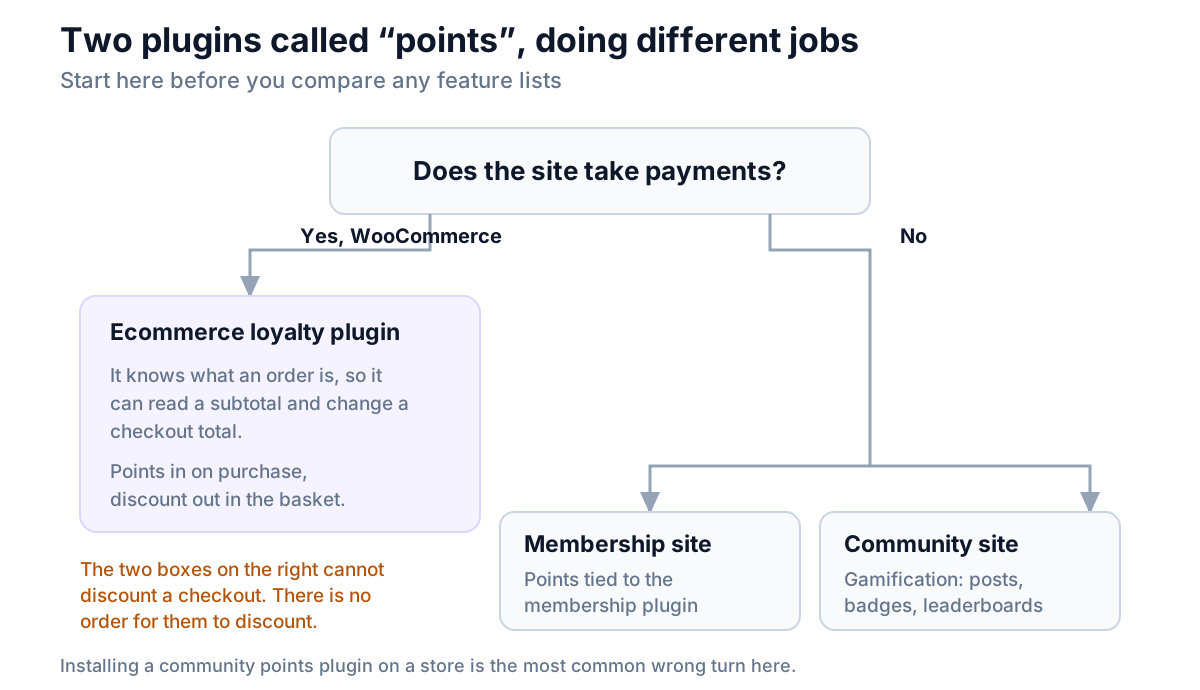
If you are on WooCommerce, everything below applies. If you are not, the honest answer is that a loyalty program needs something to be loyal to — get the store running first.
Seven checks before installing a WordPress loyalty plugin
1. Where does it store the ledger?
This is the single most predictive question, and almost nobody asks it.
WordPress gives a plugin two easy places to put data: wp_postmeta and wp_options. Both are convenient, and both are shared with the things your store depends on most — products, orders, and the autoloaded settings that WordPress reads on every single page load.
A loyalty ledger is write-heavy and grows without limit. Every order, every redemption, every expiry is a row. Put that in the shared tables and you are adding permanent weight to queries that were already the slowest on your site.
A plugin with its own table keeps its growth to itself. We benchmarked the difference in why loyalty points do not belong in postmeta.
How to check: install on a staging site, place a test order, then look at the database — a plugin with its own tables will have created something like wp_pluginname_points on activation. Many plugins also say so in their documentation, because it is a selling point when it is true.
2. Does it earn on the subtotal or the order total?
If points are calculated on the order total, you are paying customers for your own shipping charge and for tax you collected for a government.
On a store with $9 shipping and 20% tax, earning on the total inflates your payout by roughly a fifth, forever, and nothing will ever flag it. It is not a bug — it is a default nobody looked at.
How to check: place a test order with shipping and tax on it, then compare the points awarded against the product subtotal. Do not trust the settings screen; do the arithmetic.
3. How does a customer actually spend points?
There are two answers, and they are not close in quality.
A coupon code. The plugin generates a code and the customer applies it in the coupon box. This is what any tool that cannot modify your checkout must do. It costs the customer four or five extra steps, and each one loses people.
A discount applied in the basket. The customer sees their balance where they already are, enters how many points to use, and the total updates. Two steps, no copying.
Redemption rate is the number that decides whether a loyalty program is worth running. McKinsey's loyalty research found that members who redeem spend around 25% more than members who do not. A redemption path with five steps in it suppresses exactly the behavior you are paying for.
One more thing to check here: can they spend part of a balance? All-or-nothing redemption — 500 points buys one fixed reward — leaves a customer with 260 points nothing to do today, so they do nothing.
4. Does it work in the block-based Cart and Checkout?
WooCommerce ships block-based Cart and Checkout pages, and new stores get them by default. Plenty of loyalty plugins were written against the classic shortcode checkout and have not caught up.
The failure mode is quiet and awful: everything works while you test on an old store, then you rebuild your checkout with blocks and the redemption panel simply does not appear.
How to check: create a page with the Checkout block, add something to a basket, and look. If the panel only shows up on the classic checkout, you have found a limit that will bite you the next time you touch your theme.
5. What is metered, and what does renewal cost?
Read the pricing page for units, not for features. The ones that matter are:
| Metered unit | What it means for you |
|---|---|
| Orders per month | The price rises every time you have a good month |
| Customers or contacts | The price rises as your list grows, which is the goal |
| Emails sent | Retention email gets rationed |
| Sites in the license | Staging and development sites may each consume one |
Then check what happens at renewal. A one-year license that stops receiving updates is a security decision you will have to make later, under time pressure, on a plugin that is wired into your checkout.
Software running entirely on your own server has nothing to meter, which is why a free tier can be genuinely unlimited rather than a trial with a cap.
6. What happens to the data if you uninstall it?
Three behaviors exist in the wild:
- Leaves everything. Tables and balances stay. Safest, slightly untidy.
- Deletes on uninstall, keeps on deactivate. The WordPress-correct behavior: deactivating is reversible, deleting is not.
- Drops tables on deactivate. Rare, and a reason to walk away.
The one you want is the second, ideally with a setting. What matters is that the decision is yours and that it is documented somewhere before you find out empirically.
7. Is it maintained?
The feature list tells you what the plugin did on its best day. The maintenance signals tell you whether it will still work after the next WooCommerce release.
On the WordPress.org listing, look for:
- Last updated — within the last few months, not last year.
- Tested up to — the current WordPress version, or one behind.
- HPOS compatibility. WooCommerce's High-Performance Order Storage moves orders out of
wp_postsandwp_postmetainto tables of their own. A plugin that reads orders and has not declared compatibility with it is a plugin nobody has revisited recently. - Support forum — read the unresolved threads, not the resolved ones. The pattern of what goes wrong is more useful than the count.
- Active installs versus review count. A plugin with 20,000 installs and four reviews is not necessarily bad, but it does mean nobody has been checking.
Treat that HPOS line as a starting point rather than an answer, because declaring compatibility is self-certification. The developer adds one line, WooCommerce stops warning about the plugin, and nothing anywhere checks that the code behind it was actually updated.
The failure this hides is specific. A plugin can declare support and still hang its points logic on save_post_shop_order — a WordPress hook that fires when an order is written to the posts table. Turn HPOS on with compatibility mode off, orders stop being written there, the hook never fires, and points are silently never awarded. Nothing errors. The order completes normally and the balance just stays at zero.
You do not have to read anyone's source code to catch it. Step 8 of the test below does it in about two minutes.
Three questions that look important and are not
"How many features does it have?" Feature counts are the easiest thing to inflate and the least predictive thing on the page. A plugin that does points-for-orders and basket redemption properly beats one with tiers, badges, referrals and a rule builder that all sit on a broken redemption path.
"Does it have a nice dashboard?" You will look at it twice in the first week and once a quarter after that. Your customers never see it.
"Is it the most popular one?" Install counts measure marketing and age. Several very widely installed plugins store their ledger in wp_postmeta because that was normal practice when they were written.
The twenty-minute staging test, step by step
On a staging copy of your store:
- Install the plugin. Note whether it created its own tables.
- Set 1 point per $1, 100 points per $1 redeemed.
- Place a test order with shipping and tax. Compare points awarded against the subtotal.
- Log in as that customer. Find the balance — count the clicks from the homepage.
- Add something to the basket. Try to spend half the balance.
- Do the same on a page using the Checkout block.
- Deactivate the plugin. Check the balance still exists. Reactivate.
- Prove the HPOS claim. Go to WooCommerce → Settings → Advanced → Features, set order storage to High-performance order storage, and untick "Enable compatibility mode". Place another test order and mark it completed. If the points arrive, the plugin genuinely reads orders the modern way. If they do not, it was reading the posts table all along, whatever its listing says.
Anything that fails steps 3, 5, 6 or 8 will cost you money or customers, and neither is worth the migration you would rather not do later.
Where NeoGrow fits
NeoGrow is the free WooCommerce loyalty plugin we build, so here is how it answers its own checklist.
Points and review history live in the plugin's own database tables, not in wp_postmeta or wp_options. Earning is calculated on the order subtotal, so shipping and tax never inflate the payout. Redemption appears by itself in both the block-based and classic Cart and Checkout, the customer enters how many points to spend rather than taking a fixed reward, and no coupon code is involved. Nothing is metered — no order cap, no customer cap, no license key — and it declares HPOS compatibility.
It is not the right plugin for every case. There are no VIP tiers, no referral system, and expiry is fixed at six months in the free version. If any of those is a requirement this quarter, run the checklist above on something else and use it to ask better questions.
Frequently asked questions
What is a WordPress loyalty plugin?
It is a plugin that adds a points program to a WordPress site: customers earn points for actions you choose, the plugin keeps a balance against each user account, and that balance can be spent as a discount later. On a WooCommerce store, points are normally earned on orders and spent at checkout. On a membership or community site, a points system usually rewards activity rather than spending, and cannot discount an order because it has no concept of one.
Do I need WooCommerce to run a loyalty program on WordPress?
For a shopping loyalty program, yes in practice. Points for purchases need something that records purchases, a subtotal to calculate against, and a checkout total to discount. WooCommerce provides all three. A general WordPress point system can award points for logging in, commenting or completing a course, but it has no order to attach value to, so it cannot reduce what a customer pays without a separate ecommerce layer underneath.
Is there a free WordPress loyalty program plugin?
Yes, and a free tier can be genuinely complete here, because a loyalty program is arithmetic against data your site already stores — there is no external service to pay for. Read what the free tier excludes before installing. The usual limits are redemption only through coupon codes, no support for the block-based checkout, or a cap on how many customers may hold a balance.
Where do loyalty plugins store points in WordPress?
Most commonly in wp_postmeta or wp_options, because those are the paths of least resistance in WordPress, and less commonly in a table the plugin creates for itself. The distinction matters because a points ledger grows without limit and is written to on every order, redemption and expiry. Sharing those tables with products, orders and autoloaded settings slows down queries your store already depends on, and the effect compounds as history builds up.
Will a loyalty plugin slow down my WordPress site?
It depends almost entirely on the storage question above, plus one other thing: whether it loads anything from an outside server. A plugin that reads a balance from a local table adds a fast, indexed query. A plugin that stores the ledger in shared WordPress tables adds weight to queries that are already the slowest on the site. A hosted widget that fetches balances from another company's server makes your page speed depend on their response time.
What happens to my customers' points if I uninstall the plugin?
That varies by plugin and is worth knowing in advance. Correct behavior is that deactivating changes nothing and only deleting the plugin removes data, ideally with a setting to keep it. Some plugins leave everything in place permanently; a small number drop their tables on deactivation, which turns a routine troubleshooting step into permanent data loss. Test it on staging: deactivate, check the balances, reactivate.
The short checklist, one more time
Where does it put the ledger. What does it earn on. How does a customer spend a point. Does it work in the block checkout. What is metered. What happens on uninstall. Is it maintained.
Seven questions and eight steps on a staging site, and you will know more about the plugin than its landing page was ever going to tell you — including whether its HPOS badge is real.
If you want the broader picture first — earn rates, redemption, expiry and what a program actually costs — start with the complete guide to a WooCommerce loyalty program. If you have a shortlist already and want to compare them on your own store rather than on their feature tables, that is the next post. And before money changes hands, there are nine questions about the arrangement itself — ownership, metering, licence lapse and what it would cost to leave.
NeoGrow is a free WooCommerce plugin for loyalty points and photo reviews. It runs on your own store, with no order limits and no monthly fee.