
How to sell variable products well in WooCommerce
Most WooCommerce shops make the bulk of their money on variable products. Clothing has sizes. Furniture has finishes. Coffee has grinds and bag weights. Even a shop selling one thing usually sells it in three quantities.
Which means the product page is doing something more complicated than describing a product. It is asking the visitor to make a decision — and everything on that page either helps them make it or gets in the way.
The short version
- A variable product page is a decision, not a description, and the decision happens in the seconds while somebody is picking an option.
- Replace dropdowns with variation swatches on any visual attribute. A dropdown hides your range until somebody clicks it, so a shopper who never opens the menu never learns the jumper comes in eight colors.
- Show those swatches on the shop and category pages too, not only the product page. That is where most of the browsing happens.
- Every number that depends on the chosen option should follow it — price, reward points, stock status, delivery estimate, savings against RRP.
- Reward points are the number most often left behind. "Earn 15 – 20 points" is a range for a decision the shopper has already made: accurate and useless.
- NeoGrow's points message follows the selected variation, free, and works with every swatch plugin because it follows WooCommerce's own variation form rather than any one plugin.
Why the variation picker decides the sale
Watch what a shopper actually does on a variable product page. They are not reading your description. They are picking the option they want, and while they do it they are deciding whether the thing is worth the money.
That is a very short window, and almost everything that decides the sale happens inside it.
So the useful question for any product page is not "does it look nice?" It is: when the shopper picks an option, does the page tell them what they just chose?
WooCommerce variation swatches versus the default dropdowns
WooCommerce ships variations as dropdown menus. They work, and for something like Bag size: 250g / 500g / 1kg they are perfectly fine.
For anything visual they cost you sales, for a simple reason: a dropdown hides your range until somebody clicks it. A shopper who does not open the menu never learns the jumper comes in eight colors. You did the work of stocking eight colors and the page showed them one.
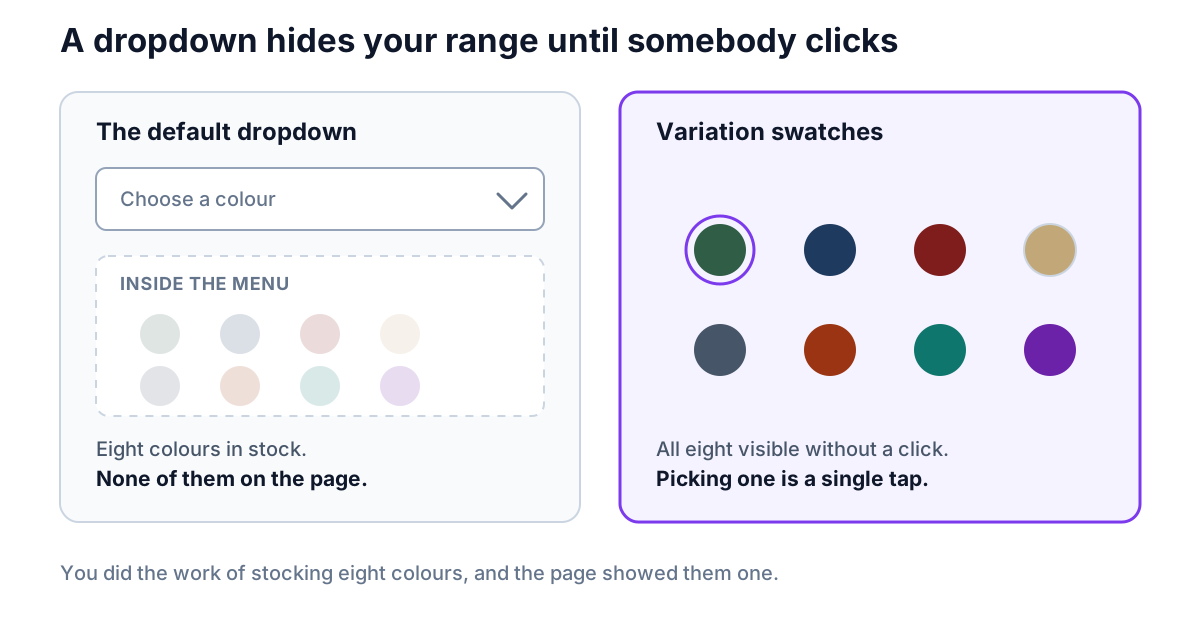
WooCommerce variation swatches turn that around. The options are visible without a click, so the range sells itself, and picking one is a single tap on a phone rather than a fiddly native select.
The four types of variation swatch
Color becomes a color swatch, a pattern or finish becomes an image swatch, and a size or capacity becomes a button or label — each one readable at a glance instead of hidden behind a select box.
| Swatch type | Best for | What it gives the shopper |
|---|---|---|
| Color | Clothing, footwear, accessories | The whole shade range visible without opening a menu |
| Image | Patterns, finishes, materials | The texture a flat color chip cannot carry |
| Button or label | Sizes, capacities, pack counts | One tap instead of a narrow native select |
| Radio | Attributes with no visual form | The closest thing to the old dropdown, still open on the page |
Which variation swatch plugin to use
If you are not already using them, Variation Swatches for WooCommerce by Emran Ahmed is the one we would point most shop owners at first. It is free on WordPress.org, it is running on 300,000+ shops with a 96% rating, and it turns your existing attributes into color, image, button or radio swatches without you restructuring anything. You set the attribute type once and the product pages follow.
There are other capable options — Brainstorm Force's is on 200,000+ shops, and WCBoost makes a lighter one. Any of them beats a dropdown for a visual attribute.
Make every number on the page follow the choice
Here is where most product pages stop short.
When a shopper picks the large size, WooCommerce updates the price. Good. But the price is rarely the only number on that page that depends on which option they picked — and any number that doesn't update is quietly telling them it isn't about them.
Reward points are the number most often left behind
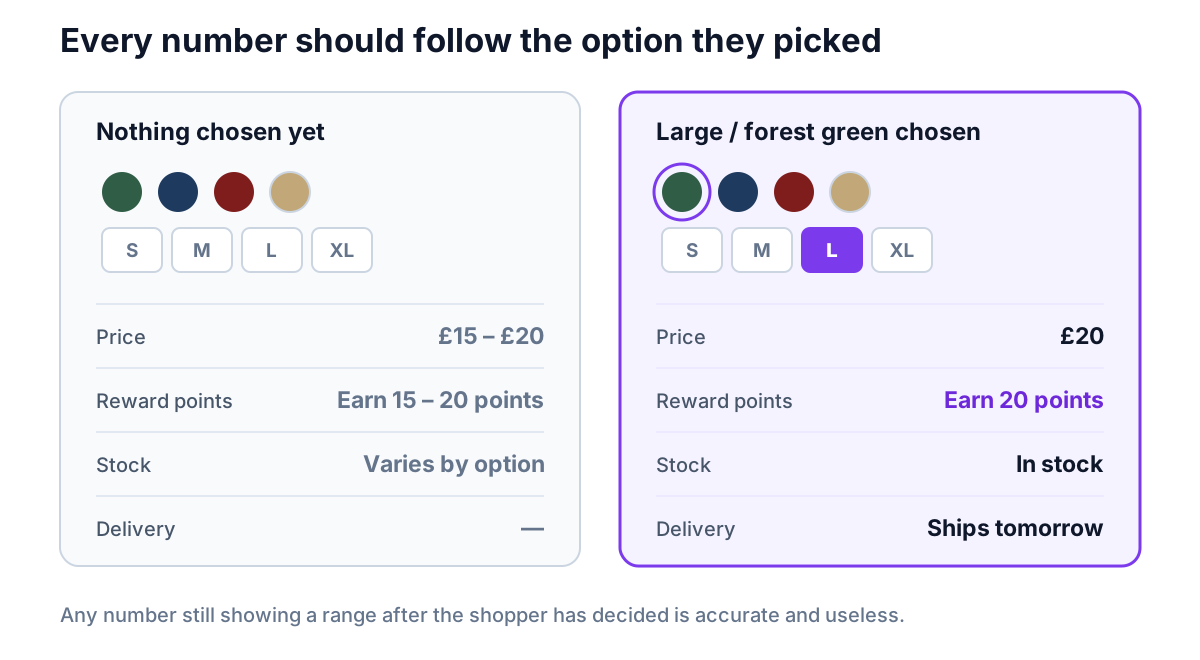
If your shop runs a rewards program, the WooCommerce reward points figure is the obvious one — and it is the one most loyalty plugins print once and leave alone, because reading the variation a shopper just chose is more work than reading the product.
A product running from £15 to £20 that says "Earn 15 – 20 points" is showing a range for a decision the shopper has already made. It is accurate and useless. The version that says "Earn 20 points" the instant they choose the £20 option is part of the decision they are making right now.
That is a small difference in code and a real one in behavior. A reward figure that responds to what somebody just tapped reads as a benefit. One that ignores them reads as furniture.
If you are setting up a rewards program from scratch, start with the complete WooCommerce loyalty program guide.
How NeoGrow does it
NeoGrow's "Earn X points with this item" message follows the selected variation. Pick an option and the figure narrows to that option; clear the selection and it goes back to the range. What each option earns comes from your own earning rules — the message just reports them for the variation in front of the shopper.
It works with every swatch plugin, and that is deliberate. Rather than integrating with any particular one, NeoGrow follows WooCommerce's own variation form — which every swatch plugin drives, because that is how they all work underneath.
We checked that rather than assuming it. NeoGrow was tested against the four most-installed swatch plugins on WordPress.org — Emran Ahmed's Variation Swatches, Brainstorm Force's, WCBoost's and Woosuite's, roughly 600,000 shops between them — with multiple swatched attributes on each, on both classic and block themes.
The practical upshot: you can change swatch plugin, or install one for the first time, and the points figure keeps working. Nothing to reconfigure and no integration to wait for.
A checklist for a WooCommerce variable product page
Worth walking one of your own product pages through:
- Are your visual attributes swatches rather than dropdowns? Color and material especially. If a shopper has to open a menu to discover your range, most of them will not.
- Does the price update the moment they choose? It should, out of the box — but themes and page builders sometimes break it.
- Does every other number update too? Rewards, stock status, delivery estimate, savings against RRP. Anything showing a range after the shopper has decided is a number doing nothing. The same applies to the currency it is shown in, if you reward customers across multiple currencies.
- Is the variation image doing any work? A swatch that changes the main image is worth more than one that only changes a label, and a variation image tooltip on hover saves a click entirely.
- Do your swatches appear on the shop and category pages? Showing them on the catalog and archive pages lets a shopper see the range before they ever open a product, which is where most of the browsing happens.
- What happens to a sold-out option? Blurring or hiding an out-of-stock variation is kinder than letting someone pick it and find out at the basket.
- Try it on a phone. Most of your traffic is there, and native dropdowns are markedly worse on touch than swatches are.
Frequently asked questions
What is a variable product in WooCommerce?
A product sold in more than one version — sizes, colors, finishes, bag weights, quantities — where the shopper picks an option before adding it to the basket, and each variation carries its own price, SKU, stock level and image. Most WooCommerce shops make the bulk of their money on them, which makes the option-picking moment the one that decides the sale.
Are variation swatches better than dropdowns?
Yes, for any visual attribute. WooCommerce ships variations as dropdown menus, which hide your range until somebody clicks. A shopper who never opens the menu never learns the jumper comes in eight colors — you stocked eight and the page showed one. Swatches make the options visible without a click, and picking one is a single tap on a phone rather than a fiddly native select. For a non-visual attribute like Bag size: 250g / 500g / 1kg, a dropdown is perfectly fine.
Which WooCommerce variation swatches plugin should I use?
Variation Swatches for WooCommerce by Emran Ahmed is the one we would point most shop owners at first: free on WordPress.org, running on 300,000+ shops with a 96% rating, and it converts your existing attributes without restructuring anything. It covers color, image, button and radio swatches, shows them on catalog and archive pages as well as the product page, and adds variation image tooltips. Brainstorm Force's is on 200,000+ shops and WCBoost makes a lighter one. Any of them beats a dropdown for a visual attribute.
What types of variation swatch are there?
Four in common use. Color swatches show the actual color as a filled circle or square. Image swatches show a thumbnail, which is what you want for patterns, finishes and materials where a flat color cannot carry the difference. Button or label swatches suit sizes, capacities and anything text-based. Radio swatches are the closest to the original dropdown and are worth using only where the attribute genuinely has no visual form.
Should swatches show on the shop and category pages too?
Yes, where your theme allows it. Most browsing happens on the catalog and archive pages, so a shopper who can see the full color range before opening a product gets to the right variation faster — and learns you stock eight colors rather than assuming you stock one.
Do WooCommerce reward points update when a shopper picks a variation?
With NeoGrow, yes. The "Earn X points with this item" message follows the selected variation — pick an option and the figure narrows to it, clear the selection and it returns to the range. It works with every swatch plugin, because NeoGrow follows WooCommerce's own variation form rather than integrating with any particular one. It was tested against the four most-installed swatch plugins on WordPress.org, roughly 600,000 shops between them, on both classic and block themes.
What should update on a variable product page besides the price?
Everything that depends on the chosen option: reward points, stock status, delivery estimate and savings against RRP. Any number still showing a range after the shopper has decided is a number doing nothing — it is accurate and useless.
What to change first on a variable product page
Variable products are where the buying decision happens, and the decision happens in the seconds while somebody is picking an option.
Show the range without a click, and make every number on the page respond to what they picked. Swatches handle the first. NeoGrow handles the rewards half with whichever swatch plugin you already use, and it is free on WordPress.org.