
How to use WooCommerce wishlist data to pick your Black Friday discounts
Every Black Friday sale starts with the same question: which products go on sale? Most stores answer it with a guess. They discount whatever is overstocked, last year's bestsellers, or everything at once.
Each of those has a cost. Overstock is often overstocked because nobody wants it. A bestseller sells anyway, so its discount is margin you give away for nothing. And a sitewide 20% does both.
A wishlist gives you a better answer, and a Black Friday strategy built on data you already have. Every saved product is a shopper telling you "I want this, and something stopped me". That is the list of products where a discount changes a decision rather than rewarding one already made. It is also a list of people to tell when the price drops.
This is the third of three Black Friday posts. The first made the case for paying part of the offer in loyalty points instead of discounts. The second tested what happens when a coupon and points meet in the cart. This one is about choosing what to discount, using NeoWish, our free wishlist plugin. Everything below was checked against NeoWish's own code on a WooCommerce 11 store.
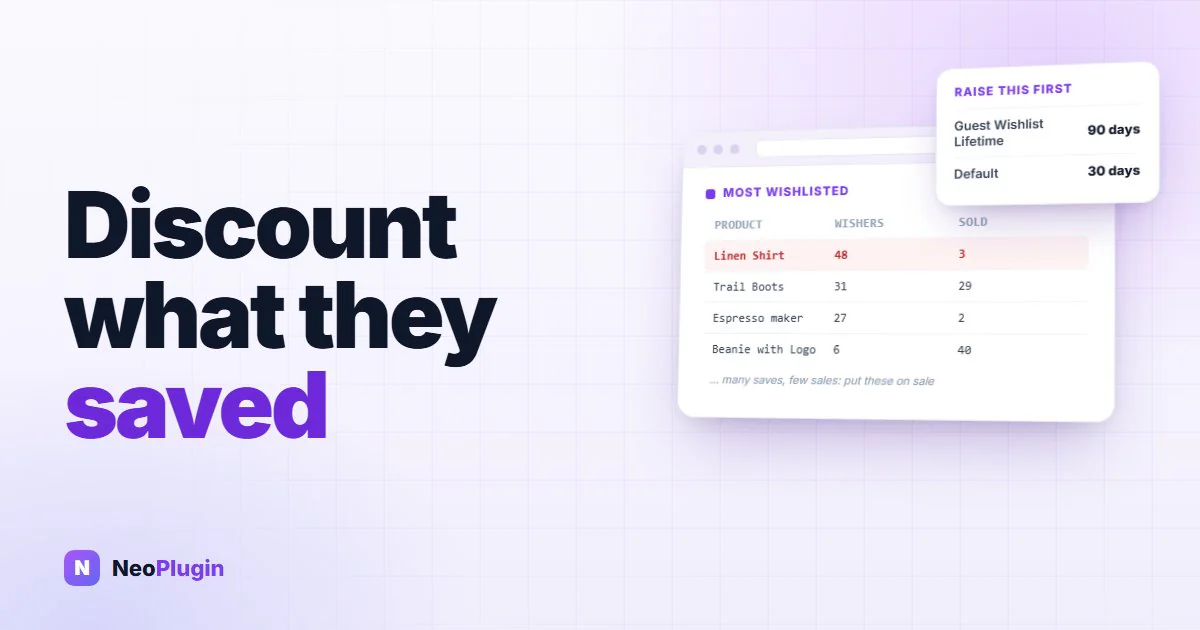
Quick answer. Discount the products with many wishlist saves and few sales. Those are the ones people want and are not buying, so a lower price changes the outcome. Read the saves in NeoWish's Most Wishlisted report, compare them with WooCommerce Analytics for the same 30 days, and schedule the sale prices. Customers with an account can be emailed from a short database query. Guests see the new price on their wishlist when they come back. Before any of that, raise NeoWish's guest wishlist lifetime: at the default 30 days, guest lists saved in October are gone by Black Friday.
The short version
- Do this first, today. Under Marketing → NeoWish → Settings, raise Guest Wishlist Lifetime (Days) from 30 to 90. A guest's list lasts 30 days from their first save, and saving more items does not extend it. At 30, anyone whose first save was on or before 27 October has lost their list by the time the sale opens on 27 November.
- Read the report every week until mid-November, and write it down. The Most Wishlisted report covers a rolling 30 days. October's saves will have dropped out of it by Black Friday.
- Put saves next to sales. Many saves and few sales means people want the product and are not buying. Those are your Black Friday products.
- Leave your bestsellers alone. If a product sells well without a discount, discounting it on Black Friday mostly lowers your margin.
- Customers with an account can be emailed, from a short database query, if they have agreed to marketing email. A saved product is not that agreement.
- Guests cannot be emailed. NeoWish never collects their address. What reaches them is the wishlist page itself, which shows the sale price with the old price crossed out, and a banner that sends them back to it.
Do this first: stop October's guest lists expiring before the sale
This takes a minute, so it comes first.
NeoWish lets guests save products without an account. Their list is tied to a cookie in their browser, and the cookie's lifetime is the Guest Wishlist Lifetime (Days) setting, which defaults to 30 days.
Two details from the code change the timing:
- The cookie is set once, on the guest's first save. Saving a second or
tenth product does not renew it, and neither does visiting. A guest who first saved on 20 October loses access to the list on 19 November, even if they added something on 18 November.
- A new lifetime applies only to cookies set after the change. Guests who
already have a cookie keep its original expiry date. So every day you wait, another day's worth of guests is locked into the 30-day limit.
Count back from 27 November. At the default setting, a guest whose first save is on or before 27 October no longer has the list when your sale starts. That includes the people who saved your products in October, at their full price, and who are most likely to buy once the price drops.
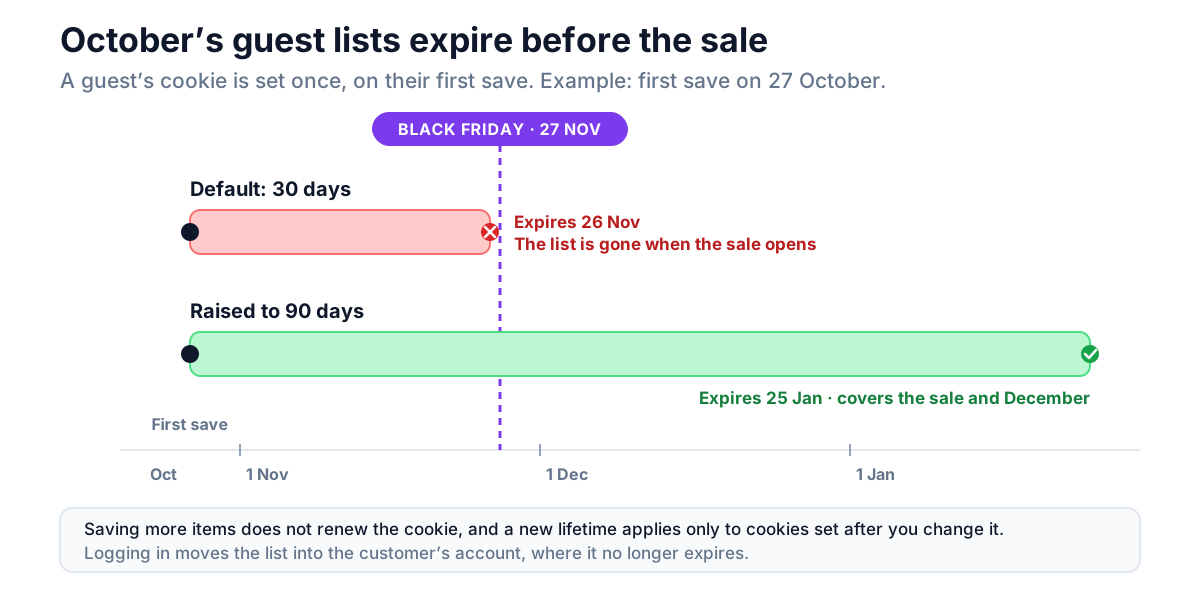
Set it to 90. A cookie set today then lasts into early January, which covers Black Friday, Cyber Monday and the December gift season. The list itself stays in your database for the lifetime plus 30 days after its last change, then NeoWish's daily cleanup deletes it, so a longer lifetime does not leave rows behind forever.
A guest who creates an account or logs in keeps the list permanently, because it moves into the account at that point. So anything that gets a saver to log in before the sale protects their list, whatever the cookie says.
Step 1: read the report every week, and write it down
The report is under Marketing → NeoWish, on the Dashboard tab: Most Wishlisted Products (Last 30 Days). It lists up to 20 products with two numbers each:
- Adds counts every time the product was saved. A shopper who removes it and
saves it again counts twice.
- Unique Wishers counts different people. Logged-in customers are counted by
account and guests by their browser. NeoWish records only a salted hash for this, never a name, email or IP address.
Use Unique Wishers. It is the number of people who wanted the product.
The window is a rolling 30 days. Open the report on 27 November and it shows saves from 28 October onwards; everything saved earlier has dropped out. So from now until mid-November, copy the table into a spreadsheet once a week. Four snapshots give you the pattern, and a product that shows up every week is a much safer pick than one that spiked once.
There is also a longer view the dashboard does not show: every product still sitting in a list, however long ago it was saved. If you can run a query (phpMyAdmin, Adminer, or wp db query on the command line), this gives it to you:
SELECT product_id, COUNT(DISTINCT list_id) AS lists
FROM wp_neowish_items
GROUP BY product_id
ORDER BY lists DESC
LIMIT 20;
Change wp_ if your database uses a different table prefix. The number is how many wishlists hold the product right now. It still includes guest lists whose cookies have expired but which NeoWish has not deleted yet.
Never run a query before? Most hosting control panels include phpMyAdmin. Open it, click your site's database on the left, and look at the table names: if they start with something other than
wp_(saywp7_, orwp_2_on a multisite network), use that prefix in the query instead. Then open the SQL tab, paste the query and click Go. To keep the result, click Export under the results and choose CSV, which opens in Google Sheets or Excel. Every query in this post only reads data. None of them changes anything in your store.
Step 2: put saves next to sales
A save count on its own tells you what people like. What you need for Black Friday is the products people want and are not buying, so you need sales alongside it.
Open WooCommerce → Analytics → Products, set a custom date range that covers the same 30 days as your snapshot, and note Items sold for each product on your list. Now every product falls into one of four groups. Call it the wishlist–sales matrix:
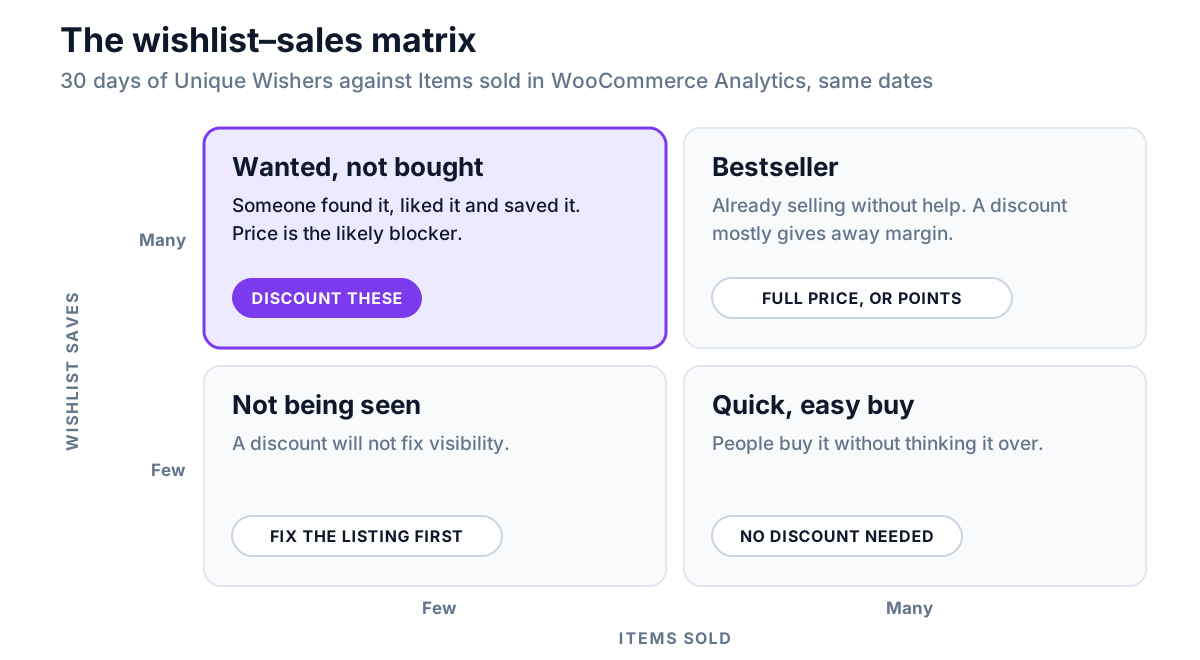
The NeoWish launch post introduced these four groups. For Black Friday, the top-left box is the whole point. These products have already passed the hard test: someone found them, liked them and saved them. Something stopped the purchase, and for most products at most stores that something is price. Black Friday is the one weekend a year when shoppers expect the price to move.
The opposite box matters as much. A product with many saves and many sales is selling without help. Taking 25% off it gives margin to customers who were already buying. If you want it in the sale anyway, the points approach keeps more of the margin: points cost you only when they are spent, and they bring the customer back to spend them.
Which size or colour did they save?
NeoWish saves the exact variation a shopper picked, so you can see which sizes or colours people want. That tells you which variations to stock up on before the sale, and which ones to discount. Replace 123 with the product's ID (shown when you hover over the product in Products):
SELECT variation_id, COUNT(*) AS saves
FROM wp_neowish_items
WHERE product_id = 123
GROUP BY variation_id
ORDER BY saves DESC;
A variation_id of 0 means the product was saved without a variation chosen.
Step 3: discount what was saved, not what is overstocked
You now have a short list of products people want but are not buying. Three decisions remain.
How deep. The saves tell you which products to discount, not how much to take off. Start smaller than your sitewide habit. The people who saved these products are already interested, so a modest cut is more likely to tip them than it would be on a random product. Write down the save count and the discount for each product. In December, that record is the only way to tell which cuts worked.
When. Schedule the price rather than changing it by hand on Thursday night. On the product's edit screen, under Product data → General, enter the Sale price, click Schedule and set the start and end dates. WooCommerce switches the price on and off for you.
What it stacks with. A sale price is the first layer, not the only one. In our coupon test, a sale price, a coupon and a points redemption all applied to the same order. Exclude sale items, under Usage restriction on the coupon's edit screen, stopped the coupon from discounting the sale product further, which protects the margin you have left. It did not stop the points. Before you add a sitewide Black Friday code on top of these sale prices, decide whether you mean to.
Step 4: tell the people who saved it
This is where the wishlist earns the most. Your newsletter goes to everyone, and most of them have never looked at the product. These people saved it. Think of it as wishlist recovery: the same idea as an abandoned-cart email, aimed at people who never got as far as the cart.
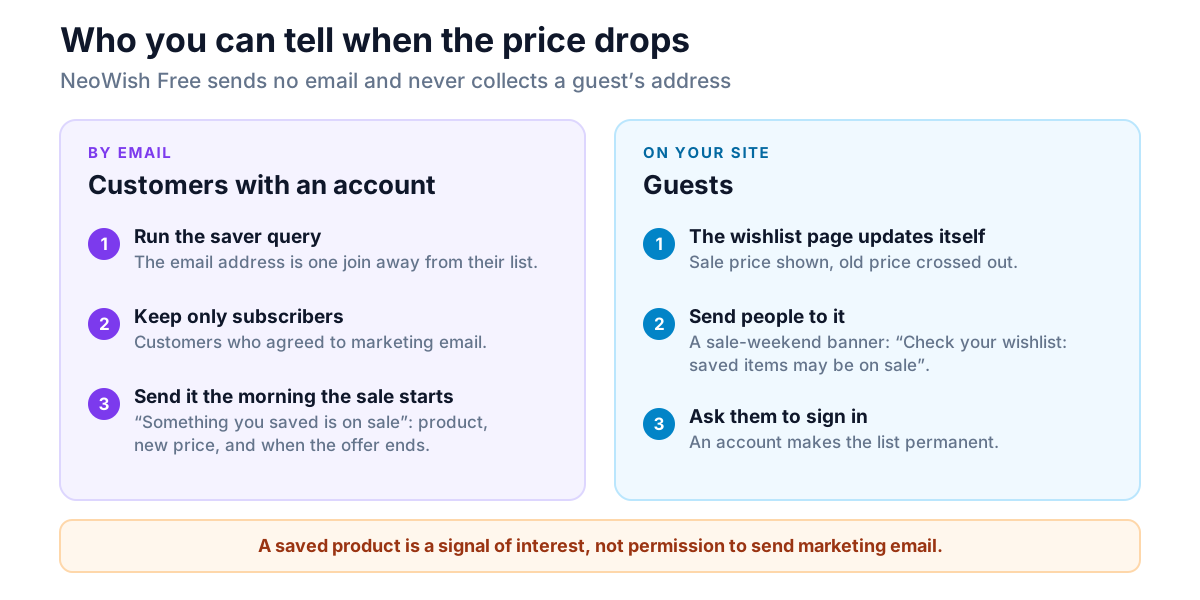
NeoWish's free version sends no emails, on purpose. It never collects a guest's email address, so it has nobody to email. How you reach savers depends on whether they have an account.
Customers with an account
Their list is attached to their account, so their email address is one join away. For a set of product IDs:
SELECT DISTINCT u.user_email, u.display_name
FROM wp_neowish_items i
JOIN wp_neowish_lists l ON l.id = i.list_id
JOIN wp_users u ON u.ID = l.user_id
WHERE i.product_id IN (123, 456, 789);
Guest lists have no user ID, so the join leaves them out. What you get is the customers with an account who currently have one of those products saved.
Before you import the list into your email tool, filter it by consent. A saved product is a signal of interest, not permission to send marketing email. In the EU and the UK that is the law, not just good manners. Send only to customers your email tool already records as subscribed, and treat the saved product as a way to make that email relevant, not as permission to send it.
The email can be short. "Something you saved is on sale", with the product, the new price and the date the sale ends, sent the morning it starts. It is short, it is about a product they picked, and it says when the offer ends, so it needs no hype.
Guests
Guests left no email address, and that is the point of a no-account wishlist. You reach them on your site instead:
- The wishlist page updates by itself. Its price column shows each product's
current price, so a product on sale appears with the old price crossed out next to the new one. You do not have to do anything to make that happen.
- Send people to it. A banner across the top of the site for the sale weekend, reading "Check your wishlist:
saved items may be on sale" with a link to the wishlist page costs nothing. Only people with something saved will find anything there. For them, that one click is the most relevant message on the site.
- Ask them to sign in. An account turns a guest's list into a permanent one.
Logged-in customers can also be emailed next time, once they have opted in.
The guest-lifetime setting from the first section decides how many of these guests still have a list to come back to.
If you also run NeoGrow, each saved product on the wishlist page shows the points it would earn. A sale price and a points figure side by side is a good reason to finally buy.
A timetable to 27 November
| When | What |
|---|---|
| Today | Raise Guest Wishlist Lifetime to 90. Take the first report snapshot. |
| Every week to mid-November | Copy the Most Wishlisted report into your spreadsheet. |
| Around 10 November | Put saves next to Analytics sales. Pick the many-saves, few-sales products. Check stock on the most-saved variations. |
| By 20 November | Schedule the sale prices with start and end dates. Decide whether a sitewide coupon goes on top. |
| 24–26 November | Run the saver query, filter it by consent, and load it into your email tool. Prepare the wishlist banner. |
| 27 November | The sale starts. The email goes out, and the banner goes up. |
| December | Compare each discounted product's sales with its save count and the cut you gave. That is next year's plan. |
Frequently asked questions
How do I see which products are most wishlisted in WooCommerce?
Check your wishlist plugin's report, or its database tables. WooCommerce Analytics does not count saves. With NeoWish, go to Marketing → NeoWish and open the Dashboard tab. The "Most Wishlisted Products (Last 30 Days)" report lists up to 20 products with their adds and unique wishers.
Should I discount my most wishlisted products on Black Friday?
Only the ones that are saved often and sold rarely. Many saves with few sales means people want the product and something is stopping them, usually price, so a discount can change the outcome. A product that is saved often and sells well is already selling, and discounting it mostly gives away margin.
Can NeoWish email shoppers when a saved product goes on sale?
Not in the free version. It sends no emails and never collects a guest's email address. You can find customers with an account who saved a product with a short database query and email them from your own tool, if they agreed to marketing email. Guests see the sale price on their wishlist page when they return.
Why did a guest's wishlist disappear before Black Friday?
Its cookie expired. A guest's list is tied to a browser cookie that lasts as long as the "Guest Wishlist Lifetime (Days)" setting, 30 days by default, counted from their first save. Saving more items does not extend it. Raise the setting well before the sale. It applies to cookies set after the change, so the earlier you change it, the more October saves survive. Logging in makes a list permanent.
Is it legal to email customers who wishlisted a product?
Only if they have agreed to marketing email. Saving a product is a signal of interest, not consent. In the EU and the UK you need that consent, or a lawful basis your email tool records, before sending. Email only customers who are already subscribed, and use the saved product to make the message relevant to them.
Does a wishlist show the sale price automatically?
In NeoWish, yes. The wishlist page shows each product's current price, so a product on sale appears with the old price crossed out next to the sale price, for guests and logged-in customers alike, with nothing to set up.