
Black Friday without the margin bonfire: loyalty points instead of discounts
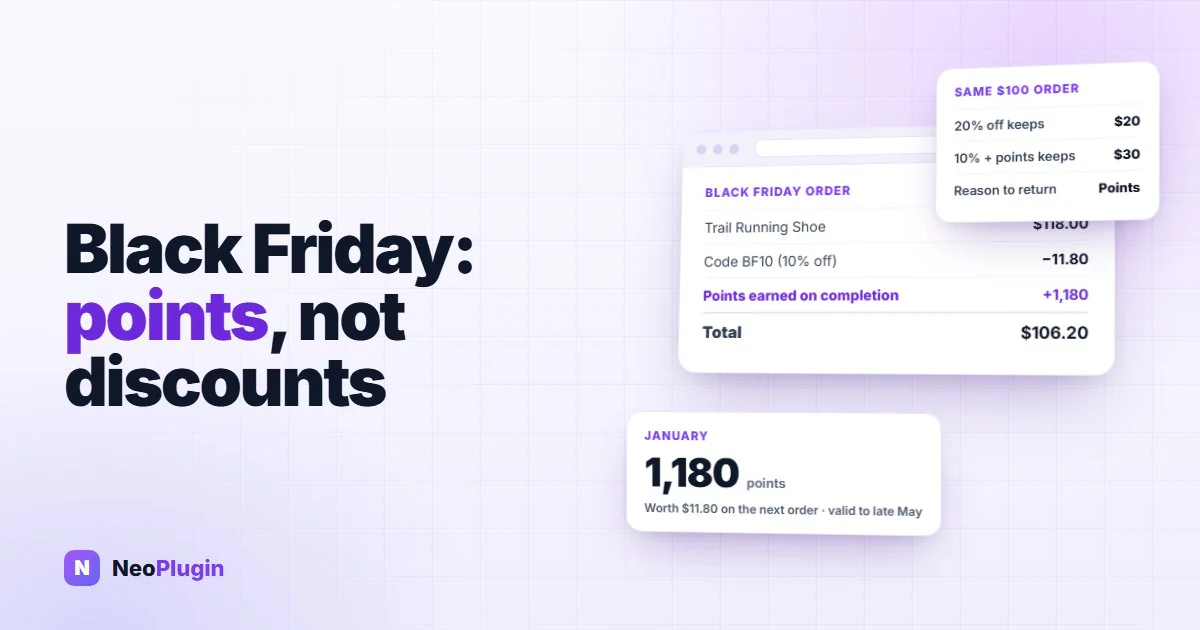
Black Friday is on 27 November 2026, Cyber Monday on 30 November. US shoppers spent $11.8 billion online on Black Friday 2025, 9.1% more than the year before, according to Adobe Analytics, and the way most stores reach for their share of it is the same every year: a bigger percentage off than last time.
That works for the stores that can afford it. For a WooCommerce shop with real margins and no warehouse full of loss leaders, a 30% weekend is a margin bonfire that buys a crowd of one-time buyers who were never yours to keep.
There is a quieter way to run the weekend. Give a smaller discount, or none, and pay the difference in loyalty points the customer can only spend on a second order. The cost arrives later, lands on an order you would not otherwise have had, and only ever arrives if the customer comes back. That is the whole argument, and the rest of this post is the numbers and the mechanics.
It assumes a WooCommerce store with a points program already running, or about to. If you are setting one up for the first time, the earn and redemption settings are explained in the complete WooCommerce loyalty program guide.
The short version
- A discount is spent once. It cuts margin on every Black Friday order, including the ones that would have happened at full price, and it buys nothing after the weekend.
- Points are a deferred discount with a condition attached: the customer has to come back. On a $100 order, 10% off plus 10% back in points keeps $10 more margin today than 20% off, and the $10 of points costs you nothing unless it is spent on a second order.
- Points earned on Black Friday are the January reason to return. Roughly a quarter of first-time buyers ever come back on their own; a balance in their account is the nudge the rest never got.
- Know what your plugin pays points on. Most pay on the product subtotal: sale prices count, coupons often do not, and shipping and tax never should. On Black Friday those details decide the real cost.
- Returns peak after Black Friday. Find out before the sale whether a refund reverses the points, or whether you adjust them by hand.
- Say when the points arrive. Most programs credit points when the order is completed, which on a physical-goods store is a day or three after checkout. Tell customers that at checkout and again in the email that lands when the points do.
What a Black Friday discount actually costs
Take a $100 order with a 40% gross margin, so $40 before the discount.
At 20% off, the customer pays $80 and the margin is $20. You have given up half your margin on that order. And you gave it up on every order that weekend, including the ones from customers who had the product in their cart already and would have paid full price on Thursday.
Then the weekend ends. The discount bought one order. It did nothing about whether there will be a second one, and the research on that is not kind: RJMetrics measured it at about 27% of first-time customers ever coming back, across 176 retailers and 18 million customers. What that means for a WooCommerce store, and what to do about it, is the subject of how to turn a first-time buyer into a repeat customer. A Black Friday crowd skews even more heavily toward people who found you through the discount and will follow the next discount somewhere else.
So the standard Black Friday trade is: half your margin, for one order, from a buyer who is less likely than average to return. It is a trade worth making for a store clearing stock or buying market share. It is a poor one for a store that needs each customer to be worth more than their first order.
The points alternative, in numbers
Same $100 order, same 40% margin. Instead of 20% off, offer 10% off, plus 10% back in points for the next order. In a program running 100 points to the dollar, that is 1,000 points on the order.
| 20% off | 10% off + 10% back in points | |
|---|---|---|
| Customer pays today | $80 | $90 |
| Margin kept today | $20 | $30 |
| Cost still to come | $0 | Up to $10, and only if they come back |
| What the customer leaves with | A product | A product and a $10 balance |
The $10 of points is a liability, and you should budget for all of it being redeemed. But look at where it lands. It can only be spent on a second order. If the customer returns in January and spends their 1,000 points on a $60 order, that order carries $24 of margin at 40%, minus the $10 of points, leaving $14. Across the two orders you kept $44. The 20% discount kept $20, and whether a second order ever happens is left to chance.
The two-order rule. Margin across both orders = margin kept on Black Friday + (margin on the return order − points redeemed on it). For a $100 order at 40% margin, moving from 20% off to 10% off plus 10% back in points takes that figure from $20 to $44, more than doubling it, with every point redeemed.
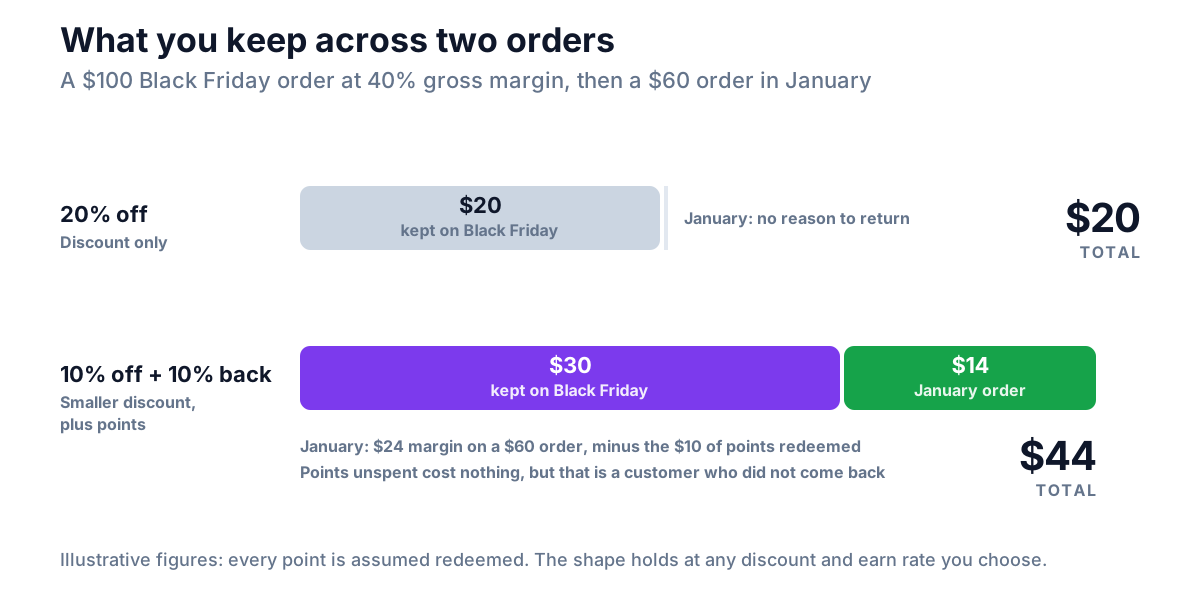
If the customer never comes back, the points expire and cost nothing. That is not a win you should count on, since the program exists to stop exactly that, but it is the honest floor: the worst case of the points route is the margin you kept on day one.
The percentages are yours to choose. A store with thinner margins might run 5% off plus 5% back. A store that cannot discount at all can run no discount and 15% back, which reads as generous and costs nothing until a second order arrives. The shape of the argument holds at any rate; the loyalty program guide has the cost table for choosing one.
Why a balance brings people back when a discount does not
A discount is a reason to buy now. A balance is a reason to buy again, and it keeps working for as long as it sits in the account. McKinsey's loyalty research found that members who actually redeem points spend around 25% more than members who never do, which is why everything below is about getting the balance spent rather than just issued. Points nobody redeems are not savings. They are the customers who did not come back.
How WooCommerce loyalty points behave on a Black Friday order
The strategy above only works if you know what your plugin actually does on the day. Four mechanics matter, and most store owners have never checked them.
What the points are calculated on
Most points plugins, NeoGrow included, award on the order subtotal: the products themselves, before tax, shipping and fees. Two consequences for a sale weekend:
- Sale prices are already in the subtotal. A product marked down from $100 to $70 earns points on $70. You do not pay points on a discount you already gave.
- Coupons usually are not. A coupon is applied after the subtotal, so a customer using a 10% code on a $100 cart typically earns points on $100, not $90. That is more generous than it looks, and it is also the behavior the "10% off plus 10% back" offer above assumes. If you would rather points follow the coupon, that is a one-line change in most plugins; NeoGrow's is below.
When the points land
Points are usually credited when the order is marked Completed, not at checkout. On a store that completes orders when they ship, a Black Friday order earns its points some days later. That is the correct behavior, since it means a cancelled order never earns anything, but it has a consequence: the customer reads "earn 1,000 points" at checkout and sees nothing in their account on Friday night. Say when the points will arrive, and make sure the completed-order email says they have.
When the points expire
Points earned on 27 November with a six-month expiry are good until late May. The January window this whole argument depends on is comfortably inside that. What you want to avoid is a short expiry that quietly deletes the Black Friday balance before the customer has a reason to shop again, and a long one that lets the balance sit forgotten. Check your setting, and tell the customer the date.
What happens on a return
Black Friday is followed by the busiest returns period of the year. Three behaviors exist across plugins: automatic reversal when an order is refunded, manual adjustment by the store, or nothing. Know which one you have before the sale, and test a partial refund separately. A partial refund does not change the order status, so a plugin that reverses points by watching for the refunded status will miss every one. The mechanics are in WooCommerce points and rewards: how earning and redeeming actually work.
Three ways to run it on the day
1. Sale prices plus normal points
The simplest. Set sale prices on the products you want to move, schedule them with the Sale price dates fields on each product, and leave the points program exactly as it is. Customers earn points on the sale price. Nothing to switch on or off, no coupon to stack, and the product page already shows the earn figure beside the sale price.
This is the right version for a store that wants a modest, visible discount and the points as the quiet second reason. It is also the one that cannot go wrong.
2. A coupon plus points
A site-wide code is the classic Black Friday mechanic, and it works with points with two settings worth checking on the coupon itself, under Marketing → Coupons:
- Individual use only stops the code combining with other coupons. Whether it also stops it combining with a points redemption depends on how your plugin applies points; most apply them as a negative fee rather than a coupon, which the setting does not see. If a customer can stack a 20% code and a $10 points redemption on one order, that is a discount you did not plan. Test it on a staging order before the weekend, or read what eleven test carts showed.
- Exclude sale items keeps the code off products already marked down.
Remember that points are usually earned on the pre-coupon subtotal. If your offer is "20% off with code" and you did not intend to also pay full points on the undiscounted amount, decide now whether that is a bonus you are happy to give.
3. Points instead of a discount, at a higher rate
The version for a store that will not discount at all: full price, and a higher earn rate for the weekend. "Double points this weekend" is the usual wording.
Here is the honest problem. Most free points plugins have no scheduled campaign feature, so the obvious move is to raise the earn rate on Friday morning and lower it on Monday night. On a plugin that awards points at completion, that does not do what you expect. The rate is read when the order is completed, not when it is placed. A Black Friday order you ship on Wednesday earns Wednesday's rate.
Two ways to run it properly:
- Complete every Black Friday order before you lower the rate. Workable for a small store with a quick turnaround, risky for anyone else.
- Tie the rate to the order date in code. Most plugins expose the rate through a filter; the snippet in the NeoGrow section below does this in ten lines.
A paid campaign feature is the third way, and the one to choose if you will do this every year. It is on NeoGrow's Pro roadmap and not in the free plugin, and this post is not going to pretend otherwise.
Should sale items earn points at all?
The margin argument says no: a product already sold at 30% off should not also pay out points on top. The customer argument says yes: a program that stops paying when the customer finally buys feels like a trick, and "no points on sale items" is the kind of small print that gets screenshotted.
A reasonable middle: pay points on sale items at the normal rate, which costs you 1% to 5% of an already-reduced price, and never run the higher-rate weekend offer on top of deep markdowns. If your margins genuinely cannot carry points on sale items, exclude them, say so plainly next to the earn line, and keep the rule all year rather than only in November.
NeoGrow's free plugin pays points on sale items; excluding them is a filter rather than a setting, shown below. An exclusion setting is on the Pro roadmap because it is the thing a store asks for after its first Black Friday.
Tell them, in the four places that work
A points offer nobody notices is a discount you did not give and a customer you did not keep. Four placements do most of the work, and three of them are pages and emails you already have:
- The product page, with the earn figure beside the price. During the sale this is the line that turns "20% off elsewhere" into "and 1,000 points here".
- The order confirmation page, straight after checkout: you will earn 1,000 points once this order is complete. This is where to set the expectation about timing.
- The completed-order email, which arrives when the points do. A separate "you earned points" email is one more thing to mute; a line in the email they were already going to open reaches everyone.
- A January email that says the balance exists and what it is worth. This is the one that converts the whole plan, and it is the one most stores never send. Put a date in the calendar now.
The first three are covered, with screenshots, in how to turn a first-time buyer into a repeat customer.
A timeline from now to January
Early October. Decide the rate: 10% off plus 10% back, or whatever your margins allow. Check what your plugin pays points on, when it credits them, when they expire and what it does on a refund. Place a test order, complete it, redeem the points, then refund it and look at the balance.
October, if you run a wishlist. Pick the products to discount from what shoppers have saved, and make sure guest wishlists last long enough to reach the sale: how to use wishlist data to pick your Black Friday discounts.
Two weeks before. Tell your list what the offer is and, if you run points, remind them of their current balance. Put the earn figure on the product pages if it is not there already.
The weekend. Run it. Do not touch the earn rate by hand unless you have read the section above.
First week of December. Complete orders promptly, because that is when the points land and the completed-order email goes out. Handle refunds and adjust points as they come.
Second week of January. Send the balance email. This is the order the whole plan was for.
Where NeoGrow fits
NeoGrow is the free plugin we build, and the mechanics above describe it specifically. Everything in this section was read from the plugin's source rather than its settings screen: which order status fires the award, what amount it is calculated from, when the rate is read, and what a refund does. If your store runs a different plugin, those four are the questions to put to its documentation or its code.
- Rates. Two settings under Marketing → NeoGrow → Settings: Points per $1 Spent and Redemption Value per 100 Points. The defaults, 1 and 1, return 1% of subtotal; a "10% back" weekend is an earn rate of 10 at the default redemption value.
- What it pays on. The order subtotal, before tax, shipping and fees. Sale prices are included; coupons are not deducted, so a customer using your Black Friday code earns on the pre-coupon amount unless you change it.
- When. Points are credited when the order becomes Completed. The product page, confirmation page and order emails all carry the figure, and the confirmation page says it will arrive on completion.
- Expiry. Six months from the day they were earned, oldest spent first. Black Friday points are good until late May. Choosing your own window, or switching expiry off, is part of the Pro add-on.
- Refunds. The free plugin does not reverse points automatically. You adjust them under Users → Edit User, with the reason recorded in the points log, and because that is manual it covers partial refunds as well as full ones. Automatic reversal is in Pro. On a store expecting a wave of December returns, that is a real difference and you should weigh it.
- Redemption. Points come off at the cart as a discount, capped by the balance and by the cart value, with the customer choosing how many to spend.
Three snippets for the cases above. Each goes in a small plugin or your theme's functions file.
Points on the amount after coupons rather than before:
// Earn on the subtotal minus coupon discounts. $amount is the order
// subtotal before tax, shipping and fees; $order is the WC_Order.
add_filter( 'neogrow_earn_base_amount', function ( $amount, $order ) {
    return max( 0, $amount - (float) $order->get_discount_total() );
}, 10, 2 );
Double points for orders placed over the Black Friday weekend, keyed to the order date rather than the completion date, so a Black Friday order shipped the following Wednesday still earns the weekend rate:
// Runs when the order is completed, so the rate is tied to the date the
// order was placed. $order is null outside an order context; keep the guard.
add_filter( 'neogrow_earn_rate', function ( $rate, $order ) {
    if ( ! $order instanceof WC_Order ) {
        return $rate;
    }
    $placed = $order->get_date_created();
    $start  = new DateTime( '2026-11-27 00:00:00', wp_timezone() );
    $end    = new DateTime( '2026-12-01 00:00:00', wp_timezone() );
    return ( $placed && $placed >= $start && $placed < $end ) ? $rate * 2 : $rate;
}, 10, 2 );
No points on sale items, by removing their lines from the earn base:
// Remove on-sale lines from the earn base. Line subtotals are pre-coupon,
// matching how the default base is calculated.
add_filter( 'neogrow_earn_base_amount', function ( $amount, $order ) {
    foreach ( $order->get_items() as $item ) {
        $product = $item->get_product();
        if ( $product && $product->is_on_sale() ) {
            $amount -= (float) $item->get_subtotal();
        }
    }
    return max( 0, $amount );
}, 10, 2 );
Full setup is in the NeoGrow documentation.
Frequently asked questions
Is it better to give loyalty points or a discount on Black Friday?
Points, for any store that needs the customer to come back; a flat discount only makes sense for clearing stock. A discount cuts margin on every order that weekend and buys nothing afterward; points cost nothing until they are spent on a second order, and a balance in the account is a reason to place one. The usual compromise is a smaller discount plus points, for example 10% off and 10% back, which keeps more margin on the day than 20% off and leaves the customer with a reason to return in January.
Can I offer double points on Black Friday in WooCommerce?
Yes, but tie the higher rate to the date the order was placed, not the date it was completed. Most plugins credit points when the order is completed and read the earn rate at that moment, so raising the rate for the weekend and lowering it on Monday gives the normal rate to any Black Friday order you ship later in the week. Either complete every weekend order before you change the rate back, or tie the rate to the order date in code. NeoGrow's free plugin has no scheduled campaign setting; the ten-line filter in this post does the job, and a campaign feature is on the Pro roadmap.
Do customers earn points on sale items in WooCommerce?
Usually yes, calculated on the sale price rather than the regular price. Most plugins calculate points from the order subtotal, which already reflects sale prices, so a product marked down from $100 to $70 earns points on $70. Coupons are a different matter: they are applied after the subtotal, so a customer using a code typically earns on the pre-coupon amount unless the plugin is told otherwise.
Do points earned on Black Friday expire?
Only if your program has an expiry, and the window decides whether they survive until January. With NeoGrow's six-month expiry, points earned on 27 November are valid until late May, which comfortably covers the January return window. Check your own setting before the sale and tell customers the date, because a balance that silently expires before they shop again is the one outcome worse than no points at all.
What happens to loyalty points if a Black Friday order is returned?
One of three things, depending on the plugin: automatic reversal, a manual adjustment by you, or nothing. Some reverse points automatically on refund, some leave it to you to adjust by hand, and some do nothing. Test both a full and a partial refund before the sale, because a partial refund does not change the order status and plugins that watch only for the refunded status miss it. NeoGrow's free plugin leaves the adjustment to you, under Users → Edit User, with the reason logged; automatic reversal is in the Pro add-on.
Can customers use points and a Black Friday coupon on the same order?
Often yes, and often without the store intending it, because a points redemption is usually a fee rather than a coupon. A coupon's Individual use only setting stops it combining with other coupons, but most points plugins apply a redemption as a negative fee, which that setting does not see. Place a staging order with your Black Friday code and a points redemption and look at the total before the weekend, not after.
When should I announce a Black Friday points offer?
Two weeks before the sale, on the product pages during it, and again in the second week of January. The first message goes to the people who already have an account and a balance; during the sale the product pages carry the earn figure beside the price. The announcement that matters most comes later: an email in the second week of January reminding customers what their Black Friday points are worth. That is the order the whole approach was designed to produce.
Keep the margin, keep the customer
A 20% Black Friday discount is a bet that volume will make up for margin, placed on a crowd that is unlikely to return. Points turn the same budget into a bet on the second order instead: less given away on the day, nothing given away to customers who never come back, and a reason sitting in every account when the January quiet arrives.
Run the numbers for your own margin, check the four mechanics on your own plugin, and put the January email in the calendar before you put the sale on the homepage.