
Why loyalty points do not belong in postmeta
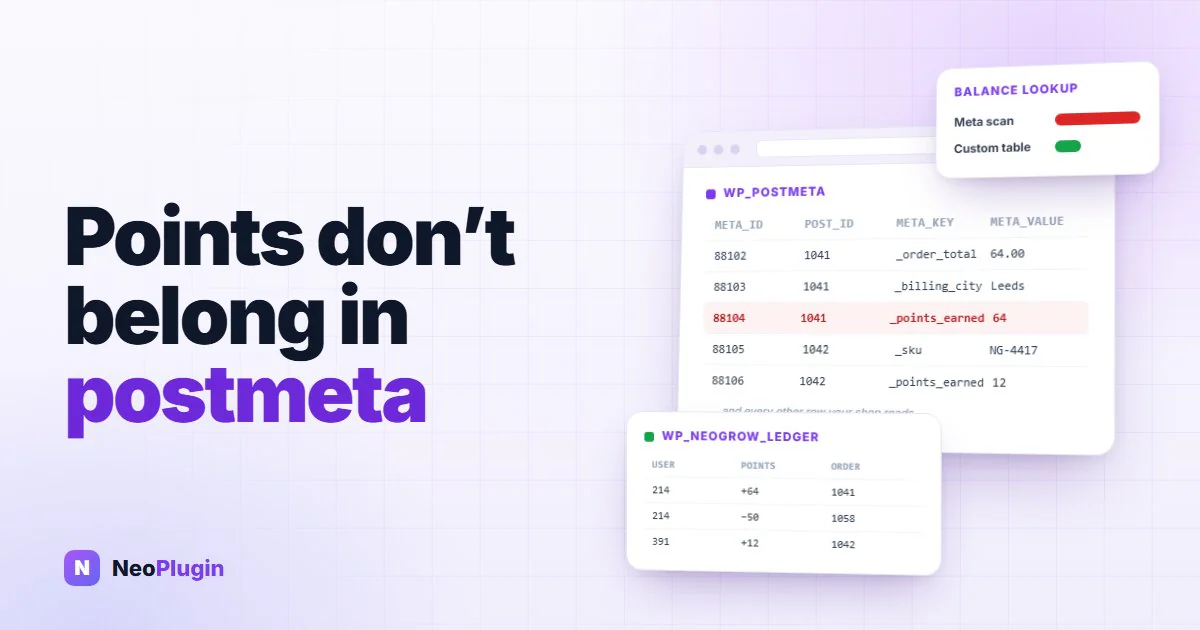
Every WooCommerce loyalty plugin has to answer one question before it writes a line of code: where does a customer's point balance live?
The convenient answer is to reuse what WordPress already gives you — a row in wp_usermeta, a key in wp_postmeta, or a serialised blob in wp_options. It works on a demo store. It is also the reason so many WooCommerce loyalty points plugins become the slowest thing on a catalog once the store is real.
The short version
- A WooCommerce loyalty plugin is a database design problem wearing a marketing hat. Where the points are stored matters more to your shop's speed than how many earning rules the plugin offers.
wp_optionscharges every page. Anything autoloaded is read into memory before WordPress knows whether the page needs it, so a growing points structure there bills your blog posts for a feature only checkout uses.wp_postmetaputs your points behind your orders. It is the table WooCommerce leans on hardest, and a points ledger in it competes with the queries your shop depends on.wp_usermetaholds a number, not a history. One value per user per key gives you a balance with nothing behind it — no way to answer why a balance is what it is.- NeoGrow uses its own table,
wp_neogrow_points_log— an append-only ledger where a balance is the sum of its rows, with four indexes chosen for the queries the plugin actually runs. - It is the same move WooCommerce made when it took orders out of the posts table, and NeoGrow declares compatibility with HPOS and with the block checkout.
- Two things to know before installing: the Growth Dashboard analytics are cached for an hour, and nothing is backfilled from past orders.
What the convenient answer actually costs
wp_options is loaded, in part, on every single request. Anything marked autoload is pulled into memory before WordPress knows whether the page even needs it. A loyalty plugin that parks a growing structure there is charging your blog posts for a feature only your checkout uses.
wp_postmeta has the opposite problem. It is one enormous key-value table shared by every plugin on the site, and it is already the table WooCommerce leans on hardest. Adding point transactions to it means your loyalty queries and your order queries compete for the same indexes.
wp_usermeta fails differently again. It is built to hold one value per user per key, which is fine for a balance and useless for everything around it: a single number carries no record of how it got there, so a refund, a correction, or a customer asking why they have 340 points has nothing to read back.
| Where the balance lives | What the table was built for | What that means for your shop |
|---|---|---|
wp_options | Site-wide settings, the autoloaded ones read as a block on every request | A growing points structure is read into memory on pages that will never use it |
wp_postmeta | Key-value attributes hung off posts and orders | Points queries contend with the order queries your checkout depends on |
wp_usermeta | One value per user, per key | A balance with no history behind it — nothing to audit, reconcile or explain |
| A custom table | A transaction ledger, and nothing else | Its own indexes, its own table, no autoload, and no contention with WooCommerce |
Neither is a bug, exactly. Both are a plugin borrowing a table that was designed for something else.
What NeoGrow does instead
NeoGrow keeps points in a custom table, wp_neogrow_points_log. It is an append-only ledger: every earn and every redemption is a row, points is a signed integer, and a customer's balance is the sum of their rows. Nothing is overwritten, so the history is the data rather than something maintained alongside it.
A row records the customer, the signed points, an event type, a reference — the order ID, stored as a bigint to match WooCommerce's own order IDs rather than as a string — a log entry, and a timestamp.
Four indexes sit on it, and each one earns its place:
user_id— a customer's balance.(event_type, ref_id)— has this order already been credited?(user_id, created_at)— the My Account points history, and the batched
expiry sweep, which groups by customer while comparing dates.
created_aton its own — because a B-tree cannot serve an ordering or a
range on a non-leading column. The admin points log sorts every page by date with no customer in the predicate, and the dashboard chart filters on it. Both were a full table scan plus a filesort until this index existed.
That last one is the argument in miniature. It is a narrow fix for two specific queries, and it is only available to a plugin that owns its table. Nobody gets to add an index to wp_postmeta because their loyalty points need one.
The table buys three things:
- Point lookups never touch
wp_postmeta, so they do not compete with order
queries. Checkout stays responsive on stores with thousands of active customers.
- The schema is designed for the job — a transaction log with its own indexes,
rather than string keys in a generic bag.
- The ledger is never autoloaded. It cannot grow into the autoload payload,
because it is not in wp_options at all, so a page that does not use points pays nothing for them.
It is the same reason WooCommerce itself moved orders out of the posts table with HPOS: transactional data outgrows a general-purpose key-value store, and the fix is a table shaped like the thing you are storing. NeoGrow declares compatibility with HPOS and with the block-based cart and checkout, so it runs on either order storage mode. Generic storage is fine until volume makes the mismatch expensive.
Where the analytics go
There is one deliberate trade-off worth knowing about. The Growth Dashboard statistics — the chart and the summary cards — are cached for one hour.
Your live points data is always current: a balance shown to a customer, or the Points Log on a user profile, is read straight from the table. It is only the aggregate analytics view that lags. Recomputing store-wide totals on every admin page load is exactly the kind of thing that makes wp-admin crawl, and an hour-old chart is a fair price for an admin that stays fast.
The part people discover too late
NeoGrow is not retroactive. It starts tracking from the moment you activate it, and it will not scan your order history to backfill points for purchases that already happened.
That is a design decision, not an oversight. Backfilling means walking every historical order on a live site and writing a transaction for each one, which is precisely the sort of migration that takes a store down at the wrong moment.
If you want to recognize long-standing customers, Users > Edit User lets you set a starting balance by hand, and the adjustment is written to the Points Log with your reason attached. Manual adjustment is also how refunds are handled in the free version — the full lifecycle of a point is here.
Frequently asked questions
Where should a WooCommerce loyalty plugin store points?
In a dedicated custom table, not in generic WordPress metadata. wp_usermeta, wp_postmeta and wp_options were built for settings and attributes, and a growing points ledger in any of them competes with the queries your shop actually depends on. NeoGrow keeps WooCommerce loyalty points in wp_neogrow_points_log, an append-only ledger with four indexes chosen for the queries it runs.
Will a loyalty points plugin slow down WooCommerce?
It can, and where it stores balances is the reason. A plugin that autoloads points data from wp_options makes every page on the site pay for a feature only checkout uses, and one that writes point transactions into wp_postmeta puts them in the same table WooCommerce leans on hardest. Point lookups in NeoGrow never touch wp_postmeta, so they do not compete with order queries.
What does the NeoGrow points table look like?
wp_neogrow_points_log is an append-only ledger. Each row holds the customer, a signed points figure, an event type, a reference to the order as a bigint matching WooCommerce's own order IDs, a log entry and a timestamp — and a balance is the sum of a customer's rows. It carries four indexes: user_id, (event_type, ref_id), (user_id, created_at), and created_at on its own, the last because the admin log sorts by date with no customer in the predicate and a B-tree cannot order on a non-leading column.
Does NeoGrow import points from past orders?
No. NeoGrow is not retroactive — it starts tracking from the moment you activate it and will not scan order history to backfill points. Backfilling means walking every historical order on a live site and writing a transaction for each one, which is the kind of migration that takes a store down at the wrong moment. To recognize long-standing customers, set a starting balance by hand under Users > Edit User; the adjustment is written to the Points Log with your reason attached.
Is the points balance shown to customers ever out of date?
No. Balances and the Points Log are read straight from the table, so what a customer sees is current. Only the aggregate Growth Dashboard analytics — the chart and summary cards — are cached, for one hour, so that recomputing store-wide totals does not slow down wp-admin.
Which table do the points end up in?
A WooCommerce loyalty plugin is a database design problem wearing a marketing hat. If you are evaluating one, the useful question is not how many earning rules it has — it is which table the points end up in, and whether the plugin can add an index to it when a query needs one. For everything else worth weighing, see the complete WooCommerce loyalty program guide.
You can read the NeoGrow documentation for the full schema and hook reference, or get the plugin free from WordPress.org.