
Incentivized reviews in WooCommerce: how to pay for them without breaking the rules
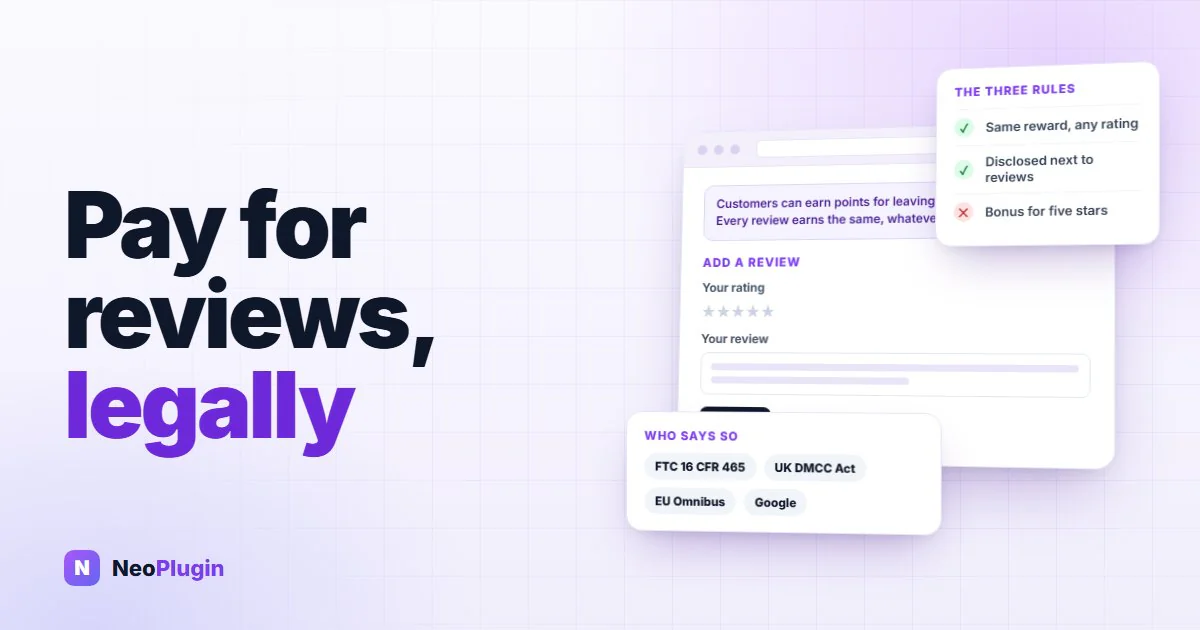
Offering customers something for writing a review — points, a discount, a small credit — is one of the most effective things a store can do about an empty reviews tab. It is also legal, in every market this post covers.
What is not legal is a short list of specific things that tend to creep in around it: paying more for a better rating, hiding the fact that reviewers were paid, and quietly steering unhappy customers away from the public form. Each of them can turn a set of honest, paid-for reviews into a liability for the store that published them.
Our complete guide to WooCommerce product reviews sums this up in three rules. This post is the long version: what each rule actually says, where it comes from, and what it means for a WooCommerce store in practice.
This is not legal advice. It is a plain reading of the published rules, with links to each one so you can read them yourself. If your store's situation is unusual, or you sell in a regulated category, ask a lawyer who knows your market.
The short version
- Paying for a review is allowed. Paying for a positive review is not. The reward has to be the same whatever rating the customer gives.
- A bonus for five stars is paying for a positive review. The US regulator has said so in as many words, and so has Google. A plugin offering it as a setting does not change that.
- Tell shoppers the reviews were incentivized. One plain sentence near the reviews is the usual way, and in the UK a hidden incentive is now a banned practice.
- Ask every customer, not just the happy ones. Routing satisfied customers to the public form and unhappy ones somewhere private is review gating.
- Moderate on content, not on rating. Removing spam and personal information is fine. Removing criticism — or paying only for the reviews you approve, and approving only the good ones — is not.
- Never offer an incentive for a Google review of your business. Google's rules for business reviews ban incentives outright, even disclosed ones.
What the rules actually say
Four sources cover almost every WooCommerce store. They agree with each other more than you might expect.
| Where | Source | What it says about incentives |
|---|---|---|
| United States | FTC rule on consumer reviews, 16 CFR 465, in force since 21 October 2024 | Incentives must not be conditioned, expressly or by implication, on the review expressing a particular sentiment |
| United States | FTC Endorsement Guides, 16 CFR 255 | Incentives should be disclosed; selectively asking only happy customers can be deceptive |
| United Kingdom | Digital Markets, Competition and Consumers Act 2024, in force since 6 April 2025 | Concealed incentivised reviews are a banned practice |
| European Union | Unfair Commercial Practices Directive, as amended by the Omnibus Directive (EU) 2019/2161 | A store showing reviews must say whether, and how, it checks they come from real customers |
| Product Ratings policies | Incentives cannot depend on the review's sentiment, and incentivized reviews must be flagged |
The FTC rule
The US rule is the most specific of the four. Section 465.4 makes it unfair or deceptive for a business "to provide compensation or other incentives in exchange for, or conditioned expressly or by implication on, the writing or creation of consumer reviews expressing a particular sentiment, whether positive or negative".
Read that carefully and two things stand out. It is about sentiment, not about incentives in general — paying for a review is fine. And it covers conditions that are only implied: you do not have to write "five stars only" for a reward to count as conditioned on a good review.
The FTC's own questions and answers on the rule confirm the first point directly — the rule "does not prohibit giving incentives for reviews, as long as there isn't an express or implied requirement that the reviews have to express a particular sentiment" — and add that failing to disclose an incentive could separately violate the FTC Act, under the Endorsement Guides.
What a violation costs
The rule is backed by civil penalties. Section 5(m)(1)(A) of the FTC Act, the provision that covers knowing violations of a trade regulation rule, carries a maximum of $53,088 per violation — the inflation-adjusted figure set on 17 January 2025 and still current as this post goes out, listed in 16 CFR 1.98.
Two things about that number matter more than the number itself. It applies to a knowing violation — actual knowledge, or knowledge fairly implied from the circumstances — which is a different thing from an honest mistake, though it is a bar that drops as a rule ages and the regulator publishes plain-English guidance about it. And the rule is written about individual reviews rather than campaigns, so a store should not assume that one setting applied across three hundred reviews is one violation.
The UK
Since 6 April 2025, UK law lists "concealed incentivised reviews" among its banned practices. The Competition and Markets Authority's short guide for businesses describes them as reviews that do not make it clear they were written in exchange for money or another benefit. The incentive itself is not the problem; hiding it is.
The EU
The EU's rule is less about incentives than about honesty over where reviews come from. A trader that gives consumers access to reviews must tell them whether and how it makes sure those reviews come from people who actually bought or used the product. Claiming reviews are from real customers without taking reasonable steps to check is itself treated as unfair.
For a WooCommerce store, the practical answer is usually one sentence — how reviews are collected and whether they are checked against orders — plus the verified owner label WooCommerce already provides.
If you send product reviews to Google Merchant Center, its Product Ratings policy allows incentivized reviews on two conditions: the incentive "cannot be dependent on the sentiment of the review", and each incentivized review is marked with the is_incentivized_review attribute in the feed.
Google's rules for business reviews — the ones on Google Maps and your Business Profile — are stricter and separate. They prohibit reviews posted because of an incentive at all, disclosed or not. Points for a product review on your own site are one thing; points for a Google review of your shop are not allowed.
Rule 1: pay for the review, not the rating
The reward must be identical for a one-star review and a five-star review. The moment it is not, you are buying opinions rather than reviews. The difference fits in one sentence:
Not compliant: "Leave a review for 10 points, and get 15 bonus points for a 5-star review."
>
Compliant: "Leave an honest review and earn 25 points, whatever your rating."
This is the rule that catches well-meaning stores, because the ways of breaking it look generous rather than dishonest:
- A bonus for five stars. "Earn 10 points for a review, and 15 more for a 5-star one." The FTC's Q&A asks almost exactly this — whether a business can pay incentives for 5-star reviews if the incentive is disclosed — and answers: "No. That conduct would violate Section 465.4."
- A reward only for reviews you publish, when you only publish the good ones. This is the implied version. If points arrive on approval, and approval depends on the rating, the payment depends on the rating.
- Wording that suggests the answer. "Loved your order? Leave a review for 50 points" is an invitation aimed at people who loved it. "Tell us what you thought — every review earns 50 points" is not.
- "Upgrade your review" offers. Rewarding a customer for raising a rating, or for removing a critical review, is the same thing run backwards.
The setting your plugin ships is not a permission
A bonus for a high rating is an easy feature to build and an easy one to sell, so it turns up in review and loyalty plugins under names like bonus points for a 5-star review or extra reward for a positive review. Finding it in a settings screen does not make the arrangement allowed. The rule applies to the business publishing the reviews, not to the plugin author, so the exposure is the store's either way.
If a plugin on your store offers one, set it to zero — and check what it is set to now rather than assuming. A figure that arrives switched on puts a store in the prohibited arrangement without anyone choosing it.
Paying more for a photo is a different thing
A photo review earning more than a text review is common, and it is a different kind of condition. The extra reward depends on the format of the review — whether it has a picture — not on what the review says about the product. A one-star review with a photo of a broken item earns exactly what a five-star review with a photo earns.
That is how the rules read on their face, since they talk about sentiment. It stays true only as long as the photo requirement is neutral: pay for "a photo of the product", not for "a photo of you enjoying it". There is more on setting photo rewards in WooCommerce photo reviews.
Rule 2: disclose it
Shoppers reading your reviews are entitled to know that the people writing them were rewarded. A single, plain sentence does the job, placed where the reviews are — above the review list or the review form, not in your terms and conditions:
Customers can earn points for leaving a review on this store. Every review earns the same, whatever the rating.
What makes a disclosure work:
- Put it next to the reviews. A disclosure a shopper has to go looking for does not disclose anything.
- Name the reward. "Points", "a discount on your next order", "10% off". Vague phrases like "we may thank reviewers" hide more than they reveal.
- Say it applies to every rating, if it does. That is the sentence that makes a paid review credible rather than suspect.
- Keep it true. If you stop rewarding reviews, take the sentence down; if you change the reward, change the sentence.
- Flag it in your Google feed, if you send one, with
is_incentivized_review.
Where the sentence goes
The disclosure is for the shopper reading the reviews, not for the customer writing one. That single distinction decides most of these:
| Read by a shopper weighing the reviews | What it does | |
|---|---|---|
| Directly above the review form or the review list | Yes | The whole job. It sits in the eyeline of someone deciding how much to trust the ratings. |
| In a tab or accordion the shopper has to open | Only if they open it | Better than nothing, but a shopper who never opens the tab reads the reviews as unpaid. |
| In your terms and conditions | No | Nobody weighing a product opens the terms. This is the placement that most often gets called concealment. |
| In the site-wide footer | Rarely | Technically present, practically invisible, and it cannot say which products the reward applies to. |
| Only in the email asking for the review | No | Discloses to the writer, who already knows — the shopper it is meant for never sees it. |
| Nowhere | No | In the UK, an incentive you do not disclose is a banned practice in its own right. |
Flagging an incentivized review in a Google feed
If you send a product review feed to Google Merchant Center yourself, the flag is a boolean element inside the review, between is_verified_purchase and collection_method:
<review>
  <review_id>10482</review_id>
  <reviewer><name>A. Customer</name></reviewer>
  <review_timestamp>2026-09-24T10:14:00Z</review_timestamp>
  <title>Good fit, sole wore quickly</title>
  <content>Comfortable from the first day, but the sole showed wear after two months.</content>
  <ratings><overall min="1" max="5">3</overall></ratings>
  <products><product><product_ids><skus><sku>NG-4417</sku></skus></product_ids></product></products>
  <is_incentivized_review>true</is_incentivized_review>
  <collection_method>post_fulfillment</collection_method>
</review>
Check your schema version before you add it. is_incentivized_review exists in the product reviews feed specification 2.4; it is not in 2.3, so adding it to a feed still declaring the older schema fails validation rather than disclosing anything. collection_method takes unsolicited or post_fulfillment — a review written in answer to a review request email after delivery is the second one.
If a plugin builds the feed for you, this is a question for its authors rather than a file you edit: ask which schema version it emits and whether it can set the flag at all.
Pair it with the other half of the honesty question — how you know reviewers are real customers. WooCommerce's Show "verified owner" label on customer reviews setting, under WooCommerce → Settings → Products, marks every review from someone who bought the product. Switching it on is free and it answers the EU's question on every review individually.
Rule 3: ask everyone, and never gate
Review gating means sorting customers by how happy they are before deciding who gets asked for a public review. It usually looks like one of these:
- A one-question survey — "How was your order?" — that sends high scorers to the review form and low scorers to a private feedback box.
- Review requests sent only to customers who rated their support ticket highly, or who have ordered more than once.
- A "Happy? Leave us a review. Not happy? Contact us first" email.
The FTC's Endorsement Guides use almost this exact scenario as an example: a marketer who invites only purchasers who gave very positive feedback to post reviews, while "less pleased and unhappy purchasers are simply thanked for their feedback". That practice "may be an unfair or deceptive practice if it results in the posted reviews being substantially more positive" than they would otherwise have been. The FTC's Q&A adds that asking only customers you think are happy "could violate the FTC Act".
It is also pointless on its own terms. Shoppers look for the critical reviews deliberately, and a page of nothing but praise reads as edited.
The fix is simple: every customer gets the same request, at the same point after their order. WooCommerce's own review request email does exactly that — one email per completed order, the same link for everyone. Setting it up, and three things to check before it reaches a customer, is covered in how to switch on the WooCommerce review request email.
Moderate on content, never on rating
Holding reviews for approval is sensible. What you approve on has to be about content, not opinion.
The FTC rule's section on suppression lists the kinds of content a business can legitimately keep off its site: trade secrets, defamation, personal information, discriminatory language, clearly false or misleading material, reviews reasonably believed to be fake, and reviews unrelated to what you sell. It also makes it unlawful to present the reviews you show as all or most of the reviews received, when negative ones have been held back because of their rating or sentiment.
A practical policy that stays on the right side of that:
- Remove: spam, abuse, phone numbers and addresses, reviews of a different product, a delivery complaint that belongs in support.
- Keep: fair criticism, low ratings, reviews you disagree with.
- Reply to the critical ones in public, rather than removing them. A useful reply under a two-star review is the strongest credibility signal on the page.
- Never auto-hide anything because of its rating, or because other shoppers reported it. A report is a reason to look, not a reason to hide.
A checklist before you pay for your first review
- The reward is the same for every rating — no bonus for five stars, no extra for "positive" reviews. Open the settings screen of every plugin that pays for reviews and read the figure rather than assuming it is zero.
- The request is worded neutrally, and it goes to every customer, not just the ones you expect to be happy.
- A disclosure sentence sits next to your reviews, names the reward, and says it applies to every rating.
- Show "verified owner" label is switched on.
- Reviews are held for approval, and you approve on content, never on rating.
- Points are credited on approval — and approval is decided by the policy above, so the payment never depends on the opinion.
- If you send reviews to Google Merchant Center, incentivized ones carry
is_incentivized_review. - You are not offering anything for Google reviews of your business.
Where NeoGrow fits
NeoGrow is the free plugin we build, and paying customers for reviews is one of the things it does. Here is how it lines up against the three rules above.
- The same reward for every rating. A text review earns one figure and a photo review another, whatever stars the customer gives. Nothing in the plugin reads a review's star rating when deciding what it earns, and there is no setting that changes that.
- Points are credited on approval, so you are paying for reviews rather than for submissions. Pair that with the content-only moderation policy above.
- The disclosure sentence is switched on by default, shown just above the review form on both classic and block themes, and editable. It hides itself if you set review points to 0, so it never claims a reward you no longer pay.
- Nothing is hidden automatically. Shoppers can report a review, and a report only flags it for you to look at.
- No gating feature. NeoGrow's review reminder sends one email to every registered customer after a completed order, and it stands down when WooCommerce's own review request is switched on so no one is asked twice.
To check your own store, open Marketing → NeoGrow → Settings. The review rewards sit together, and they are the whole list — Points for a Text Review and Points for a Photo Review. Just below them, Show Review Disclosure switches the statement on, and Disclosure statement holds your own wording; leave it blank and you get the shipped sentence, "Customers can earn points for leaving a review on this store."
That default names the reward but does not say the reward is the same at every rating, which is the half that makes a paid review credible. Adding it is one line in that box. The wording is yours, and the default is a plain starting point rather than legal text. Full setup is in the NeoGrow documentation.
Frequently asked questions
Is it legal to pay customers for product reviews?
Yes, in the US, the UK and the EU, as long as the reward does not depend on what the review says and the incentive is disclosed. What is prohibited is paying for a particular opinion — most commonly, paying more for a positive review — and, in the UK, hiding that a review was incentivised.
Can I give a bonus for a 5-star review?
No. A bonus that depends on the star rating is an incentive conditioned on the review's sentiment. The FTC's guidance on its review rule answers this exact question with "No", even when the incentive is disclosed, and Google's Product Ratings policy says incentives "cannot be dependent on the sentiment of the review".
My review plugin has a 5-star bonus setting. Does that make it allowed?
No. The rule applies to the business publishing the reviews, so a setting in a plugin is a feature, not a permission — and the exposure is the store's. Set it to zero, and check what it is set to now: a bonus that ships switched on puts a store in the prohibited arrangement without anyone choosing it. If it will not go to zero, or the plugin pays the bonus without a setting at all, switch review points off entirely until you can replace the plugin — no reviews is a smaller problem than paid-for ratings.
Do I have to disclose that reviews were incentivized?
Yes. In the US the FTC treats undisclosed incentives as a possible violation of the FTC Act under its Endorsement Guides; in the UK, concealed incentivised reviews are a banned practice. One plain sentence next to the reviews, naming the reward, is the usual way to do it.
Can I pay more for a photo review than a text review?
The rules are about the review's sentiment, and a photo is a format rather than an opinion, so paying more for a photo does not depend on what the customer thinks of the product. Keep the condition neutral — a photo of the product, not a photo showing the customer is happy with it — and disclose it like any other reward.
Can I only ask happy customers for reviews?
No. Selectively inviting customers you expect to be satisfied, or routing unhappy ones to private feedback instead of the review form, is review gating. The FTC's Endorsement Guides give it as an example of a practice that can be deceptive. Send every customer the same request.
Can I delete negative reviews?
You can remove reviews for what they contain — spam, abuse, personal information, content about a different product, or reviews you reasonably believe are fake. You should not remove them for their rating or opinion, and the FTC rule makes it unlawful to present the reviews you show as all or most of the reviews you received when negative ones have been suppressed.
Can I offer points for a Google review of my store?
No. Google's rules for business reviews on Maps and Business Profile prohibit incentivized reviews altogether, disclosed or not. Incentives are allowed for product reviews submitted through Google Merchant Center, if they do not depend on sentiment and are flagged in the feed.
Pay for honesty, and say so
An incentivized review is not a lesser review. Done properly — the same reward for every rating, a sentence saying so, and every customer asked — it is simply a review from someone who would not otherwise have bothered to write one. And a page of paid reviews that includes a few fair complaints is more persuasive than any number of five-star entries nobody believes.
Check the three things this week: your reward is the same at one star as at five — read it off the settings screen rather than taking it on trust — your disclosure sits next to your reviews, and your requests go to everyone.