
How to import WooCommerce reviews when you leave a hosted reviews app
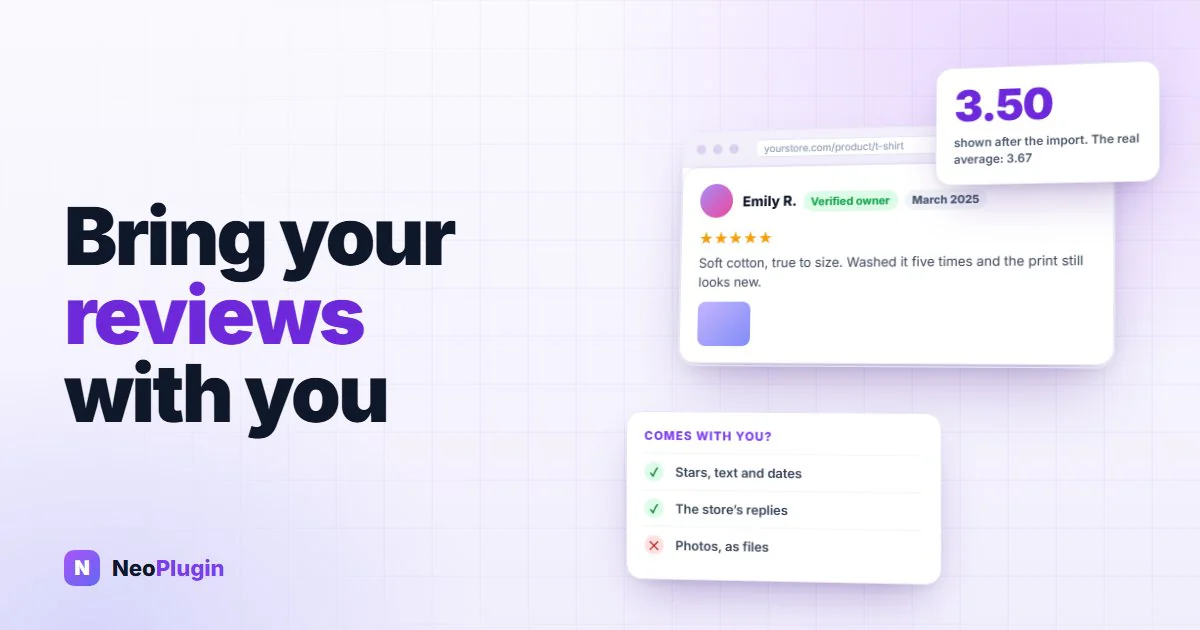
Your reviews took years to collect, and they sit on somebody else's server. That's fine until the day you cancel the reviews app, or move the whole shop to WooCommerce, and find that WooCommerce has no button to bring them in.
This guide covers how to import WooCommerce reviews from a hosted reviews app: what the export file holds, what has no place to go, a script that does the import, and the two things that go wrong quietly afterwards. It's part of our guide to WooCommerce product reviews. The wider question of renting a service or owning the data is the one we looked at for loyalty programs in plugin vs hosted app.
Everything about WooCommerce below was tested on WordPress 7.1.4 and WooCommerce 11.1.2, with a six-row test file, a throwaway order and a throwaway customer account, all deleted afterwards. What each app's export contains comes from that app's own help pages, read on 15 November 2026.
Quick answer. WooCommerce has no review importer: its product CSV carries one review column, Allow customer reviews?, and no reviews. To import reviews, export them from the old app as a CSV, match each one to a product by SKU, and insert each as an approved product review with its original date and star rating. Then recalculate each product's rating, because WooCommerce counts a review before its stars are saved. Photos arrive as links to the old app's server, so copy the files into your own Media Library before you close the account.
The short version
- Export first, cancel second. The file, and the photo links in it, come from an account you're about to close.
- A WooCommerce review is a comment with a rating. Stars, text, name, email, date and the store's reply all have a place. Titles, videos, votes and Q&A don't.
- Match products by SKU. The old app's product IDs mean nothing to WooCommerce.
- Recalculate after importing. In our test a product with reviews of 5, 2 and 4 stars showed 3.50 until we did; the right answer was 3.67.
- Insert reviews as approved. That way nobody is emailed and no reward points are paid. Importing them as pending and approving them later did both.
- Photos are links, not files. Copy them while the links still work, and expect to need a plugin or a few lines of code to show them.
- Import all of them. Leaving the one-star reviews behind is review suppression, however it happened.
What a review is in WooCommerce
It helps to know where you're going before you pack. A WooCommerce review is a WordPress comment on a product, with three things added:
- its type is
review; - its star rating is saved beside it, as comment meta called
rating, a number from 1 to 5; - a verified flag, also comment meta, records whether the reviewer bought the product.
That's the whole format. Name, email, text and date are ordinary comment fields. A store's reply is a second comment whose parent is the review.
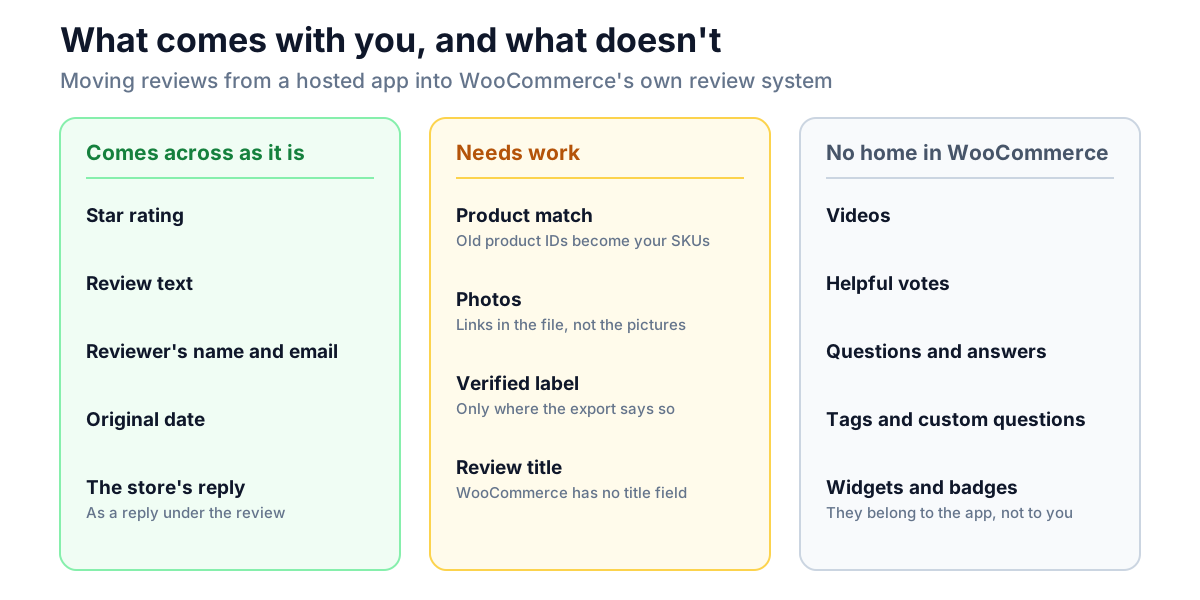
WooCommerce itself has no field for a review title, a photo, a video, a helpful-vote count or a question and answer. Those came from the app you're leaving, and they need a plugin on the WooCommerce side, or they stay behind.
What the export gives you
Every hosted reviews app we checked exports reviews as a CSV file, one review per row. The columns differ. Here are two whose help pages list them:
| Judge.me | Yotpo | |
|---|---|---|
| Where | Reviews → Export | Reviews → Export to CSV |
| How it arrives | Downloads at once under 100 reviews; a link by email above that, which expires after 3 hours | A link by email, within about an hour |
| Rating, text, date | Yes | Yes |
| Reviewer name and email | Yes | Yes |
| Product | Product ID and handle; no SKU | Product ID, handle and SKU |
| Photos | Image links | Image links, separated by semicolons |
| Videos | Not in the file | Video links |
| Verified buyer | Not in the file | Yes, as Reviewer Type |
| Store's reply | Yes, with its date | Yes, as a comment |
| Not exported | Review tags; reviews customers asked to delete | Questions and answers |
Sources: Judge.me's Exporting reviews and Yotpo's Exporting Reviews from Yotpo. Judge.me also caps one file at 100,000 reviews.
Loox exports from Manage Reviews, under the three-dot menu, as Export all reviews; its help page doesn't list the columns. For that app, and any other, open the file and read the header row before you plan anything. The header row is the only description of your data you can trust.
Do this while the account is still open. Export everything: published, hidden and pending. Keep an untouched copy of the file. And don't plan on the export page, or the photo links inside the file, outliving your subscription.
WooCommerce has no importer for reviews
Three things look like they might do it. None does the job for a file from a hosted app.
- The product CSV importer (Products → Import) reads and writes one review column, Allow customer reviews?. That switches reviews on or off for a product. It doesn't carry reviews.
- WordPress's own export file (Tools → Export) does carry them. We exported a product with its reviews and the file held each review with its type, rating and verified flag. That makes it the route from one WooCommerce store to another, but it only reads WordPress's own format, not a reviews app's CSV.
- Moving the whole database, as most site migrations do, brings reviews along with everything else. Again, that's WooCommerce to WooCommerce.
So for a hosted app's export, you either use an import plugin or insert the reviews yourself. The second is about a hundred lines, and it's below.
Prepare the file
The script reads a CSV with these columns. Rename the export's columns to match, and add the ones it doesn't have as empty columns.
| Column | What goes in it |
|---|---|
id | The review's ID in the old app. It's saved with the review so a second run skips it |
sku | The SKU of the product in WooCommerce |
rating | 1 to 5 |
author | The name to show |
email | The reviewer's email address |
date | When the review was written, as 2025-03-14 09:30:00, in UTC |
body | The review text |
verified | 1, 0, or empty to let WooCommerce decide (see below) |
reply | The store's public reply, or empty |
reply_date | When you replied, or empty |
photos | Photo links, separated by semicolons, or empty |
Three jobs take most of the time:
1. Match the products. The export names products by the old platform's ID or handle. WooCommerce needs something it knows. SKU is the safest, because you can set the same SKU on both sides. If your export has no SKU column, as Judge.me's doesn't, add one with a lookup against a product list from the old store. A review of a product you no longer sell has nowhere to go; the script reports it and moves on.
2. Fold the title into the text. If the old app had review titles, put the title at the start of body, or drop it. WooCommerce has no title field.
3. Leave the text alone. Fix the encoding if accents have turned into question marks (save the file as UTF-8). Don't fix the reviews.
The import script
Save this as import-reviews.php and run it with WP-CLI, which most WooCommerce hosts provide over SSH. Back up the database first.
<?php
/**
 * Import product reviews from a CSV file into WooCommerce.
 *
 *   wp eval-file import-reviews.php reviews.csv       (dry run: counts only)
 *   wp eval-file import-reviews.php reviews.csv go    (import)
 *
 * Columns: id, sku, rating, author, email, date, body, verified, reply, reply_date, photos
 */
$file = $args[0] ?? '';
$go   = 'go' === ( $args[1] ?? '' );
$fh   = fopen( $file, 'r' );
if ( ! $fh ) {
	WP_CLI::error( "Can't open $file" );
}
require_once ABSPATH . 'wp-admin/includes/media.php';
require_once ABSPATH . 'wp-admin/includes/file.php';
require_once ABSPATH . 'wp-admin/includes/image.php';

$head    = array_map( 'trim', fgetcsv( $fh ) );
$head[0] = preg_replace( '/^\xEF\xBB\xBF/', '', $head[0] ); // Excel's byte-order mark.
$count   = array( 'imported' => 0, 'already imported' => 0, 'no product' => 0, 'bad rating' => 0, 'photos' => 0, 'photos failed' => 0 );
$touched = array();

while ( false !== ( $cells = fgetcsv( $fh ) ) ) {
	if ( count( $cells ) !== count( $head ) ) {
		continue; // Blank or broken line.
	}
	$row        = array_combine( $head, array_map( 'trim', $cells ) );
	$product_id = wc_get_product_id_by_sku( $row['sku'] );
	$rating     = (int) $row['rating'];

	if ( ! $product_id ) {
		$count['no product']++;
		WP_CLI::warning( "Review {$row['id']}: no product with SKU {$row['sku']}" );
		continue;
	}
	if ( $rating < 1 || $rating > 5 ) {
		$count['bad rating']++;
		WP_CLI::warning( "Review {$row['id']}: rating {$row['rating']} is not 1 to 5" );
		continue;
	}
	// The old review ID is saved with each review, so a second run skips it.
	if ( get_comments( array( 'post_type' => 'product', 'meta_key' => '_import_id', 'meta_value' => $row['id'], 'status' => 'any', 'count' => true ) ) ) {
		$count['already imported']++;
		continue;
	}
	$count['imported']++;
	if ( ! $go ) {
		continue;
	}

	$date_gmt = gmdate( 'Y-m-d H:i:s', strtotime( $row['date'] . ' UTC' ) );
	$user     = get_user_by( 'email', $row['email'] );
	$meta     = array( 'rating' => $rating, '_import_id' => $row['id'] );
	if ( '' !== $row['verified'] ) {
		$meta['verified'] = (int) $row['verified']; // Blank: WooCommerce checks its own orders.
	}

	$review_id = wp_insert_comment( array(
		'comment_post_ID'      => $product_id,
		'comment_type'         => 'review',
		'comment_author'       => $row['author'],
		'comment_author_email' => $row['email'],
		'comment_content'      => $row['body'],
		'comment_date'         => get_date_from_gmt( $date_gmt ),
		'comment_date_gmt'     => $date_gmt,
		'comment_approved'     => 1,
		'user_id'              => $user ? $user->ID : 0,
		'comment_meta'         => $meta,
	) );

	if ( '' !== $row['reply'] ) {
		$reply_gmt = gmdate( 'Y-m-d H:i:s', strtotime( ( $row['reply_date'] ?: $row['date'] ) . ' UTC' ) );
		wp_insert_comment( array(
			'comment_post_ID'  => $product_id,
			'comment_parent'   => $review_id,
			'comment_type'     => 'comment',
			'comment_author'   => get_bloginfo( 'name' ),
			'comment_content'  => $row['reply'],
			'comment_date'     => get_date_from_gmt( $reply_gmt ),
			'comment_date_gmt' => $reply_gmt,
			'comment_approved' => 1,
		) );
	}

	// Copy each photo into the Media Library, attached to the product.
	foreach ( array_filter( array_map( 'trim', explode( ';', $row['photos'] ) ) ) as $url ) {
		$photo_id = media_sideload_image( $url, $product_id, 'Customer photo: ' . get_the_title( $product_id ), 'id' );
		if ( is_wp_error( $photo_id ) ) {
			$count['photos failed']++;
			WP_CLI::warning( "Review {$row['id']}: {$url}: " . $photo_id->get_error_message() );
			continue;
		}
		add_comment_meta( $review_id, '_import_photo_id', $photo_id );
		$count['photos']++;
	}
	$touched[ $product_id ] = true;
}

// WordPress counts each review before its rating is saved, so recalculate at the end.
foreach ( array_keys( $touched ) as $product_id ) {
	WC_Comments::clear_transients( $product_id );
}

foreach ( $count as $label => $n ) {
	WP_CLI::log( "$label: $n" );
}
WP_CLI::success( $go ? 'Import finished.' : 'Dry run only. Add "go" to import.' );
Run it twice. The first time without go: it changes nothing and tells you how many rows would import and which ones won't.
wp eval-file import-reviews.php reviews.csv
wp eval-file import-reviews.php reviews.csv go
What it does, and doesn't:
- It inserts reviews directly, as approved. They skip the moderation queue, the spam checks and every notification, which is right for reviews that were already published somewhere else.
- It keeps the original dates, so the reviews sort where they belong and a five-year-old review doesn't appear as this week's.
- It links a review to a customer account when the email belongs to one.
- It's safe to run again. Each review carries its old ID, and a second run skips it. In our test the second run imported nothing and listed four as already imported.
- It never reads the rating to decide anything, except to refuse a row that has none.
- It doesn't show photos. It saves them and records which review each belongs to. Showing them is the section after next.
A large file with photos takes a while, because WordPress makes several smaller copies of every image. If your connection drops, run it again; it picks up where it stopped.
What we saw in the test
Six rows, picked to cover the cases that matter:
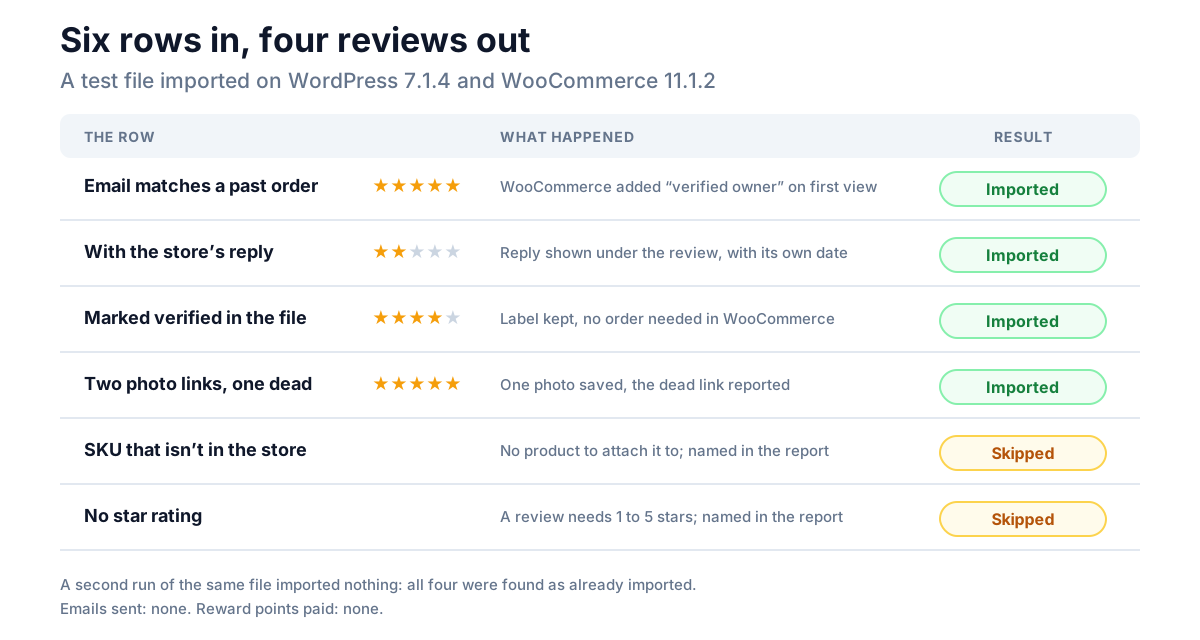
On the product page the reviews showed their original dates, the reply sat under its review, and the product's structured data carried the same dates and the new average.
The rating that comes out wrong
This is the one that catches hand-written imports. After our first run, without the last step of the script, the T-Shirt had three reviews, of 5, 2 and 4 stars. Its average showed 3.50, from two ratings. The right answer is 3.67. The Polo had one five-star review and showed no rating at all.
The cause is the order WordPress works in. When an approved comment is inserted, WordPress first saves it, then tells everyone the product's comment count changed, and only then saves the comment's meta. WooCommerce recalculates the product's rating at the second step, when this review's stars don't exist yet. So after an import, the last review inserted on every product is counted as a review but its rating is missed.
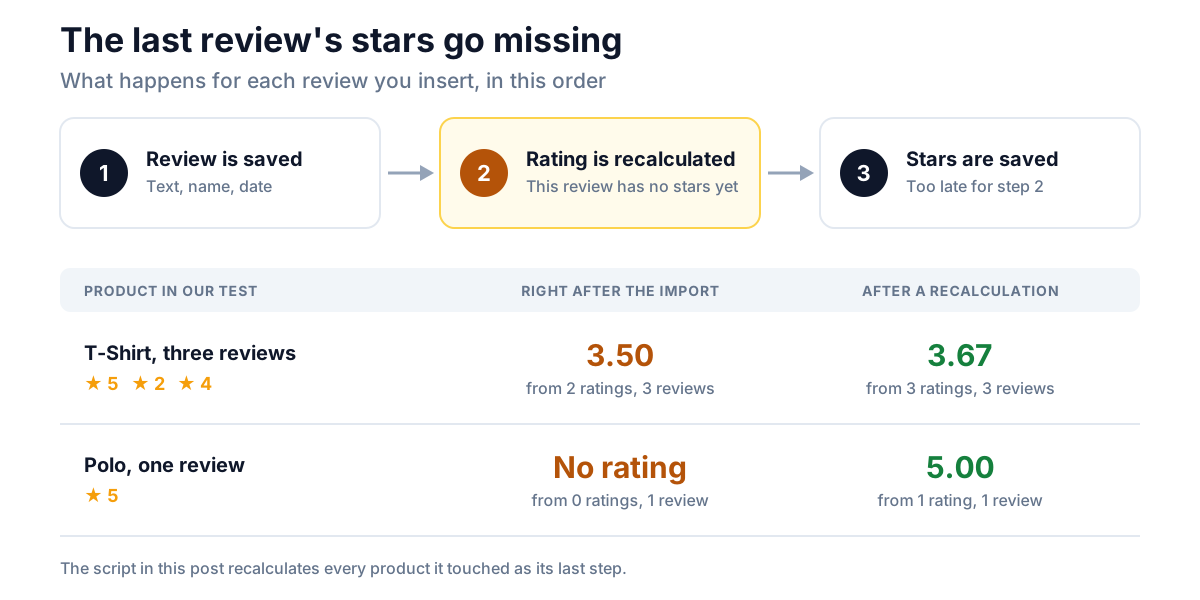
On a product with hundreds of reviews the error is small. On a product with one or two it's the difference between stars and no stars, on the page and in the markup Google reads. The fix is one line per product, and it's the last loop in the script:
WC_Comments::clear_transients( $product_id );Despite the name, that recalculates the product's average, its review count and its count per star, and saves them. If you imported with another tool and the numbers look off, run it for the affected products.
Verified owner labels on imported reviews
The "verified owner" label isn't worked out when a page loads. WooCommerce decides it once per review and saves the answer. For a review left on your store, that happens when it's submitted. An imported review was never submitted, so WooCommerce decides the first time the review is displayed, by looking for a paid order for that product: under the customer's account if the review is linked to one, otherwise under the reviewer's email address.
That has two consequences:
- If you also moved your orders, import them first. In our test, a review whose email matched an existing order got the label on first view, with nothing in the
verifiedcolumn. A review displayed before its order exists is saved as not verified, and stays that way. - If you didn't move your orders, the label depends on the file. A
1in theverifiedcolumn keeps it. Use that only where the old app's export says the reviewer was a verified buyer, as Yotpo's Reviewer Type column does. Judge.me's export has no such column, so those reviews arrive without the label unless the orders came too.
Don't mark every imported review verified to make the page look better. The label is a statement of fact about a purchase, and our post on verified owner reviews covers what it does and doesn't promise.
Why photographs are the hard part
Everything so far is text, and text moves in a file. A photo doesn't. The export holds a link to each photo, and the link points at the old app's server. Three problems follow.
The files aren't yours until you copy them. While the account is open the links work. Don't count on that afterwards. The script copies each photo into your own Media Library, attached to the product it's a photo of, and records on the review which photos belong to it. Do this before you cancel, not after.
Some links won't copy. WordPress only fetches a link that ends in an image extension: .jpg, .jpeg, .jpe, .png, .gif or .webp. A link with no extension is refused, and a dead link fails. In our test one of three links was dead; the script reported it by review ID and carried on. Keep that report: it's your list of photos to chase by hand.
WooCommerce has nowhere to show them. A review photo isn't part of a WooCommerce review. After the import the photos sit in the Media Library and the reviews know which ones are theirs, but nothing prints them. You need a reviews plugin that shows photos, or a few lines like these, which print each imported photo under its review as a thumbnail linking to the full image:
add_action( 'woocommerce_review_after_comment_text', function ( $comment ) {
	foreach ( get_comment_meta( $comment->comment_ID, '_import_photo_id' ) as $photo_id ) {
		echo wp_get_attachment_link( (int) $photo_id, 'thumbnail' );
	}
} );
That hook runs in WooCommerce's classic review template. A store whose product page uses the Product Reviews block doesn't run it; our post on photo reviews explains how to tell which you have.
Two smaller points. Videos don't fit this route at all: WordPress stores a video as one large file with no smaller copies, and our comparison of photo and video reviews covers what that costs. And a copied photo is an ordinary upload, so whatever was inside the file comes with it, including any location data the old app didn't remove.
Don't email anyone, and don't pay twice
An import should be silent. Whether it is depends on how the reviews go in.
Inserted as approved, the way the script does it, the reviews raised nothing in our test: no email to the store, none to customers, and no reward points, with a loyalty plugin active that pays for reviews.
Inserted as pending and approved afterwards, they behave like new reviews. We tried one: approving it paid the review's reward points to the customer's account and sent the store's "new comment" email. Multiply that by a thousand reviews and you've paid out for reviews that were rewarded, or not, years ago under someone else's rules.
So if you want to read the reviews before they go live, read them in the spreadsheet, not in the moderation queue.
Three rules for the reviews themselves
Import all of them. It's tempting to filter the file to four and five stars on the way in. In the US, the FTC's rule on consumer reviews treats showing reviews as representative, while holding some back because of their rating, as suppression. A migration isn't an exception. What you may leave out is what you could have removed anyway, by the same rules at every rating: spam, abuse, other people's personal details. Our post on review moderation has the list.
Keep each review on its own product. A review belongs to the thing the customer bought. If a product was replaced by a different one, its reviews don't transfer to the replacement.
Treat the file as personal data. It holds your customers' names and email addresses. WooCommerce doesn't show a reviewer's email on the page, and the script doesn't change that. Delete the CSV, and the copy in your downloads folder, when the import is checked.
After the import: a ten-minute check
- Counts. The script's "imported" figure should equal the rows you expected, and every "no product" warning should be a product you chose not to move.
- One product page. Check the average, the number of reviews, the dates and one reply.
- A product with one review. It should show stars. If it doesn't, the recalculation didn't run.
- Products → Reviews. The imported reviews are listed there with their original dates.
- Photos. Open the Media Library, filter to a product's attachments, and compare with the warnings list. Every "photos failed" line is a picture you still have to fetch by hand.
- Where the photos load from. Open a review with a photo and look at the image's address. It should be on your own domain. An address on the old app's server means that photo was never copied, and it will break when the account closes.
- The page source. Search it for
aggregateRatingon one imported product. The next section says what should be there.
What search engines see after the import
You don't need to write any structured data for imported reviews. WooCommerce builds a product's markup from the database each time the page loads, so imported reviews are in it as soon as they're in the store. In our test the T-Shirt's Product markup carried the recalculated average and the review count as its AggregateRating, and listed the reviews newest first by their original dates, each with that date as datePublished. WooCommerce puts the five most recent reviews in the markup, so an import of old reviews doesn't push anything dated today into it.
Two things to know:
- The rating trap reaches the markup too. WooCommerce prints a rating only for a product that has at least one counted rating. A product whose single imported review lost its stars has none, so it has no
AggregateRatinguntil you recalculate. - The old app's markup leaves with its widget. If the app added its own review markup to your pages, that goes when you remove it, and WooCommerce's takes over. Check one page in Google's Rich Results Test after the switch.
Markup makes a product eligible for stars in search; Google decides whether to show them. Our post on star ratings not showing in Google covers the reasons it doesn't, and the WooCommerce product schema guide covers the rest of the markup.
If you use NeoGrow
NeoGrow adds photo reviews to WooCommerce's own review system, so imported reviews and new ones end up in one list, in your database. Two things are worth knowing for a migration.
Imported reviews pay no points, as long as they're inserted as approved. NeoGrow pays for a review when it's submitted or when its status changes to approved, and a direct insert does neither.
NeoGrow can show an imported photo. It shows one photo per review, and it finds it through two pieces of comment meta. This links each imported review's first photo, and is safe to run more than once:
<?php
// wp eval-file link-photos.php
$ids = get_comments( array( 'post_type' => 'product', 'meta_key' => '_import_photo_id', 'status' => 'any', 'fields' => 'ids' ) );
foreach ( $ids as $review_id ) {
	$photo_id = (int) get_comment_meta( $review_id, '_import_photo_id', true );
	add_comment_meta( $review_id, 'neogrow_review_photo_id', $photo_id, true );
	add_comment_meta( $review_id, '_neogrow_has_photo', '1', true );
}
In our test the imported photo then appeared under its review as a thumbnail that opens full size, the same as a photo a customer uploads. If you use this, leave out the display snippet above, or the photo prints twice.
Frequently asked questions
How do I import WooCommerce reviews from a CSV file?
WooCommerce has no built-in tool for it. Match each row to a product by SKU, then insert each review as a comment of type review with its star rating saved as rating meta, either with an import plugin or with a script like the one in this post. Recalculate each product's rating afterwards.
Can the WooCommerce product importer import reviews?
No. The product CSV has one review column, Allow customer reviews?, which turns reviews on or off for a product. It doesn't hold reviews.
Can I import Judge.me or Yotpo reviews into WooCommerce automatically?
Not with WooCommerce alone. Both apps export reviews as a CSV file, and WooCommerce has nothing that reads it. You rename the columns, match each review to a product, and run an import. Yotpo's file includes each product's SKU and whether the reviewer was a verified buyer; Judge.me's has neither, so its reviews need a SKU column added before they can be matched.
Do imported reviews keep their original dates?
Yes, if the import sets them. A WooCommerce review's date is the comment's date, and it can be set to any past date when the review is inserted. In our test the product page and the product's structured data both showed the original dates.
Will imported reviews show as "verified owner"?
Only if WooCommerce can find a paid order for that product from the same customer account or email address, or if the import sets the review's verified flag. WooCommerce checks once, the first time the review is displayed, and saves the answer.
Why is my average rating wrong after importing reviews?
WordPress recalculates a product's comment count before a newly inserted review's rating is saved, and WooCommerce works out the average at that moment. The last review inserted on each product is counted without its stars. Recalculating the product's rating fixes it.
Will importing reviews email my customers?
Not if the reviews are inserted directly as approved. In our test that sent no email at all. Approving imported reviews one by one from the moderation queue does send the store's notification email, and can trigger rewards.
What happens to review photos when I leave a hosted reviews app?
The export gives you links to the photos on the app's server, not the photos. Copy the files into your own Media Library while the account is still open, and plan for a plugin or a short snippet to show them, because WooCommerce reviews have no photo of their own.
Your reviews, in your database
Once the import is done, every review is a row in your own database, beside the orders and products it belongs to. No widget has to load for a shopper to read one, and nothing about them depends on a subscription. The move takes an afternoon of spreadsheet work and a careful check of the numbers. The photos are the part to do first, while the links still answer.