
Video reviews in WooCommerce vs photo reviews: which is worth collecting

A customer's photo shows what a product looks like. A customer's video shows how it moves, how it sounds and how it fits, which no still can. So once a store has photo reviews, video reviews in WooCommerce look like the obvious next step.
WooCommerce takes neither out of the box; both need a plugin. Before you pick one, it's worth knowing what each format costs, and most of that cost is decided by WordPress, not the plugin. We uploaded test photos and a test video to a WooCommerce store and followed each file: what WordPress keeps, what a review shows, which formats will display, and what stays inside the file, including where it was taken.
Quick answer. Collect photos first. WordPress turns a review photo into small copies, so a review shows a thumbnail of a few kilobytes, and it removes the photo's metadata from those copies. A review video is kept exactly as uploaded: no smaller copy, no thumbnail, and every byte of metadata the phone wrote, which can include where it was shot. iPhones record photos and video in Apple's High Efficiency formats by default, and that video has full browser support only in Safari. Video is worth asking for when motion, sound or fit is the question shoppers have, and only with a plugin that handles size, format and loading for you.
The short version
- WooCommerce supports neither. Photo and video reviews both need a plugin.
- A photo review is cheap to show. WordPress makes about ten smaller copies, and a review shows one of 300 pixels, 13 to 20 KB for the JPEG thumbnails on our store.
- A video review is shown as uploaded. WordPress makes no smaller version and no poster frame, so the plugin has to stop every shopper downloading the whole file.
- iPhone formats need handling. WordPress converts an iPhone's HEIC photos only on servers whose image library supports them, and HEVC video has full support only in Safari.
- WordPress keeps location data in the file it stores. A photo of 2,560 pixels or less kept its GPS position in the full-size file; a video keeps whatever the phone wrote. A snippet below removes it from photos.
- Video takes longer to moderate. You have to watch it, with the sound on.
How we tested
Our test store runs WordPress 7.1.4, WooCommerce 11.1.2 and PHP 8.3, with WordPress's default GD image library. We made two JPEG test photos carrying an iPhone model name and a GPS position, one 1,600 by 1,200 pixels and one 4,032 by 3,024, the size a 12-megapixel phone camera produces, and a short WebM test video. We uploaded each through WordPress's own media functions, the ones review plugins use, then fetched every file WordPress made over the web and read what was inside. Afterwards we deleted them all.
Photo reviews vs video reviews, side by side
| Photo review | Video review | |
|---|---|---|
| WooCommerce support | None, needs a plugin | None, needs a plugin |
| What WordPress keeps | The original plus about ten smaller copies | The file exactly as uploaded |
| What a review shows | A small copy, 13–20 KB on our store | The whole file, unless the plugin holds it back |
| iPhone default format | HEIC, converted only if the server supports it | HEVC, full support only in Safari |
| Location data | Removed from the small copies, kept in some full-size files | Kept, if the phone recorded it |
| Moderation | A glance | Watching it through, with sound |
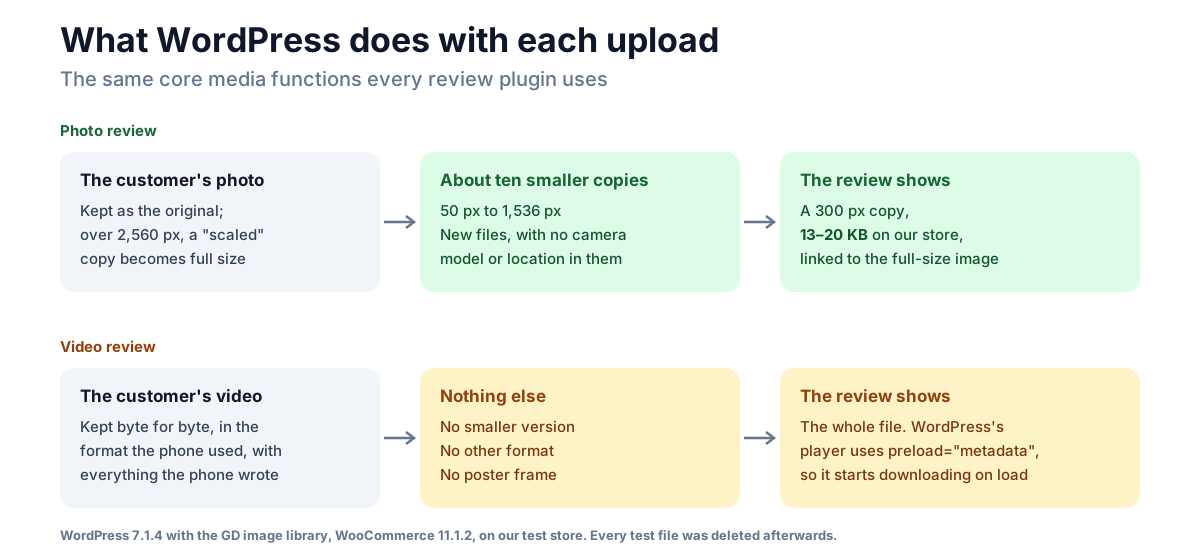
What WordPress does with a review photo
When a photo arrives, WordPress keeps the original and makes smaller copies for each image size the site registers. On our store that was ten, from a 50-pixel square to 1,536 pixels wide, with WooCommerce's sizes among them. A photo wider or taller than 2,560 pixels also gets a "scaled" copy of 2,560 pixels, and that copy becomes the one WordPress treats as the full-size image.
A review then shows one of the small copies. NeoGrow, our review plugin, shows the 300-pixel one, and on our store those were 13 to 20 KB for JPEG photos, with a link to the full-size image for a closer look. However large the customer's photo, the page carries a thumbnail.
The copies are new files, so they don't carry the original's metadata: in our test, every copy WordPress made had lost the camera model and the GPS position. The original, and the full-size image when it is the original, kept both. More on that below.
What WordPress does with a review video
A video gets none of that. WordPress stored our test video and served it back byte for byte; the file a shopper downloads is the file the customer uploaded. It read the video's length and dimensions, and made no smaller version, no copy in another format, and no poster frame to show before it plays.
That leaves three jobs to the review plugin:
- Size. Even a few seconds of phone video is usually larger than a phone photo, and it reaches every shopper who plays it at full size. The plugin needs a size limit below your server's upload limit, which our photo reviews guide covers.
- Loading. WordPress's own video player starts with
preload="metadata", so the browser downloads the start of every video when the page loads. A review plugin should load nothing until the shopper presses play. - A preview. With no poster frame, the plugin has to show something other than a blank box, or the review looks broken.
The iPhone format problem
iPhones save photos as HEIF (HEIC files) and video as HEVC by default, which Apple calls the High Efficiency setting; the Most Compatible setting switches new photos and videos to JPEG and H.264, according to Apple's support page on the formats (checked 7 November 2026). A customer who uploads straight from the phone can send either.
Photos are the smaller problem. Since WordPress 6.7, an uploaded HEIC photo is converted to JPEG on the server when the server's ImageMagick supports HEIC; without that, WordPress asks for the photo to be converted first. Many review plugins accept only JPEG, PNG and WebP anyway, as NeoGrow does, and developers report iPhones converting a HEIC photo to JPEG when a form accepts only JPEG. Tools → Site Health → Info → Media Handling shows whether your server can read HEIC.
Video is the bigger one. WordPress never converts video, so a customer's HEVC clip is served as HEVC. Can I use's HEVC table (checked 7 November 2026) lists full support only in Safari; Chrome, Edge and Firefox are listed as partial, depending on the device's hardware and operating system. So a video review filmed on an iPhone may play for some of your shoppers and not others, and you won't see the problem on your own iPhone or Mac.
Location data in review photos and videos
Phones can record where each photo and video was taken, and the position travels inside the file. For a review, that can mean a customer's home.
This is what we found in each file WordPress kept:
| File | Location in the file |
|---|---|
| 1,600-pixel photo, full-size image (the original) | Kept |
| 1,600-pixel photo, every smaller copy | Removed |
| 4,032-pixel photo, original | Kept |
| 4,032-pixel photo, "scaled" full-size image | Removed |
| 4,032-pixel photo, every smaller copy | Removed |
| Video | Kept, byte for byte, whatever the phone wrote |
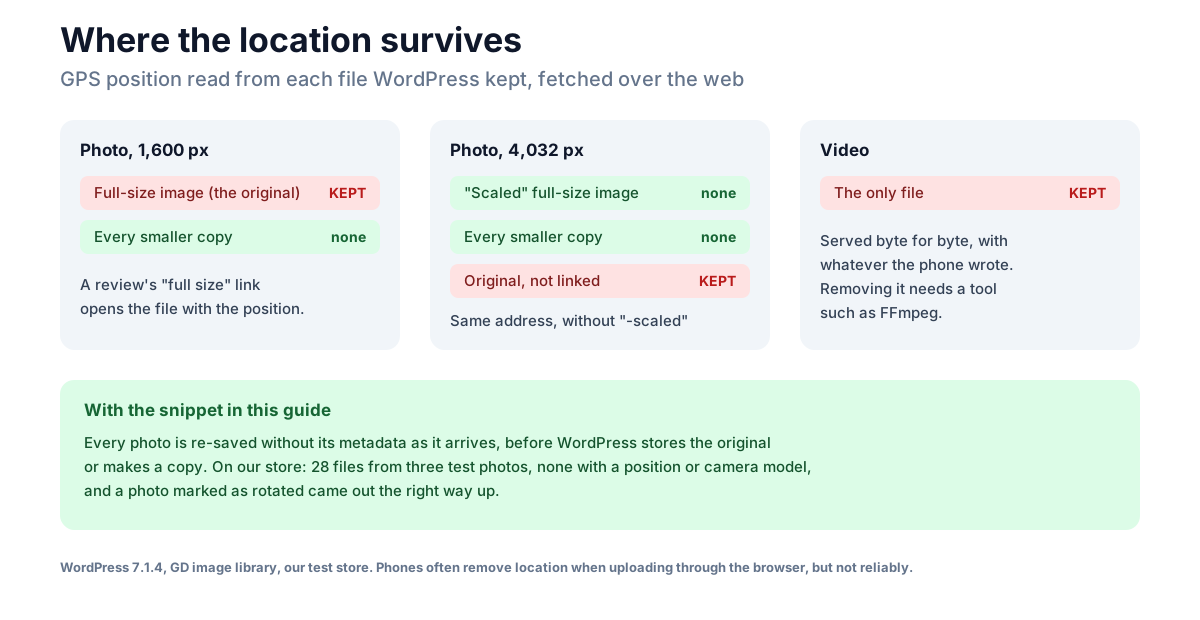
Two of those matter. A photo of 2,560 pixels or less, such as one a phone or an app has already resized, keeps its position in the very file a review's "view full size" link opens. A larger photo keeps it in its original, which nothing links to, but which stays on the server at the scaled image's address without "-scaled".
How often a position arrives at all is hard to say. Developers report iPhones removing it from photos uploaded through the browser since iOS 16.4, in WebKit's bug tracker, and similar behaviour on some Android phones, but not consistently, and a photo copied to a computer first and uploaded from there keeps whatever it has. Better not to depend on the phone.
Removing location from review photos
This snippet removes the metadata, location included, from every JPEG and WebP photo as it's uploaded, before WordPress stores the original or makes any copy. Add it to a small custom plugin or a code-snippets plugin:
// Remove location and camera data from uploaded photos before WordPress keeps them.
add_filter( 'wp_handle_upload', function ( $upload ) {
	if ( ! empty( $upload['error'] ) || ! in_array( $upload['type'], array( 'image/jpeg', 'image/webp' ), true ) ) {
		return $upload;
	}
	// GD writes no metadata when it saves; ImageMagick keeps it unless it resizes.
	$gd_only = function () {
		return array( 'WP_Image_Editor_GD' );
	};
	add_filter( 'wp_image_editors', $gd_only );
	$editor = wp_get_image_editor( $upload['file'] );
	remove_filter( 'wp_image_editors', $gd_only );

	if ( ! is_wp_error( $editor ) ) {
		// Apply the camera's rotation first, since the data that records it goes too.
		$editor->maybe_exif_rotate();
		$editor->save( $upload['file'] );
	}
	return $upload;
} );
With it on our store, none of the files from either photo kept a position or a camera model, the originals included, and a photo the camera had marked as rotated came out the right way up. It runs for every image uploaded to the site, product photos included, which is no loss for a shop. It uses WordPress's GD image library for the re-save even on a server that prefers ImageMagick, because WordPress's ImageMagick editor only strips metadata when it resizes, as we found in its code. Two things to know: it re-saves each photo at WordPress's default JPEG quality, which nobody will notice in a review but you may for product photography; and GD drops the photo's colour profile along with the rest, as WordPress's GD copies already do, so a wide-colour iPhone photo can look slightly flatter.
There is no equivalent for video. Removing a video's location means rewriting the file with a tool such as FFmpeg, which PHP can't do on its own and most shared hosts don't offer. A plugin that accepts video should either do it or tell customers their video is published as it is.
When a video review is worth it
A photo answers "what does it look like?". A video answers the questions a photo can't:
- Fit and drape: how a jacket sits on a moving person, how a dress hangs.
- Sound: a speaker, a kettle's whistle, how loud a fan is.
- Size in use: a bag being packed, a chair being sat in.
- How it works: assembly, a mechanism, a pump action.
For most products, a photo answers what shoppers ask, at a fraction of the cost to you and to them. A customer will take a photo in seconds; a video means filming, and often reshooting, and fewer customers will do it.
So start with photos everywhere, and ask for video only for products where those questions come up, for example from your product questions or your returns reasons. If you reward reviews, a larger reward for a video is fair, as long as it never depends on what the video says; our guide to incentivized reviews covers the rules, and our photo reviews guide covers what to pay.
Where NeoGrow fits
NeoGrow, our free plugin, adds one photo to WooCommerce's own review form, pays points for a review once you approve it, and pays more for one with a photo. It accepts JPEG, PNG and WebP, and shows a 300-pixel copy in the review with a link to the full-size image.
It doesn't remove location data today. That means the photo described above, 2,560 pixels or less with a position in it, keeps that position in the full-size image NeoGrow's link opens. Until it does, use the snippet above.
Video reviews are planned for NeoGrow Pro, which isn't released yet.
Frequently asked questions
Does WooCommerce support video reviews?
No. WooCommerce's review form takes text and a star rating, with no file upload at all, so video reviews in WooCommerce, like photo reviews, need a plugin.
Are video reviews better than photo reviews?
Not by default. A video shows motion, sound and fit, which a photo can't, but it costs more to collect, store, show and moderate, and fewer customers will make one. Collect photos first, and ask for video where those questions matter.
Why won't a customer's video review play?
Most often because it was filmed on an iPhone in the High Efficiency setting, which records HEVC. WordPress doesn't convert video, and HEVC has full browser support only in Safari; Chrome, Edge and Firefox support it depending on the device.
Do review photos show where a customer lives?
They can. A phone can record a GPS position in a photo, and WordPress keeps it in the original file. On our test store, a photo of 2,560 pixels or less kept its position in the full-size image a review links to. The snippet in this guide removes it on upload.
How large can a video review be?
No larger than the lowest of three limits: the review plugin's own, and your server's upload_max_filesize and post_max_size. Since WordPress serves the file as uploaded, set the plugin's limit with your shoppers' downloads in mind, not just your server's.
Should I pay more points for a video review?
You can, since a video takes more effort, as long as the reward never depends on the rating or what the video says, and the offer is disclosed. Our guide to incentivized reviews covers the rules.
The takeaway
Photo and video reviews both need a plugin, but WordPress treats them very differently. A photo is turned into small copies that load fast and carry no metadata; a video is served exactly as the customer uploaded it, at full size, in whatever format and with whatever location the phone wrote. Start with photos, strip their location on upload, and ask for video only where motion, sound or fit is the question, with a plugin that handles size, format and loading.