
WooCommerce reviews shortcode: how to show reviews beyond the product page

Most stores show their reviews in one place: the bottom of each product page, under a tab. That's where a shopper who is already deciding reads them. The shopper who hasn't picked a product yet, on your home page or a category page, sees none. So people go looking for a WooCommerce reviews shortcode to put them there, and find there isn't one.
We tested what WooCommerce 11.1 does ship for showing reviews away from the product page: three review blocks, a widget, and a shortcode for top-rated products. They work, with costs nobody mentions: the blocks load 44 scripts to draw a list of reviews, and the widget is hidden from the screen you'd add it from. This guide covers each, where it fits, and a tested shortcode that shows reviews as plain HTML anywhere.
Quick answer. WooCommerce has no shortcode that shows reviews. It ships three blocks, All Reviews, Reviews by Product and Reviews by Category, which work anywhere the block editor does, but they draw the reviews with JavaScript: on our test store one block took a page from 10 scripts to 54, about 650 KB more after compression. The Recent Product Reviews widget is plain HTML but shows no review text, and WooCommerce hides it from the block widget screen. For a home page, a category page or any page built with shortcodes, the snippet below adds a
[recent_product_reviews]shortcode that writes the reviews into the page with no JavaScript.
The short version
- WooCommerce has no reviews shortcode. Its only rating shortcode,
[top_rated_products], lists products, not reviews. - The review blocks are the no-code route, with sorting and a Load more button. They're heavy on a page that loads no other WooCommerce blocks, and the review text isn't in the page source.
- Photos and review titles added by plugins don't appear in them. The data the blocks read has no field for either.
- The widget is light but thin: product, stars and a first name, no review text.
- The shortcode below shows the latest reviews with their text, for the whole store, one product or one category, and adds nothing to the page's scripts.
- Reviews off the product page earn no stars in search. Those come from each product page.
How we tested
Our test store runs WordPress 7.1.4, WooCommerce 11.1.2, the Astra theme and PHP 8.3, with 37 approved reviews across eight products. We put each review block, the widget, [top_rated_products] and our own shortcode on test pages and on category pages, read each page's source, and loaded it in a headless browser to see what drew the reviews and how many files it took. We counted scripts with only WooCommerce active, so other plugins didn't add to the total, and checked the category snippet on Twenty Twenty-Five as well as Astra. Afterwards the store went back exactly as it was.
What WooCommerce gives you
| Option | Shows | Works in | Review text in the page source | Extra scripts |
|---|---|---|---|---|
| All Reviews block | Every product's reviews | Block editor, block theme templates | No, drawn by JavaScript | 44 |
| Reviews by Product block | One product's reviews | The same | No | 44 |
| Reviews by Category block | Reviews from chosen categories | The same | No | 44 |
| Recent Product Reviews widget | Product, stars, first name and initial | Classic widget areas | No text at all | None |
[top_rated_products] shortcode | Products sorted by rating, with stars | Anywhere a shortcode works | No reviews shown | None |
Our [recent_product_reviews] | Latest reviews with text, stars, name, product | Anywhere a shortcode works | Yes | None |
The extra scripts are on top of the 10 an ordinary page loaded on our store with only WooCommerce active, and any of the three blocks loads the same set. The widget's and [top_rated_products]'s figures are from their code: both are written on the server and add no scripts of their own.
WooCommerce's review blocks
WooCommerce has three blocks for showing reviews away from a product page: All Reviews, Reviews by Product and Reviews by Category. Each shows a list of reviews with the product's name, the stars, the reviewer's name and avatar, the date, the text, and a "Verified buyer" mark where WooCommerce knows the reviewer bought the product. Each has settings for what to show, 10 reviews to start with, a Load more button, and an order: most recent, highest rated or lowest rated. They work in any page or post, on a classic theme as well as a block theme, and in a block theme's templates.
The page arrives empty
The blocks don't write the reviews into the page. The HTML WooCommerce sends holds an empty box with the block's settings on it. Once the page has loaded, WooCommerce's script asks its Store API for the reviews (/wc/store/v1/products/reviews) and draws them in the box.
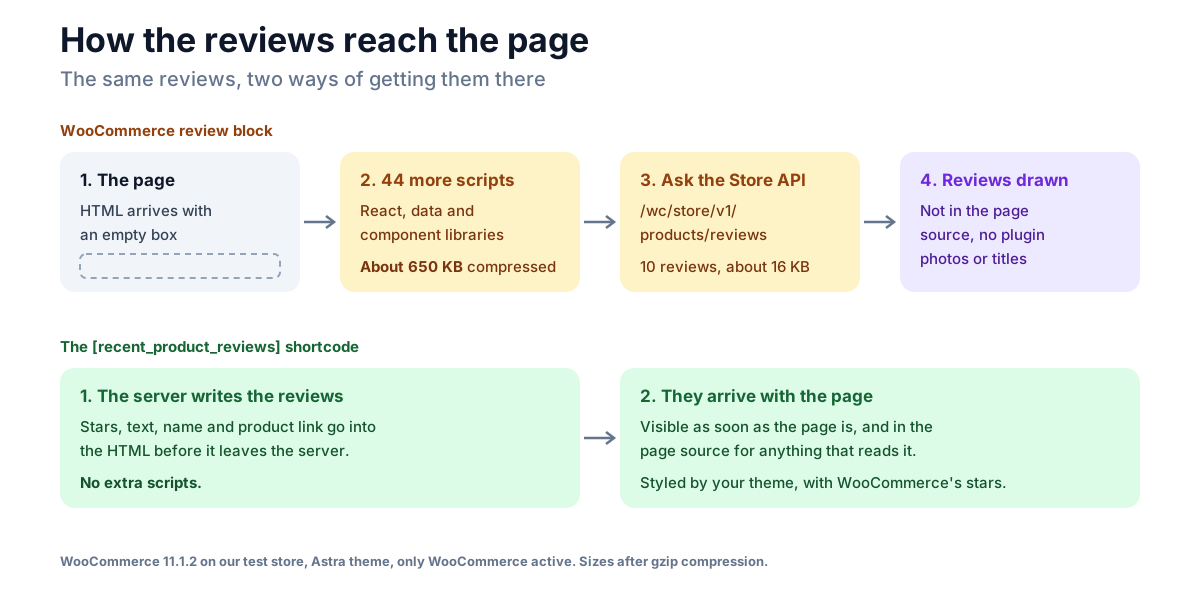
To draw them, it brings the libraries WooCommerce's blocks are built on: React, WordPress's data and component libraries, a date library and more. With only WooCommerce active, an ordinary page on our store loaded 10 scripts, 60 KB after gzip compression (187 KB uncompressed). The same page with an All Reviews block loaded 54 scripts, 716 KB compressed (2.2 MB uncompressed), plus 16 KB of reviews from the API. The other two blocks loaded the same set.
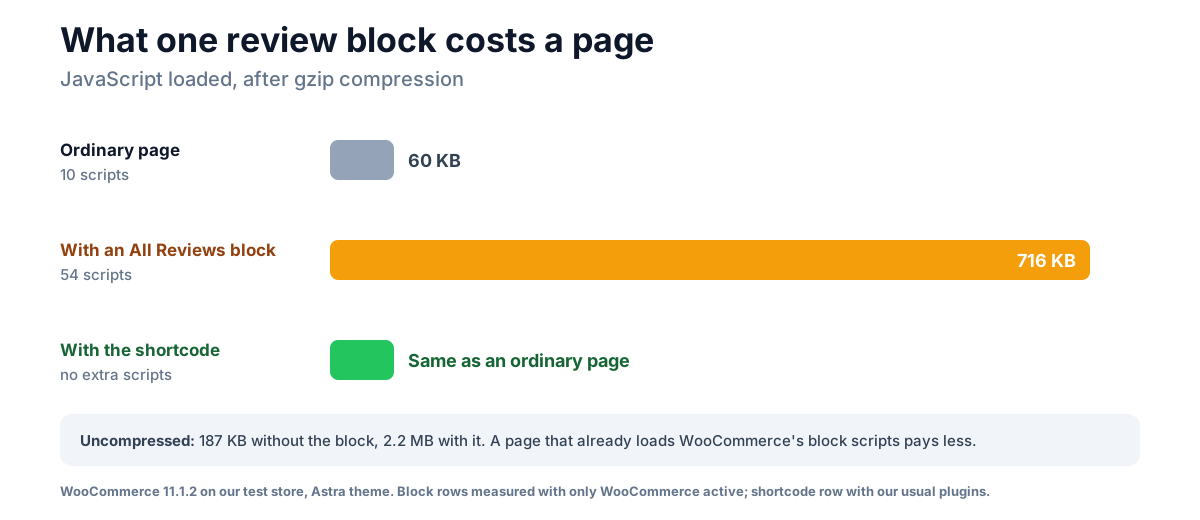
For comparison, the heaviest review plugin in our review plugin performance test added 33.4 KB compressed. A browser caches the files after the first page, and a page that already loads WooCommerce's block scripts, such as the Cart or Checkout block, shares much of the set. But a home page on a classic theme usually loads none of them, so it pays the whole cost for a list of reviews, on the page many first visits start from. That much JavaScript also has to run, and while it runs the page is slower to respond to a shopper's taps, which is what Interaction to Next Paint (INP), one of Google's Core Web Vitals, measures. We didn't measure Core Web Vitals here, so we can't say by how much.
The empty box has a second effect: the review text isn't in the page source. Google can render JavaScript, so it may still read the reviews; a crawler that doesn't run JavaScript sees an empty box.
Photos and titles don't come through
The Store API answers with a fixed set of fields for each review: product, reviewer, rating, text, date, "verified" and avatar. There's no field for a photo or a title, which is where review plugins usually add theirs.
On our store, a five-star review of the Belt with a customer photo, added by our own plugin, NeoGrow, shows the photo on the Belt's page. The same review came first in the Reviews by Product block for the Belt, without the photo. Expect the same of any plugin that adds photos, titles or badges to reviews, unless it says it extends the Store API.
Is there a WooCommerce reviews shortcode?
No. On our store, WooCommerce registers one shortcode with "rating" in it, [top_rated_products], which shows a grid of products sorted by their average rating, with stars, and no reviews. It's useful on a home page, but it isn't what most people searching for a reviews shortcode want.
A shortcode matters if your home page is built with the classic editor, a page builder such as Elementor, or a theme's own sections, where blocks don't go. So here is one. It writes the latest approved reviews straight into the page: stars, the text (trimmed to 40 words), the reviewer's name, "verified owner" when WooCommerce's setting to show that label is on, and a link to the review on its product page. Add it to a small custom plugin or a code-snippets plugin:
/**
 * [recent_product_reviews] — the latest approved reviews as plain HTML.
 * [recent_product_reviews count="3"]
 * [recent_product_reviews product="19"]
 * [recent_product_reviews category="accessories"]
 */
add_shortcode( 'recent_product_reviews', function ( $atts ) {
	$atts = shortcode_atts( array( 'count' => 3, 'product' => 0, 'category' => '' ), $atts, 'recent_product_reviews' );
	$args = array(
		'post_type'   => 'product',
		'post_status' => 'publish',
		'status'      => 'approve',
		'type'        => 'review',
		'number'      => max( 1, absint( $atts['count'] ) ),
	);
	if ( absint( $atts['product'] ) ) {
		$args['post_id'] = absint( $atts['product'] );
	} elseif ( $atts['category'] ) {
		$ids = wc_get_products( array( 'category' => array_map( 'trim', explode( ',', $atts['category'] ) ), 'limit' => -1, 'return' => 'ids' ) );
		$args['post__in'] = $ids ? $ids : array( 0 );
	}

	$items = '';
	foreach ( get_comments( $args ) as $review ) {
		$rating   = (int) get_comment_meta( $review->comment_ID, 'rating', true );
		$verified = 'yes' === get_option( 'woocommerce_review_rating_verification_label' ) && wc_review_is_from_verified_owner( $review->comment_ID ) ? ' (verified owner)' : '';
		$items   .= sprintf(
			'<li>%s<blockquote>%s</blockquote><p>%s%s, on <a href="%s">%s</a></p></li>',
			$rating ? wc_get_rating_html( $rating ) : '',
			wpautop( esc_html( wp_trim_words( $review->comment_content, 40 ) ) ),
			esc_html( $review->comment_author ),
			esc_html( $verified ),
			esc_url( get_comment_link( $review ) ),
			esc_html( get_the_title( $review->comment_post_ID ) )
		);
	}
	// The "woocommerce" class is what WooCommerce's star styles hang on.
	return $items ? '<ul class="woocommerce recent-product-reviews" style="list-style:none;margin-left:0">' . $items . '</ul>' : '';
} );
count is how many reviews to show, product takes a product's ID (the number in its edit link), and category takes one or more category slugs, separated by commas. With no reviews to show, it prints nothing, so an empty category doesn't get an empty heading.
On our store it showed the right reviews for the whole store, for the Belt alone and for the Music category, printed nothing for a category with no reviews, and dropped "verified owner" when we switched the label off. With our usual plugins active, the page loaded exactly the same 31 scripts as a page without it. It looks like the rest of your theme's text, with WooCommerce's own stars.
Two things it leaves out on purpose. It has no rating filter, for the reason in Showing your best reviews first below. And it doesn't show plugin photos either, because each plugin stores them its own way; for NeoGrow's, the photo is in the review's neogrow_review_photo_id comment meta as an attachment ID.
Where to put reviews
The home page
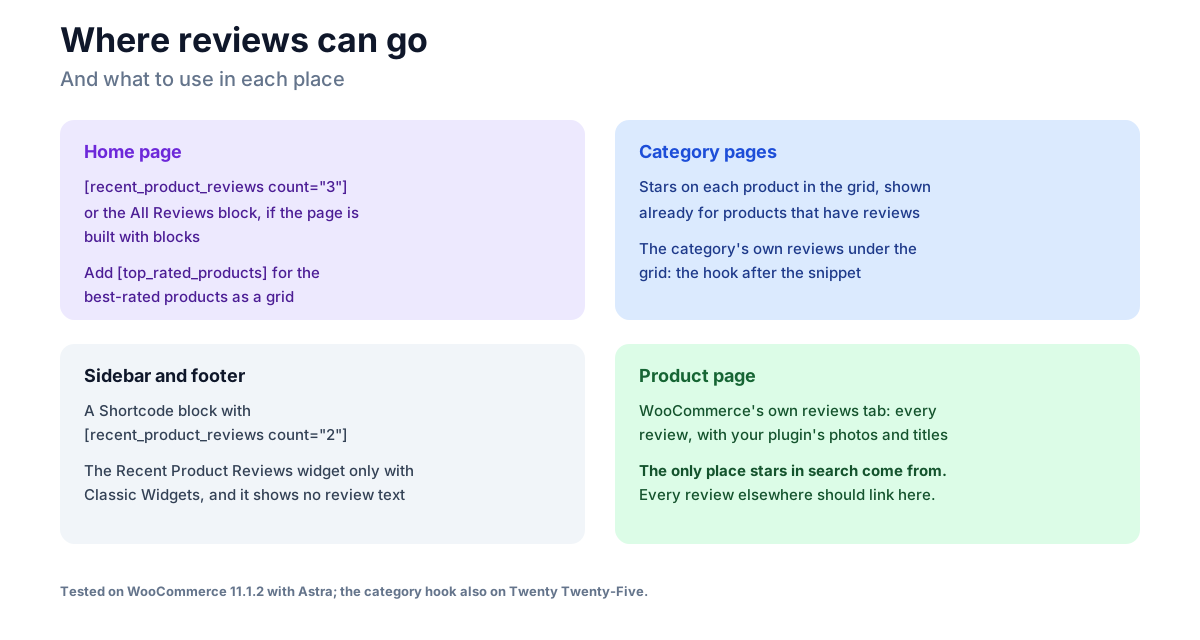
This is where reviews do the most work for a shopper who hasn't chosen anything yet. Three recent reviews, each linking to its product, is enough. If your home page is built with blocks, the All Reviews block does it with no code, at the script cost above; with the classic editor, a page builder or a theme's sections, use the shortcode in a text or shortcode element. Put [top_rated_products limit="4"] next to it if you want the best-rated products as well.
Category pages
WooCommerce already shows stars on each product in a category grid, when Enable star rating on reviews is on under WooCommerce → Settings → Products. Products with no reviews show no stars at all, which on our store was two of the five accessories. That's honest, and it's also a reason to get reviews on those products first.
To show the category's own reviews under its grid, add this below the shortcode snippet:
// Category pages: that category's latest reviews under its products.
add_action( 'woocommerce_after_shop_loop', function () {
	if ( is_product_category() ) {
		echo do_shortcode( '[recent_product_reviews category="' . esc_attr( get_queried_object()->slug ) . '"]' );
	}
}, 20 );
It worked on both themes we tried: Astra, a classic theme, and Twenty Twenty-Five, a block theme. A category with no reviews shows nothing extra.
Sidebars and footers
WooCommerce's Recent Product Reviews widget is the light option: it's written into the page on the server and loads no scripts. But it shows only the product's image and name, the stars and the reviewer's first name and initial ("by Sarah C."), with no review text. And since WordPress moved widgets to blocks, WooCommerce hides it from the widget screen, because it counts the All Reviews block as its replacement; we read that in WooCommerce's code. You'll only see it with the Classic Widgets plugin, or if it was placed before the switch.
The simpler route is a Shortcode block in the widget area with [recent_product_reviews count="2"].
What reviews off the product page do for search
Nothing, directly. Neither the review blocks nor the shortcode adds structured data, and on our store a page with an All Reviews block carried only the site's usual breadcrumb and organisation markup. The stars in search results come from each product page's own markup, which WooCommerce writes from the product's reviews; our guide to stars not showing in Google covers that side. Reviews elsewhere are for shoppers, and each one's link sends a shopper to the product page that earns the stars.
Showing your best reviews first
The blocks can sort by highest rating, and it's tempting to put only five-star reviews on the home page. The FTC's rule on consumer reviews makes it unlawful to present the reviews you show as all or most of the reviews you received when negative ones have been held back because of their rating, and other countries have similar rules.
The safer pattern is the default order, most recent first, which is what the shortcode does: it shows low ratings when they're the latest, as our Music category's two- and three-star reviews were. If you do pick favourites, label them as a selection and link to the product pages where every review is.
Where NeoGrow fits
NeoGrow, our free plugin, doesn't add a reviews block or shortcode. It works on the supply side: a photo and title on WooCommerce's own review form, points for writing a review once you approve it, and a review reminder after an order. Its photos and titles show on the product page, on classic and block themes alike, but as tested above, not in WooCommerce's review blocks or in the shortcode here. If showing photos on your home page matters to you, that's a limit to know about.
Frequently asked questions
Is there a WooCommerce reviews shortcode?
No. WooCommerce has no shortcode that shows reviews; its only rating shortcode, [top_rated_products], shows products sorted by rating. WooCommerce ships three review blocks instead, All Reviews, Reviews by Product and Reviews by Category, and the snippet in this guide adds a [recent_product_reviews] shortcode for places blocks can't go.
How do I show WooCommerce reviews on my home page?
If the home page is built with blocks, add the All Reviews block. If it's built with the classic editor, a page builder or a theme's own sections, add the shortcode from this guide. Three recent reviews, each linking to its product, is enough.
Why don't the reviews show in my page source?
WooCommerce's review blocks send an empty box and draw the reviews with JavaScript after the page loads, from WooCommerce's Store API. That's normal for these blocks. The shortcode in this guide writes the reviews into the HTML instead.
Do WooCommerce's review blocks slow down a page?
On a page that loads no other WooCommerce blocks, yes, noticeably: on our test store one block took a page from 10 scripts to 54, about 650 KB more after compression. A page that already loads WooCommerce's block scripts pays less, and a browser caches the files after the first visit.
Why are review photos missing from the All Reviews block?
The blocks read reviews from WooCommerce's Store API, which has no field for a photo or a title. Plugins that add those usually add them to the product page only, so they show there and not in the blocks.
Will reviews on my home page give me stars in Google?
No. Neither the blocks nor the shortcode adds structured data. Stars in search come from each product page's own markup, which WooCommerce builds from that product's reviews.
The takeaway
WooCommerce has no reviews shortcode, and what it has instead comes with trade-offs: blocks that are easy to add but load 44 scripts and keep the text out of the page source, and a light widget that shows no text and is hidden from the widget screen. For a home page, a category page or a sidebar, three recent reviews written into the page, linking to their products, do the job with nothing extra to load. Whichever you use, show the most recent rather than the best, and let the product pages do the work in search.