
Do review plugins slow down WooCommerce? We measured five

Every plugin costs something. The question is whether a review plugin costs enough to notice, and most answers you'll find are guesses. So we measured WooCommerce review plugin performance on one test store: five plugins, each on its own against WooCommerce alone, over more than 1,400 timed page loads.
The short version: three of them added under 35 ms, close to our machine's own run-to-run variation, two added more on every page, and the biggest cost on the store wasn't a plugin at all. It was a WordPress setting that's off by default. Two of the five plugins are ours, and one of ours had a cost we didn't expect. It's in the results below.
Quick answer. A review plugin slows WooCommerce down through server time, extra database queries and the files it loads in the browser. On our test store, NeoGrow, NeoLite Review Customizer and NeoLite Disable Reviews each added under 35 ms of server time and loaded nothing outside product pages. Customer Reviews for WooCommerce added 78 to 98 ms, 17 to 30 queries, and 238 KB of CSS and JavaScript on every page. Site Reviews added 155 to 170 ms and 78 KB on every page. On a product with 500 reviews, turning on WordPress's comment paging cut the page from 1,565 ms to 650 ms with no review plugin at all.
The short version
- Small plugins stay small. NeoGrow and both NeoLite plugins added under 35 ms on product pages, and 0 to 15 ms elsewhere.
- Where the files load matters. Two plugins loaded their CSS and JavaScript on the home page and the shop, where no review is shown.
- Queries per review add up. One plugin made about one extra database query for every review on the page: 521 extra for 500 reviews.
- Check Settings → Discussion first. WordPress shows every review on one page unless you turn on paging. With 500 reviews, that one setting mattered more than any plugin.
- Caching hides server time, not files. A page cache serves logged-out shoppers a stored copy, but the cart, checkout and logged-in customers still pay it, and every visitor's browser still downloads the files.
How we measured
The store was our test store: WordPress 7.1.3, WooCommerce 11.1.2, the Astra theme, and PHP 8.3.14 with OPcache on, running on a Windows PC under Apache. No page cache and no object cache, so every load built the page from scratch. Visitors were logged out.
Each run had WooCommerce plus one plugin active, and nothing else. We loaded four pages: the home page, the shop, a simple product with 10 reviews (the Belt) and a variable product with 4 (the Hoodie). Each page was loaded 5 times to warm up, then 20 times timed, in three separate rounds, so 60 timed loads per page per plugin. The figures are medians. A small probe plugin, deleted afterwards, recorded each load's server time, its database query count and its peak memory. Front-end files were counted from each page's HTML.
The plugins, at the versions installed on our store:
| Plugin | Version | What it does |
|---|---|---|
| NeoGrow | 1.2.22 | Loyalty points and photo reviews |
| NeoLite Review Customizer | 1.1.1 | Renames and restyles the reviews section |
| NeoLite Disable Reviews | 1.1.1 | Login-only reviews, or none |
| Customer Reviews for WooCommerce | 5.124.0 | Review reminders and its own reviews display |
| Site Reviews | 8.3.4 | A general reviews plugin, with optional WooCommerce support |
We didn't change any plugin's settings for the test. Site Reviews' own WooCommerce integration was off, as it is after install, so on our product pages the reviews were still WooCommerce's own; its figures are what having it active costs. Customer Reviews and Site Reviews had small updates available (5.126.0 and 8.3.5) that we didn't install.
One caution about the numbers. Our machine is slower than a good host, so the absolute times are high: WooCommerce alone took 460 to 610 ms per page. The differences are what to read. The same configuration varied by up to about 20 ms between rounds, so treat anything smaller than that as noise.
WooCommerce review plugin performance: the results
Server time is the part of Time to First Byte (TTFB) that your server controls: until WordPress finishes building the page, the browser receives nothing. Here's what each plugin added to the Belt's product page, compared with WooCommerce alone (562 ms, 74 queries, 26.0 MB):
| Plugin | Server time added | Queries added | Memory added | CSS and JavaScript |
|---|---|---|---|---|
| NeoLite Disable Reviews | +13 ms | 0 | +0.1 MB | None |
| NeoLite Review Customizer | +24 ms | 0 | +0.1 MB | None |
| NeoGrow | +28 ms | +14 | +0.7 MB | 10.6 KB, product pages only |
| Customer Reviews for WooCommerce | +98 ms | +30 | +7.2 MB | 238.5 KB, every page |
| Site Reviews | +160 ms | +6 | +6.1 MB | 77.8 KB, every page |
Across all four pages, the time added ranged from 0 to 13 ms for Disable Reviews, 8 to 25 ms for Review Customizer, 9 to 33 ms for NeoGrow, 78 to 98 ms for Customer Reviews and 155 to 170 ms for Site Reviews. The chart shows the product-page figures, in milliseconds added to WooCommerce's 562 ms:
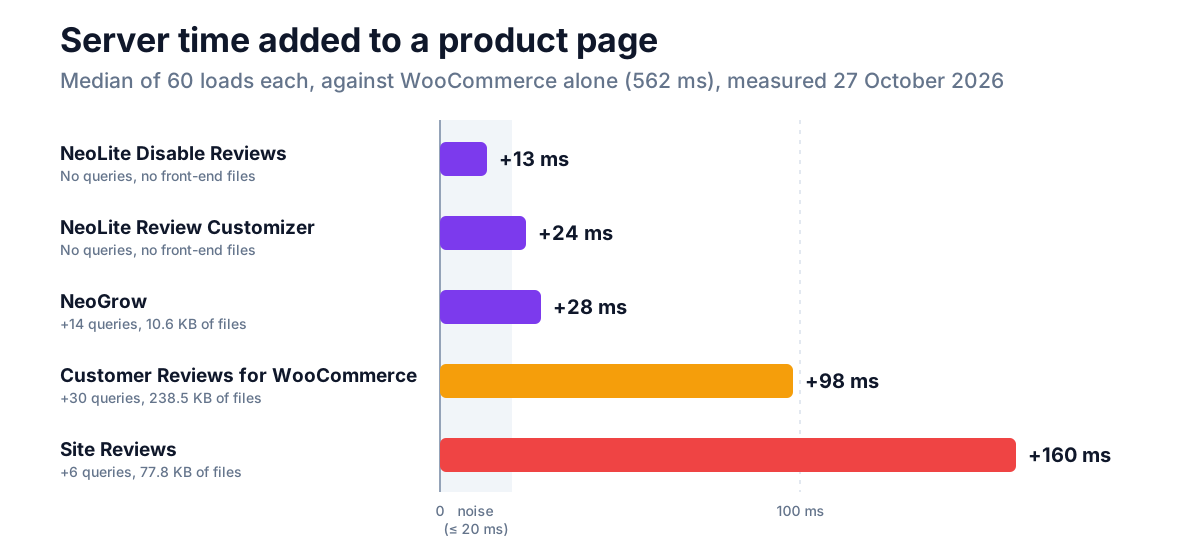
Site Reviews made only six extra queries, yet added the most time. The queries weren't its cost; loading its code was. It brought in about 210 more PHP files than WooCommerce alone on every page, against about 65 for NeoGrow. Queries are easy to count, but they aren't the whole bill.
The files each plugin loads
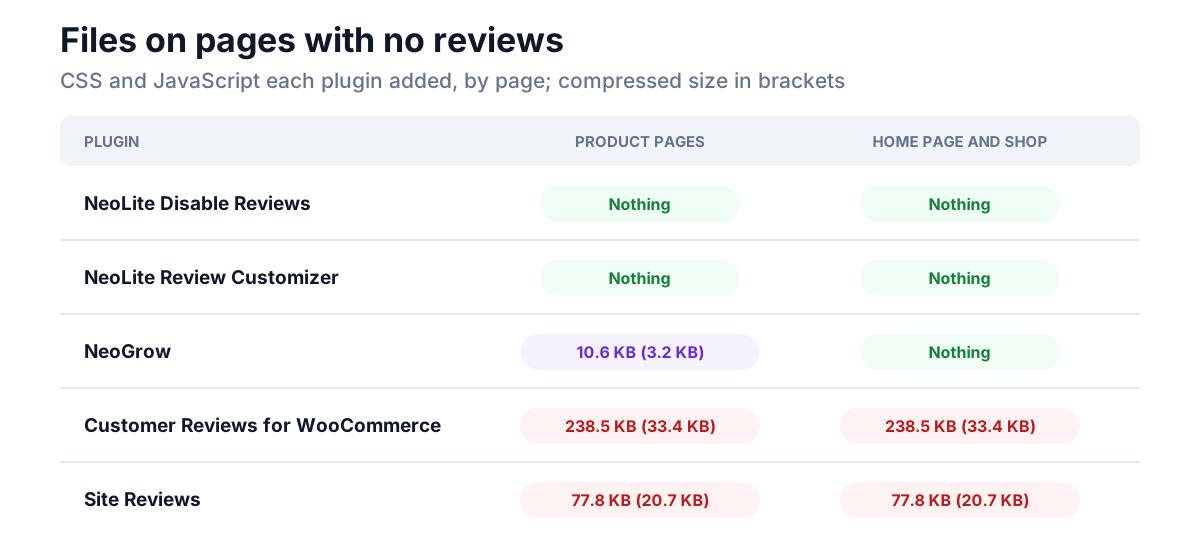
The other cost lands in the shopper's browser: the CSS and JavaScript a plugin adds to the page.
| Plugin | Product pages | Home page and shop |
|---|---|---|
| NeoLite Disable Reviews | Nothing | Nothing |
| NeoLite Review Customizer | Nothing | Nothing |
| NeoGrow | 3 files, 10.6 KB (3.2 KB compressed); 4 files on a variable product | Nothing |
| Customer Reviews for WooCommerce | 3 files, 238.5 KB (33.4 KB compressed) | The same 3 files |
| Site Reviews | 2 files, 77.8 KB (20.7 KB compressed) | The same 2 files |
Compressed sizes are with gzip; your server may compress differently. A browser caches these files after the first page, so the cost is paid mostly on a shopper's first visit, which is also the visit you're most likely to lose.
These files can also reach Core Web Vitals. A stylesheet in the page's head holds back the first render, which can delay Largest Contentful Paint (LCP), and JavaScript that runs on every page competes with the shopper's taps, which is what Interaction to Next Paint (INP) measures. We didn't measure Core Web Vitals in this test, so we can't say by how much; a page that shows no reviews just has no reason to carry the cost at all.
What we found in our own plugin
NeoGrow added 8 database queries to every page, product page or not. We read through them. Six were NeoGrow checking, on every page load, that its two daily background jobs were still scheduled, which only needs checking now and then. The other two were settings read from the database one at a time instead of with the rest. None of it is slow on its own, and on our machine the whole plugin stayed within about 30 ms. But it's work that doesn't need doing on every visit, so it's on our fix list. The other six queries on the Belt's page loaded its two review photos and two review settings, which is the plugin doing its job.
We found one more thing while checking the HTML: NeoGrow's review photos aren't lazy-loaded, so the browser fetches them even when the shopper never scrolls down to the reviews. They're small thumbnails, about 300 pixels wide, but that's on the fix list too.
The setting that cost more than any plugin
WordPress has a setting in Settings → Discussion called Break comments into pages. WooCommerce reviews are comments, so it decides how many reviews a product page shows at once. It's off by default in a new WordPress install, so a product shows every review it has.
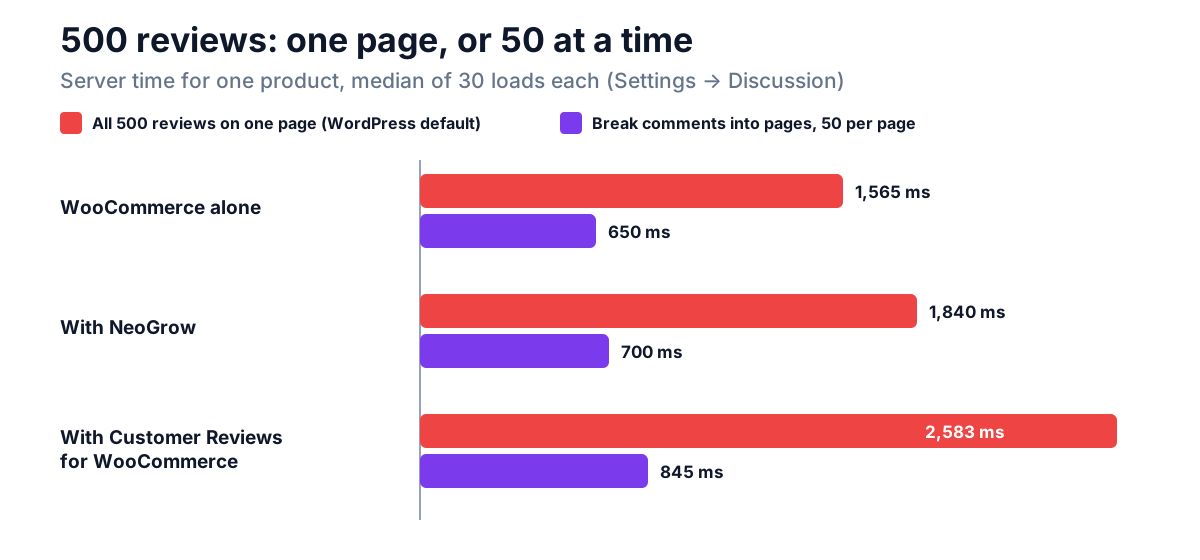
We added 500 test reviews to one product, the Polo, and timed it both ways (30 loads each), then deleted the reviews:
| All 500 reviews on one page | 50 reviews per page | |
|---|---|---|
| WooCommerce alone | 1,565 ms, 711 KB of HTML | 650 ms, 219 KB |
| With NeoGrow | +275 ms, +290 KB | +50 ms, +32 KB |
| With Customer Reviews for WooCommerce | +1,018 ms, +521 queries | +195 ms, +71 queries |
Turning on paging saved WooCommerce alone 915 ms on that product, more than any plugin cost. It also cut 492 KB from the HTML, and the page went from 7,872 HTML elements to 1,136. That matters in the browser too: Google's Lighthouse flags an excessive DOM size, because every element adds to the work of styling and laying out the page.
The 500-review test also showed which plugins do work for each review. Customer Reviews for WooCommerce made about one extra query per review shown. NeoGrow's queries stayed flat at about 10, but it adds a Helpful and a Report link to every review, which is about 0.6 KB of HTML each.
To turn it on, tick Break comments into pages, and choose how many top level comments per page and whether the first or last page shows by default. We used 50, WordPress's own default when paging is on. If your products have only a handful of reviews, this changes nothing, and you can leave it.
Does a page cache make this irrelevant?
Partly. A full-page cache, from your host or a caching plugin, stores the finished HTML and hands it to logged-out visitors without running WordPress at all, so none of the server time above applies to them. But WooCommerce tells caches not to store the cart, checkout and My Account pages, and most caches skip logged-in customers entirely. Those are the visits closest to a sale. A cache also does nothing about the files a plugin loads: the browser downloads them either way.
How to check your own store
You don't need a benchmark harness to find the expensive plugin on your store:
- On a staging copy, not the live store, install the free
Query Monitor plugin. It shows each page's queries, grouped by the plugin that made them, and the page's generation time.
- Open a product page and your home page and note the queries and
time for each review plugin.
- Open your browser's developer tools, Network tab, and reload. Filter
by CSS and JS, and look for files from review plugins on pages that show no reviews.
- Deactivate the plugin and reload a few times. One load proves
nothing; compare the middle value of five or more.
Then check Break comments into pages on any product with more than about fifty reviews.
Frequently asked questions
Do review plugins slow down WooCommerce?
Some do, and by very different amounts. On our test store, three of the five added under 35 ms of server time, within about the noise of the machine. Two added 78 to 170 ms, and loaded 78 to 238 KB of CSS and JavaScript on every page, including pages that show no reviews.
How do I test WooCommerce review plugin performance?
Compare the same pages with and without the plugin, on a staging copy. Query Monitor shows queries and generation time per plugin, and your browser's Network tab shows the files. Load each page several times and compare the middle values, because single loads vary.
Should I turn on "Break comments into pages" for reviews?
Yes, if a product has more than about fifty reviews. WordPress shows every review on one page by default. On our product with 500 reviews, showing 50 per page took the page from 1,565 ms to 650 ms with no review plugin installed.
Does a caching plugin fix a slow review plugin?
Only for logged-out visitors, and only the server time. WooCommerce keeps the cart, checkout and My Account pages out of the cache, and most caches skip logged-in customers. The plugin's CSS and JavaScript still download in the browser.
Do photo reviews make pages slower?
Each photo is an image the shopper downloads, like any product image. On our product pages, NeoGrow's photo reviews added two small database lookups per photo, and its review styles were 7.8 KB. Photos should be small thumbnails and lazy-loaded, since reviews sit below the fold. NeoGrow's thumbnails are about 300 pixels wide, but they aren't lazy-loaded yet.
Which review plugin is fastest?
On our store, the ones that load nothing they don't need. NeoLite Disable Reviews and NeoLite Review Customizer loaded no front-end files at all, and NeoGrow loaded its files only on product pages. Measure on your own store before deciding, since themes and hosting change the numbers.
Measure before you blame
A review plugin is rarely why a WooCommerce store is slow, but it can be, and now you know what to look for: files on pages without reviews, a query for every review, and a long list of reviews WordPress was never told to break into pages. Check the Discussion setting first, since it's free. Then measure your plugins on a staging copy before Black Friday's traffic does it for you.