
WooCommerce on a block theme: what breaks and what doesn't
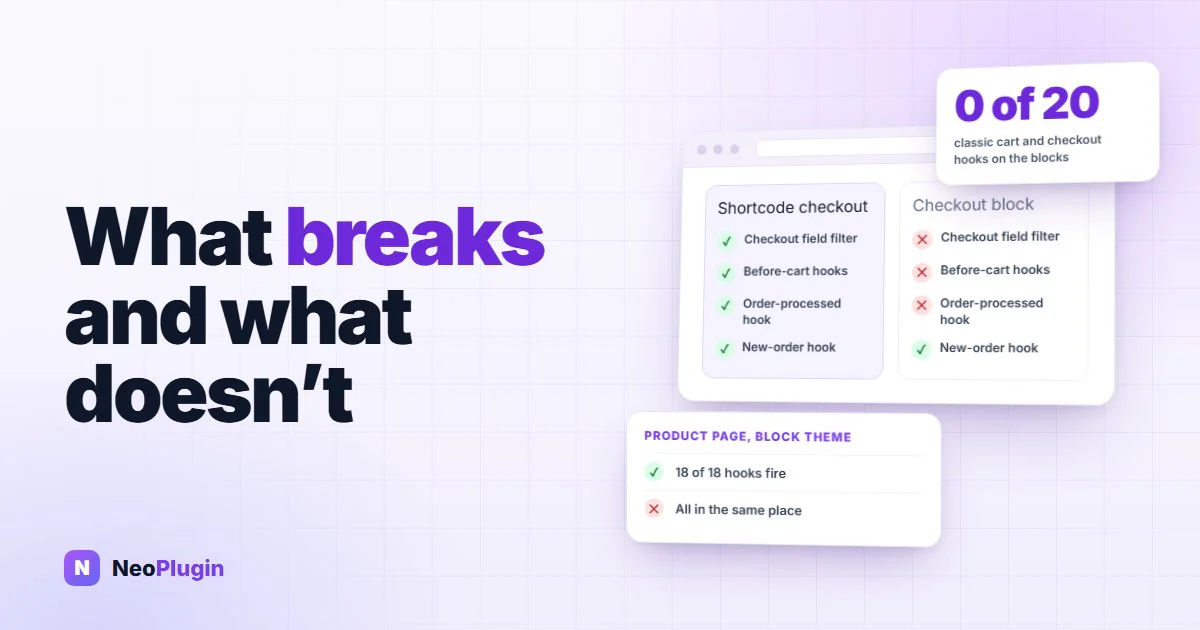
"Does it work with block themes?" is the question every WooCommerce add-on gets asked, and the usual answer is a guess in one direction or the other. So we tested it. We put a probe on 53 of the classic WooCommerce hooks that add-ons rely on, ran a WooCommerce block theme and a classic theme side by side, and placed real test orders through both kinds of checkout.
The result isn't what the question assumes. The block theme broke very little. What broke was the Cart and Checkout blocks, and they broke in exactly the same way on the classic theme. This post is the general version of a trap our reviews guide and its photo reviews chapter run into, with the numbers.
Quick answer. On a WooCommerce block theme, the product page and shop page still fire nearly all of the classic hooks, because WooCommerce re-fires them around its blocks. In our test, a Twenty Twenty-Five product page printed all 18 of the product-page hooks we checked, though several in different places. What breaks is the Cart and Checkout blocks: they ran none of the 20 classic cart, checkout and order-placement hooks, and they did that on a classic theme (Astra) too. Shortcode cart and checkout pages ran all 20 on both themes. So check whether your cart and checkout pages are blocks before you blame the theme.
The short version
- The theme isn't the big break. Product pages fired 18 of 18 classic hooks on both themes. The shop page fired 9 of 11 on the block theme.
- The Cart and Checkout blocks are. They ran 0 of 8 cart hooks, 0 of 7 checkout hooks and 0 of 5 order-placement hooks, on either theme.
- They're separate choices. New stores get the Cart and Checkout blocks whatever the theme, and a block theme can still use the shortcode pages.
- Some hooks move rather than vanish. On the block theme, three "before" hooks printed above the breadcrumbs and the summary hook printed after the price.
- Hooks that every checkout shares still run. New-order, status-change and email hooks fired on both checkouts.
How we tested
The store was our test store: WordPress 7.1.4, WooCommerce 11.1.2 and PHP 8.3, with only WooCommerce and a small probe plugin active. Every hook in the probe printed a visible marker into the page, so we could see both whether it fired and whether its output reached the screen. Filters changed something visible: an extra product tab, a label on the price, an extra checkout field.
We ran four setups:
| Setup | Theme | Cart and checkout pages |
|---|---|---|
| 1 | Astra (classic) | [woocommerce_cart] and [woocommerce_checkout] shortcodes |
| 2 | Astra (classic) | Cart and Checkout blocks |
| 3 | Twenty Twenty-Five (block) | Shortcodes |
| 4 | Twenty Twenty-Five (block) | Cart and Checkout blocks |
In each one a headless browser opened a simple product and a variable product, the shop page, the cart, the checkout and the account page, then filled in the checkout and placed a cash-on-delivery order. We read the markers from the rendered page, after the blocks' JavaScript had run, and the server's log of which hooks fired. The test orders and every other change were deleted afterwards.
Twenty Twenty-Five used WooCommerce's block templates for the product and shop pages: separate blocks for the image, title, price and so on, not the single "classic template" placeholder. Which of the two a store gets depends on its history, and we come back to that below.
The results
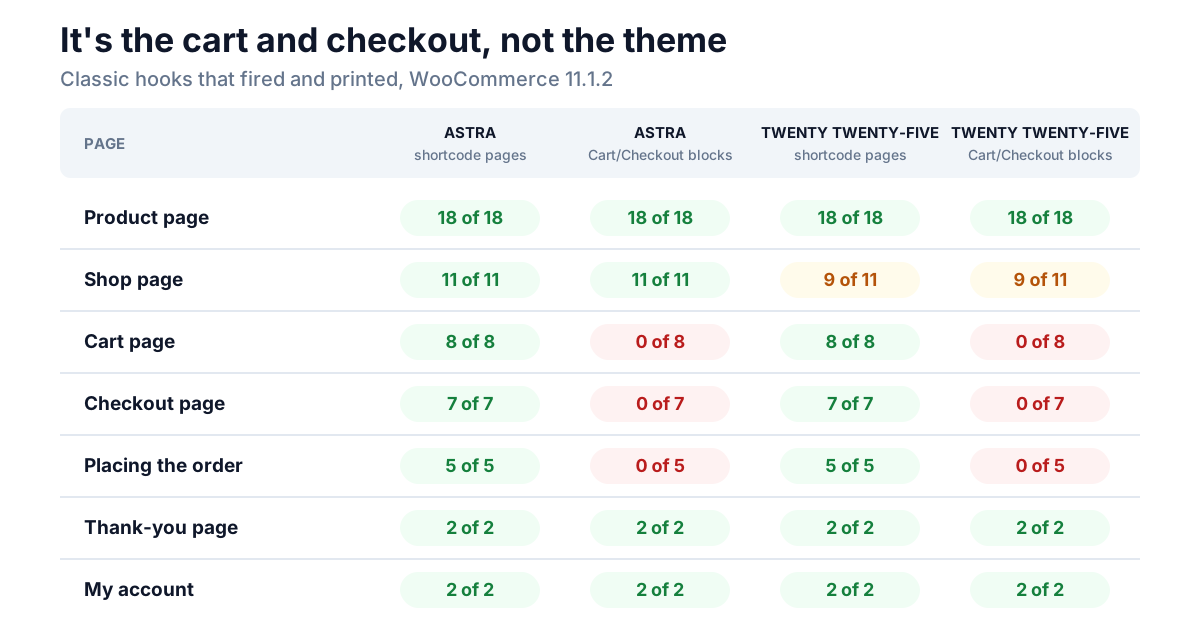
| Page | Classic hooks checked | Astra, shortcodes | Astra, blocks | Twenty Twenty-Five, shortcodes | Twenty Twenty-Five, blocks |
|---|---|---|---|---|---|
| Product page | 18 | 18 | 18 | 18 | 18 |
| Shop page | 11 | 11 | 11 | 9 | 9 |
| Cart page | 8 | 8 | 0 | 8 | 0 |
| Checkout page | 7 | 7 | 0 | 7 | 0 |
| Placing the order | 5 | 5 | 0 | 5 | 0 |
| Thank-you page | 2 | 2 | 2 | 2 | 2 |
| My account | 2 | 2 | 2 | 2 | 2 |
Read the table by column pairs. Switching the theme from Astra to Twenty Twenty-Five (columns 1 to 3, or 2 to 4) cost two hooks on the shop page. Switching the cart and checkout from shortcodes to blocks (columns 1 to 2, or 3 to 4) cost all 20 cart, checkout and order hooks, whichever theme was active.
The product page on a block theme: the hooks fire, somewhere else
A block template has no PHP file for an add-on to hook into, so WooCommerce fills the gap itself. It wraps its product blocks in a compatibility layer that fires the classic actions before and after the matching block. Every one of the 18 product-page hooks we checked printed on Twenty Twenty-Five, for both the simple and the variable product, including the three review hooks.
The catch is position. An action fired "before the first block" lands wherever the first block happens to be, which isn't where the classic template put it:
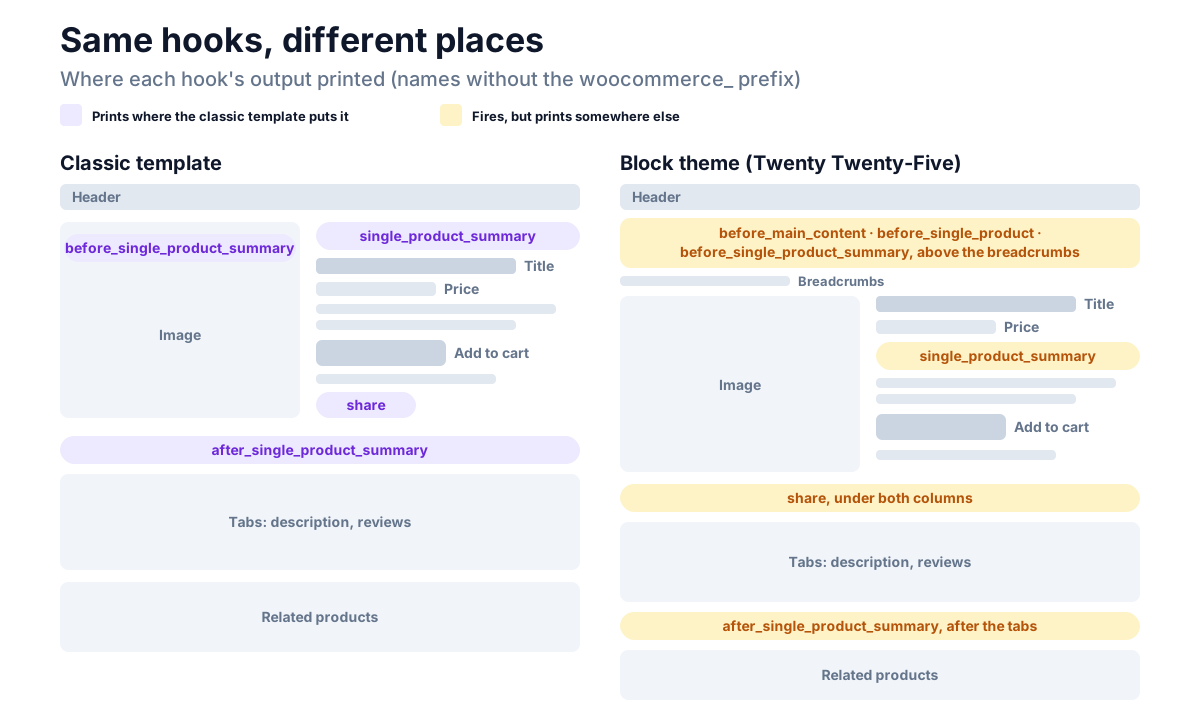
woocommerce_before_main_content,woocommerce_before_single_productandwoocommerce_before_single_product_summaryall printed together, full width, above the breadcrumbs.woocommerce_single_product_summaryprinted after the price and before the short description. WooCommerce fires it just before the Excerpt or Product Summary block, so anything an add-on puts "under the title" ends up under the price.woocommerce_shareprinted under both columns, not at the end of the summary.woocommerce_after_single_product_summaryprinted after the tabs, not before them.
None of this errors. An add-on's output simply turns up in a different spot, which is usually fine and occasionally looks broken.
Two conditions turn "moved" into "missing". If someone removes the Excerpt and Product Summary blocks from the template, woocommerce_single_product_summary never fires at all, and WooCommerce's product structured data goes with it. That's the trap in our post on star ratings not showing in Google. And if the template uses the Product Reviews block with review blocks inside it, the woocommerce_review_* actions don't fire, which is why review photos and badges disappear. The default template has neither problem.
Filters fared better than actions, because the blocks call the same product functions the classic template does. woocommerce_product_tabs added its tab, and woocommerce_get_price_html and woocommerce_product_single_add_to_cart_text changed the price and the button, on both themes.
The shop page: two hooks gone
The shop page printed 9 of the 11 classic hooks on Twenty Twenty-Five. All the loop hooks fired for every product, including woocommerce_before_shop_loop_item, woocommerce_shop_loop_item_title and woocommerce_after_shop_loop.
The two that didn't:
woocommerce_archive_description. On a block template it's tied to the Term Description block, which the shop page doesn't have.woocommerce_sidebar. Block themes have no sidebar for it to fill.
One filter stopped working. The block grid draws its own "Sale" badge, so woocommerce_sale_flash wasn't called on the shop page or in the related products under a product. The sale badge on the product's own image still used it. And the related products on a block-theme product page didn't fire the loop-item actions, though woocommerce_loop_add_to_cart_link still applied to their buttons.
The cart and checkout blocks: where it really breaks
This is the column that matters. With the Cart block, none of the eight cart page actions ran: not woocommerce_before_cart, not woocommerce_cart_collaterals, not woocommerce_proceed_to_checkout. With the Checkout block, none of the seven checkout page actions ran either, from woocommerce_before_checkout_form to woocommerce_review_order_before_submit. That was the same on Astra and on Twenty Twenty-Five.
That's not an oversight in the compatibility layer. The Cart and Checkout blocks are a different application: a React front end that talks to WooCommerce through the Store API, with no PHP template for those actions to fire in.
Filters split down the middle:
| Filter | Shortcode cart and checkout | Cart and Checkout blocks |
|---|---|---|
woocommerce_get_item_data (extra lines under a cart item) | Applied | Applied |
woocommerce_cart_item_name | Applied | Not applied |
woocommerce_checkout_fields | Applied (our extra field appeared) | Never called |
woocommerce_order_button_text | Applied | Not applied |
woocommerce_thankyou_order_received_text | Applied | Applied |
The checkout fields row is the one that costs stores money. Any plugin that adds a field through woocommerce_checkout_fields, such as a delivery date, a VAT number or a gift message, shows nothing on the Checkout block, with no error.
Placing the order runs a different chain
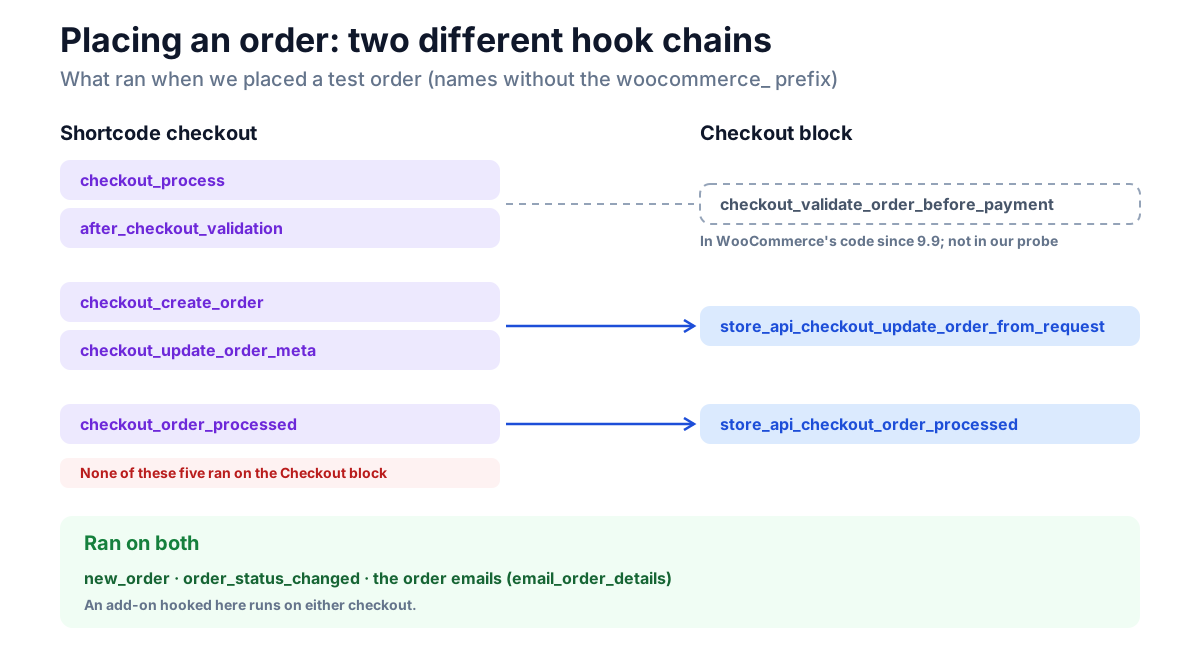
When the test order was placed through the shortcode checkout, all five classic order hooks ran: woocommerce_checkout_process, woocommerce_after_checkout_validation, woocommerce_checkout_create_order, woocommerce_checkout_update_order_meta and woocommerce_checkout_order_processed.
Through the Checkout block, none of them ran. The order was created by the Store API, which fired its own hooks: woocommerce_store_api_checkout_update_order_from_request and woocommerce_store_api_checkout_order_processed.
This is the quiet failure. A plugin that saves its data on woocommerce_checkout_update_order_meta, or sends something to a CRM on woocommerce_checkout_order_processed, does nothing on a block checkout. The order still goes through, the customer still gets an email, and the missing step only shows up later.
What ran on both checkouts: woocommerce_new_order, woocommerce_order_status_changed and the order emails. An add-on that hangs its work on those behaves the same either way.
What doesn't break
Plenty, and it's worth saying so, because "block themes break plugins" gets repeated about things that are fine:
- Product data filters. Price, button text and product tabs applied on every setup.
- Adding to the cart.
woocommerce_add_to_cart_validationandwoocommerce_add_to_cartfired. The Store API's own add-to-cart route calls the same validation filter. - Extra cart item lines through
woocommerce_get_item_data, on both kinds of cart. - The thank-you page.
woocommerce_before_thankyou,woocommerce_thankyouand the received-text filter ran in all four setups. - My account. It's still a shortcode on a block theme, so all its hooks fire.
- Emails, order statuses and the admin. None of them depend on the theme or the checkout type.
The cart and checkout aren't tied to the theme
This is the point most worth taking away. Two separate decisions get bundled together as "going block-based":
- The theme. A block theme changes the product and shop templates, which mostly keeps the hooks, as above.
- The cart and checkout pages. A new WooCommerce store creates them with the Cart and Checkout blocks, whatever the theme. Our Astra store had them.
So a store on a classic theme can have the block checkout, and a store on a block theme can have the classic one. To switch back, open the page in the editor and use Switch to classic cart or Switch to classic checkout in the block's settings, or replace the block with the Classic Shortcode block. That's a decision about your checkout, not your theme, and the newer checkout has its own advantages, so make it for a specific add-on that needs it.
Which product template your store has
On a block theme, WooCommerce serves one of two product templates, and which one depends on a store setting that's set by the store's history, not by the theme:
- The block version, with separate image, title, price and Product Details blocks. A store gets it if it was set up on a recent WooCommerce, or if it switched from a classic theme to a block theme. When a store switches, WooCommerce turns the setting on.
- The "classic template" version, a single placeholder block that runs the old PHP template. WooCommerce 7.9's update turned the setting off for stores that already existed, so a store that has run a block theme since before that update keeps it.
Both fire the classic product-page hooks. The placeholder version fires them in their classic positions, because it is the classic template.
How to check your own store
- Open your Cart page and Checkout page in the editor. If you see a Cart or Checkout block, you're on the blocks. If you see a Shortcode or Classic Shortcode block, you're on the classic pages.
- List the add-ons that touch the cart or checkout. Anything that adds a checkout field, a cart notice, a fee, a gift option, or that sends order data somewhere. Those are the ones at risk.
- Test each one logged out. Add a product, look at the cart and the checkout for what the add-on should show, then place a test order with cash on delivery and open it in WooCommerce → Orders. Check that the add-on's field or data is there.
- Check the product template. In Appearance → Editor → Templates → Single Product, make sure it still has an Excerpt or Product Summary block. If it has a Product Reviews block with review blocks inside it, check that your review add-on shows on the page.
Step 3 is the one that catches the order-hook failure, because it only shows in the saved order.
For developers: the block-safe equivalents
If you maintain an add-on, these are the replacements we'd reach for:
| Classic hook | Use on the blocks |
|---|---|
woocommerce_checkout_fields | woocommerce_register_additional_checkout_field(), WooCommerce's additional checkout fields API |
woocommerce_checkout_process, woocommerce_after_checkout_validation | woocommerce_checkout_validate_order_before_payment (since WooCommerce 9.9; read from the code, not in our probe) |
woocommerce_checkout_create_order, woocommerce_checkout_update_order_meta | woocommerce_store_api_checkout_update_order_from_request |
woocommerce_checkout_order_processed | woocommerce_store_api_checkout_order_processed |
| Cart and checkout page actions | A block integration (IntegrationInterface) with data added to the Store API through ExtendSchema |
Where you can, hang order logic on woocommerce_new_order or the status-change hooks, which ran on both checkouts. Otherwise bind the classic hook and its Store API twin side by side, and test both.
One trap from our own testing. Store API data is registered on the woocommerce_blocks_loaded action, and WooCommerce fires it early, during plugins_loaded. An add-on that boots later and only binds that action never registers its data, and the checkout panel that depends on it renders nothing. We saw it happen when we changed the plugin load order on our test store. Bind the action, then call your register method straight away if did_action( 'woocommerce_blocks_loaded' ) is already true.
What NeoGrow does
NeoGrow is our loyalty and reviews plugin, so we ran it through the same setups with a logged-in customer who had points:
- The points redemption box appeared on the Cart and Checkout blocks and on the shortcode pages. NeoGrow registers a block integration for the blocks and uses the classic actions for the shortcodes.
- Redeeming points on an order is bound to both chains: the classic
woocommerce_checkout_create_orderandwoocommerce_checkout_order_processed, and their Store API twins. - The "earn points" message on the product page appeared on Twenty Twenty-Five as well as on Astra.
- Review extras cover both review paths, including the Product Reviews block that skips the classic review hooks.
Frequently asked questions
Does a WooCommerce block theme break plugins?
Mostly not on the product and shop pages. In our test a block theme fired all 18 product-page hooks we checked and 9 of 11 shop-page hooks, because WooCommerce re-fires the classic actions around its blocks. Some print in different places. The real break is the Cart and Checkout blocks, which ran none of the 20 classic cart, checkout and order hooks on a classic theme as well.
Do I need a block theme to use the Checkout block?
No. The Cart and Checkout blocks work on classic themes, and new stores get them by default whatever the theme. Our Astra store used them. A block theme can also run the classic shortcode cart and checkout.
Why doesn't my checkout field plugin show on the new checkout?
The Checkout block never calls the woocommerce_checkout_fields filter, so fields added that way don't appear. The plugin needs to support the block checkout, usually through WooCommerce's additional checkout fields API, or you can switch the checkout page back to the classic shortcode.
Will switching back to the classic checkout fix it?
For add-ons built on the classic checkout hooks, yes. Every one of them ran on the shortcode checkout in our test, on both themes. Open the Checkout page in the editor and choose Switch to classic checkout, or replace the block with the Classic Shortcode block. Do the same for the cart.
Why did my add-on's output move on a block theme?
On a block template, WooCommerce fires the classic actions before or after a matching block instead of at fixed points in a PHP file. So woocommerce_single_product_summary prints after the price rather than before the title, and three "before" hooks print above the breadcrumbs.
Is the Product Reviews block the same problem?
It's a related one. The default product template on a block theme still renders reviews through the classic path, so the review hooks fire. A template with the Product Reviews block and review blocks inside it skips them. Our post on the Product Reviews block skipping review hooks covers it.
The takeaway
When something breaks after a store "goes block-based", look at the checkout before the theme. On our test store the block theme kept nearly every hook, while the Cart and Checkout blocks ran none of the 20 classic cart, checkout and order hooks, on either theme. Test each add-on with a real order before you rely on it, and check the saved order, not just the page.