
ProductGroup schema for WooCommerce variable products, explained
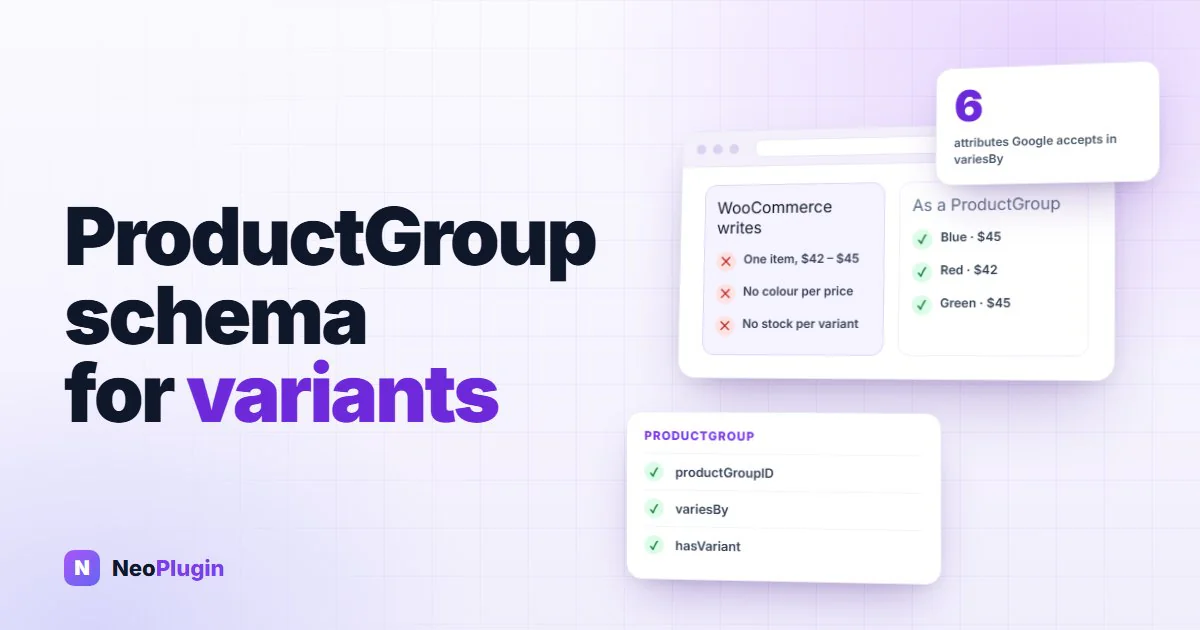
A variable product is one product in your store and several in a shopper's mind: the red one in medium is not the blue one in large. Google has a way to describe that, ProductGroup schema, which lists each variation with its own price, stock and attributes. WooCommerce doesn't write it. It describes a variable product as one item with a price range.
We measured what WooCommerce 11.1 writes for variable products, read what Google's variant documentation asks for, and tested a snippet that turns WooCommerce's own markup into a ProductGroup. Along the way we hit the edge cases that trip up most implementations, including our own plugin's: products that vary by gender, attributes Google has no word for, and variations without a price.
Quick answer. WooCommerce describes a variable product as a single
Productwith anAggregateOffer, a price range, so Google sees one item from $42 to $45 instead of four variants. Google's variant markup is aProductGroupwith aproductGroupID, avariesBylist of the attributes that differ, written as full schema.org URLs, and ahasVariantlist ofProductnodes, each with its own SKU, URL, attributes andOffer. Google says this makes products "eligible for display with variant information in merchant listing experiences". WooCommerce doesn't add it on its own; the snippet below does, and so does our plugin NeoSERP.
The short version
- WooCommerce writes a price range, not variants. On our store, a Hoodie with four variations came out as one
Productwith anAggregateOfferfrom $42 to $45. - In our Rich Results Test, the price range wasn't a merchant listing at all. The same Hoodie as a ProductGroup, written by NeoSERP, gave a valid listing for each variant.
- Google's variant markup has three key parts:
productGroupID,variesByandhasVariant. - Only six attributes count: color, size, material, pattern, suggested age and suggested gender. A "Logo: yes/no" attribute has nowhere to go.
- Gender goes on each variant as an audience, not as a plain attribute.
- Leave out variations without a price. WooCommerce's price range already does.
- Changing WooCommerce's markup to ProductGroup takes two filters, because WooCommerce silently drops any type it isn't expecting.
How we tested
Our test store runs WordPress 7.1.4, WooCommerce 11.1.2, the Astra theme and PHP 8.3. We read the product markup of the Hoodie, a variable product with four variations that differ by colour and by a "Logo" attribute, and of a temporary running jacket we made with four variations by gender and size, one of them left without a price. We read each page with only WooCommerce active, then with our snippet, then with NeoSERP, our schema plugin. Afterwards we deleted the jacket and put the store back as it was.
What WooCommerce writes for a variable product
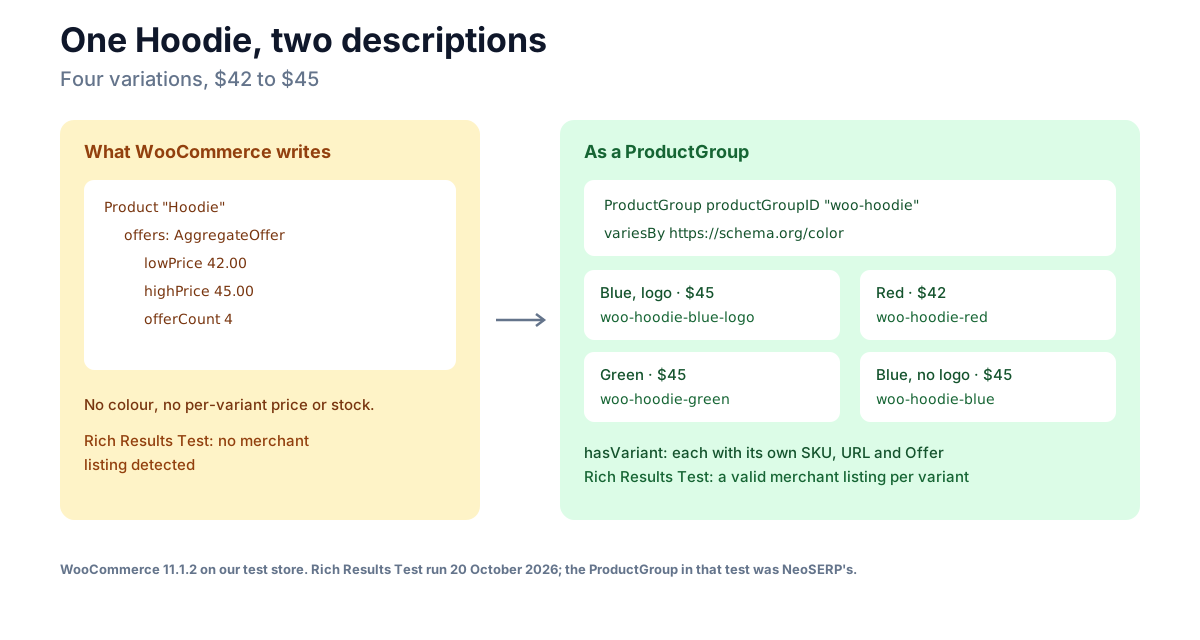
WooCommerce's variable product schema depends on the prices. When the variations have different prices, WooCommerce writes a single Product whose offer is an AggregateOffer: the lowest price, the highest and a count. For our Hoodie:
"offers": [{
  "@type": "AggregateOffer",
  "lowPrice": "42.00",
  "highPrice": "45.00",
  "offerCount": 4,
  "priceCurrency": "USD",
  "availability": "https://schema.org/InStock"
}]
That's AggregateOffer schema in one block, trimmed for length: one item, a range, and nothing to say which colour costs what or which is in stock. Our running jacket came out the same way, with an offerCount of 3, because WooCommerce leaves the variation without a price out of the range.
There is one exception. Open a variation's own address, with its attributes in the query string, and WooCommerce writes a single Offer at that variation's price plus inProductGroupWithID. But the page's canonical URL is still the product without the query, so that's not the version Google is asked to index, and it still has no group describing the other variations.
When we ran WooCommerce's markup through Google's Rich Results Test for our merchant listings guide on 20 October 2026, the Hoodie's price range wasn't detected as a merchant listing at all, only as a product snippet. Google's merchant listing documentation requires an Offer and doesn't support AggregateOffer for merchant listings.
Side by side, for the same variable product:
| What WooCommerce writes | What a ProductGroup writes | |
|---|---|---|
| The product | Product | ProductGroup with a productGroupID |
| What differs | Not stated | variesBy, as schema.org URLs |
| The variations | Not listed | hasVariant, one Product each |
| Price and stock | One AggregateOffer: lowest, highest, count | An Offer on each variant |
What ProductGroup schema is
Google's product variant documentation (checked 7 November 2026) describes a product with variants as a ProductGroup, and says adding it "makes your products eligible for display with variant information in merchant listing experiences". Eligible, not guaranteed: Google decides what to show.
The parts that matter:
| Property | On | What it holds |
|---|---|---|
productGroupID | The group | The parent's identifier, its "parent sku" |
variesBy | The group | The attributes the variants differ by, as schema.org URLs |
hasVariant | The group | One Product per variant |
inProductGroupWithID | Each variant | The group's productGroupID |
sku | Each variant | Its own identifier; Google says each variant "must have a unique ID" |
url | Each variant | An address that preselects that variant |
offers | Each variant | An Offer with its own price and availability |
Google lists name as the group's only required property, with the rest recommended. Each variant is a full product in its own right, so it follows the merchant listing rules, which require an offer with a price.
Google describes two layouts. In the single-page one, all variants live on one page and are selected with query parameters, with one canonical URL for the group and a distinct URL for each variant. That is exactly how WooCommerce works, so it's the layout every WooCommerce store uses.
hasVariant schema, or isVariantOf
Google accepts the link in either direction: the group lists its variants in hasVariant, or each variant points to the group with isVariantOf. On a WooCommerce page, where the group and its variants are printed together, hasVariant is the simpler of the two, and it's what the snippet below and NeoSERP write.
A product group schema example
This is our running jacket after the snippet below, trimmed to one variant, with the test prefix taken out of the name, our store's address replaced by example.com, and WooCommerce's & shown as &:
{
  "@type": "ProductGroup",
  "name": "Running Jacket",
  "productGroupID": "R21-JACKET",
  "variesBy": [
    "https://schema.org/suggestedGender",
    "https://schema.org/size"
  ],
  "hasVariant": [{
    "@type": "Product",
    "name": "Running Jacket - Women, S",
    "sku": "R21-JACKET-WS",
    "inProductGroupWithID": "R21-JACKET",
    "url": "https://example.com/product/running-jacket/?attribute_gender=Women&attribute_size=S",
    "size": "S",
    "audience": { "@type": "PeopleAudience", "suggestedGender": "female" },
    "offers": {
      "@type": "Offer",
      "price": "58.00",
      "priceCurrency": "USD",
      "availability": "https://schema.org/InStock"
    }
  }]
}
The group kept WooCommerce's rating and its reviews, and lost its price range, since each variant now carries its own price.
The edge cases
variesBy takes six values, as full URLs
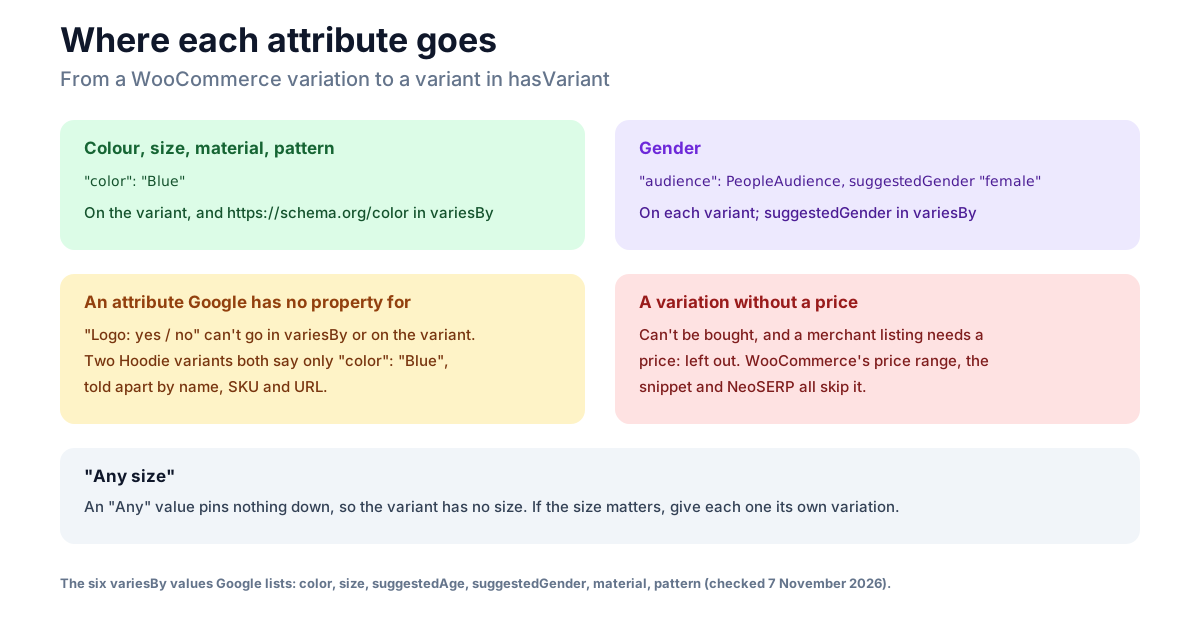
Google lists exactly six: https://schema.org/color, size, suggestedAge, suggestedGender, material and pattern, each written as a full schema.org URL. A bare "color" is not what the documentation shows. Your WooCommerce attribute can be called anything, "Colour", "Farbe", pa_color; what matters is which of the six it maps to.
Gender is an audience, on each variant
A product sold in men's and women's versions varies by https://schema.org/suggestedGender, but the variant doesn't get a suggestedGender property of its own. It gets an audience, a PeopleAudience with suggestedGender set to male, female or unisex, as in the example above. Google's examples put a shared audience, such as a unisex one, on the group instead.
This is where our own plugin falls short today; see What NeoSERP does below.
Attributes Google has no property for
Our Hoodie varies by colour and by "Logo: yes or no". Logo isn't one of the six, so it can't go in variesBy or on the variant. The result is two variants that both say only "color": "Blue", told apart by their name, SKU and URL. Google's documentation doesn't say how it treats two variants identical in every listed attribute. If an attribute matters to shoppers and Google has no word for it, consider whether those versions are better as separate products.
Variations without a price
A variation with no price can't be bought, and a merchant listing needs a price, so leave it out. WooCommerce already does for its price range, and the snippet and NeoSERP both skip it: our jacket's unpriced "Women, M" appeared nowhere.
"Any" variations
A WooCommerce variation can say "Any size", which covers every size. It pins nothing down, so the variant gets no size value. If a size matters, give each one its own variation.
How to show product variants in Google without a plugin
This snippet changes WooCommerce's own markup for variable products into a ProductGroup with a variant for each priced variation. Add it to a small custom plugin or a code-snippets plugin, then edit the $map at the top to match your attribute names: pa_ and the slug for global attributes, the lowercase name for attributes set on the product.
add_filter( 'woocommerce_structured_data_product', function ( $markup, $product ) {
	if ( ! $product->is_type( 'variable' ) ) {
		return $markup;
	}

	// Your attribute names (pa_ for global attributes), mapped to the
	// properties Google accepts in variesBy.
	$map     = array(
		'pa_color' => 'color',
		'pa_size'  => 'size',
		'size'     => 'size',
		'gender'   => 'suggestedGender',
	);
	$genders = array( 'men' => 'male', 'women' => 'female', 'unisex' => 'unisex' );

	$group_id = $product->get_sku() ? $product->get_sku() : (string) $product->get_id();
	$variants = array();
	$varies   = array();

	foreach ( $product->get_visible_children() as $id ) {
		$variation = wc_get_product( $id );
		// A variant without a price can't be offered, so leave it out.
		if ( ! $variation || '' === $variation->get_price() ) {
			continue;
		}
		$variant = array(
			'@type'                => 'Product',
			'name'                 => $variation->get_name(),
			'sku'                  => $variation->get_sku() ? $variation->get_sku() : (string) $id,
			'inProductGroupWithID' => $group_id,
			'url'                  => $variation->get_permalink(),
			'offers'               => array(
				'@type'         => 'Offer',
				'price'         => wc_format_decimal( $variation->get_price(), wc_get_price_decimals() ),
				'priceCurrency' => get_woocommerce_currency(),
				'availability'  => 'https://schema.org/' . ( $variation->is_in_stock() ? 'InStock' : 'OutOfStock' ),
				'url'           => $variation->get_permalink(),
			),
		);
		foreach ( $variation->get_attributes() as $name => $value ) {
			// An empty value is "Any", which pins nothing down.
			if ( '' === $value || empty( $map[ $name ] ) ) {
				continue;
			}
			$term  = taxonomy_exists( $name ) ? get_term_by( 'slug', $value, $name ) : false;
			$label = $term ? $term->name : $value;

			if ( 'suggestedGender' === $map[ $name ] ) {
				$gender = $genders[ strtolower( $label ) ] ?? '';
				if ( '' === $gender ) {
					continue;
				}
				$variant['audience'] = array( '@type' => 'PeopleAudience', 'suggestedGender' => $gender );
			} else {
				$variant[ $map[ $name ] ] = $label;
			}
			$varies[ 'https://schema.org/' . $map[ $name ] ] = true;
		}
		$variants[] = $variant;
	}

	if ( $variants ) {
		$markup['@type']          = 'ProductGroup';
		$markup['productGroupID'] = $group_id;
		$markup['variesBy']       = array_keys( $varies );
		$markup['hasVariant']     = $variants;
		// The price range is now in the variants.
		unset( $markup['offers'] );
	}
	return $markup;
}, 10, 2 );

// WooCommerce prints only the types it expects on a page, so add ProductGroup.
add_filter( 'woocommerce_structured_data_type_for_page', function ( $types ) {
	$types[] = 'productgroup';
	return $types;
} );
The second filter is the one people miss. WooCommerce sorts its markup by type and prints only the types it expects on the page, so a node whose type has become ProductGroup simply disappears. Without it, our test page had no product markup at all.
With both, the Hoodie and the jacket came out as in the example above: the Hoodie with four variants and variesBy color, the jacket with three, by gender and size, and the unpriced variation left out. Simple products were untouched.
Two things it doesn't do. It doesn't add shipping, returns or a GTIN to the variants; our guides to shippingDetails and return policies cover those. And it inherits one quirk from WooCommerce: WooCommerce escapes & as & inside its JSON-LD, so a variant URL with two attributes reads ?attribute_gender=Women&attribute_size=S to a JSON parser. We haven't verified how Google reads that; our product schema guide covers WooCommerce's output in more detail.
Two things to know before you check the result. WooCommerce doesn't cache its product markup; it builds it again on every page view, so there's nothing in WooCommerce to clear. A page-cache plugin or your host's cache will keep serving the old markup until you purge it, so purge before you test. And the snippet loads every variation on every view of a variable product. WooCommerce itself stops loading variations into the page above 30 (the woocommerce_ajax_variation_threshold filter), so on a product with hundreds of variations, the snippet adds work WooCommerce normally skips. A page cache covers that for most visitors.
Does Yoast or Rank Math output ProductGroup?
Some do, depending on the edition:
- Yoast's paid WooCommerce SEO add-on has added
ProductGroupsince
version 16.2, according to its changelog. Free Yoast SEO doesn't.
- Rank Math PRO writes
productGroupID,variesByandhasVariant
for variations, in a section of its WooCommerce product schema guide labelled PRO. The free version doesn't list it.
- WPSSO Core uses
ProductGroupfor variable products by default,
according to its developer.
All three checked 7 November 2026. If you run one that already writes ProductGroup, don't add the snippet or a second plugin on top: two groups for one product is worse than one.
What NeoSERP does
NeoSERP, our free schema plugin, replaces WooCommerce's product markup and writes a ProductGroup for every variable product from the variations and attributes you already have. It recognises colour, size, material and pattern attributes by name in the common European languages, and a setting per attribute covers any name it can't guess. On our store:
- The Hoodie came out as a ProductGroup with four variants,
variesBy
color, each variant with its own SKU, URL, price and availability, and with a plain & in its URLs.
- The jacket's unpriced variation was left out, as in the snippet.
- The jacket's gender didn't come through. NeoSERP puts gender on the
group when every variation shares one, but when variations differ by gender it leaves gender out of variesBy and off the variants. So "Men, S" and "Women, S" both said only "size": "S". That's a gap we know about.
It describes up to 30 variations per product. NeoSERP is free on WordPress.org.
Frequently asked questions
What is ProductGroup schema?
It's the structured data Google uses for a product with variants: a ProductGroup with a productGroupID, a variesBy list of the attributes that differ, and a hasVariant list of the variants, each a Product with its own SKU, URL, attributes and offer. Google says it makes products eligible for variant information in merchant listings.
Does WooCommerce output product variant schema?
No. WooCommerce describes a variable product as one Product with an AggregateOffer, a price range. Only a variation's own query-string address gets a single offer with inProductGroupWithID, and that page's canonical URL points back to the main product.
What is hasVariant schema?
hasVariant is the ProductGroup property that lists the variants, each as a full Product. The alternative is for each variant to point to its group with isVariantOf; on a WooCommerce page, where everything is printed together, hasVariant is simpler.
Is AggregateOffer schema enough for Google?
For product snippets, it can be. For merchant listings, no: Google's merchant listing documentation requires an Offer and doesn't support AggregateOffer, and in our Rich Results Test, WooCommerce's price range wasn't detected as a merchant listing at all.
What values can variesBy take?
Six, written as full schema.org URLs: https://schema.org/color, size, suggestedAge, suggestedGender, material and pattern. An attribute that isn't one of them, such as a logo option, can't be expressed.
Do Yoast or Rank Math add ProductGroup to WooCommerce?
The paid editions do: Yoast's WooCommerce SEO add-on since version 16.2, and Rank Math PRO, according to its documentation. Free Yoast SEO and free Rank Math don't. WPSSO Core uses ProductGroup by default.
The takeaway
WooCommerce tells Google a variable product is one item with a price range, and Google's merchant listings want each variant described on its own. A ProductGroup does that: a group ID, the attributes that vary as schema.org URLs, and a variant for each priced variation, with gender as an audience. Map your attributes to Google's six, leave out what can't be bought, and remember the second filter, or WooCommerce will quietly print nothing.