
Missing field "shippingDetails" in WooCommerce: what it means and how to fix it
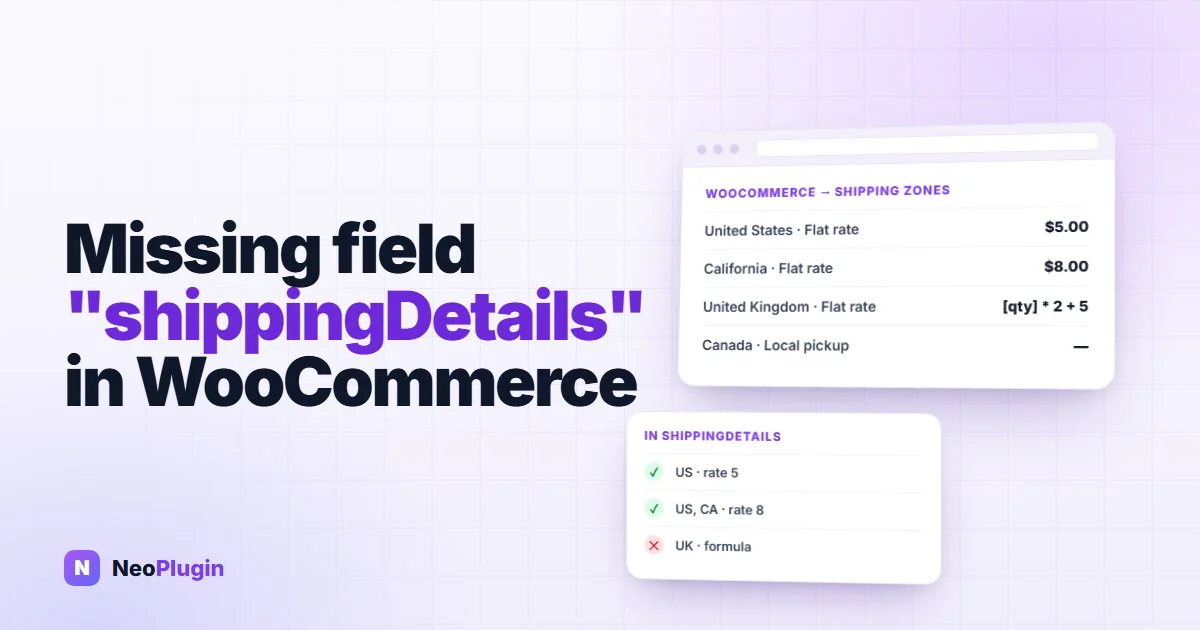
If Search Console lists Missing field "shippingDetails" (in "offers") on your product pages, you're in good company: every WooCommerce store gets it. WooCommerce knows your shipping zones and rates, but it never writes them into the product markup Google reads, so Google can't tell what delivery costs.
The warning is optional, and your products stay eligible for merchant listings without the field. It's still worth fixing, because shipping cost is one of the things a shopper compares before clicking. This post covers what the missing field shippingdetails in offers warning means, what the shipping details schema needs, and three ways to add it, each tested in Google's Rich Results Test on WooCommerce 11.1.2. One of the three doesn't clear the warning, even though Google recommends it.
Quick answer.
Missing field "shippingDetails"means theOfferin your product markup doesn't say what shipping costs or where you ship. It's a non-critical issue: the product stays a valid merchant listing. WooCommerce never adds shipping to its markup, so you fix it outside WooCommerce: enter your shipping in Search Console → Settings → Shopping → Shipping and returns (no code), or add anOfferShippingDetailsto each offer with thewoocommerce_structured_data_product_offerfilter, or use a plugin that builds it from your shipping zones. Only the markup routes clear the warning in Google's Rich Results Test.
The short version
- It's optional. The product stays eligible for merchant listings. Google lists the issue under Improve item appearance, not Why items are invalid.
- WooCommerce never writes it. Shipping costs depend on the cart, and core puts nothing about shipping into the product markup.
- The markup needs three things: a rate, a destination and a delivery time. Free shipping is a rate of
0. - A store-wide policy didn't clear the warning. Google recommends an Organization-level shipping policy, and Google's test accepted ours, but it still flagged the product offer.
- Search Console's own shipping settings outrank all markup. That route needs no code, but it doesn't change the page, so the test keeps reporting the field.
Is "Missing field shippingDetails" optional, and can you ignore it?
Yes, and yes: your products stay eligible for merchant listings without it. What you give up is telling Google your delivery cost and time, which is information a shopper compares before buying.
In Google's Rich Results Test the warning reads Missing field "shippingDetails" (optional), and in Search Console's Merchant listings report it sits in the Improve item appearance table with the other non-critical issues. A product with only non-critical issues is still valid, and can still appear as a merchant listing.
Optional doesn't mean pointless, though. Shipping markup is how Google learns what delivery costs and how long it takes. Our guide to merchant listings issues covers how to tell the critical issues from the optional ones. This post is about this one warning.
Why every WooCommerce store gets Missing field "shippingDetails" (in "offers")
WooCommerce writes its product markup from the product: name, price, availability, image, reviews. Shipping isn't a property of the product. It comes from shipping zones, which match the customer's address, and from methods whose cost can depend on the whole cart: a flat rate per item, free shipping over a minimum order, a formula. Core doesn't try to turn that into a single number for one product, so the offer goes out with no shipping at all.
We checked on our test store: WooCommerce 11.1.2's markup for a simple $18 T-shirt had no shipping in it, and Google's test listed Missing field "shippingDetails" among its four non-critical issues.
What the shipping details schema needs
Google calls the shipping block on an offer OfferShippingDetails. Its merchant listing documentation (last updated 8 September 2026) lists three properties as required inside it:
| Property | What it holds | Notes |
|---|---|---|
shippingRate | The cost, as a MonetaryAmount with value and currency | Use 0 for free shipping. The currency must match the offer's. |
shippingDestination | Where that rate applies, as a DefinedRegion | addressCountry is the minimum. addressRegion narrows it to a state. |
deliveryTime | Handling time plus transit time, in days | One per shipping block. |
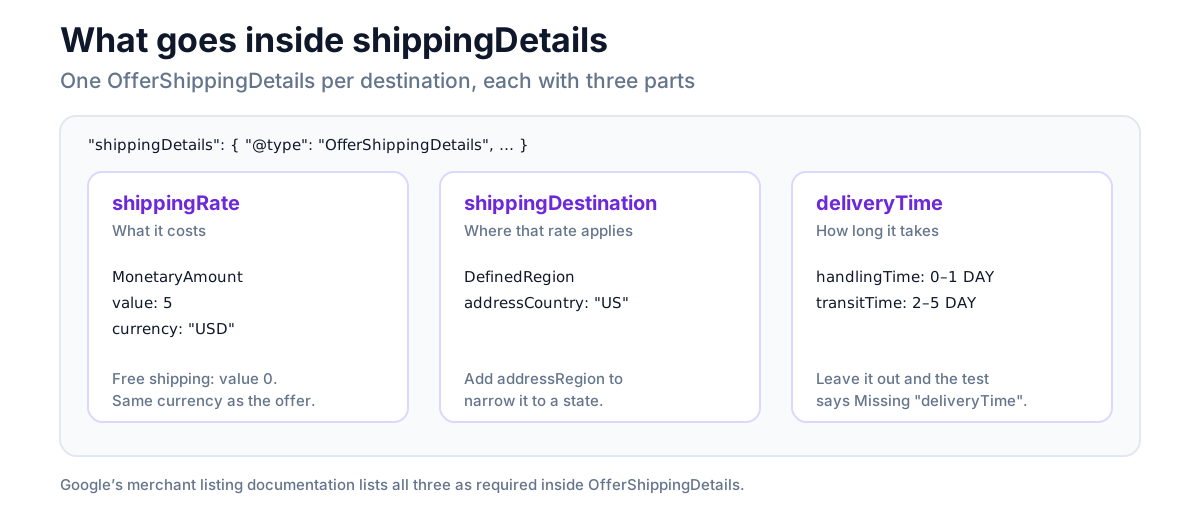
Google's table calls deliveryTime required, but the Rich Results Test treats a missing one the same way it treats a missing shippingDetails: as an optional warning, Missing field "deliveryTime". Add it. Without it, the shipping warning just turns into a delivery-time warning.
A product that ships to several countries at different prices gets one OfferShippingDetails per destination, in a list.
Here is a complete one, as it came out of our test store's page source once the filter further down was in place (one country shown, the rest of the offer trimmed). It sits inside the product's offers, which is how Google knows which product it belongs to:
"offers": {
  "@type": "Offer",
  "price": "18.00",
  "priceCurrency": "USD",
  "shippingDetails": [
    {
      "@type": "OfferShippingDetails",
      "shippingRate": {
        "@type": "MonetaryAmount",
        "value": 5,
        "currency": "USD"
      },
      "shippingDestination": {
        "@type": "DefinedRegion",
        "addressCountry": "US"
      },
      "deliveryTime": {
        "@type": "ShippingDeliveryTime",
        "handlingTime": { "@type": "QuantitativeValue", "minValue": 0, "maxValue": 1, "unitCode": "DAY" },
        "transitTime": { "@type": "QuantitativeValue", "minValue": 2, "maxValue": 5, "unitCode": "DAY" }
      }
    }
  ]
}
Three ways to fix it
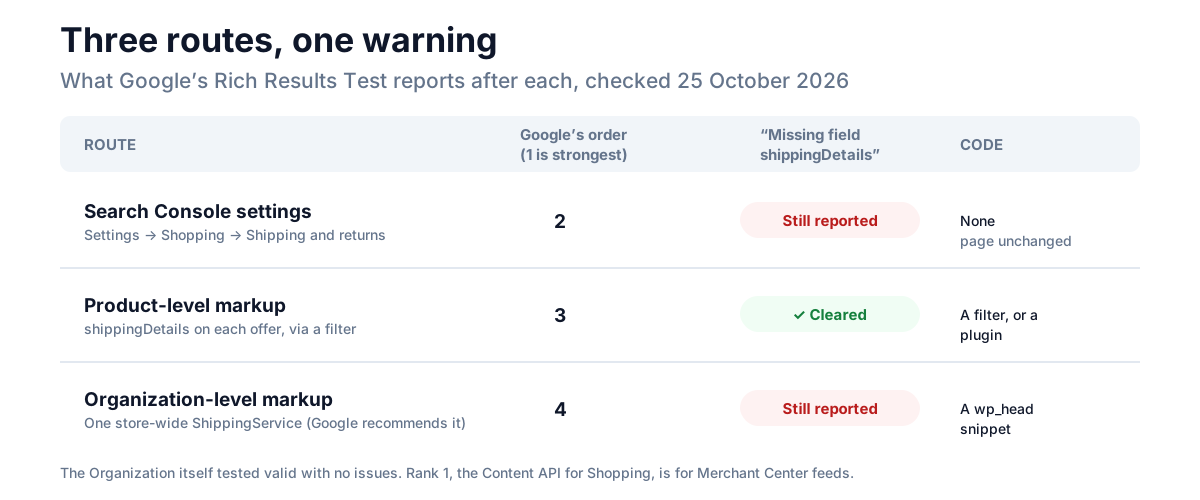
Google accepts shipping information from several places, and its shipping policy documentation ranks them, strongest first:
- Account-level shipping settings sent through the Content API for Shopping.
- Settings in Merchant Center or Search Console.
- Product-level markup:
shippingDetailson each offer. - Organization-level markup: one store-wide shipping policy.
For a WooCommerce store, that gives three practical routes, plus a plugin that does the product-level one for you. We tested the markup routes in Google's Rich Results Test, and the results differ in a way the documentation doesn't mention:
| Route | Clears the warning in the test? | Code | Follows your WooCommerce rates? |
|---|---|---|---|
| Search Console settings | No: the page doesn't change | None | No, entered by hand |
shippingDetails on each offer, via a filter | Yes | A PHP snippet | No, typed into the snippet |
Store-wide Organization policy | No: the offer is still flagged | A PHP snippet | No, typed into the snippet |
| NeoSERP, from your shipping zones | Yes, plus a delivery-time warning without the helper below | None | Yes |
1. Search Console's Shipping and returns settings (no code)
In Search Console, open Settings → Shopping → Shipping and returns. An owner or full user of the property can enter shipping costs and delivery times there, and Google's help page says you don't need a Merchant Center account to do it. If you already have one, it has to be linked to the property. Shipping settings are approved automatically.
These settings sit above all markup in Google's order, so this is the quickest way to give Google your shipping. What Google doesn't document is whether the Merchant listings report then stops listing the missing field. The Rich Results Test only reads your page, which hasn't changed, so it keeps reporting it.
2. Product-level markup: a shippingDetails schema example for WooCommerce
WooCommerce lets you add to the offer it builds for every product through the woocommerce_structured_data_product_offer filter. This adds a $5 rate to the US and a $12 rate to Canada, each with its own delivery time, in your store's currency:
add_filter( 'woocommerce_structured_data_product_offer', function ( $offer ) {
	$currency = get_woocommerce_currency();

	// Country => flat rate, then handling and transit time in days (min, max).
	$rates = array(
		'US' => array( 5, 0, 1, 2, 5 ),
		'CA' => array( 12, 0, 1, 5, 10 ),
	);

	foreach ( $rates as $country => $r ) {
		$offer['shippingDetails'][] = array(
			'@type'               => 'OfferShippingDetails',
			'shippingRate'        => array(
				'@type'    => 'MonetaryAmount',
				'value'    => $r[0],
				'currency' => $currency,
			),
			'shippingDestination' => array(
				'@type'          => 'DefinedRegion',
				'addressCountry' => $country,
			),
			'deliveryTime'        => array(
				'@type'        => 'ShippingDeliveryTime',
				'handlingTime' => array( '@type' => 'QuantitativeValue', 'minValue' => $r[1], 'maxValue' => $r[2], 'unitCode' => 'DAY' ),
				'transitTime'  => array( '@type' => 'QuantitativeValue', 'minValue' => $r[3], 'maxValue' => $r[4], 'unitCode' => 'DAY' ),
			),
		);
	}

	return $offer;
} );
Change the countries, the rates and the days to match your checkout, and add it with a code-snippets plugin or a small custom plugin. For free shipping to a country, set its rate to 0.
We ran it on our test store and put the T-shirt's markup through the Rich Results Test. Missing field "shippingDetails" was gone, and so was any deliveryTime warning. The issues left were the ones that have nothing to do with shipping: no global identifier, no return policy, no validFrom. On the variable Hoodie, the filter added the same two blocks to WooCommerce's price range offer.
Two cautions. First, these are numbers typed into code, so they don't change when you change a rate in WooCommerce. Second, keep them honest. Google's help page warns that a listing can be rejected when the shipping cost Google was given is lower than what your site charges. If a rate depends on the cart, publish the rate a single item really pays, or leave that country out.
3. Organization-level markup: the store-wide policy Google recommends
Google's merchant listing documentation now recommends a single shipping policy for the whole store, in your Organization markup, with offer-level markup kept for products that ship differently. Google says offer-level shipping supports only a subset of the store-wide properties, and the store-wide policy is where it documents order-value rules, such as free shipping above $100:
add_action( 'wp_head', function () {
	$currency = get_woocommerce_currency();
	$days     = function ( $min, $max ) {
		return array(
			'@type'    => 'ServicePeriod',
			'duration' => array( '@type' => 'QuantitativeValue', 'minValue' => $min, 'maxValue' => $max, 'unitCode' => 'DAY' ),
		);
	};

	$organization = array(
		'@context'           => 'https://schema.org',
		'@type'              => 'Organization',
		'@id'                => home_url( '/#organization' ),
		'name'               => get_bloginfo( 'name' ),
		'url'                => home_url( '/' ),
		'hasShippingService' => array(
			'@type'              => 'ShippingService',
			'@id'                => home_url( '/#standard-shipping' ),
			'name'               => 'Standard shipping',
			'fulfillmentType'    => 'https://schema.org/FulfillmentTypeDelivery',
			'handlingTime'       => $days( 0, 1 ),
			'shippingConditions' => array(
				array(
					'@type'               => 'ShippingConditions',
					'shippingDestination' => array( '@type' => 'DefinedRegion', 'addressCountry' => 'US' ),
					'orderValue'          => array( '@type' => 'MonetaryAmount', 'minValue' => 0, 'maxValue' => 99.99, 'currency' => $currency ),
					'shippingRate'        => array( '@type' => 'MonetaryAmount', 'value' => 5, 'currency' => $currency ),
					'transitTime'         => $days( 2, 5 ),
				),
				array(
					'@type'               => 'ShippingConditions',
					'shippingDestination' => array( '@type' => 'DefinedRegion', 'addressCountry' => 'US' ),
					'orderValue'          => array( '@type' => 'MonetaryAmount', 'minValue' => 100, 'currency' => $currency ),
					'shippingRate'        => array( '@type' => 'MonetaryAmount', 'value' => 0, 'currency' => $currency ),
					'transitTime'         => $days( 2, 5 ),
				),
			),
		),
	);

	echo '<script type="application/ld+json">' . wp_json_encode( $organization ) . "</script>\n";
} );
That says: $5 to the US, free from $100, handled in up to a day and delivered in two to five. It prints on every page.
We put its output, together with WooCommerce's own markup for the T-shirt, through the Rich Results Test. The test detected the Organization as a valid item with no issues. But the T-shirt's merchant listing still came back with Missing field "shippingDetails". The test checks each offer for its own shipping block, and a store-wide policy elsewhere on the page didn't satisfy it. Google's documentation treats the store-wide policy as the default that offer-level markup overrides, so this is a policy Google can read, not a way to make the warning disappear. If what you want is a clean report, you need the product-level markup as well, or instead.
If an SEO plugin already prints an Organization for your site, add the shipping service to that node through the plugin's own filter rather than printing a second Organization.
How NeoSERP builds it from your shipping zones
NeoSERP, our free product schema plugin, writes the WooCommerce shipping schema for you: shippingDetails on every offer, built from the shipping zones you already have, so the markup changes when your rates do. Typing rates into code is the weak point of the filter above; reading the zones is how NeoSERP avoids it.
Zones don't always give a single honest number, so it leaves some out. We set up five temporary zones on our test store, next to its existing free shipping zone, and read what NeoSERP produced:
| Zone on the test store | Shipping methods | In NeoSERP's markup |
|---|---|---|
| Bangladesh | Free shipping, no minimum | Bangladesh, rate 0 |
| United States | Flat rate $5, plus free shipping over $100 | United States, rate 5: free shipping with a minimum isn't free for every order |
| California | Flat rate $8 | United States, region CA, rate 8 |
| United Kingdom | Flat rate [qty] * 2 + 5 | Left out: a formula needs a cart |
| Europe (a continent) | Flat rate $12 | Left out: a continent isn't a country |
| Canada | Local pickup only | Left out: pickup isn't shipping |
| Locations not covered by your other zones | Any | Left out: it has no country |
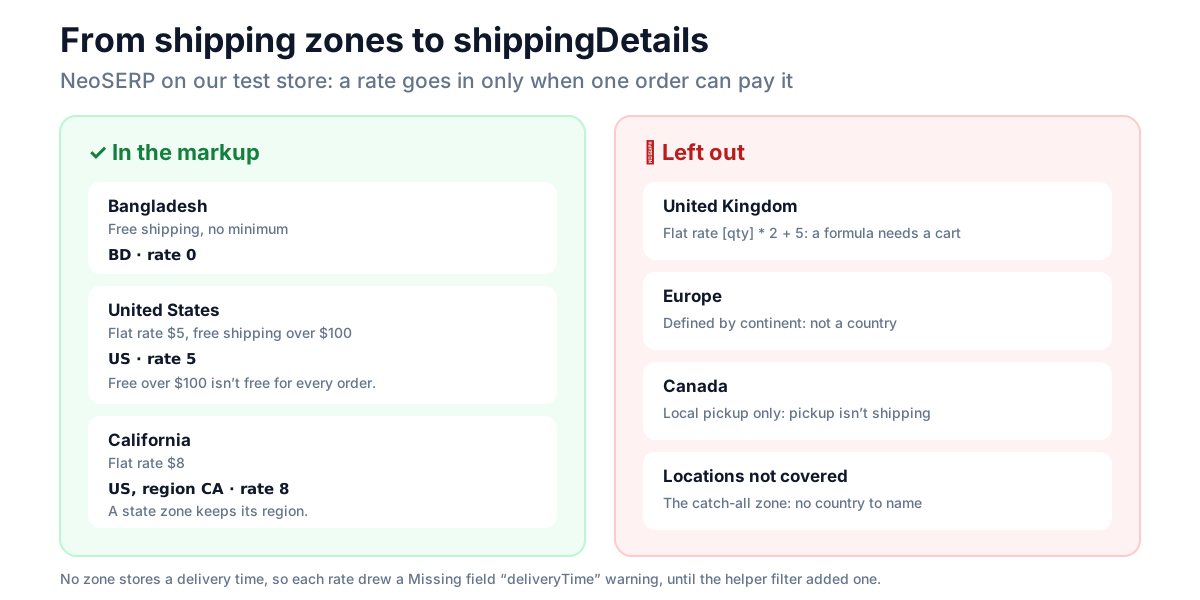
The three shipping blocks cleared Missing field "shippingDetails" in the Rich Results Test. What NeoSERP doesn't do yet, and we'd rather say so: it writes no delivery time, because WooCommerce zones don't store one. The test flagged Missing field "deliveryTime" once for each of the three blocks. That warning is non-critical too.
Until NeoSERP has a setting for it, you can add your delivery times through its documented neoseo_offer_shipping filter. This gives every shipping block it builds the same handling and transit time; change the days to your own:
add_filter( 'neoseo_offer_shipping', function ( $nodes ) {
	foreach ( $nodes as $i => $node ) {
		$nodes[ $i ]['deliveryTime'] = array(
			'@type'        => 'ShippingDeliveryTime',
			'handlingTime' => array( '@type' => 'QuantitativeValue', 'minValue' => 0, 'maxValue' => 1, 'unitCode' => 'DAY' ),
			'transitTime'  => array( '@type' => 'QuantitativeValue', 'minValue' => 2, 'maxValue' => 5, 'unitCode' => 'DAY' ),
		);
	}
	return $nodes;
} );
We tested it with NeoSERP on the same store. The T-shirt's offer and all five offers on the variable Hoodie (the group and its four variations) carried the delivery time, and the Rich Results Test no longer reported Missing field "deliveryTime". If your countries take different times, check $node['shippingDestination']['addressCountry'] inside the loop and set the days per country.
One thing to know if your zones overlap. WooCommerce charges a customer the first zone in your list that matches their address, so keep a narrow zone, like California, above a wide one, like the United States. NeoSERP reads every zone and doesn't check that order. NeoSERP is free and in review at WordPress.org; until it's approved, you can download it from its page.
Frequently asked questions
What does Missing field "shippingDetails" (in "offers") mean?
The offer in your product markup doesn't say what shipping costs or where you ship. Search Console and the Rich Results Test report it on every product page where the Offer has no shippingDetails. On a WooCommerce store that's every product, because core never adds it.
Is "Missing field shippingDetails" optional?
Yes. It's a non-critical issue. The product stays a valid merchant listing, and the Rich Results Test labels it (optional). Fixing it lets Google know your shipping cost and delivery time instead of leaving them out.
Why does WooCommerce not add shippingDetails?
Because WooCommerce's shipping costs come from zones and the cart, not from the product. Core writes the product markup from product data only, and leaves shipping out. You add it with a filter, a store-wide policy, Search Console's settings, or a plugin that reads your zones.
Does a store-wide shipping policy fix the warning?
Not in our test. Google recommends an Organization-level shipping policy, and the Rich Results Test accepted ours as valid, but it still reported Missing field "shippingDetails" on the product's offer. Google's documentation treats the store-wide policy as the default that offer-level markup overrides, so Google can still read it. To clear the warning, add shippingDetails to the offer.
How do I mark free shipping in the schema?
Give shippingRate a value of 0. For free shipping above an order value, Google documents an orderValue range in the store-wide policy, as in the example above.
Why does Google now say Missing field "deliveryTime"?
Because your shipping block has a rate and a destination but no delivery time. Google's documentation lists deliveryTime as required inside each OfferShippingDetails, and the Rich Results Test reports one missing per block. Add a ShippingDeliveryTime with handlingTime and transitTime in days.
Do I need shippingDetails if I use Merchant Center?
Google doesn't need both. Merchant Center and Search Console settings rank above any markup, so Google uses those. The markup is still what clears the warning in the Rich Results Test, and it keeps the page self-describing for other tools that read it.
Start with the route that keeps itself true
The warning is optional, so there's no rush. What matters is that whatever Google reads matches what your checkout charges. If your rates rarely change, the filter above clears the warning today. If they change, enter them in Search Console, or let your shipping zones write the markup, so the number Google sees is always the one your customer pays.